
Zvolte jazyk

Virginia MVDB-61 Dealer Qualification Form (Fillable PDF)

  1. Jazyk Angličtina
  2. Země USA
  3. Aktivita Registrace vozidla
  4. Stát Virginie
Virginia MVDB-61 Dealer Qualification Form (Fillable PDF)

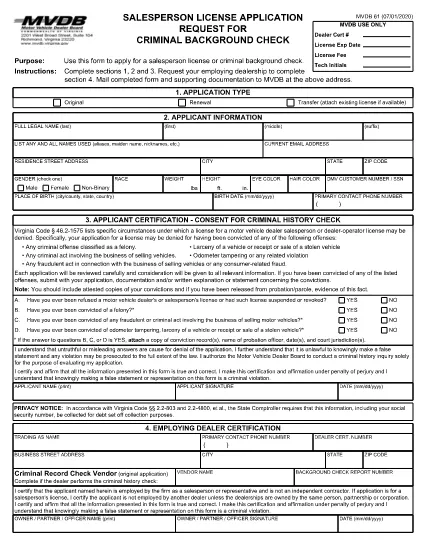
The MVDB-61 is the official Virginia Motor Vehicle Dealer Qualification form required for anyone applying to become a dealer operator or salesperson. This fillable PDF lets you complete the application quickly, securely, and without printing a single page.

What Is the MVDB-61 Form?

MVDB‑61 collects personal information, business details, and background data needed by the Virginia Department of Motor Vehicles (DMV) to assess your eligibility for a dealer license. The form is also used when you need a background check for a salesperson license.

How to Fill Out MVDB-61 Online

Instead of downloading, printing, and scanning, simply click the "Fill out this form" button on this page. The Formize PDF Filler app will load the MVDB‑61 document directly in your browser:

  • Step 1: Click the button and wait a few seconds for the filler to appear.
  • Step 2: Complete sections 1, 2, and 3 with your personal and business information.
  • Step 3: If you are a salesperson, have your employing dealership fill out section 4.
  • Step 4: Review all entries, add your electronic signature, and click Save or Download.
  • Step 5: Print the completed PDF (optional) and mail it with supporting documents to the address shown on the form, or submit it electronically if your DMV office accepts e‑submissions.

Common Mistakes to Avoid

  • Leaving any required field blank – the filler will highlight missing data.
  • Using an outdated address for the DMV – verify the current mailing address on the official Virginia DMV website.
  • Forgetting the $50 non‑refundable test fee when applying for the Dealer Qualification Test.
  • Submitting a scanned copy of a printed form with illegible handwriting.

Where to Submit Your Completed Form

After you finish the fillable PDF, mail the form and any required attachments to:

Virginia Department of Motor Vehicles
2020 West Broad Street
Richmond, VA 23220

If you are taking the Dealer Qualification Test, bring the completed MVDB‑61 and the $50 fee to any DMV Customer Service Center.

Benefits of Using Formize’s Fillable PDF

  • Instant validation of required fields.
  • Secure electronic signature without printing.
  • Save a copy for your records with one click.
  • Accessible on desktop, tablet, and mobile browsers.

Start your dealer qualification journey now—click the button below and let Formize handle the paperwork for you.

FAQ
  • What is the purpose of the MVDB‑61 form?

    MVDB‑61 is used to apply for a Virginia motor vehicle dealer operator or salesperson license and to schedule the Dealer Qualification Test.

  • Can I fill out MVDB‑61 on a mobile device?

    Yes. The Formize PDF Filler works on smartphones, tablets, and desktop browsers, allowing you to complete the form anywhere.

  • Do I need to pay a fee when submitting MVDB‑61?

    A non‑refundable $50 fee is required when you take the Dealer Qualification Test. The fee is paid at the DMV Customer Service Center.

  • What happens if I make a mistake on the form?

    The fillable PDF highlights missing or incorrectly formatted fields. You can correct any errors before saving or printing the final document.

  • Is an electronic signature accepted?

    Yes. The Virginia DMV accepts electronic signatures on the MVDB‑61 when submitted via the official fillable PDF.

  • Where can I find the official mailing address for the DMV?

    The current mailing address is 2020 West Broad Street, Richmond, VA 23220. Always verify on the Virginia DMV website for any updates.

JAK

Jak zdarma vyplnit MVDB-61 online v 5 jednoduchých krocích:

  1. 1
    Open the Fillable Form
    Click the "Fill out this form" button on the page. The Formize PDF Filler will load the MVDB‑61 document directly in your browser.
  2. 2
    Complete Required Sections
    Enter your personal, business, and background information in sections 1‑3. If you are a salesperson, have your dealership fill out section 4.
  3. 3
    Add Your Signature
    Use the built‑in e‑signature field to sign electronically. No printing required.
  4. 4
    Save or Download
    Click "Save" to store the completed form in your cloud storage, or "Download" to get a PDF copy for your records.
  5. 5
    Submit to the DMV
    Mail the printed form with supporting documents and the $50 test fee to the Virginia DMV address, or bring it to a DMV Customer Service Center for the qualification test.
Aplikace Formize PDF Filler
O

Registrační formuláře vozidla

MVDB-61 je jeden z registračních formulářů vozidla, což jsou dokumenty používané k registraci motorového vozidla u příslušného vládního orgánu, obvykle ministerstva pro motorová vozidla (DMV) nebo obdobného úřadu. Tyto formuláře jsou vyžadovány, když si osoba koupí nové nebo ojeté vozidlo, převede vlastnictví vozidla nebo se s vozidlem přestěhuje do nové jurisdikce.

Konkrétní registrační formuláře vozidla se mohou lišit podle jurisdikce, ale obecně vyžadují následující informace:

Informace o vozidle: Zahrnuje podrobnosti o vozidle, jako je značka, model, rok, identifikační číslo vozidla (VIN) a stav počítadla kilometrů.

Informace o vlastníkovi: Formulář bude vyžadovat informace o vlastníkovi vozidla, včetně jeho jména, adresy, kontaktních údajů a čísla řidičského průkazu.

Doklad o vlastnictví: V závislosti na okolnostech může být vyžadován doklad o vlastnictví, jako je osvědčení o vlastnictví, prodejní doklad nebo osvědčení výrobce o původu (u nových vozidel).

Informace o pojištění: Obvykle je vyžadován doklad o platném pojištění vozidla. To může zahrnovat poskytnutí čísla pojistné smlouvy, data krytí a údajů o pojišťovně.

Platba poplatků: Registrace vozidla zahrnuje platbu různých poplatků, jako jsou registrační poplatky, daně a případně další poplatky specifické pro jurisdikci.

Kromě těchto základních požadavků mohou mít některé jurisdikce další požadavky na formuláře nebo dokumentaci. V určitých oblastech mohou být například nezbytné výsledky testů emisí, bezpečnostní kontroly nebo prokázání trvalého pobytu.

Po vyplnění a odeslání registračních formulářů vozidla vydá státní úřad osvědčení o registraci, SPZ a registrační nálepky. Tyto doklady ukazují, že vozidlo je legálně registrováno a oprávněno k provozu na veřejných komunikacích.

Je důležité poznamenat, že požadavky na registraci vozidel se mohou výrazně lišit podle jurisdikce. Proto se doporučuje konzultovat s místním DMV nebo ekvivalentním úřadem konkrétní formuláře a postupy platné pro vaši lokalitu.

FUNKCE

PDF Filler

Nejjednodušší způsob, jak vyplnit MVDB-61 online

  • Rychle vyplňte MVDB-61
    Hledáte způsob, jak rychle vyplnit MVDB-61 online? S naším online bezplatným vyplňováním formulářů PDF budete vědět, jak upravit a vyplnit tento dokument PDF za méně než minutu.
  • Snadno použitelný online editor PDF
    Už vás nebaví tisknout soubory PDF, abyste je mohli upravovat, než je znovu naskenujete a odešlete zpět? Upravujte dokumenty PDF zdarma online. Použijte náš online editor PDF, abyste ušetřili čas a papír.
  • Skvělé nástroje, všechny platformy
    Zajímá vás, jak vyplnit MVDB-61 na Macu, nebo možná jak používat PDF filler zdarma? Naše online nástroje PDF fungují na všech platformách.
  • Bezpečné ukládání souborů
    Dokončené soubory „MVDB-61“ jsou uloženy v zabezpečené databázi spravované hostingem Amazon Cloud. Své soubory můžete z našeho systému kdykoli smazat. V každém případě jsou tyto soubory po 24 hodinách automaticky smazány.
  • Chat s MVDB-61
    Chatujte s „MVDB-61“ na Chatize, což je bezplatný pomocník pro čtení PDF. Ptejte se a získejte odpovědi z „MVDB-61“. Stačí kliknout na tlačítko Chat with Document výše.

Smazat relaci plnění

Smazat vybranou relaci plnění? V takovém případě bude váš postup při vyplňování formuláře ztracen.

Smazat relaci úprav

Smazat vybranou relaci úprav? V tomto případě bude váš postup při vytváření a úpravách formuláře ztracen.