Vælg sprog

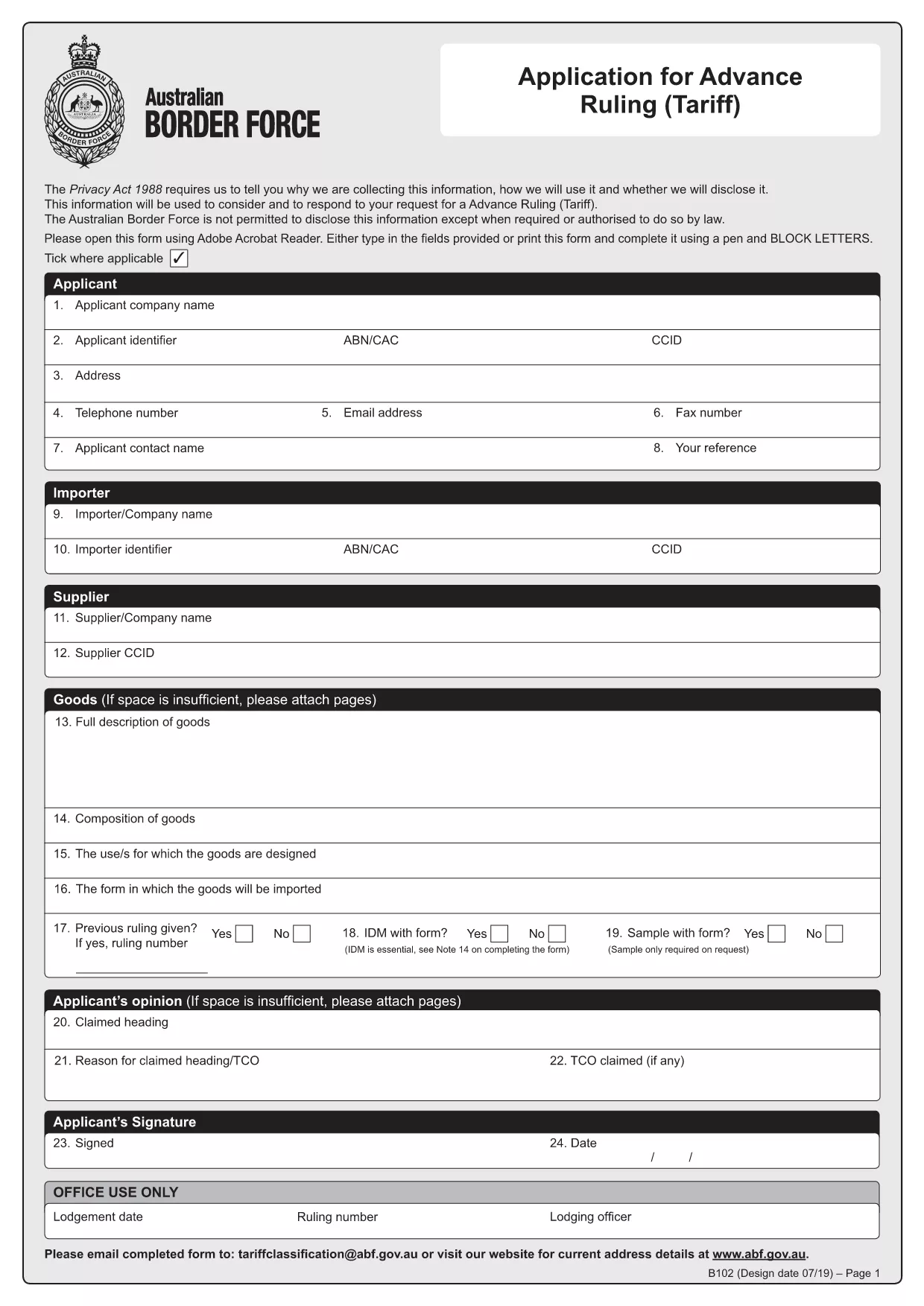
HSN Code Application Form (B102) – Fillable PDF

  1. Sprog engelsk
  2. Land Australien
  3. Aktivitet Customs Classification
  4. Afdeling Australian Border Force
HSN Code Application Form (B102) – Fillable PDF

What is the HSN Code Application Form?

The HSN (Harmonized System Nomenclature) code is the international standard for classifying goods in customs. In Australia, the Form B102 – Application for Advance Ruling (Tariff) is used to request an official classification (HSN code) before importing goods. This ensures you know the correct duty rates and compliance requirements.

Why Use the Fillable B102 Form Online?

Formize turns the static PDF into a fillable, interactive form that can be completed in any browser. Benefits include:

  • Instant validation of required fields
  • Auto‑save so you never lose data
  • Direct PDF download after you finish
  • No need for Adobe Acrobat or other editors

Step‑by‑Step Guide to Complete the Form

Follow these simple steps to get your HSN code application ready for submission.

Common Mistakes to Avoid

Even experienced importers can miss details. Avoid these pitfalls:

  • Leaving the "Manufacturer Details" section blank.
  • Providing an incomplete product description.
  • Submitting the form without supporting technical specifications.

Where to Submit Your Completed Form

After you finish, download the completed PDF and email it to tariffclassification@abf.gov.au within 5 days of the request, or mail it to the National Trade Advice Centre, GPO Box 2809, Melbourne VIC 3001.

FAQ
  • What is an HSN code?

    An HSN (Harmonized System Nomenclature) code is a globally recognized six‑digit number used to classify goods for customs duties, taxes, and trade statistics.

  • Do I need a B102 form for every import?

    No. You only need to submit a B102 form when you want an advance ruling on the classification of a specific product before importing it.

  • Can I edit the form after I download it?

    Yes, but the easiest method is to complete the form online with Formize, then download the final PDF. Editing a static PDF later can cause formatting issues.

  • How long does the Australian Border Force take to issue a ruling?

    The standard service time is 30 days, though it can be longer during periods of high demand.

  • Is there a fee for submitting the B102 application?

    The service is free of charge when you submit directly to the Australian Border Force. Brokers may charge their own fees for assistance.

  • What supporting documents should I attach?

    Include product data sheets, technical specifications, photographs, and any prior classification decisions that relate to the goods.

  • What if I make a mistake on the form?

    You can withdraw the request and submit a new B102 application. Ensure all fields are correct before submission to avoid delays.

HVORDAN

Sådan udfylder du HSN code application form gratis online i 4 nemme trin:

  1. 1
    Open the Fillable Form
    Click the **Fill out this form** button on the page. The Formize PDF Filler app loads instantly in your browser.
  2. 2
    Enter Your Information
    Complete each section—importer details, product description, and supporting documents. The app highlights any missing required fields.
  3. 3
    Validate & Save
    Use the built‑in validator to check for errors, then click **Save**. Your data is stored securely online.
  4. 4
    Download the Completed PDF
    When all fields are filled, click **Download PDF**. The file is ready for submission to the Australian Border Force.
Formize PDF Filler app
OM

HSN code application form skabelon

Med det traditionelle sæt funktioner til at se og udfylde et PDF-dokument, kombineret med fordelene ved en webapplikation og responsivt layout, kan du fuldføre HSN code application form på få minutter.

FUNKTIONER

PDF Filler

Den nemmeste måde at udfylde HSN code application form online

  • Udfyld hurtigt HSN code application form
    Leder du efter en måde, hvorpå du hurtigt kan fylde HSN code application form online? Med vores online gratis PDF-formularudfylder ved du, hvordan du redigerer og udfylder dette pdf-dokument på mindre end et minut.
  • Let at bruge online PDF-editor
    Træt af at udskrive PDF-filer, så du kan redigere dem, før du scanner igen og sender dem tilbage? Rediger PDF-dokumenter gratis online. Brug vores online pdf-editor for at spare tid og papir.
  • Fantastiske værktøjer, alle platforme
    Er du i tvivl om, hvordan du udfylder HSN code application form på en Mac, eller måske hvordan du bruger en PDF-filler gratis? Vores online PDF-værktøjer fungerer på alle platforme.
  • Sikker fillagring
    Fuldførte "HSN code application form"-filer gemmes i en sikret database, der administreres af Amazon Cloud-hosting. Du kan til enhver tid slette dine filer fra vores system. Under alle omstændigheder slettes disse filer automatisk efter 24 timer.
  • Chat med HSN code application form
    Chat med "HSN code application form" på Chatize, som er en gratis PDF-læserassistent. Stil spørgsmål og få svar fra "HSN code application form". Bare klik på knappen Chat med dokument ovenfor.

Slet udfyldningssession

Vil du slette den valgte påfyldningssession? I dette tilfælde vil dine fremskridt med at udfylde formularen gå tabt.

Slet redigeringssession

Vil du slette den valgte redigeringssession? I dette tilfælde vil dine fremskridt med at oprette og redigere formularen gå tabt.