Vælg sprog

NSW Photo Card Application – Fillable PDF Form

  1. Land Australien
  2. Sprog engelsk
  3. Aktivitet Identification
  4. Afdeling Transport for NSW
NSW Photo Card Application – Fillable PDF Form

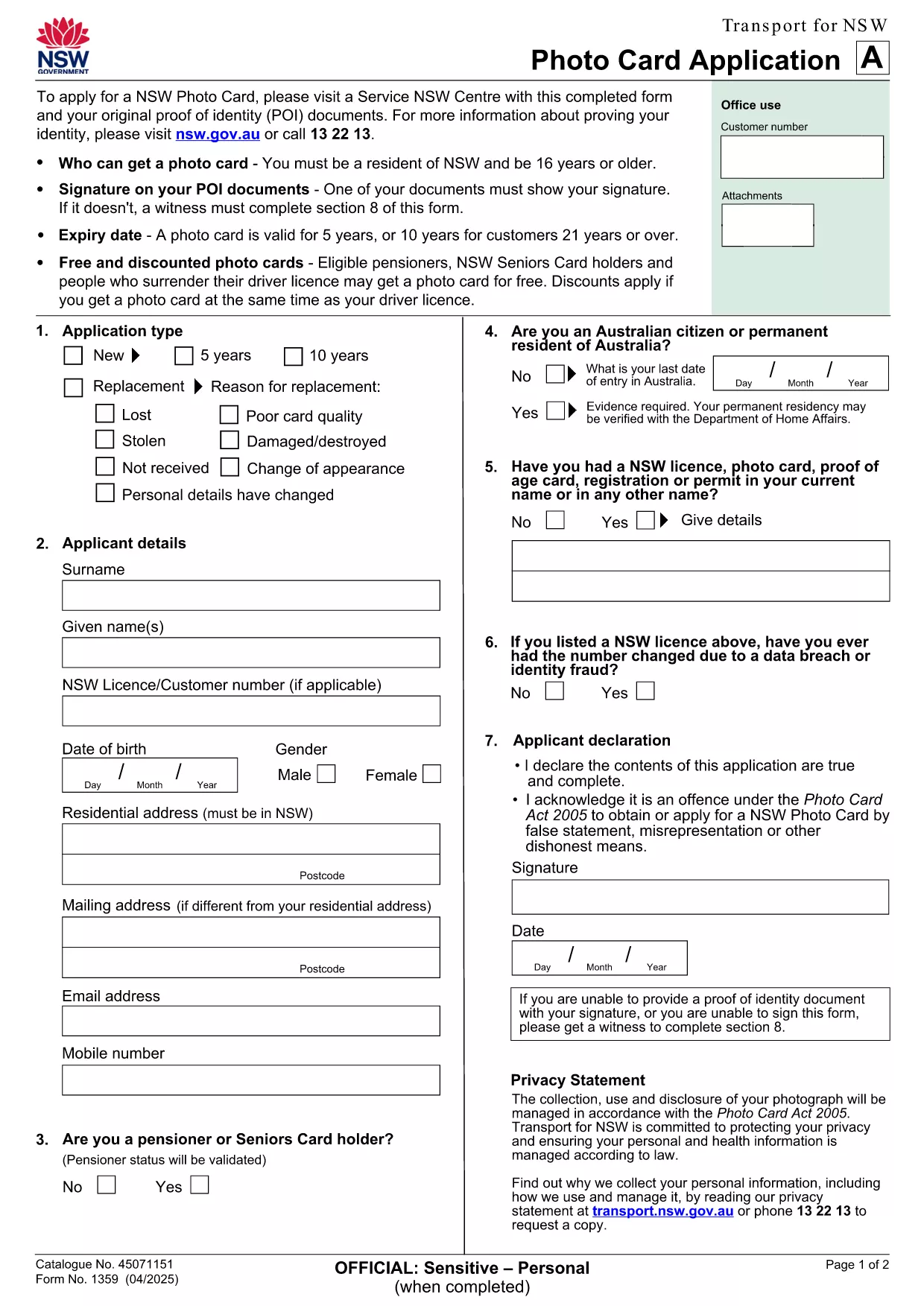
Looking for a fast, secure way to apply for a NSW Photo Card? Our fillable PDF form lets you complete the official identification card application directly in your browser. No printing, scanning, or messy paperwork – just click, fill, and download.

Why You Need a NSW Photo Card

A NSW Photo Card is a government‑issued photo identification that proves your name, address, date of birth and photo. It’s perfect if you don’t have a driver licence or need a secondary ID for age‑restricted purchases, bank transactions, or online verification.

How to Complete the Fillable PDF Form

Follow these simple steps to fill out the form using the Formize PDF Filler app:

  • Click the "Fill out this form" button below.
  • Wait a few seconds while the Formize PDF Filler loads the document.
  • Enter your details in each field – the form automatically validates dates and numbers.
  • Upload a clear digital photo if the field requests one.
  • Review the completed form, then click Download to save a copy.

Common Mistakes to Avoid

  • Missing proof of identity documents: You must bring original documents (e.g., birth certificate, passport) to the Service NSW centre.
  • Incorrect photo specifications: Follow the photo guidelines – plain background, no sunglasses, and face fully visible.
  • Leaving fields blank: Even optional fields should be marked as "N/A" if not applicable.

Where to Submit Your Application

After downloading the completed PDF, print it and bring it to any Service NSW Centre with your supporting documents. You’ll have your photo taken on‑site, and the card will be issued within a few days.

Need a quick reference? Download the original PDF anytime.

FAQ
  • Can I submit the NSW Photo Card application online?

    No. The NSW government requires the completed form to be submitted in person at a Service NSW Centre, but you can fill it out online using our fillable PDF.

  • What documents do I need to bring?

    You must provide original proof of identity documents such as a birth certificate, passport, or existing driver licence, plus proof of address.

  • How long is the NSW Photo Card valid?

    The card is valid for 5 years. If you are 21 or over, you may be eligible for a 10‑year card.

  • Is there a fee for the Photo Card?

    Yes, fees vary depending on whether you hold a NSW driver licence and your concession status. Visit Service NSW for the latest fee schedule.

  • Can I use the Photo Card for online verification?

    In most cases, the NSW Photo Card is accepted as proof of identity, but some online services may still require a driver licence or passport. Check the service’s ID requirements.

  • What if I have a medical condition and cannot visit a centre?

    You may be eligible for a mail‑in application using a photo kit. Contact Service NSW for specific instructions.

HVORDAN

Sådan udfylder du NSW Photo Card gratis online i 6 nemme trin:

  1. 1
    Click the Fill‑out Button
    Press the "Fill out this form" button on the page to launch the Formize PDF Filler.
  2. 2
    Wait for the Filler to Load
    The app loads the PDF in a few seconds – you’ll see the form fields become editable.
  3. 3
    Enter Your Details
    Type in your name, address, date of birth, and any other required information. Use the dropdowns where provided.
  4. 4
    Upload Your Photo
    If the form asks for a photo, click the upload button and select a clear, recent picture that meets the guidelines.
  5. 5
    Review and Download
    Check every field for accuracy, then click the Download button to save the completed form to your device.
  6. 6
    Print and Submit
    Print the filled PDF and take it, along with your original identity documents, to a Service NSW Centre.
Formize PDF Filler app
OM

NSW Photo Card skabelon

Med det traditionelle sæt funktioner til at se og udfylde et PDF-dokument, kombineret med fordelene ved en webapplikation og responsivt layout, kan du fuldføre NSW Photo Card på få minutter.

FUNKTIONER

PDF Filler

Den nemmeste måde at udfylde NSW Photo Card online

  • Udfyld hurtigt NSW Photo Card
    Leder du efter en måde, hvorpå du hurtigt kan fylde NSW Photo Card online? Med vores online gratis PDF-formularudfylder ved du, hvordan du redigerer og udfylder dette pdf-dokument på mindre end et minut.
  • Let at bruge online PDF-editor
    Træt af at udskrive PDF-filer, så du kan redigere dem, før du scanner igen og sender dem tilbage? Rediger PDF-dokumenter gratis online. Brug vores online pdf-editor for at spare tid og papir.
  • Fantastiske værktøjer, alle platforme
    Er du i tvivl om, hvordan du udfylder NSW Photo Card på en Mac, eller måske hvordan du bruger en PDF-filler gratis? Vores online PDF-værktøjer fungerer på alle platforme.
  • Sikker fillagring
    Fuldførte "NSW Photo Card"-filer gemmes i en sikret database, der administreres af Amazon Cloud-hosting. Du kan til enhver tid slette dine filer fra vores system. Under alle omstændigheder slettes disse filer automatisk efter 24 timer.
  • Chat med NSW Photo Card
    Chat med "NSW Photo Card" på Chatize, som er en gratis PDF-læserassistent. Stil spørgsmål og få svar fra "NSW Photo Card". Bare klik på knappen Chat med dokument ovenfor.

Slet udfyldningssession

Vil du slette den valgte påfyldningssession? I dette tilfælde vil dine fremskridt med at udfylde formularen gå tabt.

Slet redigeringssession

Vil du slette den valgte redigeringssession? I dette tilfælde vil dine fremskridt med at oprette og redigere formularen gå tabt.