Vælg sprog

NSW Photo Card Application Form (Fillable PDF)

  1. Land Australien
  2. Sprog engelsk
  3. Aktivitet Identification
  4. Afdeling Transport
NSW Photo Card Application Form (Fillable PDF)

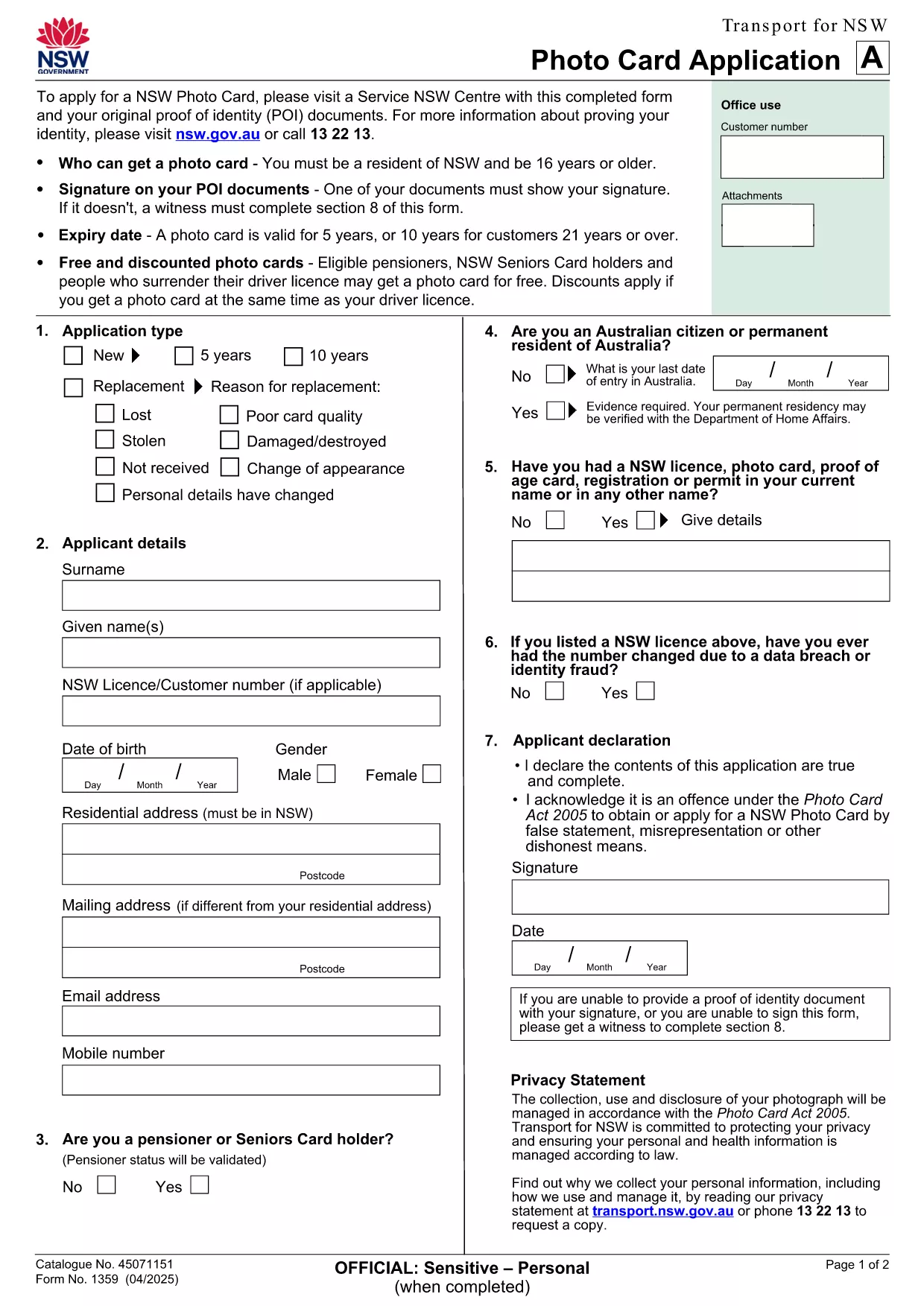
Need a new Photo Card in New South Wales? The official NSW Photo Card application form requires a recent photograph of yourself. With Formize, you can download the PDF, attach your picture, and complete the entire form online – no printer or scanner needed.

Why a Photo Card Application Needs a Picture

The Photo Card is a government‑issued ID that verifies your identity. A clear, recent picture helps officers match the card to the holder quickly and reduces fraud.

How to Fill Out the NSW Photo Card Form Online

  1. Click the "Fill out this form" button on this page.
  2. Wait for the Formize PDF Filler app to load (usually a few seconds).
  3. Upload a high‑resolution photo (JPEG or PNG, 2 MB max).
  4. Complete the personal‑details sections – name, address, date of birth, etc.
  5. Review the entered data, then click Save or Print to submit at your nearest Service Centre.

Common Mistakes & Tips

  • Wrong photo size: Use a passport‑style headshot with a plain background.
  • Missing signature: The digital signature field must be filled; you can sign with your mouse or touch screen.
  • Incorrect address format: Follow the example shown on the form to avoid processing delays.

Download & Save Your Completed Form

After you finish, you can download a copy of the completed PDF for your records. Bring the printed form and your original photo to a Service Centre, or submit it digitally if your centre accepts e‑submissions.

Need help? The Service Centre staff can assist with identity verification and photo quality checks.

FAQ
  • Do I need a passport‑style photo for the NSW Photo Card?

    Yes. The photo must be a clear headshot with a plain background, taken within the last 12 months.

  • Can I submit the form without printing it?

    Most Service Centres require a printed form, but some locations accept a saved PDF on a USB drive. Check with your local centre.

  • What file formats are accepted for the picture?

    JPEG and PNG files are supported, up to 2 MB in size.

  • Is there a fee for the Photo Card?

    A standard Photo Card costs $30. Seniors and pensioners may be eligible for a free card.

  • How long does it take to receive the card after submission?

    The card is mailed to your address within 3 weeks of submitting the completed application.

  • Can I edit the form after I’ve saved it?

    Yes. Open the saved PDF in Formize again, make changes, and re‑save before you submit.

  • What should I do if my photo is rejected?

    You’ll be asked to provide a new picture that meets the requirements. Bring a compliant photo to the Service Centre for a quick replacement.

HVORDAN

Sådan udfylder du NSW photo card application gratis online i 5 nemme trin:

  1. 1
    Open the Fillable Form
    Click the "Fill out this form" button on this page. The Formize PDF Filler will open in a new tab.
  2. 2
    Upload Your Photo
    Select the photo field, then choose a recent passport‑style picture (JPEG/PNG, max 2 MB). The image will appear instantly.
  3. 3
    Enter Your Details
    Type in your name, address, date of birth, and any other required information. All fields are searchable and auto‑save.
  4. 4
    Add Your Signature
    Use the signature box to draw your signature with a mouse, trackpad, or touchscreen.
  5. 5
    Review and Save
    Check every field for accuracy, then click "Save PDF" to download the completed form or "Print" to take it to a Service Centre.
Formize PDF Filler app
OM

NSW photo card application skabelon

Med det traditionelle sæt funktioner til at se og udfylde et PDF-dokument, kombineret med fordelene ved en webapplikation og responsivt layout, kan du fuldføre NSW photo card application på få minutter.

FUNKTIONER

PDF Filler

Den nemmeste måde at udfylde NSW photo card application online

  • Udfyld hurtigt NSW photo card application
    Leder du efter en måde, hvorpå du hurtigt kan fylde NSW photo card application online? Med vores online gratis PDF-formularudfylder ved du, hvordan du redigerer og udfylder dette pdf-dokument på mindre end et minut.
  • Let at bruge online PDF-editor
    Træt af at udskrive PDF-filer, så du kan redigere dem, før du scanner igen og sender dem tilbage? Rediger PDF-dokumenter gratis online. Brug vores online pdf-editor for at spare tid og papir.
  • Fantastiske værktøjer, alle platforme
    Er du i tvivl om, hvordan du udfylder NSW photo card application på en Mac, eller måske hvordan du bruger en PDF-filler gratis? Vores online PDF-værktøjer fungerer på alle platforme.
  • Sikker fillagring
    Fuldførte "NSW photo card application"-filer gemmes i en sikret database, der administreres af Amazon Cloud-hosting. Du kan til enhver tid slette dine filer fra vores system. Under alle omstændigheder slettes disse filer automatisk efter 24 timer.
  • Chat med NSW photo card application
    Chat med "NSW photo card application" på Chatize, som er en gratis PDF-læserassistent. Stil spørgsmål og få svar fra "NSW photo card application". Bare klik på knappen Chat med dokument ovenfor.

Slet udfyldningssession

Vil du slette den valgte påfyldningssession? I dette tilfælde vil dine fremskridt med at udfylde formularen gå tabt.

Slet redigeringssession

Vil du slette den valgte redigeringssession? I dette tilfælde vil dine fremskridt med at oprette og redigere formularen gå tabt.