
Vælg sprog

IMM 5476 – Use of a Representative (Canada)

  1. Land Canada
  2. Sprog engelsk fransk
  3. Aktivitet Visum
IMM 5476 – Use of a Representative (Canada)

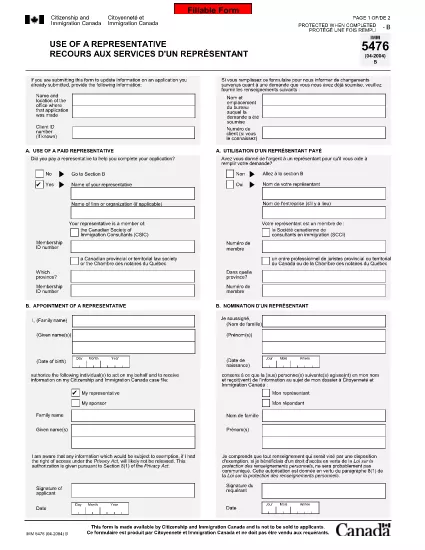
The IMM 5476 – Use of a Representative form allows you to officially appoint an immigration consultant, lawyer, or another authorized person to act on your behalf with Immigration, Refugees and Citizenship Canada (IRCC) and the Canada Border Services Agency (CBSA). This form is required for most permanent‑resident, temporary‑resident, and citizenship applications.

What Is the IMM 5476 Form?

IMM 5476 is a government‑issued PDF that records the details of your chosen representative, their contact information, and the scope of authority you are granting. It is available in both English and French and must be signed by both you (the applicant) and your representative.

How to Fill Out IMM 5476 Online

Instead of downloading the PDF and editing it manually, simply click the "Fill out this form" button on the page. Our Formize PDF Filler app will load the fillable version instantly, letting you complete the form directly in your browser.

Common Mistakes to Avoid

  • Incorrect Representative Details: Double‑check the name, address, and CRA‑issued client number of your representative.
  • Missing Signatures: Both the applicant and the representative must sign; unsigned forms are rejected.
  • Wrong Language Version: Use the official English or French version that matches the rest of your application package.
  • Out‑of‑Date Form: Always use the latest version – the link below always points to the current PDF.

When to Submit the Form

Attach IMM 5476 to the same package as your main application (e.g., Express Entry, Study Permit, Visitor Visa). If you change representatives later, submit a new, signed IMM 5476 with your updated request.

Need More Help?

While Formize does not provide live support, you can find detailed guidance on the IRCC website or consult a licensed immigration professional.

FAQ
  • Do I need a lawyer to fill out IMM 5476?

    No. You can appoint any authorized representative, such as a licensed immigration consultant, lawyer, or family member, as long as they have a valid client number.

  • Can I change my representative after submitting the form?

    Yes. Submit a new, signed IMM 5476 with the updated representative’s details and include a brief letter explaining the change.

  • Is a digital signature accepted?

    IRCC accepts electronic signatures generated within a fillable PDF application like Formize, provided the signature field is clearly marked.

  • What happens if I forget to sign the form?

    An unsigned IMM 5476 will be considered incomplete and may delay processing of your entire application.

  • Do I need to submit both English and French versions?

    Submit only the language version that matches the rest of your application package. IRCC does not require both versions.

  • Is there a fee to use the Formize PDF Filler?

    No. Formize provides free access to fillable PDFs for government forms like IMM 5476.

  • Can I print the form after filling it online?

    Yes. Once you finish, click "Download PDF" and print a hard copy if your submission requires a physical signature.

  • Where can I find the latest version of IMM 5476?

    The link on this page always points to the most recent version published by Immigration, Refugees and Citizenship Canada.

HVORDAN

Sådan udfylder du IMM 5476 gratis online i 5 nemme trin:

  1. 1
    Open the Fillable Form
    Click the "Fill out this form" button on the page. The Formize PDF Filler app will load the IMM 5476 form directly in your browser.
  2. 2
    Enter Applicant Information
    Fill in your full name, client ID, and contact details in the Applicant section. All fields are required.
  3. 3
    Enter Representative Details
    Provide the representative’s name, firm, address, phone, and email. Make sure the CRA client number matches the one on record.
  4. 4
    Add Signatures
    Use the built‑in signature fields to sign electronically. Both you and your representative must sign before saving.
  5. 5
    Download or Submit
    After completing the form, click "Download PDF" to save a copy for your records, then attach it to your immigration application package.
Formize PDF Filler app
OM

Visum formularer

IMM 5476 er en af ​​visumformularer, der er dokumenter, der bruges til at ansøge om visum til indrejse i et fremmed land. Et visum er et dokument, der tillader en udenlandsk statsborger at rejse ind, opholde sig og nogle gange arbejde i et fremmed land i en bestemt periode. De nøjagtige former og krav for at få et visum varierer efter land og visumtype.

Visumformularer kræver typisk personoplysninger som navn, fødselsdato og pasoplysninger samt oplysninger om rejsens formål og længde, påtænkt destination, og om ansøgeren tidligere har fået afslag på visum eller udvist fra et land. Formularerne kan også kræve støttedokumenter såsom pas, fotografier og bevis for økonomisk støtte.

I USA er de mest almindelige visumformer DS-160 og DS-260. DS-160-formularen bruges til at ansøge om et ikke-immigrantvisum, mens DS-260-formularen bruges til at ansøge om et immigrantvisum. Disse formularer kræver detaljerede oplysninger om ansøgerens personlige og rejsehistorik samt understøttende dokumentation såsom pas, rejseplan og økonomiske optegnelser.

Andre lande kan have forskellige visumformer og -krav, men den grundlæggende proces involverer typisk at udfylde en visumansøgning, levere understøttende dokumentation og deltage i et interview med en konsulær embedsmand på en amerikansk ambassade eller konsulat. Det er vigtigt at bemærke, at visumansøgningsprocessen kan være kompleks og tidskrævende, og det anbefales, at personer, der søger et visum, rådfører sig med en immigrationsadvokat eller anden kvalificeret professionel for at sikre, at alle nødvendige former og krav er opfyldt.

FUNKTIONER

PDF Filler

Den nemmeste måde at udfylde IMM 5476 online

  • Udfyld hurtigt IMM 5476
    Leder du efter en måde, hvorpå du hurtigt kan fylde IMM 5476 online? Med vores online gratis PDF-formularudfylder ved du, hvordan du redigerer og udfylder dette pdf-dokument på mindre end et minut.
  • Let at bruge online PDF-editor
    Træt af at udskrive PDF-filer, så du kan redigere dem, før du scanner igen og sender dem tilbage? Rediger PDF-dokumenter gratis online. Brug vores online pdf-editor for at spare tid og papir.
  • Fantastiske værktøjer, alle platforme
    Er du i tvivl om, hvordan du udfylder IMM 5476 på en Mac, eller måske hvordan du bruger en PDF-filler gratis? Vores online PDF-værktøjer fungerer på alle platforme.
  • Sikker fillagring
    Fuldførte "IMM 5476"-filer gemmes i en sikret database, der administreres af Amazon Cloud-hosting. Du kan til enhver tid slette dine filer fra vores system. Under alle omstændigheder slettes disse filer automatisk efter 24 timer.
  • Chat med IMM 5476
    Chat med "IMM 5476" på Chatize, som er en gratis PDF-læserassistent. Stil spørgsmål og få svar fra "IMM 5476". Bare klik på knappen Chat med dokument ovenfor.

Slet udfyldningssession

Vil du slette den valgte påfyldningssession? I dette tilfælde vil dine fremskridt med at udfylde formularen gå tabt.

Slet redigeringssession

Vil du slette den valgte redigeringssession? I dette tilfælde vil dine fremskridt med at oprette og redigere formularen gå tabt.