
Vælg sprog

Punjab Solemnization of Marriage Form (Fillable PDF)

  1. Sprog engelsk hindi
  2. Land Indien
  3. Stat Punjab
  4. Afdeling Indenrigs- og Justitsministeriet
Udfyld denne formular
Punjab Solemnization of Marriage Form (Fillable PDF)

Punjab Solemnization of Marriage Form (Fillable PDF)

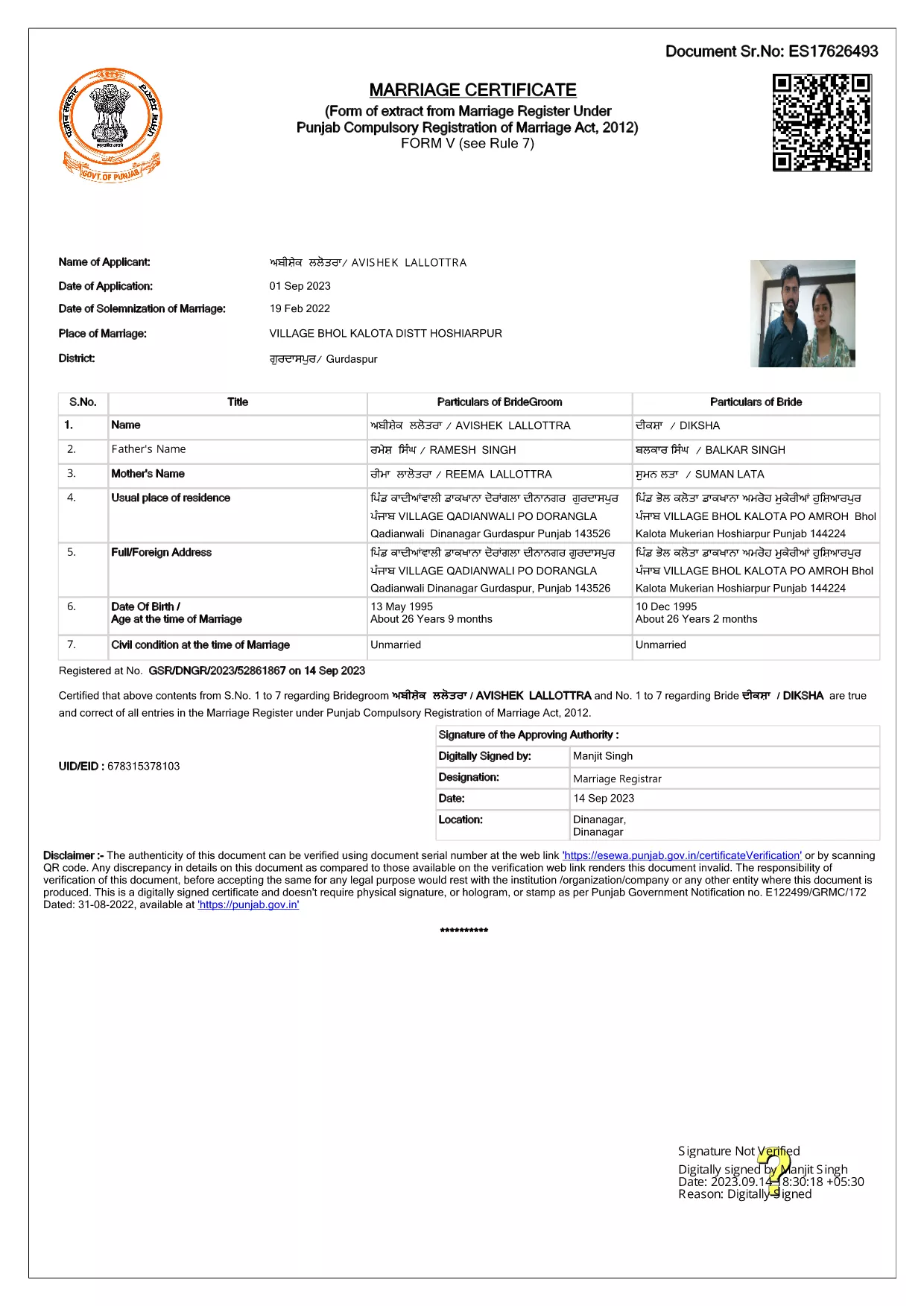
Getting married in Punjab requires you to submit the official Punjab Solemnization of Marriage form. This form records essential details of the bride, groom, and witnesses, and it is mandatory under the Punjab Compulsory Registration of Marriage Act, 2012.

What Is the Punjab Solemnization of Marriage Form?

The form is a government‑issued marriage certificate that captures personal information, parental details, and the date and place of the marriage ceremony. It is the legal proof needed for future documentation such as passport applications, property registration, and visa requests.

How to Fill Out the Form Online with Formize

Instead of printing, printing‑and‑scanning, or using a third‑party PDF editor, you can complete the form directly in your browser:

  1. Click the **"Fill out this form"** button on this page.
  2. Wait a few seconds while the Formize PDF Filler app loads.
  3. Enter the required information in each fillable field. The interface guides you through mandatory sections.
  4. Review your entries, then click **"Save & Download"** to get a completed PDF copy.

Common Mistakes to Avoid When Completing the Form

  • Incorrect spelling of names: Verify the spelling exactly as it appears on official ID documents.
  • Missing witness details: All three witnesses must be fully listed; incomplete entries will cause rejection.
  • Wrong date format: Use DD‑MM‑YYYY as required by the Punjab Registration Department.
  • Leaving optional fields blank: Even optional fields should be filled with "N/A" if not applicable.

Where to Submit the Completed Form

After you have saved the filled PDF, submit it to the nearest Punjab Registration Office or the designated online portal of the Punjab Registration Department. Bring original identity proofs for both parties and witnesses.

Download the Official PDF

Click the button below to download the original, government‑approved PDF. The file is hosted securely and matches the exact layout required by the registration authority.

FAQ
  • Is the Punjab marriage form available in Punjabi?

    The official PDF is printed in English, but you may fill it out in any language. For official submissions, the English version is accepted.

  • Do I need a digital signature?

    A digital signature is not required for the fillable PDF. You must sign the printed copy in the presence of a registrar.

  • Can I edit the form after I download it?

    Yes. The saved PDF remains fully editable with any standard PDF editor, but the Formize filler already lets you complete the form without extra software.

  • How many witnesses are required?

    Three adult witnesses are mandatory. Their full names, addresses, and signatures must be entered in the designated sections.

  • What documents do I need to submit with the form?

    Both parties must provide a valid ID (Aadhar, PAN, or passport), proof of residence, and the original signed marriage certificate.

  • Is there a fee for downloading the PDF?

    No. The PDF is provided free of charge. Any registration fees are paid directly to the Punjab Registration Office.

HVORDAN

Sådan udfylder du Punjab marriage form gratis online i 4 nemme trin:

  1. 1
    Click the Fill‑Out Button
    Press the **"Fill out this form"** button on the page to launch the Formize PDF Filler.
  2. 2
    Wait for the Filler to Load
    The app loads in a few seconds; you’ll see a clean, searchable interface with all form fields highlighted.
  3. 3
    Enter Your Information
    Type the required details for the bride, groom, and witnesses. The filler validates dates and mandatory fields automatically.
  4. 4
    Save and Download
    After reviewing, click **"Save & Download"** to get a completed PDF you can print or submit electronically.
Formize PDF Filler app
OM

Udenrigsministeriets ansøgningsskemaer

Punjab marriage form er en af ​​Udenrigsministeriets ansøgningsformularer. Det indiske udenrigsministerium tilbyder forskellige ansøgningsskemaer til forskellige tjenester relateret til eksterne anliggender og internationale relationer. Nogle almindelige ansøgningsskemaer omfatter:

Ansøgning om pas: Denne formular bruges til at ansøge om et indisk pas. Den indsamler personlige oplysninger såsom navn, adresse, fødselsdato og nationalitet.

Ansøgning om oversøisk statsborgerskab i Indien (OCI): Denne formular bruges til at ansøge om OCI-status, som giver personer af indisk oprindelse mulighed for at bo og arbejde i Indien på ubestemt tid. Den indsamler personlige oplysninger, herunder bevis for indisk oprindelse.

Visumansøgning: Denne formular bruges til at ansøge om visum til at rejse til et fremmed land. Den indsamler personlige oplysninger, rejseoplysninger og formålet med rejsen.

Ansøgning om emigrationsgodkendelse: Denne formular bruges af personer, der søger emigrationsgodkendelse til beskæftigelse i visse lande. Den indsamler personlige oplysninger og ansættelsesoplysninger.

Attestationsansøgning: Denne formular bruges til at ansøge om attestering af forskellige dokumenter, såsom uddannelsesattester, vielsesattester og kommercielle dokumenter. Den indsamler detaljer om det dokument, der skal attesteres, og formålet med attestation.

Ansøgning om konsulære tjenester: Denne formular bruges til forskellige konsulære tjenester, herunder udstedelse af nødcertifikater, assistance til indiske statsborgere i udlandet og registrering af indiske statsborgere. De specifikke detaljer, der kræves, afhænger af arten af ​​den ønskede tjeneste.

FUNKTIONER

PDF Filler

Den nemmeste måde at udfylde Punjab marriage form online

  • Udfyld hurtigt Punjab marriage form
    Leder du efter en måde, hvorpå du hurtigt kan fylde Punjab marriage form online? Med vores online gratis PDF-formularudfylder ved du, hvordan du redigerer og udfylder dette pdf-dokument på mindre end et minut.
  • Let at bruge online PDF-editor
    Træt af at udskrive PDF-filer, så du kan redigere dem, før du scanner igen og sender dem tilbage? Rediger PDF-dokumenter gratis online. Brug vores online pdf-editor for at spare tid og papir.
  • Fantastiske værktøjer, alle platforme
    Er du i tvivl om, hvordan du udfylder Punjab marriage form på en Mac, eller måske hvordan du bruger en PDF-filler gratis? Vores online PDF-værktøjer fungerer på alle platforme.
  • Sikker fillagring
    Fuldførte "Punjab marriage form"-filer gemmes i en sikret database, der administreres af Amazon Cloud-hosting. Du kan til enhver tid slette dine filer fra vores system. Under alle omstændigheder slettes disse filer automatisk efter 24 timer.
  • Chat med Punjab marriage form
    Chat med "Punjab marriage form" på Chatize, som er en gratis PDF-læserassistent. Stil spørgsmål og få svar fra "Punjab marriage form". Bare klik på knappen Chat med dokument ovenfor.

Slet udfyldningssession

Vil du slette den valgte påfyldningssession? I dette tilfælde vil dine fremskridt med at udfylde formularen gå tabt.

Slet redigeringssession

Vil du slette den valgte redigeringssession? I dette tilfælde vil dine fremskridt med at oprette og redigere formularen gå tabt.