
Vælg sprog

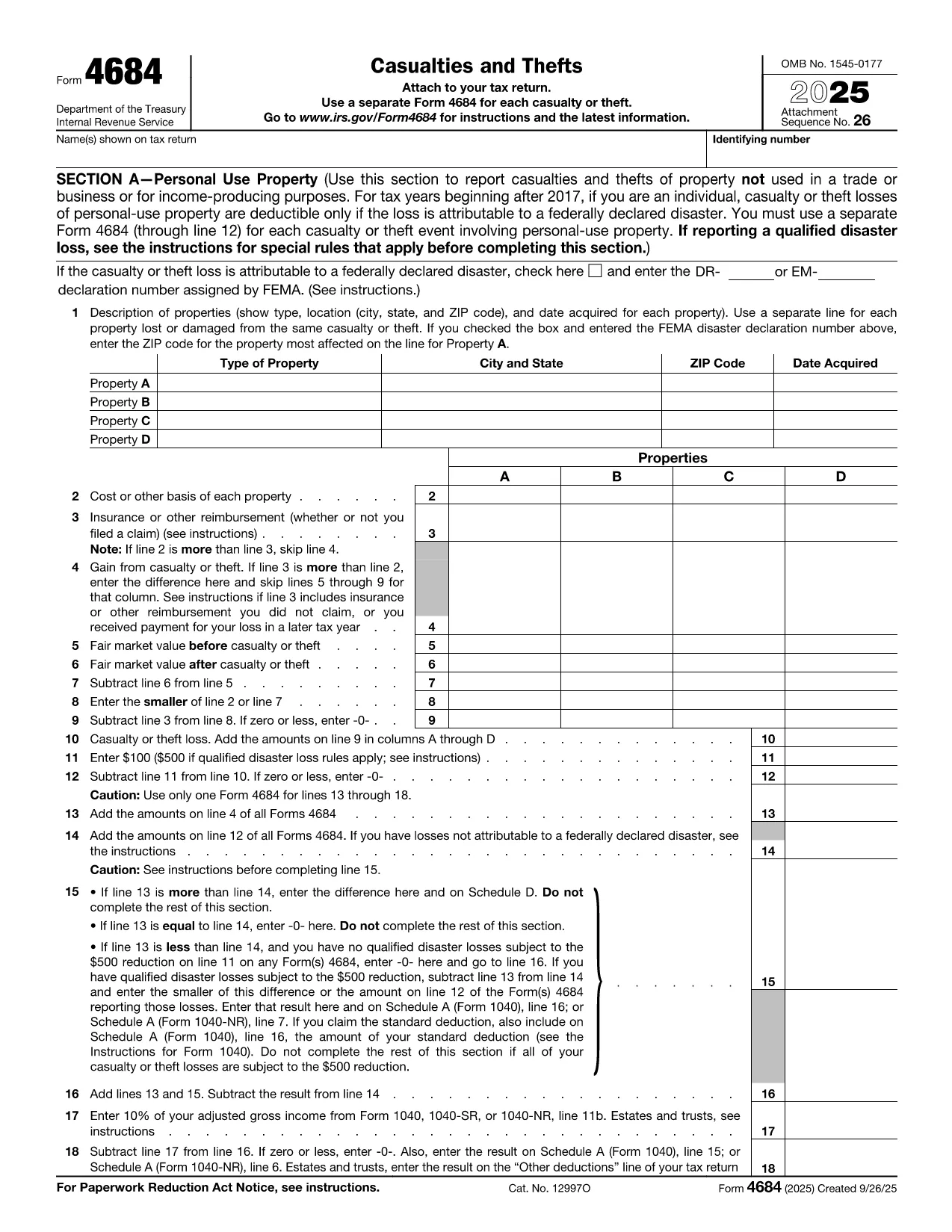
Fillable IRS Form 4684 – Casualties and Thefts

  1. Land USA
  2. Sprog engelsk
  3. Aktivitet Skatter
  4. Afdeling Internal Revenue Service
Fillable IRS Form 4684 – Casualties and Thefts

What Is Form 4684?

IRS Form 4684, Casualties and Thefts, is used to report losses from property damage, natural disasters, or theft. The form allows individuals and businesses to claim a deductible loss on their federal tax return.

How to Complete Form 4684 Online

With Formize’s built‑in PDF filler you can fill out Form 4684 directly in your browser—no download, print, or manual entry required.

  1. Click the "Fill out this form" button on this page.
  2. Wait a few seconds while the Formize PDF Filler app loads the fillable version of Form 4684.
  3. Enter your personal information, loss details, and insurance reimbursements exactly as the instructions describe.
  4. Review the calculated deductible loss that appears automatically.
  5. Save the completed PDF or download it to attach to your tax return.

Common Mistakes to Avoid

  • Skipping the disaster declaration check: For personal‑use property, a loss is only deductible if it results from a federally declared disaster.
  • Incorrect basis calculation: Use the original cost or adjusted basis, not the current market value.
  • Omitting insurance reimbursements: All insurance or other reimbursements must be reported on Line 3.
  • Failing to attach supporting documents: Receipts, police reports, and insurance statements should accompany the form.

Download the Fillable PDF

If you prefer the traditional method, you can download the official fillable PDF from the IRS. The file is fully compatible with Formize’s online editor.

Download IRS Form 4684 (PDF)

FAQs About Form 4684

Below are the most common questions taxpayers have about Form 4684.

Instruktioner

FAQ
  • When is Form 4684 required?

    You must file Form 4684 to claim a casualty or theft loss on your federal tax return. Personal‑use losses are only deductible for federally declared disasters.

  • Can I use Form 4684 for business property?

    Yes. Section B of the form is dedicated to business and income‑producing property losses.

  • Do I need to attach supporting documents?

    Yes. Attach receipts, police reports, insurance statements, and any other documentation that verifies the loss.

  • What if my loss exceeds my insurance reimbursement?

    Enter the difference on Line 4 (Gain from casualty or theft) or continue to the loss calculation sections to determine the deductible amount.

  • Is the online fillable version the same as the PDF from the IRS?

    The fillable version uses the exact IRS layout and fields, so the information you enter matches the official PDF perfectly.

  • How long do I have to file Form 4684?

    Form 4684 is filed with your annual tax return, typically due by April 15. Extensions apply if you file for an extension on your return.

  • Can I edit a completed Form 4684 later?

    Yes. With Formize you can reopen the saved PDF, make corrections, and re‑download the updated version before filing.

HVORDAN

Sådan udfylder du IRS Form 4684 gratis online i 5 nemme trin:

  1. 1
    Open the Fillable Form
    Click the "Fill out this form" button on the page. The Formize PDF Filler will load the fillable version of Form 4684 in your browser.
  2. 2
    Enter Your Information
    Fill in your name, SSN, and loss details exactly as the IRS instructions require. The online fields guide you line‑by‑line.
  3. 3
    Add Insurance & Reimbursements
    Record any insurance payouts or other reimbursements on Line 3. The calculator will automatically adjust the deductible loss.
  4. 4
    Review & Save
    Check the automatically calculated loss for accuracy, then click "Save" to download the completed PDF or store it in your Formize account.
  5. 5
    Attach to Your Tax Return
    Include the saved PDF with your Form 1040 when you file, either electronically or by mail.
Formize PDF Filler app
OM

Skatteskemaer

IRS Form 4684 er en af ​​skatteformularer, der er dokumenter, der bruges til at indberette indkomst, fradrag og skattepligt til den relevante skattemyndighed. Disse formularer er en væsentlig del af skatteansøgningsprocessen og bruges til at sikre, at enkeltpersoner og virksomheder overholder skattelovgivningen og nøjagtigt beregner deres skatteforpligtelser.

De specifikke skatteformularer, der kræves, kan variere afhængigt af faktorer såsom en persons ansøgningsstatus, indkomstkilder og landets skattelove. Men her er nogle almindelige typer af skatteformularer:

Individuelle indkomstskatteformularer: Disse formularer, såsom 1040-serien i USA, bruges af enkeltpersoner til at indberette deres indkomst, kræve fradrag og kreditter og beregne deres skattepligt.

Virksomhedsskatteformularer: Virksomheder, herunder enkeltmandsvirksomheder, partnerskaber, selskaber og selvstændige personer, skal muligvis indsende forskellige formularer for at indberette deres indtægter, udgifter og skyldige skatter. Eksempler omfatter Schedule C (Profit or Loss from Business) og Form 1120 (U.S. Corporation Income Tax Return).

Beskæftigelsesskatteformularer: Arbejdsgivere er forpligtet til at indberette medarbejderløn og tilbageholde og eftergive lønsumsafgifter. Formularer såsom W-2 (løn- og skatteopgørelse) og 941 (Employer's Quarterly Federal Tax Return) bruges til dette formål.

Investerings- og pensionskontoformularer: Disse formularer bruges til at rapportere investeringsindkomst, kapitalgevinster og -tab samt bidrag og udlodninger fra pensionskonti. Eksempler omfatter formular 1099-DIV (udbytte og fordelinger) og Formular 5498 (IRA-bidragsoplysninger).

Ejendoms- og gaveafgiftsformularer: Når en person dør eller giver betydelige gaver, kan specifikke formularer såsom Form 706 a> (United States Estate (and Generation-Skipping Transfer) selvangivelse) og formular 709 (USA-gave (og generations-) Skipping Transfer) selvangivelse) bruges til at indberette og beregne eventuelle gældende bo- eller gaveafgifter.

Det er vigtigt at bemærke, at skattelove og -former kan ændre sig over tid, så enkeltpersoner og virksomheder bør konsultere den relevante skattemyndighed eller søge professionel skatterådgivning for at sikre overholdelse af de nuværende krav.

FUNKTIONER

PDF Filler

Den nemmeste måde at udfylde IRS Form 4684 online

  • Udfyld hurtigt IRS Form 4684
    Leder du efter en måde, hvorpå du hurtigt kan fylde IRS Form 4684 online? Med vores online gratis PDF-formularudfylder ved du, hvordan du redigerer og udfylder dette pdf-dokument på mindre end et minut.
  • Let at bruge online PDF-editor
    Træt af at udskrive PDF-filer, så du kan redigere dem, før du scanner igen og sender dem tilbage? Rediger PDF-dokumenter gratis online. Brug vores online pdf-editor for at spare tid og papir.
  • Fantastiske værktøjer, alle platforme
    Er du i tvivl om, hvordan du udfylder IRS Form 4684 på en Mac, eller måske hvordan du bruger en PDF-filler gratis? Vores online PDF-værktøjer fungerer på alle platforme.
  • Sikker fillagring
    Fuldførte "IRS Form 4684"-filer gemmes i en sikret database, der administreres af Amazon Cloud-hosting. Du kan til enhver tid slette dine filer fra vores system. Under alle omstændigheder slettes disse filer automatisk efter 24 timer.
  • Chat med IRS Form 4684
    Chat med "IRS Form 4684" på Chatize, som er en gratis PDF-læserassistent. Stil spørgsmål og få svar fra "IRS Form 4684". Bare klik på knappen Chat med dokument ovenfor.

Slet udfyldningssession

Vil du slette den valgte påfyldningssession? I dette tilfælde vil dine fremskridt med at udfylde formularen gå tabt.

Slet redigeringssession

Vil du slette den valgte redigeringssession? I dette tilfælde vil dine fremskridt med at oprette og redigere formularen gå tabt.