Vælg sprog

Form 5498‑ESA Fillable PDF – Coverdell Education Savings Account Reporting

  1. Land USA
  2. Sprog engelsk
  3. Aktivitet Skatter
  4. Afdeling Internal Revenue Service
Form 5498‑ESA Fillable PDF – Coverdell Education Savings Account Reporting

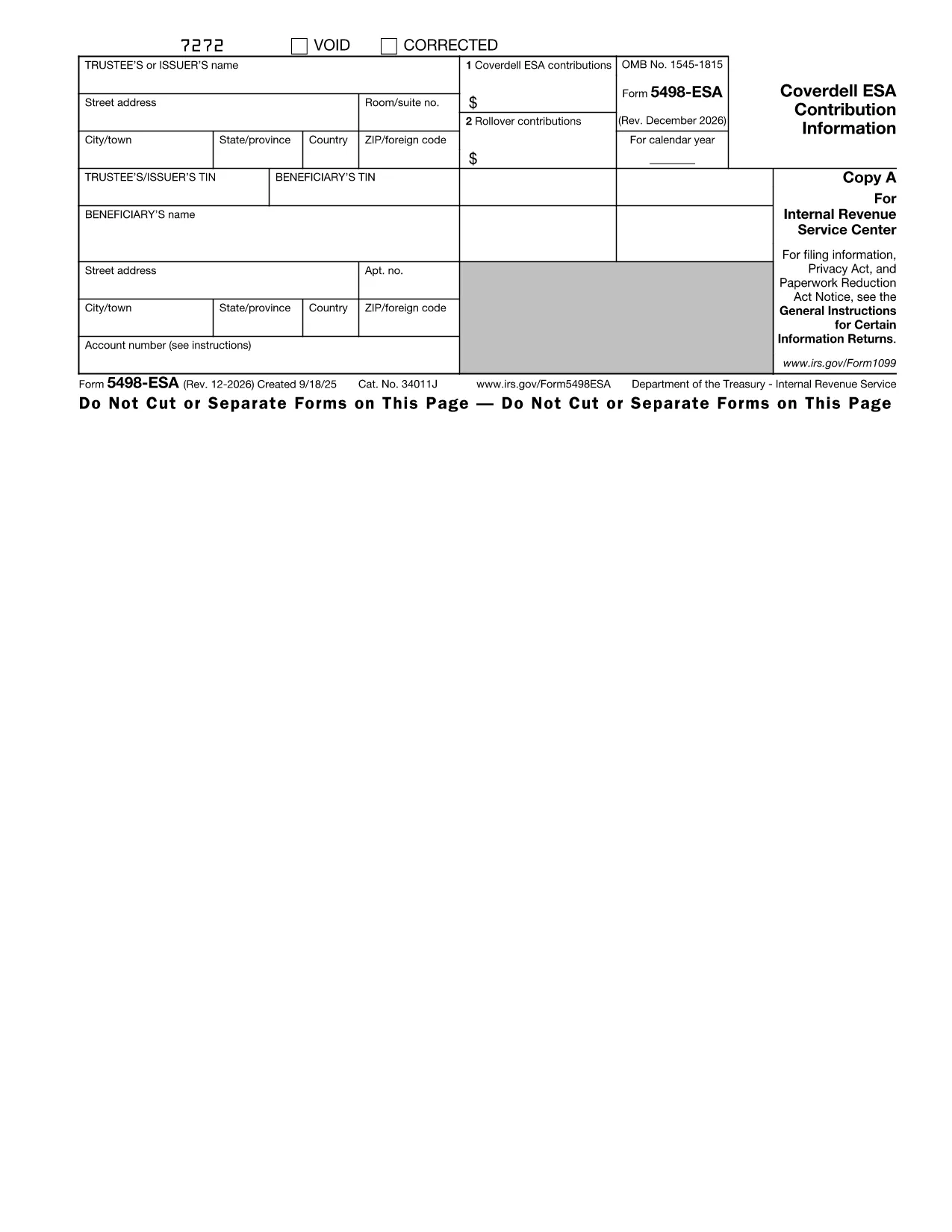
The IRS Form 5498‑ESA (Coverdell Education Savings Account Contribution Information) is the official document trustees or issuers use to report contributions, rollovers, and the year‑end fair market value of a Coverdell ESA. Accurate reporting helps the IRS track education‑savings contributions and ensures beneficiaries stay within the $2,000 annual limit.

What Is Form 5498‑ESA?

Form 5498‑ESA provides a yearly snapshot of all activity in a Coverdell ESA. It includes:

  • Trustee/issuer name, address, and TIN
  • Beneficiary name and TIN
  • Total contributions for the tax year (Box 1)
  • Rollover contributions, if any (Box 2)
  • Fair market value of the account on December 31

How to Fill Out Form 5498‑ESA Online

Instead of printing, downloading, and editing the PDF in a separate editor, simply click the "Fill out this form" button on this page. The Formize PDF Filler app will load instantly, letting you:

  1. Enter trustee and beneficiary details directly into fillable fields.
  2. Upload supporting documents if needed.
  3. Validate the data with built‑in checks that flag common mistakes.
  4. Save a completed copy or export it as a PDF for your records.

Key Deadlines and Common Errors

Deadline: Trustees must provide Copy B of Form 5498‑ESA to the beneficiary by May 31 of the year following the tax year.

Common mistakes to avoid:

  • Entering the wrong beneficiary Social Security number.
  • Reporting contributions that exceed the $2,000 limit.
  • Leaving Box 2 blank when a rollover actually occurred.
  • Failing to include the fair market value as of December 31.

Download the Fillable PDF

If you prefer to work offline, you can download the official fillable PDF directly from the IRS:

Download Form 5498‑ESA (PDF)

Why Use Formize PDF Filler?

Formize provides a secure, browser‑based environment that eliminates the need for separate PDF software. Your data never leaves the encrypted session unless you choose to save or export it. Plus, the built‑in validation helps you submit a clean, error‑free form the first time.

Ready to get started? Click the button below and let Formize guide you through every field.

Instruktioner

FAQ
  • Who must file Form 5498‑ESA?

    The trustee or issuer of the Coverdell ESA files the form. A copy (Copy B) is provided to the beneficiary by May 31 of the following year.

  • Is Form 5498‑ESA deductible on my tax return?

    No. Contributions reported on Form 5498‑ESA are not deductible, but they are important for tracking contribution limits.

  • Can I file Form 5498‑ESA electronically?

    Yes. If you have 250 or more forms, electronic filing is required. For a single form, you can submit a paper copy or use an online filler like Formize.

  • What happens if I exceed the $2,000 contribution limit?

    Excess contributions plus earnings must be withdrawn by June 1 of the following year to avoid a 6% excise tax on the excess amount.

  • Do I need to attach any supporting documents?

    Generally, no supporting documents are attached to Form 5498‑ESA, but you should keep records of contributions and rollovers for your own files.

  • How do I correct an error on a filed Form 5498‑ESA?

    Submit a corrected Form 5498‑ESA with the label "Corrected" at the top of the form. The IRS provides instructions for filing amended information returns.

HVORDAN

Sådan udfylder du Form 5498-ESA gratis online i 4 nemme trin:

  1. 1
    Click the Fill‑out Button
    On this page, click the "Fill out this form" button. The Formize PDF Filler will open in a new tab.
  2. 2
    Enter Required Information
    Type the trustee’s name, address, TIN, and the beneficiary’s details into the fillable fields. The form automatically moves you to the next section.
  3. 3
    Review and Validate
    Use the built‑in validation to check for missing or incorrect entries. Fix any highlighted errors before proceeding.
  4. 4
    Save or Export
    When all fields are complete, click "Save" to store a copy in your Formize account or "Export PDF" to download a finished PDF for your records.
Formize PDF Filler app
OM

Skatteskemaer

Form 5498-ESA er en af ​​skatteformularer, der er dokumenter, der bruges til at indberette indkomst, fradrag og skattepligt til den relevante skattemyndighed. Disse formularer er en væsentlig del af skatteansøgningsprocessen og bruges til at sikre, at enkeltpersoner og virksomheder overholder skattelovgivningen og nøjagtigt beregner deres skatteforpligtelser.

De specifikke skatteformularer, der kræves, kan variere afhængigt af faktorer såsom en persons ansøgningsstatus, indkomstkilder og landets skattelove. Men her er nogle almindelige typer af skatteformularer:

Individuelle indkomstskatteformularer: Disse formularer, såsom 1040-serien i USA, bruges af enkeltpersoner til at indberette deres indkomst, kræve fradrag og kreditter og beregne deres skattepligt.

Virksomhedsskatteformularer: Virksomheder, herunder enkeltmandsvirksomheder, partnerskaber, selskaber og selvstændige personer, skal muligvis indsende forskellige formularer for at indberette deres indtægter, udgifter og skyldige skatter. Eksempler omfatter Schedule C (Profit or Loss from Business) og Form 1120 (U.S. Corporation Income Tax Return).

Beskæftigelsesskatteformularer: Arbejdsgivere er forpligtet til at indberette medarbejderløn og tilbageholde og eftergive lønsumsafgifter. Formularer såsom W-2 (løn- og skatteopgørelse) og 941 (Employer's Quarterly Federal Tax Return) bruges til dette formål.

Investerings- og pensionskontoformularer: Disse formularer bruges til at rapportere investeringsindkomst, kapitalgevinster og -tab samt bidrag og udlodninger fra pensionskonti. Eksempler omfatter formular 1099-DIV (udbytte og fordelinger) og Formular 5498 (IRA-bidragsoplysninger).

Ejendoms- og gaveafgiftsformularer: Når en person dør eller giver betydelige gaver, kan specifikke formularer såsom Form 706 a> (United States Estate (and Generation-Skipping Transfer) selvangivelse) og formular 709 (USA-gave (og generations-) Skipping Transfer) selvangivelse) bruges til at indberette og beregne eventuelle gældende bo- eller gaveafgifter.

Det er vigtigt at bemærke, at skattelove og -former kan ændre sig over tid, så enkeltpersoner og virksomheder bør konsultere den relevante skattemyndighed eller søge professionel skatterådgivning for at sikre overholdelse af de nuværende krav.

FUNKTIONER

PDF Filler

Den nemmeste måde at udfylde Form 5498-ESA online

  • Udfyld hurtigt Form 5498-ESA
    Leder du efter en måde, hvorpå du hurtigt kan fylde Form 5498-ESA online? Med vores online gratis PDF-formularudfylder ved du, hvordan du redigerer og udfylder dette pdf-dokument på mindre end et minut.
  • Let at bruge online PDF-editor
    Træt af at udskrive PDF-filer, så du kan redigere dem, før du scanner igen og sender dem tilbage? Rediger PDF-dokumenter gratis online. Brug vores online pdf-editor for at spare tid og papir.
  • Fantastiske værktøjer, alle platforme
    Er du i tvivl om, hvordan du udfylder Form 5498-ESA på en Mac, eller måske hvordan du bruger en PDF-filler gratis? Vores online PDF-værktøjer fungerer på alle platforme.
  • Sikker fillagring
    Fuldførte "Form 5498-ESA"-filer gemmes i en sikret database, der administreres af Amazon Cloud-hosting. Du kan til enhver tid slette dine filer fra vores system. Under alle omstændigheder slettes disse filer automatisk efter 24 timer.
  • Chat med Form 5498-ESA
    Chat med "Form 5498-ESA" på Chatize, som er en gratis PDF-læserassistent. Stil spørgsmål og få svar fra "Form 5498-ESA". Bare klik på knappen Chat med dokument ovenfor.

Slet udfyldningssession

Vil du slette den valgte påfyldningssession? I dette tilfælde vil dine fremskridt med at udfylde formularen gå tabt.

Slet redigeringssession

Vil du slette den valgte redigeringssession? I dette tilfælde vil dine fremskridt med at oprette og redigere formularen gå tabt.