
Vælg sprog

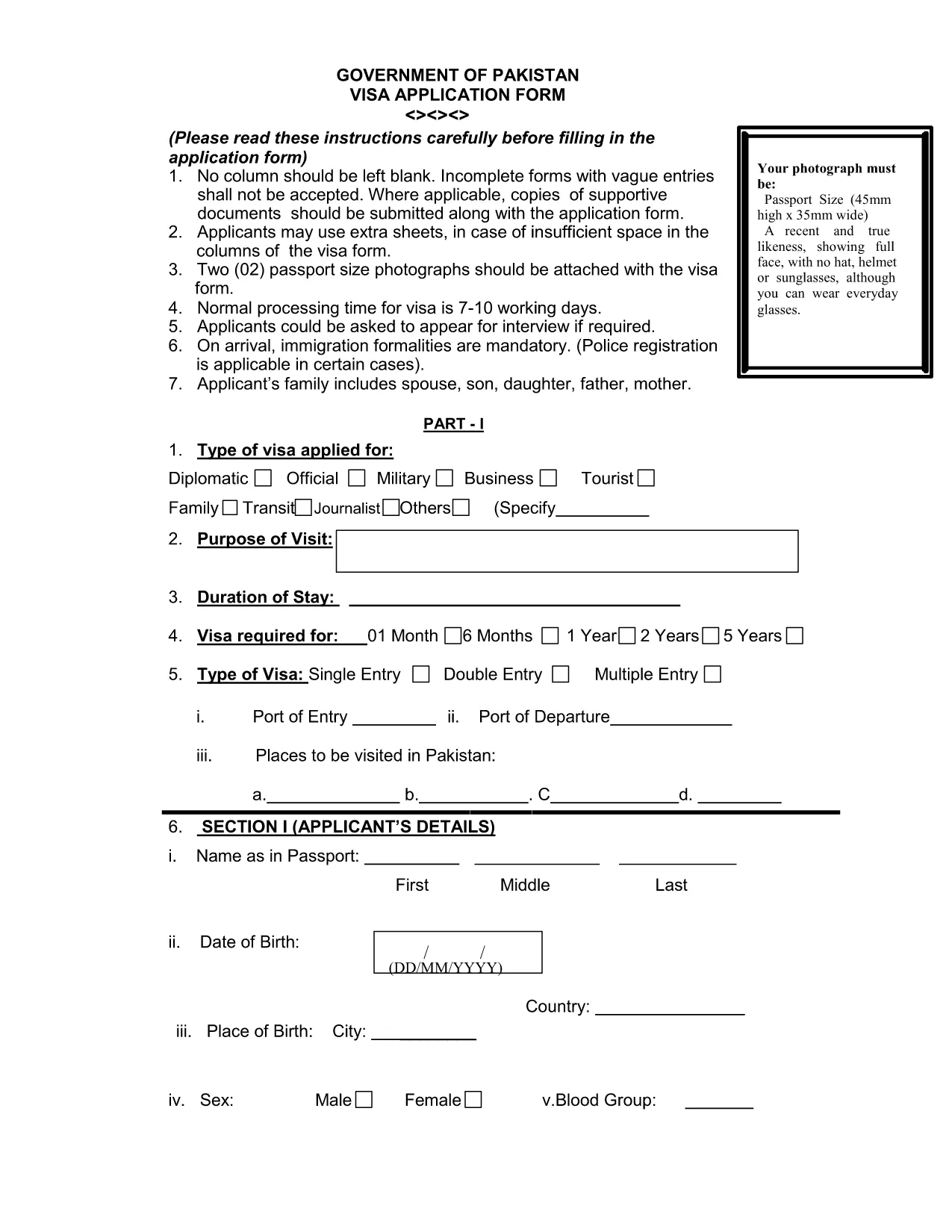
Pakistan Visa Application Form (Fillable PDF)

  1. Sprog engelsk
  2. Land Pakistan
  3. Afdeling Immigration
  4. Aktivitet Visum
Pakistan Visa Application Form (Fillable PDF)

Pakistan Visa Application Form (Fillable PDF)

Planning a trip to Pakistan? The first step is completing the official visa application. Our fillable PDF version lets you enter data directly in your browser, save your progress, and print a clean, error‑free form ready for submission.

Why Use Our Fillable PDF?

The original paper form can be hard to read and easy to fill out incorrectly. With the Formize PDF Filler you get:

  • Instant online editing – no extra software required.
  • Auto‑validation of required fields.
  • Save and resume capability.
  • High‑quality PDF ready for printing or electronic submission.

How to Complete the Pakistan Visa Form Online

Follow these simple steps to finish your application without leaving the page:

  1. Click the "Fill out this form" button below.
  2. Wait a few seconds while the Formize PDF Filler app loads.
  3. Enter your personal, passport, and travel details in the highlighted fields.
  4. Upload the required supporting documents (passport scan, photos, invitation letter, etc.).
  5. Review the completed form, then click Download PDF to print or email to the Pakistani consulate.

Common Mistakes to Avoid

Even a small error can delay processing. Keep these tips in mind:

  • Use the exact name as it appears on your passport.
  • Enter dates in the DD/MM/YYYY format.
  • Do not leave any required field blank – the filler will highlight missing entries.
  • Attach two recent passport‑size photos that meet the 2x2 inch requirement.
  • Double‑check the spelling of your address and phone number.

Required Supporting Documents

Along with the completed form, you will need to submit:

  • A clear, colour scan of the passport information page.
  • Two passport‑size photographs (white background).
  • Proof of travel (flight itinerary, hotel reservation).
  • Invitation letter or business correspondence, if applicable.

Submission Process & Processing Time

After printing, sign the form in ink and attach all supporting documents. Submit the package to the nearest Pakistani embassy or consulate. Standard processing takes 7‑10 working days, but it can vary by location.

Need the PDF now? Click the button below to start filling it out instantly.

FAQ
  • Is the Pakistan visa form free to download?

    Yes, the official form is provided at no cost. You only need to pay the visa fee when you submit the application to the embassy.

  • Can I submit the filled PDF electronically?

    Most Pakistani missions require a printed, signed copy, but some accept a scanned PDF via email. Check the specific consulate’s guidelines.

  • What passport validity is required?

    Your passport must be valid for at least six months beyond the intended date of entry into Pakistan.

  • Do I need to attach photos to the PDF before printing?

    Yes. Attach two recent passport‑size photos (2x2 inches, white background) to the designated fields before downloading the final PDF.

  • How long does visa processing take?

    Standard processing time is 7‑10 working days, though it may be longer during peak travel seasons.

  • What should I do if I make a mistake after printing?

    If you notice an error, cross out the mistake with a single line, initial it, and write the correct information clearly. For major errors, re‑fill the form online.

  • Is there a way to save my progress?

    Yes. The Formize PDF Filler lets you save the partially completed form to your computer and resume later.

  • Do I need a separate application for an e‑visa?

    The same fillable PDF is used for both regular visas and e‑visas. Follow the specific instructions on the embassy’s website for e‑visa submission.

HVORDAN

Sådan udfylder du Pakistan visa form gratis online i 4 nemme trin:

  1. 1
    Open the Fillable Form
    Click the "Fill out this form" button on the page. The Formize PDF Filler app will load in your browser.
  2. 2
    Enter Your Information
    Type your personal details, passport data, and travel plans directly into the highlighted fields. The app validates required entries automatically.
  3. 3
    Upload Supporting Documents
    Use the upload buttons to attach scanned copies of your passport page, photos, and any invitation letters.
  4. 4
    Download or Print
    When all fields are complete, click "Download PDF" to save a printable version or send the file to the Pakistani consulate.
Formize PDF Filler app
OM

Visum formularer

Pakistan visa form er en af ​​visumformularer, der er dokumenter, der bruges til at ansøge om visum til indrejse i et fremmed land. Et visum er et dokument, der tillader en udenlandsk statsborger at rejse ind, opholde sig og nogle gange arbejde i et fremmed land i en bestemt periode. De nøjagtige former og krav for at få et visum varierer efter land og visumtype.

Visumformularer kræver typisk personoplysninger som navn, fødselsdato og pasoplysninger samt oplysninger om rejsens formål og længde, påtænkt destination, og om ansøgeren tidligere har fået afslag på visum eller udvist fra et land. Formularerne kan også kræve støttedokumenter såsom pas, fotografier og bevis for økonomisk støtte.

I USA er de mest almindelige visumformer DS-160 og DS-260. DS-160-formularen bruges til at ansøge om et ikke-immigrantvisum, mens DS-260-formularen bruges til at ansøge om et immigrantvisum. Disse formularer kræver detaljerede oplysninger om ansøgerens personlige og rejsehistorik samt understøttende dokumentation såsom pas, rejseplan og økonomiske optegnelser.

Andre lande kan have forskellige visumformer og -krav, men den grundlæggende proces involverer typisk at udfylde en visumansøgning, levere understøttende dokumentation og deltage i et interview med en konsulær embedsmand på en amerikansk ambassade eller konsulat. Det er vigtigt at bemærke, at visumansøgningsprocessen kan være kompleks og tidskrævende, og det anbefales, at personer, der søger et visum, rådfører sig med en immigrationsadvokat eller anden kvalificeret professionel for at sikre, at alle nødvendige former og krav er opfyldt.

FUNKTIONER

PDF Filler

Den nemmeste måde at udfylde Pakistan visa form online

  • Udfyld hurtigt Pakistan visa form
    Leder du efter en måde, hvorpå du hurtigt kan fylde Pakistan visa form online? Med vores online gratis PDF-formularudfylder ved du, hvordan du redigerer og udfylder dette pdf-dokument på mindre end et minut.
  • Let at bruge online PDF-editor
    Træt af at udskrive PDF-filer, så du kan redigere dem, før du scanner igen og sender dem tilbage? Rediger PDF-dokumenter gratis online. Brug vores online pdf-editor for at spare tid og papir.
  • Fantastiske værktøjer, alle platforme
    Er du i tvivl om, hvordan du udfylder Pakistan visa form på en Mac, eller måske hvordan du bruger en PDF-filler gratis? Vores online PDF-værktøjer fungerer på alle platforme.
  • Sikker fillagring
    Fuldførte "Pakistan visa form"-filer gemmes i en sikret database, der administreres af Amazon Cloud-hosting. Du kan til enhver tid slette dine filer fra vores system. Under alle omstændigheder slettes disse filer automatisk efter 24 timer.
  • Chat med Pakistan visa form
    Chat med "Pakistan visa form" på Chatize, som er en gratis PDF-læserassistent. Stil spørgsmål og få svar fra "Pakistan visa form". Bare klik på knappen Chat med dokument ovenfor.

Slet udfyldningssession

Vil du slette den valgte påfyldningssession? I dette tilfælde vil dine fremskridt med at udfylde formularen gå tabt.

Slet redigeringssession

Vil du slette den valgte redigeringssession? I dette tilfælde vil dine fremskridt med at oprette og redigere formularen gå tabt.