Vælg sprog

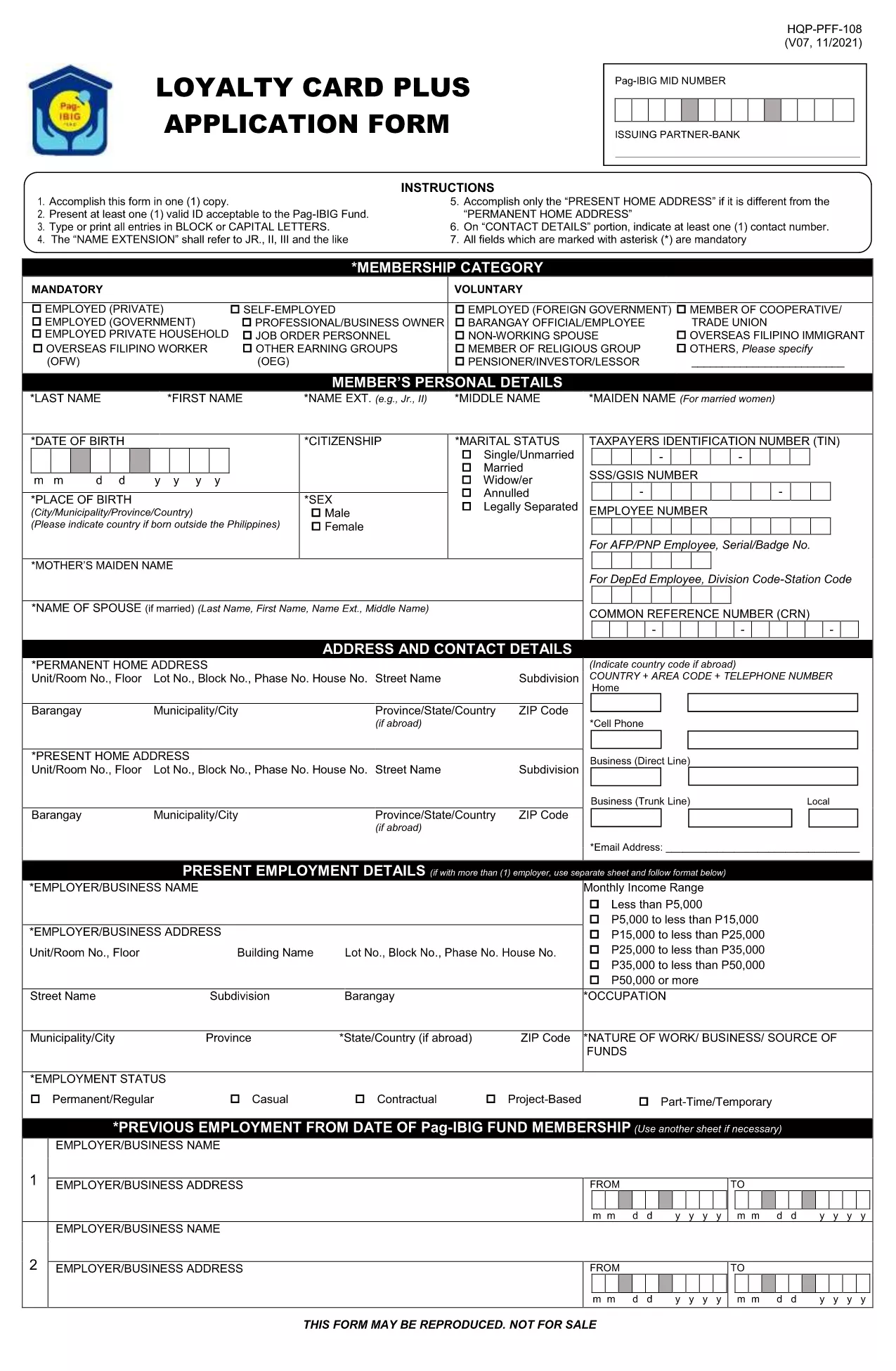
Pag‑IBIG Loyalty Card Application Form (Fillable PDF)

  1. Sprog engelsk
  2. Land Philippines
  3. Aktivitet Housing and Savings
  4. Afdeling Pag‑IBIG Fund
Pag‑IBIG Loyalty Card Application Form (Fillable PDF)

The Pag‑IBIG Loyalty Card rewards members for their consistent contributions and participation in the fund’s programs. To obtain your card, you need to complete the official Pag‑IBIG Loyalty Card Application Form, which is now available as a fillable PDF.

What is the Pag‑IBIG Loyalty Card?

The Loyalty Card is a voluntary benefit that offers exclusive discounts, priority service, and additional loan privileges to eligible Pag‑IBIG members. Once approved, the card can be used at partner merchants and for special Pag‑IBIG events.

How to Fill the Loyalty Card Application Online

Instead of downloading the PDF and opening it in a separate editor, simply click the "Fill out this form" button on this page. The Formize PDF Filler app will load the form directly in your browser, allowing you to type, select, and sign without any extra software.

Key Sections of the Form

  • Personal Information – Name, birthdate, and Pag‑IBIG Membership ID.
  • Contact Details – Current address, phone number, and email.
  • Employment & Income – Employer name, position, and monthly salary.
  • Authorization – Consent for Pag‑IBIG to verify your credit standing and eligibility.

Common Mistakes to Avoid

  • Leaving mandatory fields blank – they are marked with an asterisk (*).
  • Using an outdated Membership ID – verify your ID on the Pag‑IBIG portal first.
  • Submitting illegible signatures – the online filler lets you type a digital signature or draw one with your mouse.
  • Incorrect email format – a valid email is required for confirmation.

Download & Submit the Form

After completing all sections, click Submit. The filled PDF will be generated automatically. Save a copy for your records and follow the instructions on the confirmation page to submit the hard‑copy to your nearest Pag‑IBIG office if required.

Need the original PDF? Download it here for offline use.

FAQ
  • Do I need a PDF editor to fill the Loyalty Card form?

    No. The Formize PDF Filler works directly in your browser, so no additional software is required.

  • Is the Loyalty Card Application free of charge?

    Yes. There is no fee to apply for the Pag‑IBIG Loyalty Card. Any charges would only apply if you request a hard‑copy card at a Pag‑IBIG office.

  • What documents are required with the application?

    Generally, a valid government ID and your Pag‑IBIG Membership ID are needed. Check the confirmation page for any additional requirements.

  • Can I edit the form after I have submitted it?

    Once you click "Submit," the form is locked. If you notice an error, you must fill out a new application.

  • How long does it take to get the Loyalty Card after approval?

    Processing typically takes 7‑10 business days after you submit the completed form and required documents.

  • Is the online filler secure?

    Yes. Formize uses SSL encryption, and your data is stored only temporarily for the duration of the session.

  • Can I print the filled form before submitting?

    Absolutely. After completing the form, click "Download" to save a printable copy.

  • What if I don’t have internet access to use the online filler?

    You can download the PDF from the link provided, fill it out manually, and submit it at any Pag‑IBIG office.

HVORDAN

Sådan udfylder du Pag‑IBIG loyalty card gratis online i 5 nemme trin:

  1. 1
    Click the Fill‑out Button
    On this page, press the "Fill out this form" button. The Formize PDF Filler will open the Loyalty Card Application directly in your browser.
  2. 2
    Wait for the Filler to Load
    A few seconds may pass while the filler loads. This is normal; the app prepares the fillable fields for you.
  3. 3
    Complete Each Section
    Enter your personal, contact, and employment details. Use the dropdowns and checkboxes where provided.
  4. 4
    Review and Sign
    Double‑check all entries, add your digital signature using the signature field, and click "Save".
  5. 5
    Download or Submit
    After saving, download the completed PDF for your records or follow on‑screen instructions to submit it to your Pag‑IBIG office.
Formize PDF Filler app
OM

Pag‑IBIG loyalty card skabelon

Med det traditionelle sæt funktioner til at se og udfylde et PDF-dokument, kombineret med fordelene ved en webapplikation og responsivt layout, kan du fuldføre Pag‑IBIG loyalty card på få minutter.

FUNKTIONER

PDF Filler

Den nemmeste måde at udfylde Pag‑IBIG loyalty card online

  • Udfyld hurtigt Pag‑IBIG loyalty card
    Leder du efter en måde, hvorpå du hurtigt kan fylde Pag‑IBIG loyalty card online? Med vores online gratis PDF-formularudfylder ved du, hvordan du redigerer og udfylder dette pdf-dokument på mindre end et minut.
  • Let at bruge online PDF-editor
    Træt af at udskrive PDF-filer, så du kan redigere dem, før du scanner igen og sender dem tilbage? Rediger PDF-dokumenter gratis online. Brug vores online pdf-editor for at spare tid og papir.
  • Fantastiske værktøjer, alle platforme
    Er du i tvivl om, hvordan du udfylder Pag‑IBIG loyalty card på en Mac, eller måske hvordan du bruger en PDF-filler gratis? Vores online PDF-værktøjer fungerer på alle platforme.
  • Sikker fillagring
    Fuldførte "Pag‑IBIG loyalty card"-filer gemmes i en sikret database, der administreres af Amazon Cloud-hosting. Du kan til enhver tid slette dine filer fra vores system. Under alle omstændigheder slettes disse filer automatisk efter 24 timer.
  • Chat med Pag‑IBIG loyalty card
    Chat med "Pag‑IBIG loyalty card" på Chatize, som er en gratis PDF-læserassistent. Stil spørgsmål og få svar fra "Pag‑IBIG loyalty card". Bare klik på knappen Chat med dokument ovenfor.

Slet udfyldningssession

Vil du slette den valgte påfyldningssession? I dette tilfælde vil dine fremskridt med at udfylde formularen gå tabt.

Slet redigeringssession

Vil du slette den valgte redigeringssession? I dette tilfælde vil dine fremskridt med at oprette og redigere formularen gå tabt.