
Vælg sprog

Secure Test Declaration – Fillable PDF Form

  1. Sprog engelsk
  2. Land USA
  3. Afdeling Copyright Office
Secure Test Declaration – Fillable PDF Form

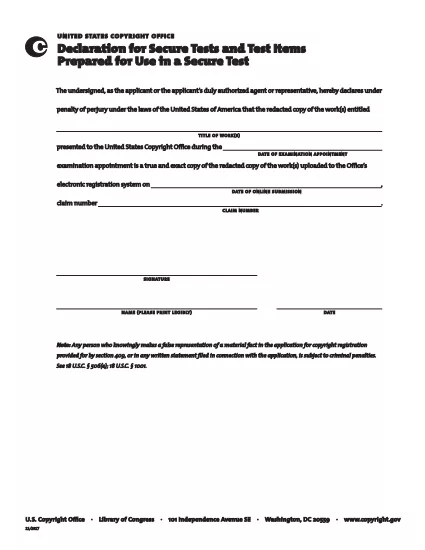
The Secure Test Declaration is a legally‑required statement used by the United States Copyright Office to certify that a test item is protected and will be handled securely. Our fillable PDF version lets you complete the form quickly, accurately, and without installing any extra software.

With Formize’s integrated PDF Filler, you can open the document directly in your browser, enter the required information, and save or print a certified copy. This eliminates the hassle of downloading, editing, and re‑uploading static PDFs.

Below you’ll find a brief overview of the form’s sections, tips for avoiding common errors, and step‑by‑step instructions for completing the declaration online.

What Is a Secure Test Declaration?

A Secure Test Declaration confirms that the test material you are submitting is confidential, that you have the authority to submit it, and that you understand the penalties for false statements. It is commonly required for copyrighted works that involve proprietary testing methods or confidential data.

Key Sections of the Form

  • Applicant Information – Name, address, and contact details.
  • Test Description – Title, purpose, and nature of the test.
  • Security Measures – How the test will be protected.
  • Declaration Statement – Signature line confirming truthfulness.

How to Fill Out the Secure Test Declaration Online

Instead of downloading the PDF and opening it in a separate editor, simply click the "Fill out this form" button on this page. The Formize PDF Filler app will load automatically, allowing you to complete every field directly in your browser.

Common Mistakes to Avoid

  • Leaving required fields blank – the filler will highlight missing information.
  • Using an unofficial signature image – type your name in the signature field for a legally accepted electronic signature.
  • Submitting outdated contact details – double‑check phone numbers and email addresses before saving.

Where to Submit the Completed Form

After saving the completed declaration, you can either:

  1. Upload the PDF through the Copyright Office’s online portal.
  2. Print, sign physically (if required), and mail it to the address listed on the form.

For most users, the electronic submission option is faster and provides immediate confirmation of receipt.

FAQ
  • Do I need Adobe Acrobat to fill out the Secure Test Declaration?

    No. Formize’s online PDF Filler works in any modern browser, so you don’t need Acrobat or any other software.

  • Can I edit the form after I’ve saved it?

    Yes. Open the saved PDF with Formize again, make any necessary changes, and re‑save.

  • Is an electronic signature accepted by the Copyright Office?

    For the Secure Test Declaration, an electronic signature entered through the Formize filler is considered valid, provided the form is submitted electronically.

  • What happens if I submit incomplete information?

    The filler will highlight missing required fields before you can save. Submitting an incomplete form may delay processing.

  • Is there a fee to download or use the Secure Test Declaration form?

    The PDF download and online filling are free. Any filing fees are set by the Copyright Office and are paid separately during submission.

HVORDAN

Sådan udfylder du secure test declaration gratis online i 4 nemme trin:

  1. 1
    Open the Fillable Form
    Click the "Fill out this form" button on the page. The Formize PDF Filler loads in a new tab.
  2. 2
    Enter Your Information
    Complete each highlighted field – the filler will guide you through Applicant Information, Test Description, and Security Measures.
  3. 3
    Sign Electronically
    Type your name in the signature field. The system records a timestamp for legal validity.
  4. 4
    Save and Submit
    Click "Save PDF" to download a copy, then upload it to the Copyright Office portal or print and mail as instructed.
Formize PDF Filler app
OM

Formularer til Copyright Office

secure test declaration er en af ​​de officielle formularer, der bruges af United States Copyright Office, en afdeling af Library of Congress, til at registrere og beskytte ophavsrettigheder. Copyright Office er ansvarlig for at administrere love om ophavsret i USA, herunder registrering af ophavsrettigheder, registrering af overførsler af ophavsret og licenser, og levering af information og tjenester relateret til ophavsret.

Her er nogle eksempler på formularer til Copyright Office:

Ansøgning om ophavsretsregistrering: Dette er hovedformularen, der bruges til at registrere en ophavsret hos det amerikanske ophavsretskontor. Forskellige ansøgningsskemaer er tilgængelige for forskellige typer værker, såsom litterære værker, billedkunst, musikalske kompositioner, lydoptagelser, film og mere. Ansøgningen indsamler oplysninger om værket, der registreres, forfatteren, sagsøgeren og andre relevante detaljer.

Dokumentregistreringsformularer: Disse formularer bruges til at registrere overførsler af ophavsrettigheder, såsom overdragelser eller licenser, hos Copyright Office. De giver mulighed for at etablere en offentlig registrering af overdragelsen af ​​ejerskab af ophavsret.

DMCA Designated Agent Directory Form: Denne formular bruges til at udpege en agent hos Copyright Office i henhold til Digital Millennium Copyright Act (DMCA). Den udpegede agent er ansvarlig for at modtage og håndtere meddelelser om fjernelse i forbindelse med online krænkelse af ophavsret.

Gebyrplan for copyright-kontor: Selvom gebyrplanen ikke er en specifik formular, giver den oplysninger om gebyrerne forbundet med forskellige ophavsretstjenester, herunder registrering, registrering og andre relaterede tjenester.

Det er vigtigt at bemærke, at de specifikke formularer og krav kan ændre sig over tid, og forskellige formularer kan være nødvendige for forskellige typer ophavsretsregistreringer eller tjenester. Det er tilrådeligt at besøge det officielle websted for U.S. Copyright Office (www.copyright.gov) eller rådføre dig med juridiske fagfolk, der er specialiseret i ophavsretslovgivningen for at få nøjagtige og opdaterede oplysninger vedrørende de specifikke formularer til Copyright Office, der er relevante for dine ophavsretsrelaterede behov.

FUNKTIONER

PDF Filler

Den nemmeste måde at udfylde secure test declaration online

  • Udfyld hurtigt secure test declaration
    Leder du efter en måde, hvorpå du hurtigt kan fylde secure test declaration online? Med vores online gratis PDF-formularudfylder ved du, hvordan du redigerer og udfylder dette pdf-dokument på mindre end et minut.
  • Let at bruge online PDF-editor
    Træt af at udskrive PDF-filer, så du kan redigere dem, før du scanner igen og sender dem tilbage? Rediger PDF-dokumenter gratis online. Brug vores online pdf-editor for at spare tid og papir.
  • Fantastiske værktøjer, alle platforme
    Er du i tvivl om, hvordan du udfylder secure test declaration på en Mac, eller måske hvordan du bruger en PDF-filler gratis? Vores online PDF-værktøjer fungerer på alle platforme.
  • Sikker fillagring
    Fuldførte "secure test declaration"-filer gemmes i en sikret database, der administreres af Amazon Cloud-hosting. Du kan til enhver tid slette dine filer fra vores system. Under alle omstændigheder slettes disse filer automatisk efter 24 timer.
  • Chat med secure test declaration
    Chat med "secure test declaration" på Chatize, som er en gratis PDF-læserassistent. Stil spørgsmål og få svar fra "secure test declaration". Bare klik på knappen Chat med dokument ovenfor.

Slet udfyldningssession

Vil du slette den valgte påfyldningssession? I dette tilfælde vil dine fremskridt med at udfylde formularen gå tabt.

Slet redigeringssession

Vil du slette den valgte redigeringssession? I dette tilfælde vil dine fremskridt med at oprette og redigere formularen gå tabt.