
Vælg sprog

Form 750-F Fillable PDF – Download & Complete Online

  1. Sprog engelsk
  2. Land USA
  3. Aktivitet Legal Forms
  4. Afdeling Justitsministeriet
Form 750-F Fillable PDF – Download & Complete Online

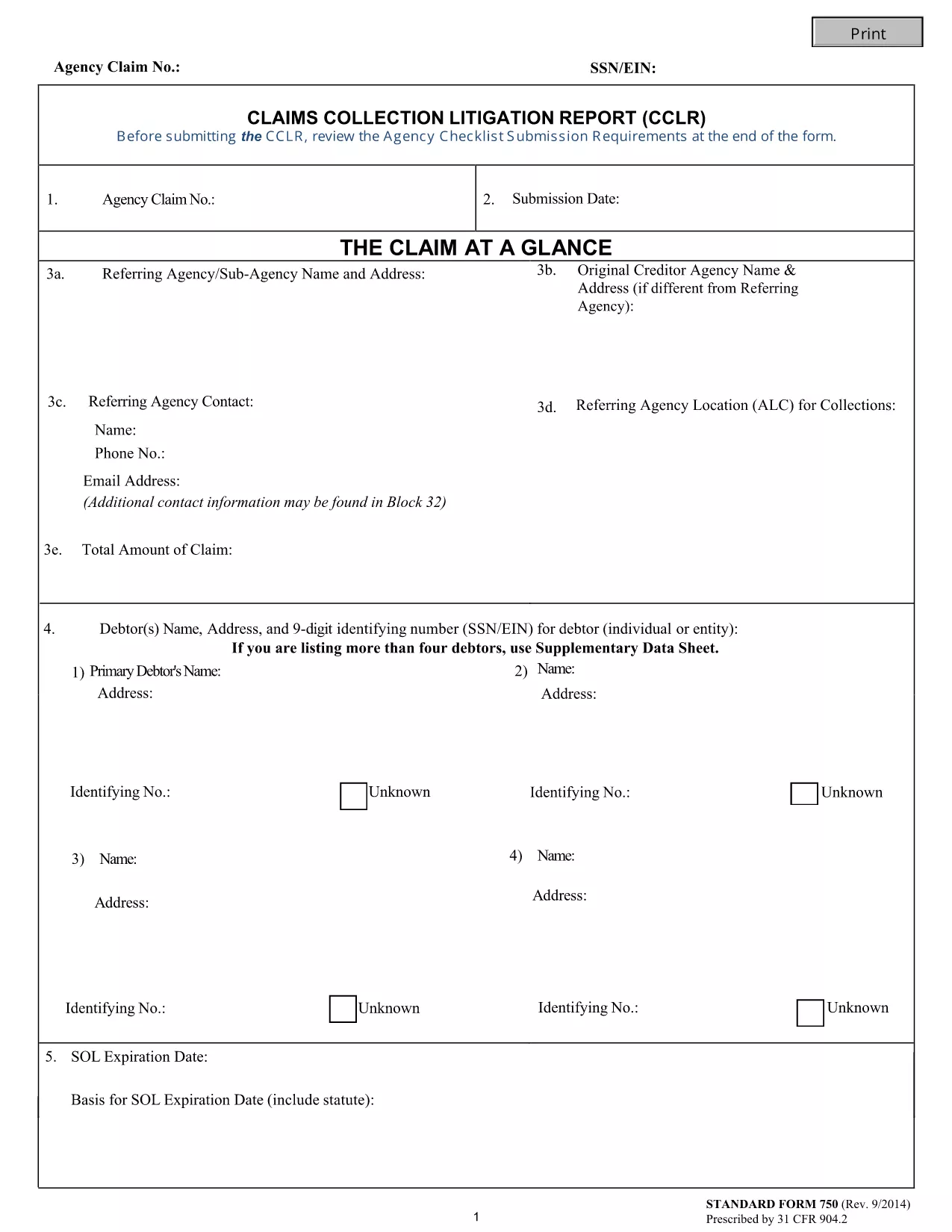
The Form 750-F (Standard Form 750) is the Department of Justice’s official debt‑substantiation report required under 31 CFR 904.2. It is used by government agencies and contractors to document and justify the collection of debts owed to the United States.

Our fillable PDF version lets you complete the form directly in your browser—no Adobe Acrobat or other editor needed. Simply click the button below, let the Formize PDF Filler load, and start typing.

What Is Form 750-F?

Form 750-F collects detailed information about the debtor, the nature of the debt, and the actions taken to recover the amount. It is commonly called the “Debt Substantiation List” and is required for:

  • Federal contract compliance audits
  • Department of Justice investigations
  • Any agency that must prove the validity of a debt before collection

How to Fill Out Form 750-F Online

Follow the step‑by‑step guide below to complete the form quickly and accurately.

Common Mistakes to Avoid

Even small errors can delay processing. Keep these tips in mind:

  • Do not leave required fields blank.
  • Use the exact format for dates (MM/DD/YYYY).
  • Enter the full legal name of the debtor as it appears on official records.
  • Double‑check dollar amounts for commas and decimal points.

Where to Submit the Completed Form

After you have saved the completed PDF, submit it according to the instructions on the covering letter of your agency or the specific contract notice. Most agencies accept electronic uploads through their secure portals.

FAQs About Form 750-F

Find quick answers to the most common questions below. If you need more help, consult your agency’s legal department.

FAQ
  • Is Form 750-F required for all federal contracts?

    Only contracts that involve debt recovery or collection actions require Form 750-F. Check your contract clause or contact your contracting officer for confirmation.

  • Can I edit the PDF after I download it?

    Yes, but using the Formize online filler is recommended because it preserves the original formatting and prevents accidental corruption of the file.

  • What should I do if I make a mistake while filling the form?

    You can clear the field and re‑enter the correct information. If you have already saved the PDF, simply open it again in the Formize filler and edit the needed sections.

  • Do I need a digital signature on Form 750-F?

    Most agencies accept an electronic signature generated by the PDF filler. Confirm with your agency whether a handwritten signature is required.

  • How long should I keep a copy of the completed Form 750-F?

    Retain a copy for at least three years, or longer if your agency’s record‑keeping policy specifies a different period.

  • Is there a cost to use the Formize PDF Filler?

    No. The Formize PDF Filler is free for all users accessing fillable forms on Formize.com.

  • Can I submit the form directly from the filler?

    The filler allows you to download the completed PDF. Submission must be done through your agency’s designated portal or mailing address.

HVORDAN

Sådan udfylder du Form 750-F gratis online i 5 nemme trin:

  1. 1
    Click the Fill‑out Button
    Press the “Fill out this form” button on the page. The Formize PDF Filler app will open in a new tab.
  2. 2
    Wait for the Filler to Load
    The app loads the fillable PDF automatically. This usually takes a few seconds.
  3. 3
    Complete All Required Fields
    Enter the requested information exactly as it appears on your source documents. Required fields are marked with an asterisk.
  4. 4
    Review and Save
    Use the built‑in preview to double‑check your entries, then click “Save” to download the completed PDF to your device.
  5. 5
    Submit or Print
    Follow your agency’s instructions to upload the PDF electronically or print and mail a hard copy.
Formize PDF Filler app
OM

Formularer til justitsministeriet (DOJ).

Form 750-F er en af ​​de officielle formularer, der bruges af det amerikanske justitsministerium og dets forskellige afdelinger, agenturer og komponenter. DOJ er en føderal udøvende afdeling, der er ansvarlig for at håndhæve føderale love, forsvare USAs interesser i juridiske anliggender og administrere retfærdighed.

Her er nogle eksempler på formularer fra Justitsministeriet:

Ansøgning om føderal bistand (SF-424): Denne formular bruges af organisationer, der ansøger om føderale tilskud eller finansiel bistand, der administreres af DOJ eller dets komponenter. Den indsamler oplysninger om organisationen, det foreslåede projekt og budgettet.

Borgerrettighedsklageformular: Denne formular bruges til at indgive en klage til DOJ's Civil Rights Division vedrørende påståede overtrædelser af borgerrettighedslovene, såsom diskrimination på grund af race, køn, handicap eller national oprindelse.

Formular for anmodning om underretning om offer: Denne formular bruges af ofre for forbrydelser til at anmode om meddelelse om status og procedurer i en føderal straffesag, som en del af DOJ's bestræbelser på at give information og støtte til ofre for forbrydelser.

Immigration Forms: DOJ's Executive Office for Immigration Review (EOIR) administrerer immigrationsdomstole og immigrationsrelaterede sager. Forskellige formularer bruges i immigrationsretssager, såsom formular EOIR-42B for ansøgninger om fritagelse for fjernelse eller formular EOIR-28 for appel.

ATF-formularer: Bureau of Alcohol, Tobacco, Firearms, and Explosives (ATF), en del af DOJ, har sit eget sæt formularer til forskellige formål, som nævnt i et tidligere svar.

Drug Enforcement Administration (DEA) Formularer: DEA, en anden komponent af DOJ, bruger sine egne formularer til spørgsmål relateret til kontrollerede stoffer, herunder ansøgninger om registrering, rapportering og krav til registrering.

Disse eksempler fremhæver nogle få kategorier af DOJ-formularer, men de specifikke formularer, der bruges af Justitsministeriet, kan variere afhængigt af den involverede afdeling, agentur eller komponent og arten af ​​tjenesterne eller procedurerne. Det er tilrådeligt at konsultere den officielle hjemmeside for den specifikke afdeling eller agentur i DOJ eller søge juridisk rådgivning for at få nøjagtige og opdaterede oplysninger om de specifikke DOJ-formularer, der er relevante for din situation.

FUNKTIONER

PDF Filler

Den nemmeste måde at udfylde Form 750-F online

  • Udfyld hurtigt Form 750-F
    Leder du efter en måde, hvorpå du hurtigt kan fylde Form 750-F online? Med vores online gratis PDF-formularudfylder ved du, hvordan du redigerer og udfylder dette pdf-dokument på mindre end et minut.
  • Let at bruge online PDF-editor
    Træt af at udskrive PDF-filer, så du kan redigere dem, før du scanner igen og sender dem tilbage? Rediger PDF-dokumenter gratis online. Brug vores online pdf-editor for at spare tid og papir.
  • Fantastiske værktøjer, alle platforme
    Er du i tvivl om, hvordan du udfylder Form 750-F på en Mac, eller måske hvordan du bruger en PDF-filler gratis? Vores online PDF-værktøjer fungerer på alle platforme.
  • Sikker fillagring
    Fuldførte "Form 750-F"-filer gemmes i en sikret database, der administreres af Amazon Cloud-hosting. Du kan til enhver tid slette dine filer fra vores system. Under alle omstændigheder slettes disse filer automatisk efter 24 timer.
  • Chat med Form 750-F
    Chat med "Form 750-F" på Chatize, som er en gratis PDF-læserassistent. Stil spørgsmål og få svar fra "Form 750-F". Bare klik på knappen Chat med dokument ovenfor.

Slet udfyldningssession

Vil du slette den valgte påfyldningssession? I dette tilfælde vil dine fremskridt med at udfylde formularen gå tabt.

Slet redigeringssession

Vil du slette den valgte redigeringssession? I dette tilfælde vil dine fremskridt med at oprette og redigere formularen gå tabt.