
Vælg sprog

MV-58A Fillable PDF Form – New York DMV

  1. Sprog engelsk
  2. Land USA
  3. Aktivitet Registreringsattest
  4. Afdeling Department of Motor Vehicles
MV-58A Fillable PDF Form – New York DMV

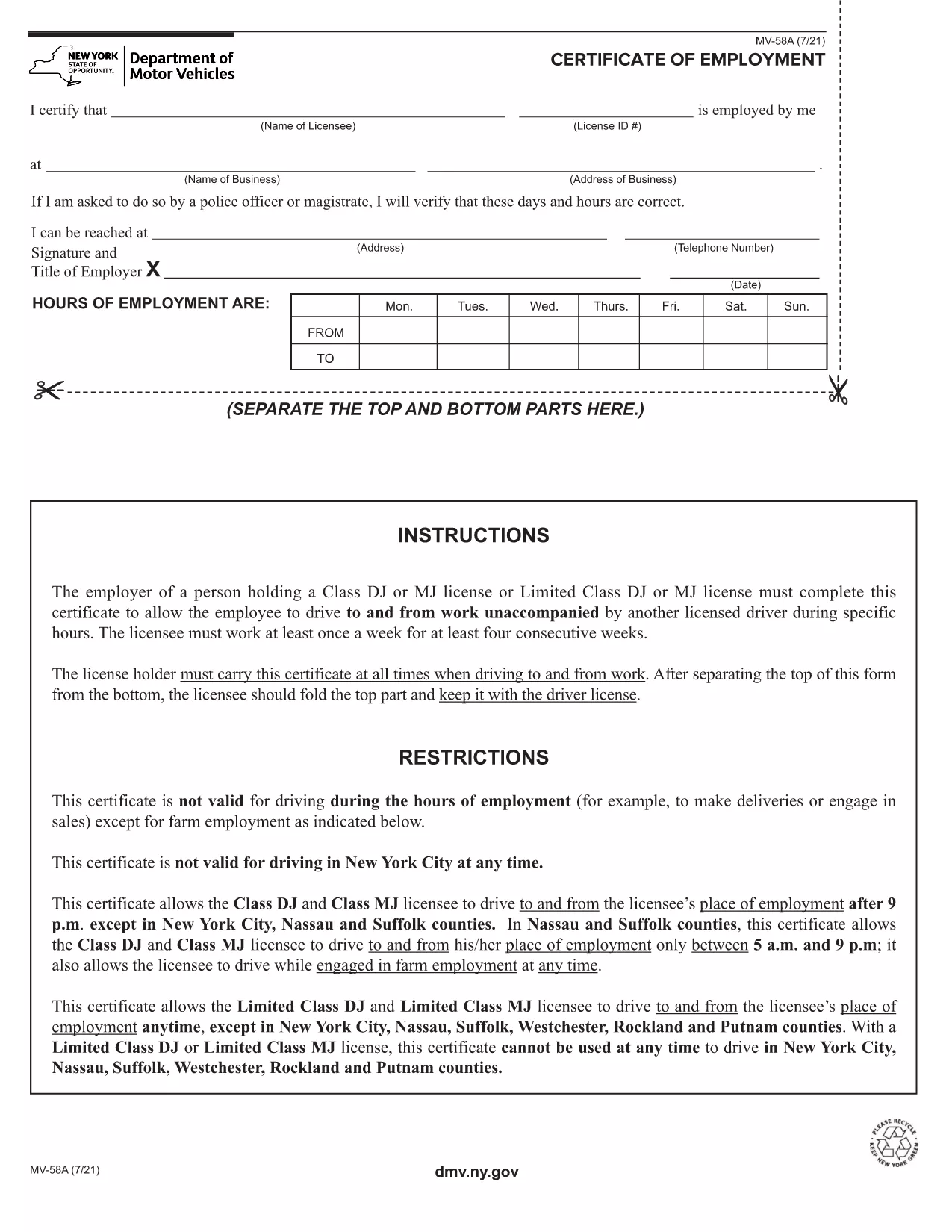
The MV-58A is the New York State Department of Motor Vehicles (DMV) form used for specific vehicle‑related transactions. Whether you need to correct registration details, request a duplicate, or handle a special circumstance, the MV-58A is the official document required by the NY DMV.

Formize.com offers a fillable PDF version of the MV-58A that lets you complete the form instantly in your browser—no extra software needed. Simply click the “Fill out this form” button, let the Formize PDF Filler load, and start entering your information.

Below you’ll find everything you need to know about the MV-58A, step‑by‑step instructions for filling it out online, common pitfalls to watch out for, and where to send the finished form.

What Is the MV-58A Form?

The MV-58A is typically used for:

  • Updating vehicle ownership information.
  • Correcting errors on a title or registration.
  • Submitting special requests that are not covered by standard DMV forms.

It is a mandatory paper‑based form for the NY DMV, but with Formize’s fillable PDF you can complete it digitally and print a clean copy for submission.

How to Complete the MV-58A Online

Follow our quick guide to finish the form without ever opening a separate PDF editor:

  1. Click the “Fill out this form” button on the page.
  2. Wait a few seconds while the Formize PDF Filler app loads the MV-58A.
  3. Enter your information in the highlighted fields. The app automatically saves your progress.
  4. Review each section for accuracy; the filler highlights any required fields you missed.
  5. When you’re done, click “Download PDF” to save a printable copy or “Print” to send it directly to your printer.

Common Mistakes to Avoid

  • Leaving required fields blank: The filler will flag empty required boxes, but double‑check before downloading.
  • Using the wrong date format: NY DMV expects MM/DD/YYYY.
  • Signing the wrong copy: The MV-58A has multiple copies; sign only the copy you will submit.
  • Incorrect vehicle identification number (VIN): Verify the VIN matches the title exactly.

Where to Submit the Completed Form

After printing, mail or deliver the signed MV-58A to your local NY DMV office. Include any supporting documents referenced on the form. For faster processing, consider using certified mail with a tracking number.

Need a reminder? Bookmark this page and return anytime you need the MV-58A fillable PDF again.

FAQ
  • What is the purpose of the MV-58A form?

    The MV-58A is used for special vehicle registration requests, corrections, or ownership updates that are not covered by standard DMV forms.

  • Can I fill out MV-58A on a phone or tablet?

    Yes. The Formize fillable PDF works on any modern browser, including mobile devices, though a larger screen makes data entry easier.

  • Do I need to print the form after filling it online?

    The NY DMV requires a signed paper copy, so you must print the completed form, sign it, and submit it by mail or in person.

  • How long does it take for the DMV to process the MV-58A?

    Processing times vary, but most requests are handled within 10‑14 business days after the DMV receives the complete form.

  • Is there a fee for submitting MV-58A?

    A processing fee may apply depending on the specific request. Check the form instructions or the NY DMV fee schedule for details.

  • What should I do if I make a mistake after printing?

    If you notice an error, correct it on a new copy of the form. Do not use correction fluid; instead, start a fresh fillable PDF and print again.

  • Can I submit the MV-58A electronically?

    The NY DMV currently requires a handwritten signature on a printed copy, so electronic submission alone is not accepted.

  • Where can I find a local NY DMV office?

    Visit the official NY DMV website and use the office locator tool to find the nearest location.

HVORDAN

Sådan udfylder du MV-58A gratis online i 5 nemme trin:

  1. 1
    Open the Fillable Form
    Click the “Fill out this form” button on the page. The Formize PDF Filler will open in a new tab.
  2. 2
    Enter Your Information
    Type directly into each highlighted field. The app saves your entries automatically.
  3. 3
    Validate and Review
    Check for any highlighted missing fields or format warnings, then review all entered data.
  4. 4
    Download or Print
    When satisfied, click “Download PDF” to save a copy or “Print” to produce a hard‑copy for mailing.
  5. 5
    Submit to the NY DMV
    Mail or deliver the signed form to your local New York DMV office along with any required attachments.
Formize PDF Filler app
OM

Formularer til registrering af køretøjer

MV-58A er en af ​​DMV-formularer, også kendt som Department of Motor Vehicles-formularer, som er dokumenter, der bruges i forskellige transaktioner og processer relateret til motorkøretøjer. DMV er et statsligt organ, der er ansvarlig for kørekort, registrering af køretøjer og håndhævelse af love om motorkøretøjer. De specifikke tilgængelige DMV-formularer kan variere efter jurisdiktion, men her er nogle almindelige eksempler:

Kørekortformularer: Disse formularer bruges til at ansøge om et kørekort eller til at anmode om ændringer eller fornyelser. De kræver typisk personlige oplysninger, identitetsbevis og kan omfatte sektioner for medicinsk information eller kørehistorie.

Køretøjsregistreringsformularer: Disse formularer bruges til at registrere et motorkøretøj hos DMV. De kræver køretøjsoplysninger, ejerskabsoplysninger og bevis for forsikring.

Formularer til titeloverførsel: Når du køber eller sælger et køretøj, bruges disse formularer til at overføre ejerskab fra en part til en anden. De kræver oplysninger om køber, sælger, køretøjsoplysninger og kan omfatte en salgsseddel.

Formularer til frigivelse af ansvar for køretøjer: Ved salg eller overdragelse af ejerskab af et køretøj underretter disse formularer DMV om, at sælgeren ikke længere er ansvarlig for køretøjet. Det hjælper med at beskytte sælgeren mod ansvar for ulykker eller hændelser, der involverer køretøjet efter salget.

Formularer til fornyelse af nummerplade og registrering: Disse formularer bruges til at forny køretøjsregistrering eller anmode om nye nummerplader. De kræver typisk oplysninger om den registrerede ejer, aktuelle registreringsoplysninger og betaling af gældende gebyrer.

Formularer til anmodning om kørejournaler: Disse formularer giver enkeltpersoner mulighed for at anmode om deres kørejournaler fra DMV, som giver oplysninger om kørselsovertrædelser, licensstatus og andre relevante detaljer.

Special- eller personlige nummerpladeformularer: Disse formularer bruges til at ansøge om personlige eller specialnummerplader, som giver enkeltpersoner mulighed for at tilpasse deres nummerplade med specifikke tegn eller design.

Dette er blot nogle få eksempler på de mange formularer, der kan være tilgængelige gennem DMV. De specifikke formularer og krav kan variere efter jurisdiktion, så det er vigtigt at konsultere det lokale DMV-websted eller besøge et DMV-kontor for at få de korrekte formularer til dine særlige behov.

FUNKTIONER

PDF Filler

Den nemmeste måde at udfylde MV-58A online

  • Udfyld hurtigt MV-58A
    Leder du efter en måde, hvorpå du hurtigt kan fylde MV-58A online? Med vores online gratis PDF-formularudfylder ved du, hvordan du redigerer og udfylder dette pdf-dokument på mindre end et minut.
  • Let at bruge online PDF-editor
    Træt af at udskrive PDF-filer, så du kan redigere dem, før du scanner igen og sender dem tilbage? Rediger PDF-dokumenter gratis online. Brug vores online pdf-editor for at spare tid og papir.
  • Fantastiske værktøjer, alle platforme
    Er du i tvivl om, hvordan du udfylder MV-58A på en Mac, eller måske hvordan du bruger en PDF-filler gratis? Vores online PDF-værktøjer fungerer på alle platforme.
  • Sikker fillagring
    Fuldførte "MV-58A"-filer gemmes i en sikret database, der administreres af Amazon Cloud-hosting. Du kan til enhver tid slette dine filer fra vores system. Under alle omstændigheder slettes disse filer automatisk efter 24 timer.
  • Chat med MV-58A
    Chat med "MV-58A" på Chatize, som er en gratis PDF-læserassistent. Stil spørgsmål og få svar fra "MV-58A". Bare klik på knappen Chat med dokument ovenfor.

Slet udfyldningssession

Vil du slette den valgte påfyldningssession? I dette tilfælde vil dine fremskridt med at udfylde formularen gå tabt.

Slet redigeringssession

Vil du slette den valgte redigeringssession? I dette tilfælde vil dine fremskridt med at oprette og redigere formularen gå tabt.