
Vælg sprog

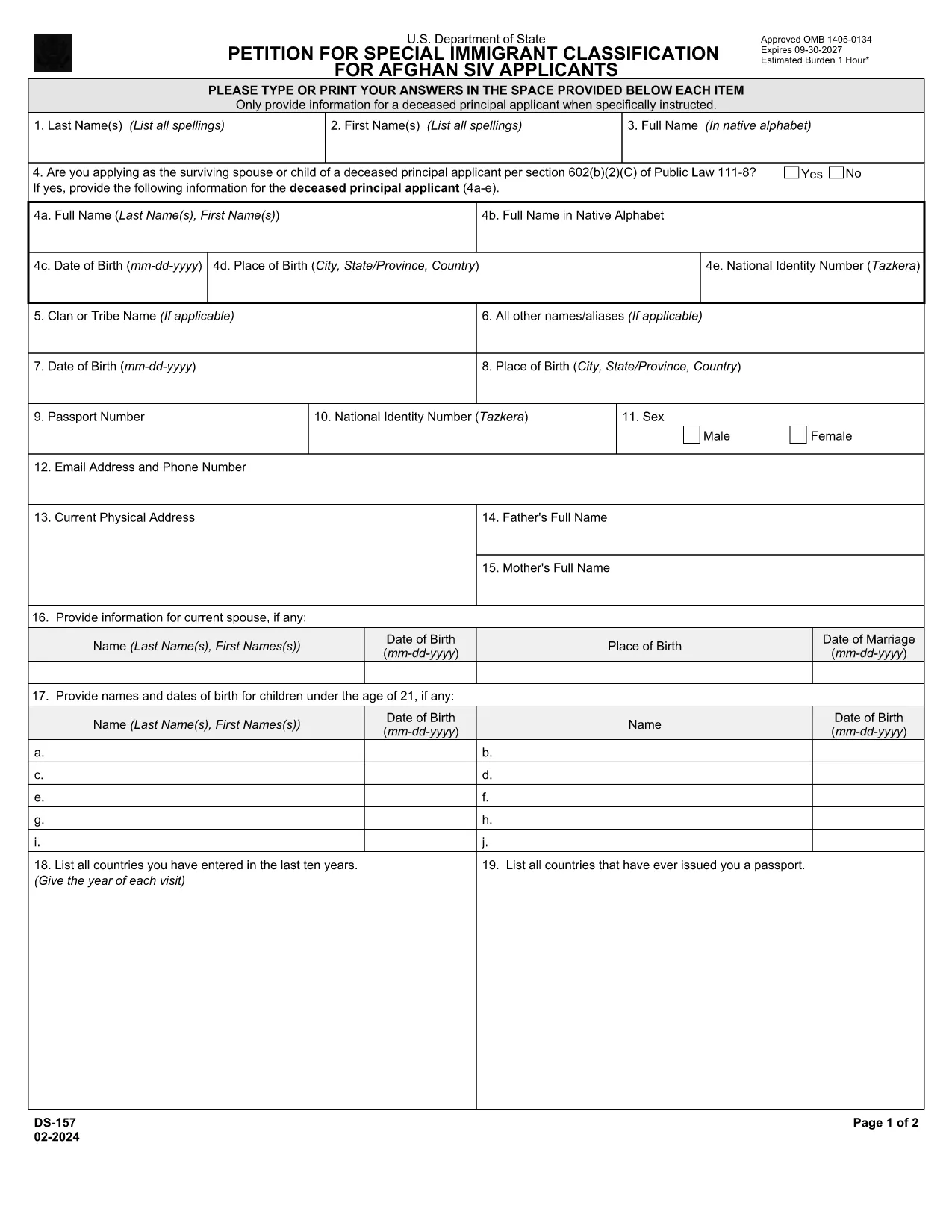
DS-157 Supplemental Nonimmigrant Visa Application – Fillable PDF

  1. Sprog engelsk
  2. Land USA
  3. Afdeling Udenrigsministeriet
  4. Aktivitet Visum
DS-157 Supplemental Nonimmigrant Visa Application – Fillable PDF

The DS-157 (Supplemental Nonimmigrant Visa Application) is required for certain male visa applicants, especially Afghan Special Immigrant Visa (SIV) candidates. It collects detailed personal, employment, and travel information that supports the main DS-160 application.

What is the DS-157 Form?

Issued by the U.S. Department of State, the DS-157 is a supplemental questionnaire that must be submitted with your visa packet. It is a fillable PDF that can be completed electronically, printed, signed, and attached to your visa interview documents.

How to Fill the DS-157 Online with Formize

Formize provides a secure, browser‑based PDF filler so you never need to download, print, or scan the form. Follow these steps:

  • Click the **"Fill out this form"** button on this page.
  • Wait a few seconds while the Formize PDF Filler app loads.
  • Enter your information in the highlighted fields. Use the tab key or click to move between sections.
  • When finished, click **"Save & Download"** to get a copy you can print or email.
  • Sign the form with your finger (touchscreen) or type your signature, then download the completed PDF.

Common Mistakes to Avoid

  • Leaving fields blank – every question must be answered, even if the answer is “None” or “N/A”.
  • Incorrect dates – double‑check birth dates, travel dates, and employment periods.
  • Illegible signatures – use the built‑in e‑signature tool for a clear, legal signature.
  • Mismatched information – ensure details match those on your DS‑160 and supporting documents.

Where to Submit the Completed Form

Print the filled DS-157, sign it in ink if you printed a hard copy, and attach it to your visa interview packet. Submit the package to the U.S. Embassy or Consulate handling your case. Some posts now accept the PDF electronically; verify the specific instructions on your appointment notice.

Download the Official PDF

For reference or offline use, you can download the official, government‑issued PDF directly from the Department of State:

Download DS-157 PDF

Using Formize’s online filler saves you time, reduces errors, and eliminates the need for a scanner.

FAQ
  • Who must complete the DS-157 form?

    All male non‑immigrant visa applicants between ages 16‑45, including Afghan SIV applicants, must submit a DS-157 in addition to the DS‑160.

  • Is the DS-157 form available in languages other than English?

    The official form is only provided in English. If you need translation assistance, you must provide an accurate English version for the U.S. Embassy.

  • Can I submit the DS-157 electronically?

    Some U.S. posts accept an electronic PDF, but most still require a printed, signed copy. Check the instructions on your appointment notice.

  • Do I need a notarized signature on the DS-157?

    No notarization is required. A regular signature (ink or e‑signature) is sufficient as long as it matches the signature on your other visa documents.

  • What happens if I make a mistake on the DS-157?

    Correct the error by crossing out the mistake neatly, writing the correct information, and initialing the change. If the mistake is extensive, download a fresh copy and refill the form.

  • How long is the DS-157 valid?

    The DS-157 is tied to a specific visa application. If your application is withdrawn or denied, you must obtain a new form for any future applications.

HVORDAN

Sådan udfylder du ds-157 gratis online i 4 nemme trin:

  1. 1
    Open the Formize filler
    Click the "Fill out this form" button on the page. The Formize PDF Filler will open in a new tab.
  2. 2
    Enter your information
    Type directly into each highlighted field. Use the tab key or click to move to the next question.
  3. 3
    Add your signature
    Use the built‑in e‑signature tool to sign with your finger or mouse. The signature is legally binding.
  4. 4
    Save and download
    When all fields are complete, click "Save & Download" to get a copy of the filled PDF. Print it if a hard copy is required.
Formize PDF Filler app
OM

Visum formularer

ds-157 er en af ​​visumformularer, der er dokumenter, der bruges til at ansøge om visum til indrejse i et fremmed land. Et visum er et dokument, der tillader en udenlandsk statsborger at rejse ind, opholde sig og nogle gange arbejde i et fremmed land i en bestemt periode. De nøjagtige former og krav for at få et visum varierer efter land og visumtype.

Visumformularer kræver typisk personoplysninger som navn, fødselsdato og pasoplysninger samt oplysninger om rejsens formål og længde, påtænkt destination, og om ansøgeren tidligere har fået afslag på visum eller udvist fra et land. Formularerne kan også kræve støttedokumenter såsom pas, fotografier og bevis for økonomisk støtte.

I USA er de mest almindelige visumformer DS-160 og DS-260. DS-160-formularen bruges til at ansøge om et ikke-immigrantvisum, mens DS-260-formularen bruges til at ansøge om et immigrantvisum. Disse formularer kræver detaljerede oplysninger om ansøgerens personlige og rejsehistorik samt understøttende dokumentation såsom pas, rejseplan og økonomiske optegnelser.

Andre lande kan have forskellige visumformer og -krav, men den grundlæggende proces involverer typisk at udfylde en visumansøgning, levere understøttende dokumentation og deltage i et interview med en konsulær embedsmand på en amerikansk ambassade eller konsulat. Det er vigtigt at bemærke, at visumansøgningsprocessen kan være kompleks og tidskrævende, og det anbefales, at personer, der søger et visum, rådfører sig med en immigrationsadvokat eller anden kvalificeret professionel for at sikre, at alle nødvendige former og krav er opfyldt.

FUNKTIONER

PDF Filler

Den nemmeste måde at udfylde ds-157 online

  • Udfyld hurtigt ds-157
    Leder du efter en måde, hvorpå du hurtigt kan fylde ds-157 online? Med vores online gratis PDF-formularudfylder ved du, hvordan du redigerer og udfylder dette pdf-dokument på mindre end et minut.
  • Let at bruge online PDF-editor
    Træt af at udskrive PDF-filer, så du kan redigere dem, før du scanner igen og sender dem tilbage? Rediger PDF-dokumenter gratis online. Brug vores online pdf-editor for at spare tid og papir.
  • Fantastiske værktøjer, alle platforme
    Er du i tvivl om, hvordan du udfylder ds-157 på en Mac, eller måske hvordan du bruger en PDF-filler gratis? Vores online PDF-værktøjer fungerer på alle platforme.
  • Sikker fillagring
    Fuldførte "ds-157"-filer gemmes i en sikret database, der administreres af Amazon Cloud-hosting. Du kan til enhver tid slette dine filer fra vores system. Under alle omstændigheder slettes disse filer automatisk efter 24 timer.
  • Chat med ds-157
    Chat med "ds-157" på Chatize, som er en gratis PDF-læserassistent. Stil spørgsmål og få svar fra "ds-157". Bare klik på knappen Chat med dokument ovenfor.

Slet udfyldningssession

Vil du slette den valgte påfyldningssession? I dette tilfælde vil dine fremskridt med at udfylde formularen gå tabt.

Slet redigeringssession

Vil du slette den valgte redigeringssession? I dette tilfælde vil dine fremskridt med at oprette og redigere formularen gå tabt.