
Vælg sprog

California DMV DL 546 Health Questionnaire – Fillable PDF

  1. Sprog engelsk
  2. Land USA
  3. Aktivitet Kørekort
  4. Stat Californien
California DMV DL 546 Health Questionnaire – Fillable PDF

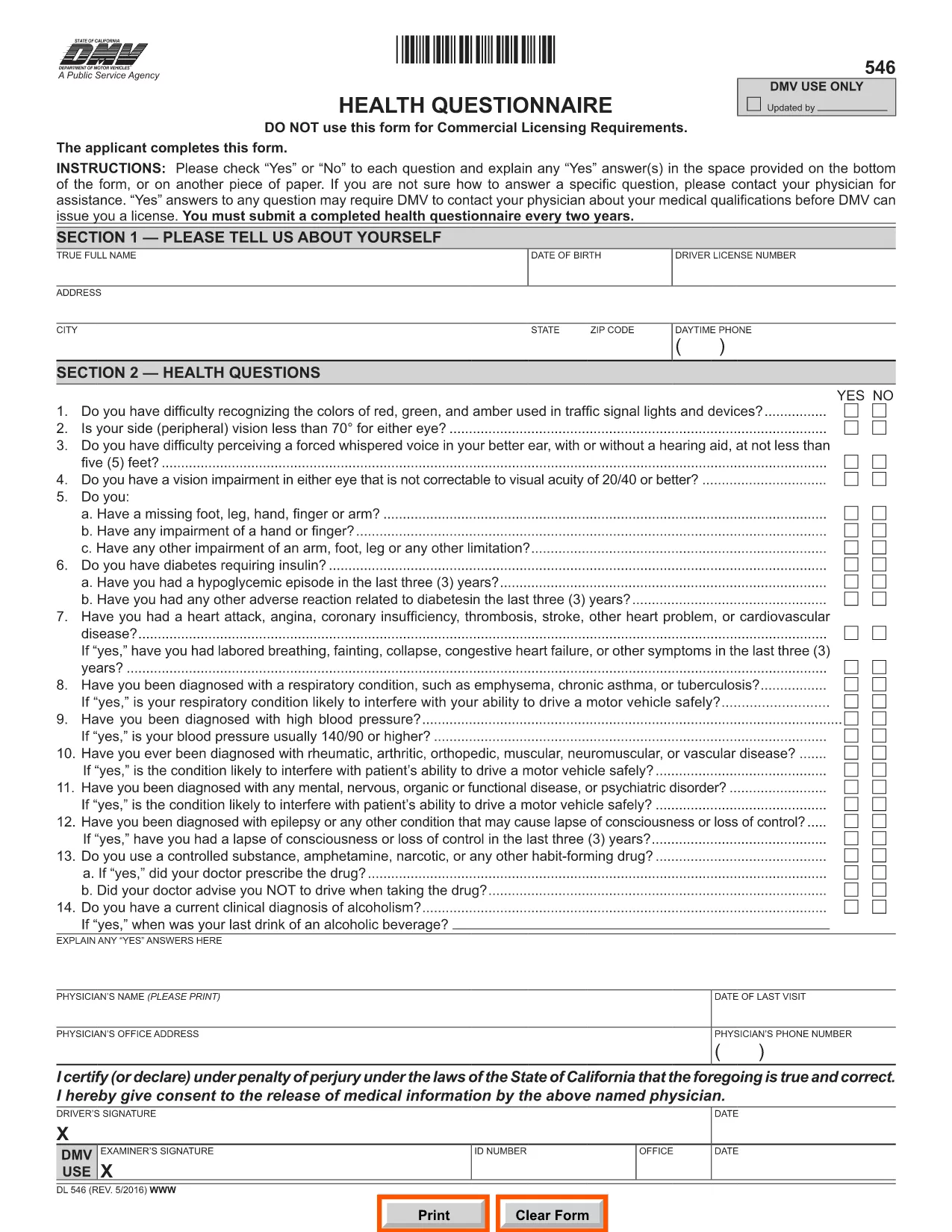
The DL 546 health questionnaire is the California Department of Motor Vehicles (DMV) form that collects medical information from anyone applying for or renewing a driver’s license. The DMV uses this form to ensure that drivers meet safety standards and can operate a vehicle without risking public health.

What Is the DL 546 Form and Who Needs It?

DL 546 is required for:

  • New driver’s license applicants
  • License renewals when the DMV requests a health update
  • Commercial driver’s license (CDL) holders needing a medical review

The questionnaire asks simple “Yes/No” questions about vision, seizures, heart conditions, and other health issues that could affect driving.

How to Complete the DL 546 Online with Formize

Formize makes the fillable PDF DL 546 experience fast and paper‑free. Follow these steps:

  1. Click the "Fill out this form" button on this page.
  2. The Formize PDF Filler app loads in your browser – no download required.
  3. Complete each question by selecting Yes or No and add any explanations in the provided text boxes.
  4. When you’re done, click Save & Sign to add an electronic signature.
  5. Download the completed form or email it directly to the DMV.

Common Mistakes to Avoid When Filling DL 546

  • Leaving a field blank: Every question must be answered, even if the answer is "No."
  • Illegible handwriting: Using the fillable PDF eliminates this risk.
  • Missing signatures or dates: The Formize app prompts you to sign before you can submit.
  • Submitting the wrong version: Ensure you are using the official California DMV PDF (linked below).

Where to Submit the Completed Form

After saving your completed DL 546, you have three submission options:

  • Online: Upload the PDF through the DMV’s MyDMV portal if available.
  • Mail: Print the PDF and send it to the address printed on the form.
  • In‑person: Bring the printed form to any California DMV office.

Choosing the online or fillable PDF route speeds up processing and reduces the chance of lost paperwork.

FAQ
  • What is the purpose of the DL 546 form?

    The DL 546 health questionnaire collects medical information to confirm that a driver meets California safety standards before a license is issued or renewed.

  • Do I need to submit the DL 546 every time I renew my license?

    Only when the DMV specifically requests an updated health questionnaire. Some renewals may not require a new DL 546.

  • Can I fill out DL 546 on a mobile device?

    Yes. Formize’s PDF Filler is fully responsive, so you can complete the form on a smartphone, tablet, or computer.

  • Is an electronic signature accepted by the California DMV?

    The DMV accepts electronic signatures for the DL 546 when the form is submitted online or emailed. Always verify the latest DMV guidelines.

  • What should I do if I answer "Yes" to a health question?

    Provide a clear explanation in the space provided and, if necessary, attach a physician’s statement or medical records as instructed on the form.

  • How long does the DMV keep my DL 546 on file?

    The DMV retains health questionnaires for the period required by California law, typically several years, to verify driver fitness.

  • Can I print the completed DL 546 after filling it online?

    Yes. After saving, you can download and print the PDF for mailing or in‑person submission if you prefer a hard copy.

HVORDAN

Sådan udfylder du DL 546 gratis online i 4 nemme trin:

  1. 1
    Open the Fillable Form
    Click the "Fill out this form" button on this page. The Formize PDF Filler will open directly in your browser.
  2. 2
    Enter Your Information
    Answer each Yes/No question, add any required explanations, and fill in your personal details in the provided fields.
  3. 3
    Add Your Electronic Signature
    When all fields are complete, click the "Sign" button to apply an e‑signature that meets DMV requirements.
  4. 4
    Save or Email the Completed PDF
    Download the finished DL 546 or use the built‑in email option to send it directly to the DMV or your physician.
Formize PDF Filler app
OM

Ansøgningsskemaer til kørekort

I de fleste lande er det obligatorisk at have et kørekort, før du kan køre på vejen. At få et kørekort er en vigtig milepæl for alle, der ønsker at køre bil.

DL 546 er en af ​​kørekortansøgningsformularer, der er dokumenter, der bruges til at indsamle oplysninger fra personer, der ønsker at ansøge om et kørekort. Det indeholder normalt felter for ansøgerens navn, fødselsdato, ID-nummer, kontaktoplysninger samt deres kørekorthistorik og erfaring.

FUNKTIONER

PDF Filler

Den nemmeste måde at udfylde DL 546 online

  • Udfyld hurtigt DL 546
    Leder du efter en måde, hvorpå du hurtigt kan fylde DL 546 online? Med vores online gratis PDF-formularudfylder ved du, hvordan du redigerer og udfylder dette pdf-dokument på mindre end et minut.
  • Let at bruge online PDF-editor
    Træt af at udskrive PDF-filer, så du kan redigere dem, før du scanner igen og sender dem tilbage? Rediger PDF-dokumenter gratis online. Brug vores online pdf-editor for at spare tid og papir.
  • Fantastiske værktøjer, alle platforme
    Er du i tvivl om, hvordan du udfylder DL 546 på en Mac, eller måske hvordan du bruger en PDF-filler gratis? Vores online PDF-værktøjer fungerer på alle platforme.
  • Sikker fillagring
    Fuldførte "DL 546"-filer gemmes i en sikret database, der administreres af Amazon Cloud-hosting. Du kan til enhver tid slette dine filer fra vores system. Under alle omstændigheder slettes disse filer automatisk efter 24 timer.
  • Chat med DL 546
    Chat med "DL 546" på Chatize, som er en gratis PDF-læserassistent. Stil spørgsmål og få svar fra "DL 546". Bare klik på knappen Chat med dokument ovenfor.

Slet udfyldningssession

Vil du slette den valgte påfyldningssession? I dette tilfælde vil dine fremskridt med at udfylde formularen gå tabt.

Slet redigeringssession

Vil du slette den valgte redigeringssession? I dette tilfælde vil dine fremskridt med at oprette og redigere formularen gå tabt.