
Vælg sprog

Form 4319 – Missouri Driver Condition Report

  1. Sprog engelsk
  2. Land USA
  3. Aktivitet Kørekort
  4. Stat Missouri
Form 4319 – Missouri Driver Condition Report

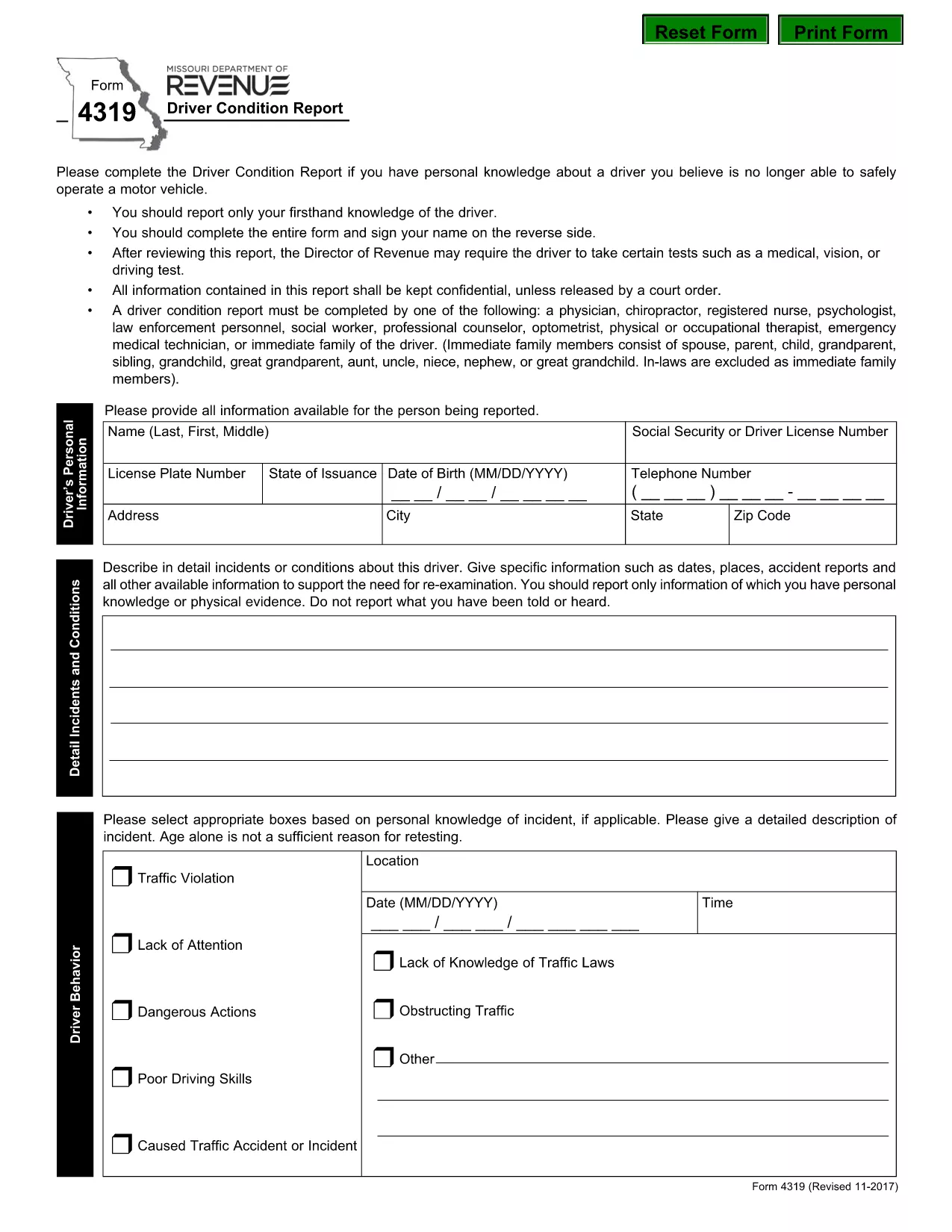
The Missouri Form 4319, also known as the Driver Condition Report, is required when a driver’s medical, vision, or overall condition may affect safe operation of a vehicle. This form is used by the Missouri Department of Revenue to evaluate whether additional testing or restrictions are needed.

What is Form 4319?

Form 4319 collects detailed information about a driver’s health, recent accidents, and any conditions that could impair driving ability. The report is confidential and is only shared with authorized officials or a court order.

How to Fill Out the Driver Condition Report Online

Instead of downloading and editing the PDF manually, simply click the “Fill out this form” button on this page. The Formize PDF Filler app will load in your browser, allowing you to complete the form directly, save your progress, and submit it electronically.

Common Mistakes to Avoid

  • Leaving any required field blank – the filler will highlight missing information before you can submit.
  • Signing on the reverse side of the PDF – use the built‑in signature field in the online filler.
  • Providing outdated medical information – ensure all health details are current.
  • Forgetting to attach supporting documents (e.g., physician’s statement) when required.

Where to Submit the Completed Form

After completing the form, you can:

  • Submit electronically through the Formize platform (recommended).
  • Print and mail the signed form to the Missouri Department of Revenue, Driver Licensing Division.

Keep a copy of the completed PDF for your records.

Download the Fillable PDF

If you prefer to work offline, you can download the official fillable PDF directly from the Missouri Department of Revenue:

Download Form 4319 (PDF)

FAQ
  • What is the purpose of Form 4319?

    Form 4319 is used by the Missouri Department of Revenue to assess a driver’s medical, vision, or other conditions that could affect safe driving.

  • Can I fill out Form 4319 on a mobile device?

    Yes. The Formize PDF Filler works on most smartphones and tablets with a modern browser.

  • Do I need a doctor’s signature on this form?

    If a physician’s statement is required, you must attach a signed statement from your doctor as a separate PDF attachment.

  • How long does it take for the Department of Revenue to process the report?

    Processing times vary, but most reviews are completed within 10‑14 business days after receipt.

  • Is the information on Form 4319 confidential?

    Yes. All information is kept confidential and is only disclosed under a court order or as required by law.

  • What should I do if I make a mistake after submitting?

    Contact the Missouri Department of Revenue’s Driver Licensing Division immediately to request a correction or to submit a revised form.

  • Can I submit the form by email?

    The online Formize submission is the preferred method. If you mail a printed copy, you can also email a scanned version to the department’s designated address.

  • Is there a fee to submit Form 4319?

    No, there is no fee to complete or submit Form 4319.

HVORDAN

Sådan udfylder du form 4319 gratis online i 5 nemme trin:

  1. 1
    Open the Fillable Form
    Click the “Fill out this form” button on the page. The Formize PDF Filler will open in a new tab.
  2. 2
    Enter Your Information
    Complete each field. Required fields are highlighted. Use the drop‑down menus and date pickers for easy entry.
  3. 3
    Add Your Signature
    Click the signature box, type your name, and the filler will create a digital signature.
  4. 4
    Save and Review
    Press the “Save” button to store a copy on your device. Review all entries for accuracy.
  5. 5
    Submit or Download
    Choose “Submit” to send the form directly to the Missouri Department of Revenue, or click “Download” to get a PDF copy for mailing.
Formize PDF Filler app
OM

Ansøgningsskemaer til kørekort

I de fleste lande er det obligatorisk at have et kørekort, før du kan køre på vejen. At få et kørekort er en vigtig milepæl for alle, der ønsker at køre bil.

form 4319 er en af ​​kørekortansøgningsformularer, der er dokumenter, der bruges til at indsamle oplysninger fra personer, der ønsker at ansøge om et kørekort. Det indeholder normalt felter for ansøgerens navn, fødselsdato, ID-nummer, kontaktoplysninger samt deres kørekorthistorik og erfaring.

FUNKTIONER

PDF Filler

Den nemmeste måde at udfylde form 4319 online

  • Udfyld hurtigt form 4319
    Leder du efter en måde, hvorpå du hurtigt kan fylde form 4319 online? Med vores online gratis PDF-formularudfylder ved du, hvordan du redigerer og udfylder dette pdf-dokument på mindre end et minut.
  • Let at bruge online PDF-editor
    Træt af at udskrive PDF-filer, så du kan redigere dem, før du scanner igen og sender dem tilbage? Rediger PDF-dokumenter gratis online. Brug vores online pdf-editor for at spare tid og papir.
  • Fantastiske værktøjer, alle platforme
    Er du i tvivl om, hvordan du udfylder form 4319 på en Mac, eller måske hvordan du bruger en PDF-filler gratis? Vores online PDF-værktøjer fungerer på alle platforme.
  • Sikker fillagring
    Fuldførte "form 4319"-filer gemmes i en sikret database, der administreres af Amazon Cloud-hosting. Du kan til enhver tid slette dine filer fra vores system. Under alle omstændigheder slettes disse filer automatisk efter 24 timer.
  • Chat med form 4319
    Chat med "form 4319" på Chatize, som er en gratis PDF-læserassistent. Stil spørgsmål og få svar fra "form 4319". Bare klik på knappen Chat med dokument ovenfor.

Slet udfyldningssession

Vil du slette den valgte påfyldningssession? I dette tilfælde vil dine fremskridt med at udfylde formularen gå tabt.

Slet redigeringssession

Vil du slette den valgte redigeringssession? I dette tilfælde vil dine fremskridt med at oprette og redigere formularen gå tabt.