
Vælg sprog

Nevada DMV Form 301 – Certification of Attendance (Fillable PDF)

  1. Sprog engelsk
  2. Land USA
  3. Aktivitet Kørekort
  4. Stat Nevada
Nevada DMV Form 301 – Certification of Attendance (Fillable PDF)

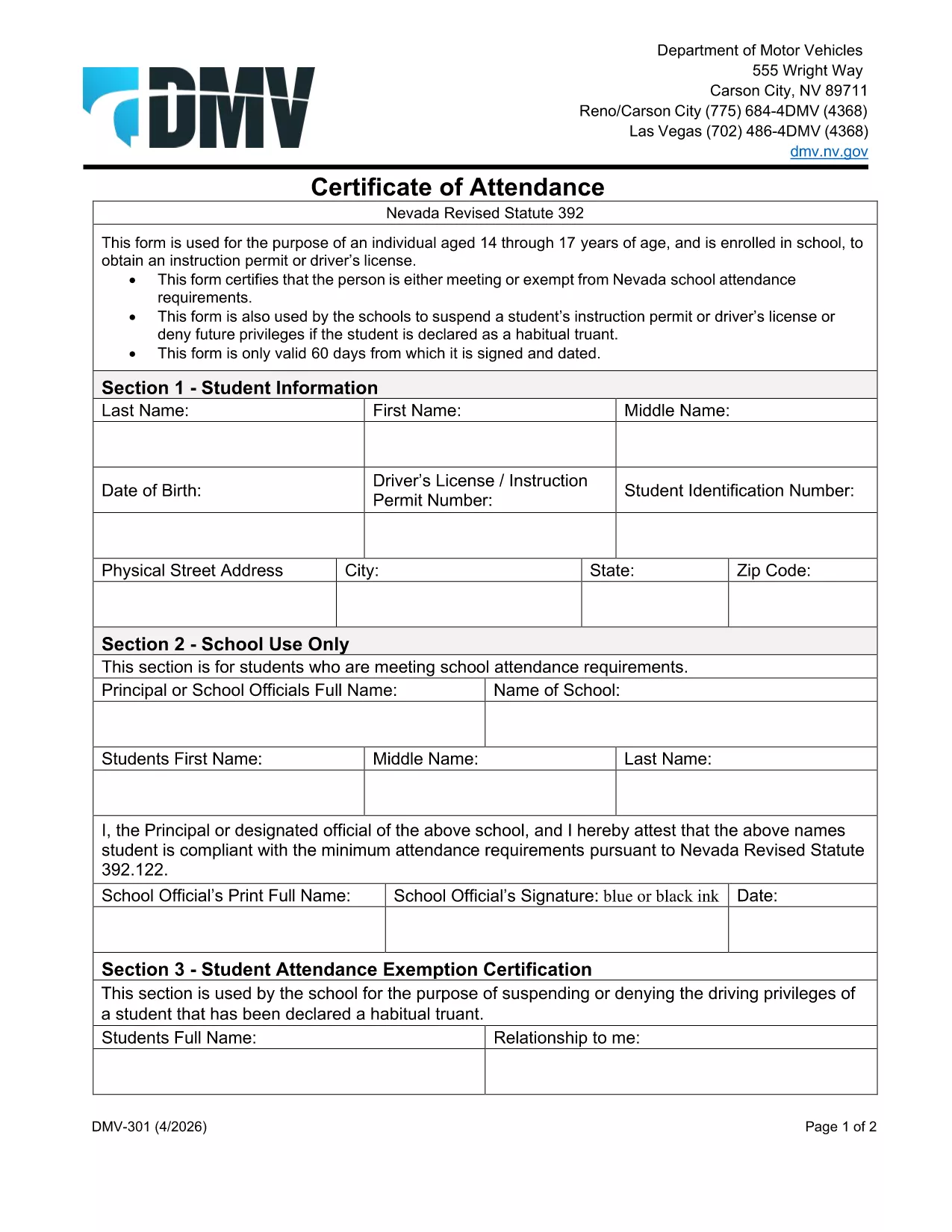
The Nevada Department of Motor Vehicles (DMV) requires Form 301 – Certification of Attendance for teens ages 14‑18 who are enrolled in school and are applying for an instruction permit or driver’s license. This form verifies that the student meets the state’s school attendance requirements or is exempt.

What Is DMV Form 301?

Form 301 is a short, one‑page certificate completed by the student, a parent/guardian, and the school. It is used to:

  • Confirm regular school attendance
  • Document any legal exemption
  • Allow the DMV to issue an instruction permit or driver’s license

How to Complete the Certification of Attendance

Follow the simple steps below. The form is fully fillable online, so you don’t need any PDF editor.

  1. Click the "Fill out this form" button on this page.
  2. Wait a few seconds while the Formize PDF Filler app loads the fillable DMV 301 PDF.
  3. Enter the student’s printed name, date of birth, and school information in the designated fields.
  4. Have the parent/guardian sign the required section electronically.
  5. If you are a school administrator, complete the "School Use Only" part and add the school seal.
  6. When all fields are completed, click Save to download a completed copy, or click Print to bring a hard copy to the DMV.

Common Mistakes to Avoid

To ensure your form is accepted, avoid these frequent errors:

  • Leaving any required field blank – the filler will highlight missing data.
  • Using an illegible signature – the electronic signature must be clear.
  • Submitting an outdated school name or address – verify the information with your school office.
  • Forgetting to date the form – the DMV requires a current date.

Where to Submit the Form

After you’ve filled and signed Form 301, bring the printed copy (or a secured digital version on a tablet) to any Nevada DMV office together with the required identification documents. The form is accepted at all DMV locations across Nevada.

Download the Fillable PDF Instantly

Ready to start? Click the button above, let Formize load the fillable PDF, and complete the Certification of Attendance in minutes.

FAQ
  • Who needs to complete DMV Form 301?

    Any Nevada resident between 14 and 18 years old who is enrolled in school and is applying for an instruction permit or driver’s license must submit a completed Form 301.

  • Can I fill out Form 301 on a mobile device?

    Yes. The Formize PDF Filler works on smartphones, tablets, and computers, allowing you to complete the form on any device.

  • Do I need a physical signature?

    The DMV accepts an electronic signature entered through the fillable PDF. Print the form with the signature if you prefer a hard copy.

  • What if my school does not have a seal?

    If the school lacks an official seal, have the school administrator write the school name and date in the "School Use Only" section and sign it.

  • How long is the Certification of Attendance valid?

    The form is valid for the specific permit or license application it accompanies. If the application is delayed, a new form may be required.

  • Where can I submit the completed Form 301?

    Bring the completed form to any Nevada DMV office, or submit it as part of your online permit application if the DMV offers that option.

  • Is there a fee to download the PDF?

    No. The PDF is provided free of charge; you only pay the standard DMV fees for the permit or license.

HVORDAN

Sådan udfylder du DMV 301 gratis online i 4 nemme trin:

  1. 1
    Open the Fillable Form
    Click the "Fill out this form" button on the page. The Formize PDF Filler app will load the DMV 301 PDF automatically.
  2. 2
    Enter Required Information
    Type the student's name, date of birth, school details, and any exemption notes directly into the highlighted fields.
  3. 3
    Add Signatures
    Use your mouse or touchscreen to sign the parent/guardian section. School officials can add their signature and seal if needed.
  4. 4
    Save or Print
    When all fields are completed, click "Save" to download the completed PDF or "Print" to obtain a hard‑copy for the DMV.
Formize PDF Filler app
OM

Ansøgningsskemaer til kørekort

DMV 301 er en af ​​kørekortformularer, der er dokumenter, der bruges i processen med at opnå eller forny et kørekort, som er et officielt offentligt udstedt dokument, der tillader enkeltpersoner at betjene et motorkøretøj på offentlig vej. Disse former kan variere afhængigt af jurisdiktionen, men de omfatter generelt følgende:

Ansøgningsskema: Denne formular bruges til at ansøge om et kørekort og beder typisk om personlige oplysninger såsom navn, adresse, fødselsdato og CPR-nummer.

Identifikationsdokumentation: Sammen med ansøgningsskemaet skal enkeltpersoner normalt fremlægge specifikke identifikationsdokumenter for at bevise deres identitet, bopæl og juridiske tilstedeværelse i landet. Disse kan omfatte et gyldigt pas, fødselsattest, socialsikringskort eller anden offentligt udstedt identifikation.

Bevis for bopæl: Mange jurisdiktioner kræver, at ansøgere fremlægger bevis for bopæl, såsom en elregning, lejeaftale eller kontoudtog, for at bekræfte deres adresse.

Lægeundersøgelsesformular: Nogle jurisdiktioner kan kræve en lægeundersøgelse for at sikre, at ansøgeren opfylder de nødvendige fysiske og mentale krav til sikker kørsel. En læge udfylder typisk denne formular.

Udførelsesformular til føreruddannelse: For førstegangschauffører kan det være nødvendigt at gennemføre et chaufføruddannelsesprogram. En formular eller et certifikat, der indikerer vellykket gennemførelse, er ofte nødvendigt for at ansøge om et kørekort.

Vision Test Form: En synstest udføres almindeligvis under ansøgningsprocessen for kørekort. En øjenplejer eller autoriseret personale vil vurdere ansøgerens synsstyrke og udfylde den påkrævede formular.

Disse formularer er typisk tilgængelige hos det lokale Department of Motor Vehicles (DMV) eller tilsvarende regeringsorgan med ansvar for kørekort. Det er vigtigt at kontrollere de specifikke krav og formularer, der gælder for din jurisdiktion, da de kan variere.

FUNKTIONER

PDF Filler

Den nemmeste måde at udfylde DMV 301 online

  • Udfyld hurtigt DMV 301
    Leder du efter en måde, hvorpå du hurtigt kan fylde DMV 301 online? Med vores online gratis PDF-formularudfylder ved du, hvordan du redigerer og udfylder dette pdf-dokument på mindre end et minut.
  • Let at bruge online PDF-editor
    Træt af at udskrive PDF-filer, så du kan redigere dem, før du scanner igen og sender dem tilbage? Rediger PDF-dokumenter gratis online. Brug vores online pdf-editor for at spare tid og papir.
  • Fantastiske værktøjer, alle platforme
    Er du i tvivl om, hvordan du udfylder DMV 301 på en Mac, eller måske hvordan du bruger en PDF-filler gratis? Vores online PDF-værktøjer fungerer på alle platforme.
  • Sikker fillagring
    Fuldførte "DMV 301"-filer gemmes i en sikret database, der administreres af Amazon Cloud-hosting. Du kan til enhver tid slette dine filer fra vores system. Under alle omstændigheder slettes disse filer automatisk efter 24 timer.
  • Chat med DMV 301
    Chat med "DMV 301" på Chatize, som er en gratis PDF-læserassistent. Stil spørgsmål og få svar fra "DMV 301". Bare klik på knappen Chat med dokument ovenfor.

Slet udfyldningssession

Vil du slette den valgte påfyldningssession? I dette tilfælde vil dine fremskridt med at udfylde formularen gå tabt.

Slet redigeringssession

Vil du slette den valgte redigeringssession? I dette tilfælde vil dine fremskridt med at oprette og redigere formularen gå tabt.