
Vælg sprog

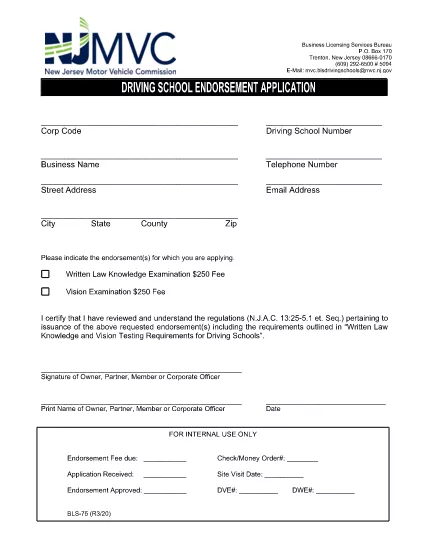
BLS‑75 Driving School Endorsement Application – Fillable PDF

  1. Sprog engelsk
  2. Land USA
  3. Aktivitet Kørekort
  4. Stat New Jersey
BLS‑75 Driving School Endorsement Application – Fillable PDF

What Is the BLS‑75 Form?

The BLS‑75 is the official New Jersey Motor Vehicle Commission (MVC) application used by driving schools to request endorsement approval. It verifies that the school meets all state‑required regulations before issuing a commercial driving‑school endorsement.

Who Must Complete the BLS‑75?

Any individual or organization that operates a driving school in New Jersey and wishes to receive the MVC endorsement must submit a completed BLS‑75. This includes new schools, schools renewing their endorsement, and schools adding new locations.

How to Fill Out the BLS‑75 Online

Instead of downloading the PDF and editing it with a separate editor, simply click the "Fill out this form" button on this page. The Formize PDF Filler app will load directly in your browser, allowing you to:

  • Enter information into each field with auto‑save.
  • Validate signatures and dates instantly.
  • Preview the completed form before submission.

Common Mistakes to Avoid

  • Leaving required fields blank. The filler highlights missing information before you can submit.
  • Using an outdated version of the form. The link on this page always points to the current BLS‑75 PDF.
  • Incorrectly formatting phone numbers or dates. Follow the sample formats shown in each field.

Where to Submit the Completed Form

After you finish, you can either:

  • Download the signed PDF and mail it to the New Jersey MVC, Division of Motor Vehicles, 124 Halsey St., Trenton, NJ 08625.
  • Upload the PDF directly through the MVC online portal (if you have an account).

For any questions about eligibility or submission, contact the New Jersey MVC Business Services Division at (609) 292‑6500.

FAQ
  • Do I need Adobe Acrobat to complete the BLS‑75?

    No. The Formize PDF Filler works in any modern browser, so you can fill out the form without installing additional software.

  • Is the online filler secure?

    Yes. All data is processed locally in your browser and transmitted over HTTPS. Formize does not store your personal information.

  • Can I save my progress and return later?

    Absolutely. Use the "Save Draft" button to download a partially completed PDF, then re‑upload it later to continue editing.

  • What if I make a mistake after submitting?

    Contact the NJ MVC Business Services Division. They will advise whether you need to submit a corrected BLS‑75 or if an amendment can be made.

  • Is there a filing fee for the BLS‑75?

    Yes, the MVC charges a processing fee. Check the latest fee schedule on the NJ MVC website or the form’s instruction page.

  • How long does the endorsement approval take?

    Processing typically takes 10‑15 business days after the MVC receives a complete and accurate BLS‑75.

HVORDAN

Sådan udfylder du BLS-75 gratis online i 4 nemme trin:

  1. 1
    Click the Fill‑out Button
    Press the "Fill out this form" button on the page. The Formize PDF Filler will open in a new browser tab.
  2. 2
    Wait for the Filler to Load
    The app loads the BLS‑75 PDF automatically. All fields become editable, and a progress bar shows the loading status.
  3. 3
    Complete Each Section
    Enter your information, upload required signatures, and double‑check the auto‑validation messages. The filler saves your work every few seconds.
  4. 4
    Save or Submit
    When finished, click "Download" to save a copy for your records or use the built‑in "Submit" button to send the PDF directly to the NJ MVC portal.
Formize PDF Filler app
OM

Ansøgningsskemaer til kørekort

I de fleste lande er det obligatorisk at have et kørekort, før du kan køre på vejen. At få et kørekort er en vigtig milepæl for alle, der ønsker at køre bil.

BLS-75 er en af ​​kørekortansøgningsformularer, der er dokumenter, der bruges til at indsamle oplysninger fra personer, der ønsker at ansøge om et kørekort. Det indeholder normalt felter for ansøgerens navn, fødselsdato, ID-nummer, kontaktoplysninger samt deres kørekorthistorik og erfaring.

FUNKTIONER

PDF Filler

Den nemmeste måde at udfylde BLS-75 online

  • Udfyld hurtigt BLS-75
    Leder du efter en måde, hvorpå du hurtigt kan fylde BLS-75 online? Med vores online gratis PDF-formularudfylder ved du, hvordan du redigerer og udfylder dette pdf-dokument på mindre end et minut.
  • Let at bruge online PDF-editor
    Træt af at udskrive PDF-filer, så du kan redigere dem, før du scanner igen og sender dem tilbage? Rediger PDF-dokumenter gratis online. Brug vores online pdf-editor for at spare tid og papir.
  • Fantastiske værktøjer, alle platforme
    Er du i tvivl om, hvordan du udfylder BLS-75 på en Mac, eller måske hvordan du bruger en PDF-filler gratis? Vores online PDF-værktøjer fungerer på alle platforme.
  • Sikker fillagring
    Fuldførte "BLS-75"-filer gemmes i en sikret database, der administreres af Amazon Cloud-hosting. Du kan til enhver tid slette dine filer fra vores system. Under alle omstændigheder slettes disse filer automatisk efter 24 timer.
  • Chat med BLS-75
    Chat med "BLS-75" på Chatize, som er en gratis PDF-læserassistent. Stil spørgsmål og få svar fra "BLS-75". Bare klik på knappen Chat med dokument ovenfor.

Slet udfyldningssession

Vil du slette den valgte påfyldningssession? I dette tilfælde vil dine fremskridt med at udfylde formularen gå tabt.

Slet redigeringssession

Vil du slette den valgte redigeringssession? I dette tilfælde vil dine fremskridt med at oprette og redigere formularen gå tabt.