
Vælg sprog

SBTS-601 Personal History Form – Fillable PDF for NC Driver Training Schools

  1. Sprog engelsk
  2. Land USA
  3. Aktivitet Kørekort
  4. Stat North Carolina
SBTS-601 Personal History Form – Fillable PDF for NC Driver Training Schools

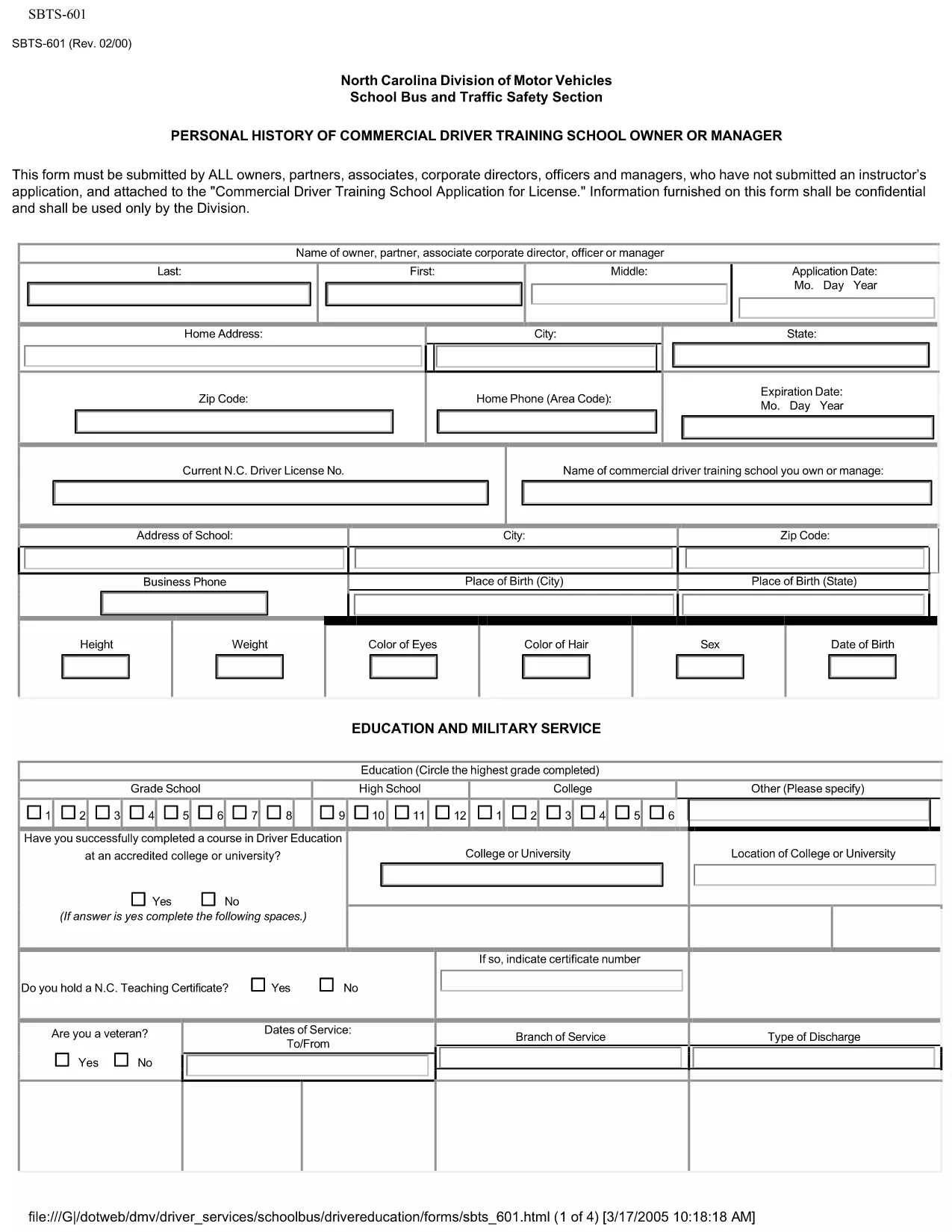
The SBTS‑601 Personal History form is required by the North Carolina Department of Transportation (NCDOT) for every owner, partner, corporate director, officer, or manager of a Commercial Driver Training School who has not previously submitted an instructor’s application. This confidential questionnaire helps the State evaluate the background of school leadership before issuing a training school license.

Our fillable PDF version lets you complete the form quickly, securely, and without printing. Simply click the "Fill out this form" button below and the Formize PDF Filler app will load the document ready for you to enter data.

What Is SBTS-601?

SBTS‑601 collects personal history details such as employment background, criminal record, driving violations, and financial information. The data is used solely for licensing decisions and is kept confidential by the NCDOT.

Who Must Complete This Form

  • Owners, partners, or shareholders of a commercial driver training school
  • Corporate officers, directors, and managers involved in school operations
  • Anyone who has not already submitted an instructor application (SBTS‑602)

How to Fill Out SBTS-601 Online

Follow the simple steps in the "How‑To" section below. The online filler saves your progress, validates required fields, and lets you download a completed PDF ready for submission.

Common Mistakes to Avoid

  • Leaving required fields blank – the filler will highlight missing information.
  • Providing outdated addresses or phone numbers – ensure all contact details are current.
  • Omitting prior convictions or driving violations – full disclosure is mandatory.
  • Submitting the form without the required supporting documents (e.g., driver’s license copy, background check).

Where to Submit the Completed Form

After you download the completed SBTS‑601 PDF, mail or hand‑deliver it to the NCDOT – School Bus and Traffic Safety Department at the address listed on the form. Include any required attachments and the applicable filing fee.

Need help? Review the FAQs below or contact the NCDOT Driver Services Division.

FAQ
  • Who is required to submit SBTS‑601?

    All owners, partners, corporate officers, directors, and managers of a commercial driver training school who have not already filed an instructor application must submit SBTS‑601.

  • Can I submit SBTS‑601 electronically?

    The NCDOT currently accepts only printed and signed PDFs. Use the fillable version to complete the form, then print and mail it.

  • What supporting documents are needed?

    Attach a copy of your driver’s license, a recent criminal background check, and any relevant financial statements as listed on the form.

  • How long does the approval process take?

    After the completed SBTS‑601 is received, the NCDOT typically reviews the application within 15‑20 business days, provided all required information is included.

  • Is the information on SBTS‑601 kept confidential?

    Yes. All data submitted on SBTS‑601 is confidential and used solely for licensing decisions by the NCDOT.

  • What if I make a mistake after submitting?

    Contact the NCDOT School Bus and Traffic Safety Department immediately. They may allow you to submit an amended form or additional documentation.

  • Is there a filing fee for SBTS‑601?

    A processing fee is required when you submit the complete application package. Refer to the form’s instructions for the current amount.

HVORDAN

Sådan udfylder du SBTS-601 gratis online i 4 nemme trin:

  1. 1
    Open the Fillable Form
    Click the "Fill out this form" button on the page. The Formize PDF Filler app will open the SBTS‑601 document directly in your browser.
  2. 2
    Enter Your Information
    Complete each section. Required fields are highlighted in red and will prevent you from saving until they are filled.
  3. 3
    Review & Validate
    Use the "Validate" button to check for missing or incorrectly formatted data. Correct any issues shown.
  4. 4
    Download the Completed PDF
    When all fields are complete, click "Download" to save the filled PDF. Print and submit it to the NCDOT as instructed on the form.
Formize PDF Filler app
OM

Ansøgningsskemaer til kørekort

I de fleste lande er det obligatorisk at have et kørekort, før du kan køre på vejen. At få et kørekort er en vigtig milepæl for alle, der ønsker at køre bil.

SBTS-601 er en af ​​kørekortansøgningsformularer, der er dokumenter, der bruges til at indsamle oplysninger fra personer, der ønsker at ansøge om et kørekort. Det indeholder normalt felter for ansøgerens navn, fødselsdato, ID-nummer, kontaktoplysninger samt deres kørekorthistorik og erfaring.

FUNKTIONER

PDF Filler

Den nemmeste måde at udfylde SBTS-601 online

  • Udfyld hurtigt SBTS-601
    Leder du efter en måde, hvorpå du hurtigt kan fylde SBTS-601 online? Med vores online gratis PDF-formularudfylder ved du, hvordan du redigerer og udfylder dette pdf-dokument på mindre end et minut.
  • Let at bruge online PDF-editor
    Træt af at udskrive PDF-filer, så du kan redigere dem, før du scanner igen og sender dem tilbage? Rediger PDF-dokumenter gratis online. Brug vores online pdf-editor for at spare tid og papir.
  • Fantastiske værktøjer, alle platforme
    Er du i tvivl om, hvordan du udfylder SBTS-601 på en Mac, eller måske hvordan du bruger en PDF-filler gratis? Vores online PDF-værktøjer fungerer på alle platforme.
  • Sikker fillagring
    Fuldførte "SBTS-601"-filer gemmes i en sikret database, der administreres af Amazon Cloud-hosting. Du kan til enhver tid slette dine filer fra vores system. Under alle omstændigheder slettes disse filer automatisk efter 24 timer.
  • Chat med SBTS-601
    Chat med "SBTS-601" på Chatize, som er en gratis PDF-læserassistent. Stil spørgsmål og få svar fra "SBTS-601". Bare klik på knappen Chat med dokument ovenfor.

Slet udfyldningssession

Vil du slette den valgte påfyldningssession? I dette tilfælde vil dine fremskridt med at udfylde formularen gå tabt.

Slet redigeringssession

Vil du slette den valgte redigeringssession? I dette tilfælde vil dine fremskridt med at oprette og redigere formularen gå tabt.