
Vælg sprog

SFN 61560 – North Dakota CDL Third‑Party Tester Form (Fillable PDF)

  1. Sprog engelsk
  2. Land USA
  3. Aktivitet Kørekort
  4. Stat North Dakota
SFN 61560 – North Dakota CDL Third‑Party Tester Form (Fillable PDF)

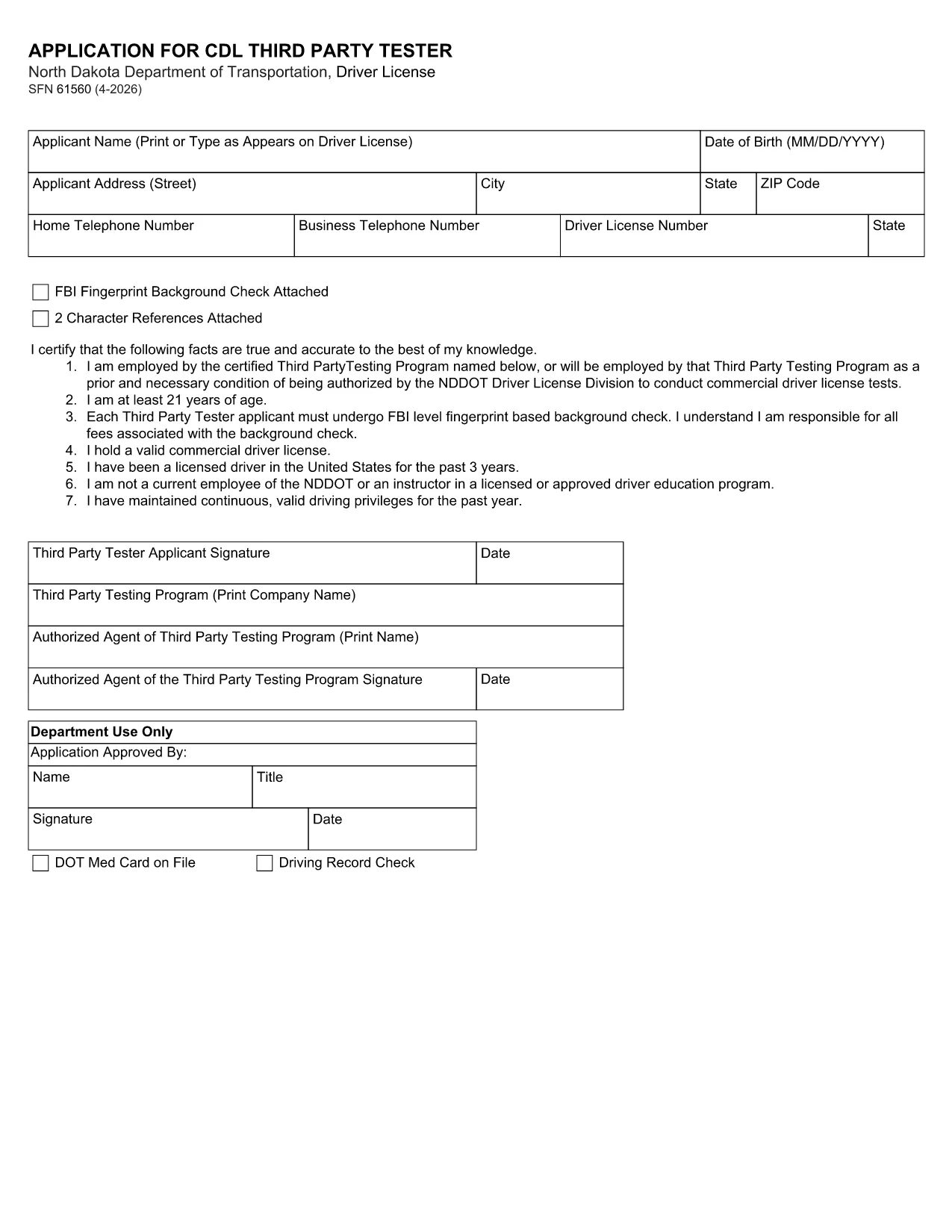
The SFN 61560 is the North Dakota Department of Transportation (ND DOT) application used by third‑party testers to request a Commercial Driver’s License (CDL) testing authorization. This form is now available as a fully fillable PDF, so you can complete it from any device without printing.

What Is the SFN 61560 Form?

SFN 61560 is the official ND DOT application for CDL third‑party testers. It collects personal information, licensing history, and the required FBI fingerprint background check. The completed form is submitted to the ND DOT to verify eligibility before you can administer CDL skills tests.

Who Needs to Complete SFN 61560?

  • Independent CDL testing companies
  • Driving schools that provide third‑party testing services
  • Any individual or organization seeking ND approval to conduct CDL skills examinations

How to Fill Out the Form Online

Instead of downloading, printing, and scanning, simply click the "Fill out this form" button on this page. The Formize PDF Filler will load in seconds, letting you type directly into each field.

Common Mistakes to Avoid

  • Leaving the FBI fingerprint section blank – a background check is mandatory.
  • Using an expired driver’s license number.
  • Forgetting to attach the two required character references.
  • Submitting the form without a notarized signature where required.

Download & Fill the Form Instantly

When you’re ready, click the button below to open the fillable PDF in Formize. After completing all fields, review the data, then either print for mail‑in submission or save a PDF copy for electronic upload if your local ND DOT office accepts it.

FAQ
  • What is the purpose of the SFN 61560 form?

    It authorizes a third‑party tester to administer CDL skills tests in North Dakota after a background check and verification of qualifications.

  • Is the PDF fillable online?

    Yes. Using Formize’s PDF Filler you can type directly into the PDF fields without printing.

  • Do I need to submit a hard copy?

    Most ND DOT offices require a printed, signed form. Save the completed PDF and print it for mailing unless you receive electronic submission instructions.

  • What supporting documents are required?

    A recent FBI fingerprint background check, two character references, and a notarized signature (if required).

  • How long does the approval process take?

    After the ND DOT receives a complete form, processing typically takes 10‑14 business days.

  • Can I edit the form after I’ve saved it?

    Yes. Open the saved PDF again in Formize or any PDF editor to make changes before final submission.

  • Is there a filing fee?

    There is no fee for the SFN 61560 application itself, but any required background‑check fees are paid to the FBI.

  • Where do I send the completed form?

    Mail it to the North Dakota Department of Transportation, Driver Licensing Division, 600 East Boulevard Ave, Bismarck, ND 58501.

  • What if I make a mistake on the form?

    Correct the error in the PDF, re‑save, and submit a clean copy. If you’ve already mailed it, contact the ND DOT licensing office for guidance.

  • Can I get help filling out SFN 61560?

    Contact the ND DOT Driver Licensing Division at (701) 328‑2725 for questions about required information.

HVORDAN

Sådan udfylder du SFN 61560 gratis online i 5 nemme trin:

  1. 1
    Step 1 – Click “Fill out this form”
    Press the button on this page to launch the Formize PDF Filler. No software download is required.
  2. 2
    Step 2 – Wait for the filler to load
    The fillable PDF loads in your browser within a few seconds. All fields become editable.
  3. 3
    Step 3 – Complete each field
    Enter your personal data, licensing details, and attach the required fingerprint and character reference documents.
  4. 4
    Step 4 – Review and save
    Double‑check every entry, then click “Save” to download a completed PDF or “Print” to send a hard copy to ND DOT.
  5. 5
    Step 5 – Submit
    Mail the printed form to the address on the ND DOT website, or upload the saved PDF if electronic submission is accepted.
Formize PDF Filler app
OM

Ansøgningsskemaer til kørekort

I de fleste lande er det obligatorisk at have et kørekort, før du kan køre på vejen. At få et kørekort er en vigtig milepæl for alle, der ønsker at køre bil.

SFN 61560 er en af ​​kørekortansøgningsformularer, der er dokumenter, der bruges til at indsamle oplysninger fra personer, der ønsker at ansøge om et kørekort. Det indeholder normalt felter for ansøgerens navn, fødselsdato, ID-nummer, kontaktoplysninger samt deres kørekorthistorik og erfaring.

FUNKTIONER

PDF Filler

Den nemmeste måde at udfylde SFN 61560 online

  • Udfyld hurtigt SFN 61560
    Leder du efter en måde, hvorpå du hurtigt kan fylde SFN 61560 online? Med vores online gratis PDF-formularudfylder ved du, hvordan du redigerer og udfylder dette pdf-dokument på mindre end et minut.
  • Let at bruge online PDF-editor
    Træt af at udskrive PDF-filer, så du kan redigere dem, før du scanner igen og sender dem tilbage? Rediger PDF-dokumenter gratis online. Brug vores online pdf-editor for at spare tid og papir.
  • Fantastiske værktøjer, alle platforme
    Er du i tvivl om, hvordan du udfylder SFN 61560 på en Mac, eller måske hvordan du bruger en PDF-filler gratis? Vores online PDF-værktøjer fungerer på alle platforme.
  • Sikker fillagring
    Fuldførte "SFN 61560"-filer gemmes i en sikret database, der administreres af Amazon Cloud-hosting. Du kan til enhver tid slette dine filer fra vores system. Under alle omstændigheder slettes disse filer automatisk efter 24 timer.
  • Chat med SFN 61560
    Chat med "SFN 61560" på Chatize, som er en gratis PDF-læserassistent. Stil spørgsmål og få svar fra "SFN 61560". Bare klik på knappen Chat med dokument ovenfor.

Slet udfyldningssession

Vil du slette den valgte påfyldningssession? I dette tilfælde vil dine fremskridt med at udfylde formularen gå tabt.

Slet redigeringssession

Vil du slette den valgte redigeringssession? I dette tilfælde vil dine fremskridt med at oprette og redigere formularen gå tabt.