
Vælg sprog

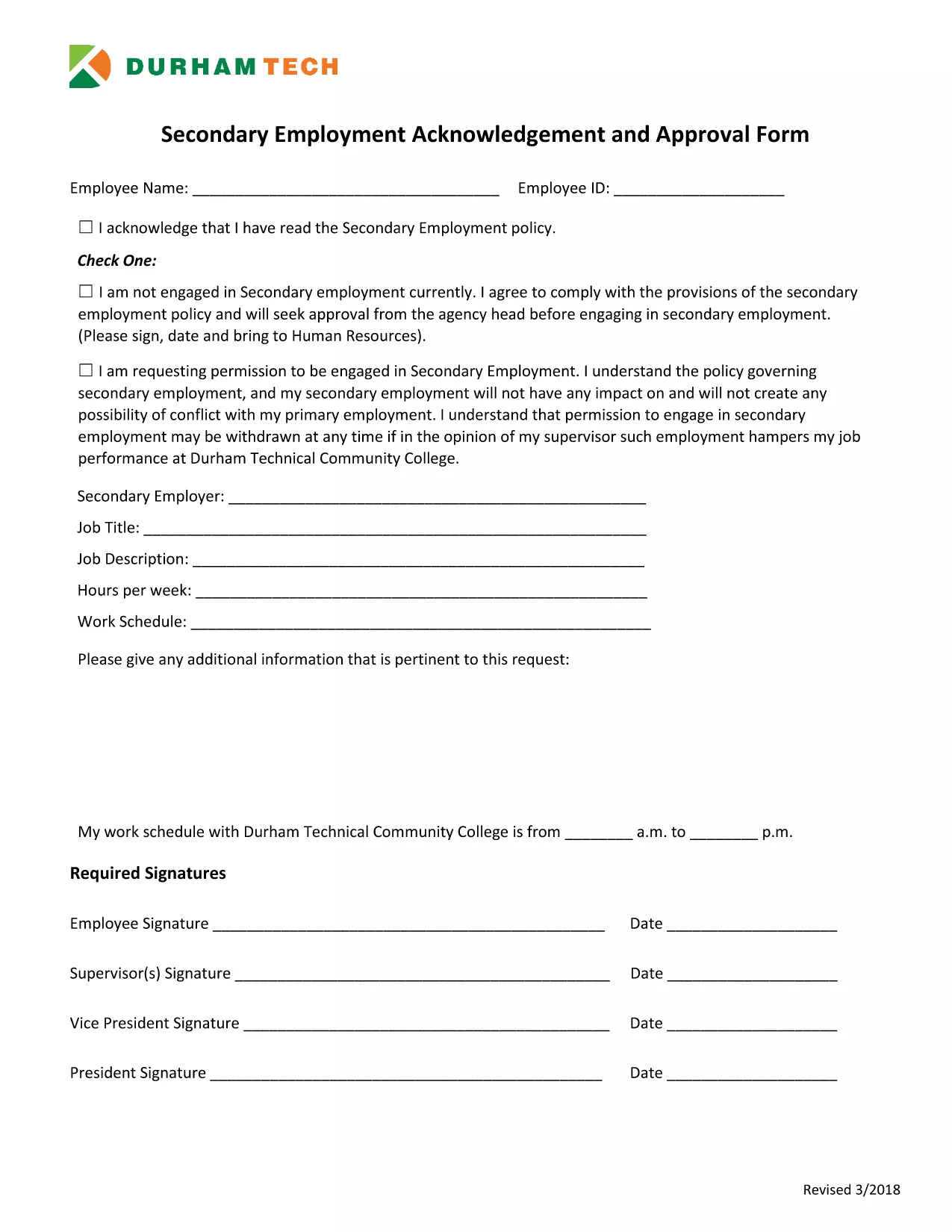
Secondary Employment Declaration – Resident Fillable PDF

  1. Sprog engelsk
  2. Land USA
  3. Aktivitet Employment Compliance
  4. Afdeling Human Resources
Secondary Employment Declaration – Resident Fillable PDF

Employers often require a Secondary Employment Declaration to ensure that any outside work does not create a conflict of interest or violate company policy. This fillable PDF is designed for residents who hold a primary position and want to disclose any additional employment.

Why You Need a Secondary Employment Declaration

  • Maintains transparency with your employer.
  • Protects you from potential policy violations.
  • Helps HR track outside income for tax and compliance purposes.

How to Complete the Form Online

Using Formize’s built‑in PDF filler, you can complete the declaration without downloading a separate editor. Just click the button below, fill each field, and save.

Common Mistakes to Avoid

  • Leaving required fields blank – the form will not submit.
  • Providing vague job descriptions – be specific about duties and hours.
  • Submitting an outdated version – always use the latest PDF (linked below).

Submission Guidelines & What Happens Next

After saving the completed PDF, email it to your HR department or upload it through your internal portal. Keep a copy for your records. HR will review the declaration and confirm whether the secondary job is permissible.

Download the Secondary Employment Request Form (PDF)

FAQ
  • Do I need to sign the secondary employment declaration electronically?

    Yes. The Formize filler includes a digital signature field. Just type your name in the signature box and it will be accepted as an electronic signature.

  • Can I edit the form after I download it?

    You can reopen the saved PDF in the Formize filler to make changes, but it’s best to complete all fields before the first download.

  • What if my secondary job changes after I submit the form?

    Submit an updated declaration using the same fillable PDF. Notify HR as soon as any details (hours, compensation, duties) change.

  • Is the secondary employment declaration required for part‑time work?

    Yes. Any paid activity outside your primary employment, including part‑time or freelance work, must be disclosed.

  • Will my personal information be shared with anyone outside my company?

    No. The form is stored securely on Formize’s encrypted servers and only shared with your HR department when you submit it.

  • What happens if I don’t submit the declaration?

    Failure to disclose secondary employment can result in disciplinary action, including possible termination, because it may violate company policy.

HVORDAN

Sådan udfylder du secondary employment declaration gratis online i 5 nemme trin:

  1. 1
    Open the Fillable Form
    Click the "Fill out this form" button on the page. The Formize PDF Filler app will load instantly in your browser.
  2. 2
    Review Each Section
    Read the instructions at the top of each page and make sure you understand what information is required.
  3. 3
    Enter Your Information
    Type directly into the PDF fields – name, employee ID, details of the secondary job, hours, and compensation.
  4. 4
    Save and Download
    When all fields are completed, click "Save". The filled PDF will be downloaded to your computer.
  5. 5
    Submit to HR
    Email the saved PDF to your HR contact or upload it to the company portal as instructed.
Formize PDF Filler app
OM

secondary employment declaration skabelon

Med det traditionelle sæt funktioner til at se og udfylde et PDF-dokument, kombineret med fordelene ved en webapplikation og responsivt layout, kan du fuldføre secondary employment declaration på få minutter.

FUNKTIONER

PDF Filler

Den nemmeste måde at udfylde secondary employment declaration online

  • Udfyld hurtigt secondary employment declaration
    Leder du efter en måde, hvorpå du hurtigt kan fylde secondary employment declaration online? Med vores online gratis PDF-formularudfylder ved du, hvordan du redigerer og udfylder dette pdf-dokument på mindre end et minut.
  • Let at bruge online PDF-editor
    Træt af at udskrive PDF-filer, så du kan redigere dem, før du scanner igen og sender dem tilbage? Rediger PDF-dokumenter gratis online. Brug vores online pdf-editor for at spare tid og papir.
  • Fantastiske værktøjer, alle platforme
    Er du i tvivl om, hvordan du udfylder secondary employment declaration på en Mac, eller måske hvordan du bruger en PDF-filler gratis? Vores online PDF-værktøjer fungerer på alle platforme.
  • Sikker fillagring
    Fuldførte "secondary employment declaration"-filer gemmes i en sikret database, der administreres af Amazon Cloud-hosting. Du kan til enhver tid slette dine filer fra vores system. Under alle omstændigheder slettes disse filer automatisk efter 24 timer.
  • Chat med secondary employment declaration
    Chat med "secondary employment declaration" på Chatize, som er en gratis PDF-læserassistent. Stil spørgsmål og få svar fra "secondary employment declaration". Bare klik på knappen Chat med dokument ovenfor.

Slet udfyldningssession

Vil du slette den valgte påfyldningssession? I dette tilfælde vil dine fremskridt med at udfylde formularen gå tabt.

Slet redigeringssession

Vil du slette den valgte redigeringssession? I dette tilfælde vil dine fremskridt med at oprette og redigere formularen gå tabt.