
Vælg sprog

Fillable IRS Form 1040 Schedule B – Interest & Dividend Income

  1. Land USA
  2. Sprog engelsk
  3. Aktivitet Skatter
  4. Afdeling IRS
Fillable IRS Form 1040 Schedule B – Interest & Dividend Income

Fillable IRS Form 1040 Schedule B – Interest & Dividend Income

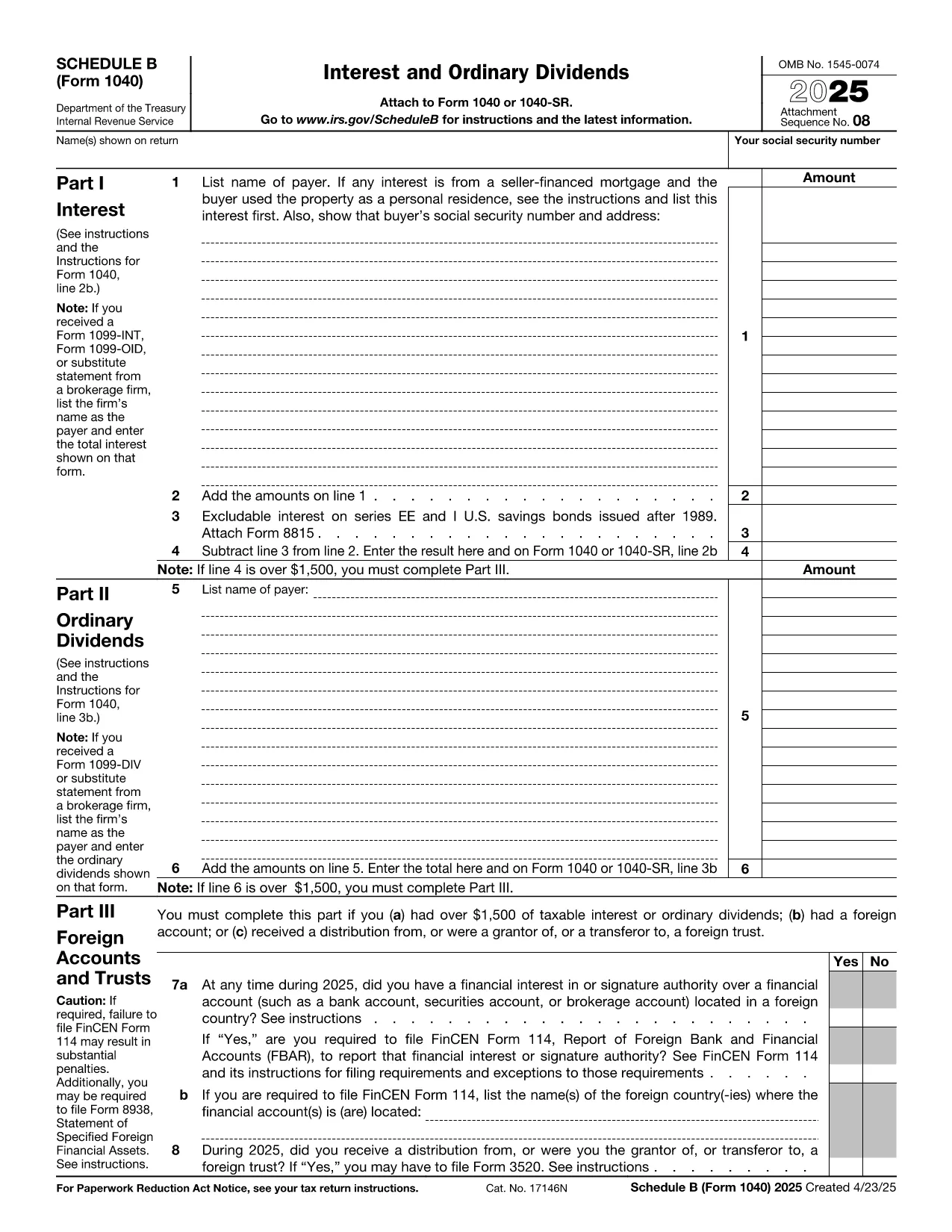
Schedule B (Form 1040) is the IRS worksheet used to report taxable interest and ordinary dividends. Whether you received a single 1099‑INT or dozens of dividend statements, the fillable PDF on this page lets you enter the data directly in your browser—no extra software required.

What Is Schedule B and Who Needs It?

Schedule B is attached to the individual income tax return (Form 1040) when you have:

  • More than $1,500 of taxable interest or dividends, or
  • Foreign accounts, trusts, or other financial assets that require reporting.

Even if you are below the $1,500 threshold, you may still need to file Schedule B if the IRS specifically asks for it.

Key Sections of the Fillable PDF

The online form mirrors the official IRS layout:

  1. Part I – Interest Income: List each payer, amount, and any tax‑exempt interest.
  2. Part II – Ordinary Dividends: Record dividend payer, amount, and qualified dividend status.
  3. Part III – Foreign Accounts and Trusts: Answer yes/no questions and provide account details if required.

All fields are editable, with automatic totals that match the paper form.

How to Complete Schedule B with Formize

Instead of downloading the PDF and opening a separate editor, simply click the Fill out this form button below. The Formize PDF Filler app loads in seconds, letting you:

  • Enter data directly on the page.
  • Save your progress and return later.
  • Export a completed PDF ready for e‑filing or printing.

Common Mistakes to Avoid

  • Leaving Part III blank when you have foreign accounts – the IRS may issue a notice.
  • Mismatching totals between Part I/II and the summary line on Form 1040.
  • Using the wrong tax year PDF – always select the current year’s Schedule B.

Where to Submit Your Completed Form

After saving the filled PDF, attach it to your electronic Form 1040 submission through approved tax‑software, or print and mail it with your paper return to the IRS address listed in the Form 1040 instructions.

Need more guidance? Review the official IRS instructions linked at the bottom of the page.

FAQ
  • Do I need Schedule B if I earned only $500 in interest?

    No, Schedule B is required only when interest or dividend income exceeds $1,500, unless the IRS specifically asks you to file it.

  • Can I file Schedule B electronically?

    Yes. After completing the fillable PDF, export it and attach it to your e‑filed Form 1040 using any IRS‑approved tax software.

  • What if I have foreign bank accounts?

    Answer “Yes” to the foreign account question in Part III and provide the required details. You may also need to file FinCEN Form 114 (FBAR).

  • Is the fillable PDF the same as the paper version?

    The fillable PDF mirrors the exact layout of the official IRS Schedule B, ensuring the totals match the paper form.

  • Can I edit the PDF after I’ve exported it?

    Once exported, the PDF is a static document. If you need changes, return to the Formize filler, modify the fields, and export again.

  • Do I need a PDF reader to use the Formize filler?

    No. The Formize PDF Filler works entirely in your web browser, so no additional software is required.

  • Where can I find the official IRS instructions for Schedule B?

    The IRS publishes a detailed instruction booklet for Form 1040, including Schedule B, on its website. A link is provided below the fillable form.

HVORDAN

Sådan udfylder du Form 1040 Schedule B gratis online i 4 nemme trin:

  1. 1
    Click the Fill‑out Button
    Press the “Fill out this form” button on the page. The Formize PDF Filler app will open in a new tab.
  2. 2
    Enter Your Data
    Type directly into each editable field (interest payer, dividend amounts, foreign account details). Totals calculate automatically.
  3. 3
    Save or Export
    When finished, click “Save” to store a copy in your browser or “Export PDF” to download the completed Schedule B for filing.
  4. 4
    Attach to Your Return
    Upload the exported PDF to your tax‑software or print it and mail it with your Form 1040.
Formize PDF Filler app
OM

Skatteskemaer

Form 1040 Schedule B er en af ​​skatteformularer, der er dokumenter, der bruges til at indberette oplysninger om en persons eller virksomheds indkomst, fradrag og skattepligt til den relevante skattemyndighed. Disse formularer er nødvendige for at overholde skattelovgivningen og opfylde skatteforpligtelser. Skatteformularer varierer afhængigt af landet og de specifikke skattekrav, der er på plads. Her er nogle almindelige typer af skatteformularer:

Individuelle skatteformularer: Disse formularer bruges af individuelle skatteydere til at rapportere deres personlige indkomst og kræve fradrag, kreditter og fritagelser. Eksempler omfatter 1040-formularen i USA eller selvangivelsesformularen i Det Forenede Kongerige.

Virksomhedsskatteformularer: Virksomhedsskatteformularer bruges af virksomheder, partnerskaber eller selvstændige personer til at indberette deres forretningsindtægter, -udgifter og andre skatterelaterede oplysninger. Eksempler inkluderer Schedule C-formularen (Profit or Loss from Business) i USA eller CT600-formularen (Company Tax Return) i Det Forenede Kongerige.

Lønskatteformularer: Disse formularer bruges af arbejdsgivere til at indberette lønninger, lønninger og skatter, der er tilbageholdt fra deres ansattes lønsedler. Eksempler omfatter W-2-formularen i USA eller P60-formularen i Storbritannien.

Omsætningsafgiftsformularer: Omsætningsafgiftsformularer bruges af virksomheder til at indberette og betale moms opkrævet på afgiftspligtige varer eller tjenester. De specifikke momsformularer varierer efter jurisdiktion.

Formularer for merværdiafgift (moms): Momsformularer bruges i lande, der pålægger en merværdiafgift, til at indberette og betale moms opkrævet på salg og kræve momsfradrag for køb. Eksempler omfatter momsangivelsesformularer, der bruges i mange lande.

Estimerede skatteformularer: Estimerede skatteformularer bruges til at indberette og betale estimerede skat på indkomst, der ikke er omfattet af tilbageholdelse, såsom selvstændig erhvervsindkomst eller investeringsindkomst.

Dette er blot nogle få eksempler på de talrige skatteformer, der kan eksistere. De specifikke formularer, der kræves, afhænger af skattelove og -regler i dit land eller jurisdiktion. Det er vigtigt at læse skattemyndighedens vejledning eller søge professionel rådgivning for at afgøre, hvilke formularer der er relevante for din situation.

FUNKTIONER

PDF Filler

Den nemmeste måde at udfylde Form 1040 Schedule B online

  • Udfyld hurtigt Form 1040 Schedule B
    Leder du efter en måde, hvorpå du hurtigt kan fylde Form 1040 Schedule B online? Med vores online gratis PDF-formularudfylder ved du, hvordan du redigerer og udfylder dette pdf-dokument på mindre end et minut.
  • Let at bruge online PDF-editor
    Træt af at udskrive PDF-filer, så du kan redigere dem, før du scanner igen og sender dem tilbage? Rediger PDF-dokumenter gratis online. Brug vores online pdf-editor for at spare tid og papir.
  • Fantastiske værktøjer, alle platforme
    Er du i tvivl om, hvordan du udfylder Form 1040 Schedule B på en Mac, eller måske hvordan du bruger en PDF-filler gratis? Vores online PDF-værktøjer fungerer på alle platforme.
  • Sikker fillagring
    Fuldførte "Form 1040 Schedule B"-filer gemmes i en sikret database, der administreres af Amazon Cloud-hosting. Du kan til enhver tid slette dine filer fra vores system. Under alle omstændigheder slettes disse filer automatisk efter 24 timer.
  • Chat med Form 1040 Schedule B
    Chat med "Form 1040 Schedule B" på Chatize, som er en gratis PDF-læserassistent. Stil spørgsmål og få svar fra "Form 1040 Schedule B". Bare klik på knappen Chat med dokument ovenfor.

Slet udfyldningssession

Vil du slette den valgte påfyldningssession? I dette tilfælde vil dine fremskridt med at udfylde formularen gå tabt.

Slet redigeringssession

Vil du slette den valgte redigeringssession? I dette tilfælde vil dine fremskridt med at oprette og redigere formularen gå tabt.