
Vælg sprog

IRS Form 637 – Excise Tax Registration (Fillable PDF)

  1. Land USA
  2. Sprog engelsk
  3. Aktivitet Skatter
  4. Afdeling IRS
IRS Form 637 – Excise Tax Registration (Fillable PDF)

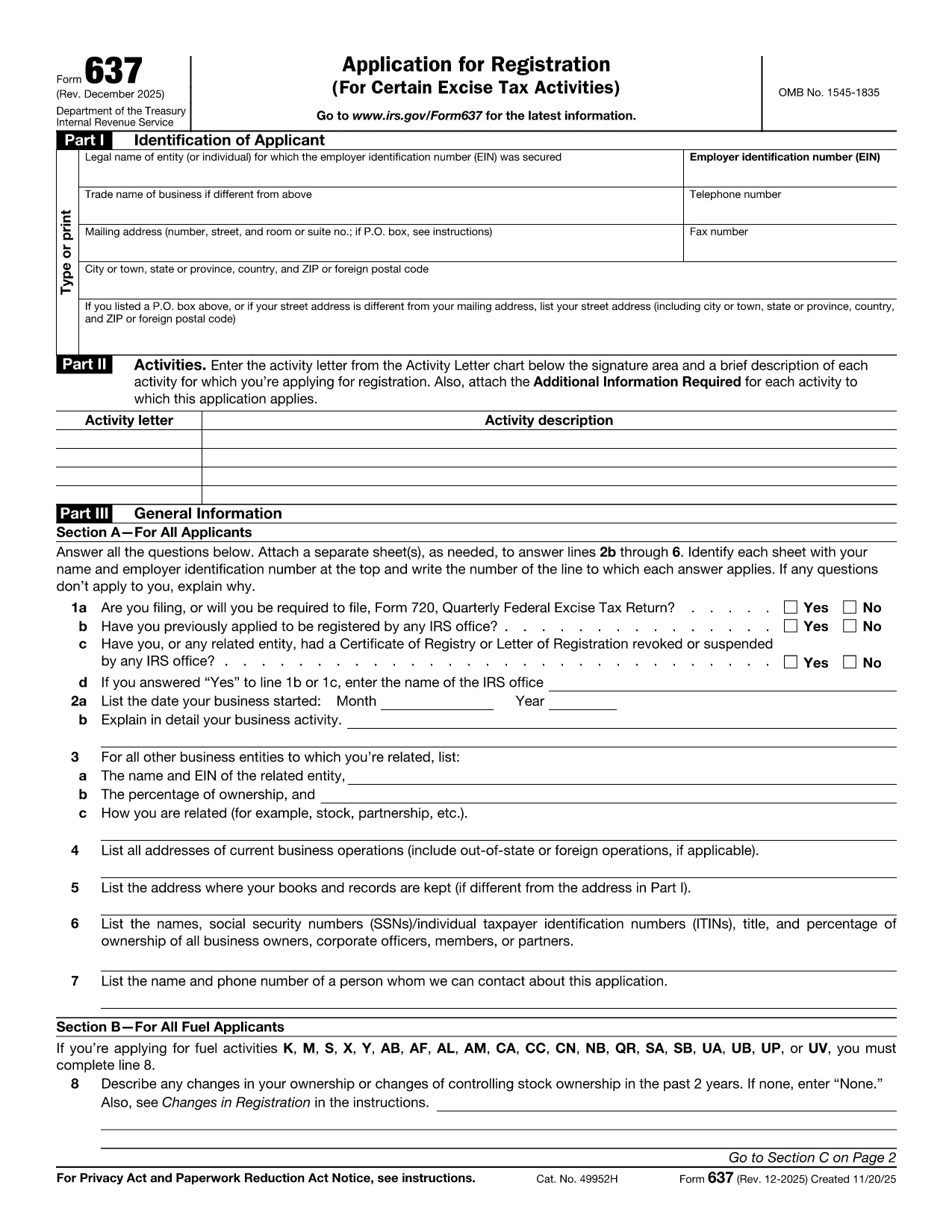
Looking for a fast, secure way to complete Form DSMV 637 (also known as IRS Form 637)? You’ve come to the right place. This page offers a fully fillable PDF that loads directly in the Formize PDF Filler—no extra software required.

What Is IRS Form 637?

Form 637 is the Internal Revenue Service’s excise tax registration form. It is used by businesses and individuals who need to register for excise taxes under sections 4101, 4222, 4662, and 4682 of the Internal Revenue Code. The form collects essential information such as the taxpayer’s name, address, type of activity, and the specific excise tax category.

How to Complete the Fillable PDF Form

Follow these simple steps to fill out the form online:

  1. Click the "Fill out this form" button below.
  2. Wait a few seconds while the Formize PDF Filler loads the document.
  3. Enter your information directly into the highlighted fields. The filler validates dates, numbers, and required fields for you.
  4. Review the completed form for accuracy.
  5. Save a copy to your device or email it directly to the IRS using the built‑in “Send” button.

Common Mistakes to Avoid

  • Leaving required fields blank: The filler will highlight missing information, but double‑check before submission.
  • Incorrect tax activity code: Use the Activity Letter chart on the form to match your business activity.
  • Mismatched EIN or SSN: Verify that the identification number matches your IRS records.
  • Illegible signatures: Use the digital signature tool in Formize for a clear, legally acceptable signature.

Where to Submit the Completed Form

After you finish, you can either:

  • Mail the printed form to the address listed in the instructions, or
  • Submit electronically through the IRS e‑services portal if you have an authorized e‑file account.

Download the Official PDF

If you prefer the static version, you can download the official IRS PDF below. The fillable version on this page is based on the same document and is kept up‑to‑date with the latest IRS revisions.

Download IRS Form 637 (PDF)

FAQ
  • Who needs to file IRS Form 637?

    Any individual or business that must register for excise taxes under sections 4101, 4222, 4662, or 4682 of the Internal Revenue Code must complete Form 637.

  • Is there a filing deadline for Form 637?

    Form 637 must be filed before you begin the taxable activity or within 30 days of starting the activity, whichever is later.

  • Can I submit Form 637 electronically?

    Yes. After completing the fillable PDF, you can upload it through the IRS e‑services portal if you have an authorized account.

  • Do I need a paid PDF editor to fill out Form 637?

    No. The Formize PDF Filler is free and works directly in your web browser—no download or installation required.

  • What should I do if I make a mistake on the form?

    Correct the error in the fillable PDF before saving or printing. If you have already submitted a paper copy, contact the IRS to request a corrected form.

  • Is Form 637 the same as DSMV 637?

    Some states refer to the excise tax registration form as DSMV 637, but the official IRS designation is Form 637. The content and requirements are identical.

HVORDAN

Sådan udfylder du Form 637 gratis online i 4 nemme trin:

  1. 1
    Open the Fillable Form
    Click the "Fill out this form" button on the page. The Formize PDF Filler will open the document in a new window.
  2. 2
    Enter Your Information
    Type directly into each highlighted field. The filler automatically validates dates, numbers, and required entries.
  3. 3
    Review and Sign
    Use the built‑in signature tool to add a digital signature. Double‑check all entries for accuracy.
  4. 4
    Save or Submit
    Save a copy to your computer or click the "Send" button to email the completed form to the IRS or your tax professional.
Formize PDF Filler app
OM

Skatteskemaer

Form 637 er en af ​​skatteformularer, der er dokumenter, der bruges til at indberette oplysninger om en persons eller virksomheds indkomst, fradrag og skattepligt til den relevante skattemyndighed. Disse formularer er nødvendige for at overholde skattelovgivningen og opfylde skatteforpligtelser. Skatteformularer varierer afhængigt af landet og de specifikke skattekrav, der er på plads. Her er nogle almindelige typer af skatteformularer:

Individuelle skatteformularer: Disse formularer bruges af individuelle skatteydere til at rapportere deres personlige indkomst og kræve fradrag, kreditter og fritagelser. Eksempler omfatter 1040-formularen i USA eller selvangivelsesformularen i Det Forenede Kongerige.

Virksomhedsskatteformularer: Virksomhedsskatteformularer bruges af virksomheder, partnerskaber eller selvstændige personer til at indberette deres forretningsindtægter, -udgifter og andre skatterelaterede oplysninger. Eksempler inkluderer Schedule C-formularen (Profit or Loss from Business) i USA eller CT600-formularen (Company Tax Return) i Det Forenede Kongerige.

Lønskatteformularer: Disse formularer bruges af arbejdsgivere til at indberette lønninger, lønninger og skatter, der er tilbageholdt fra deres ansattes lønsedler. Eksempler omfatter W-2-formularen i USA eller P60-formularen i Storbritannien.

Omsætningsafgiftsformularer: Omsætningsafgiftsformularer bruges af virksomheder til at indberette og betale moms opkrævet på afgiftspligtige varer eller tjenester. De specifikke momsformularer varierer efter jurisdiktion.

Formularer for merværdiafgift (moms): Momsformularer bruges i lande, der pålægger en merværdiafgift, til at indberette og betale moms opkrævet på salg og kræve momsfradrag for køb. Eksempler omfatter momsangivelsesformularer, der bruges i mange lande.

Estimerede skatteformularer: Estimerede skatteformularer bruges til at indberette og betale estimerede skat på indkomst, der ikke er omfattet af tilbageholdelse, såsom selvstændig erhvervsindkomst eller investeringsindkomst.

Dette er blot nogle få eksempler på de talrige skatteformer, der kan eksistere. De specifikke formularer, der kræves, afhænger af skattelove og -regler i dit land eller jurisdiktion. Det er vigtigt at læse skattemyndighedens vejledning eller søge professionel rådgivning for at afgøre, hvilke formularer der er relevante for din situation.

FUNKTIONER

PDF Filler

Den nemmeste måde at udfylde Form 637 online

  • Udfyld hurtigt Form 637
    Leder du efter en måde, hvorpå du hurtigt kan fylde Form 637 online? Med vores online gratis PDF-formularudfylder ved du, hvordan du redigerer og udfylder dette pdf-dokument på mindre end et minut.
  • Let at bruge online PDF-editor
    Træt af at udskrive PDF-filer, så du kan redigere dem, før du scanner igen og sender dem tilbage? Rediger PDF-dokumenter gratis online. Brug vores online pdf-editor for at spare tid og papir.
  • Fantastiske værktøjer, alle platforme
    Er du i tvivl om, hvordan du udfylder Form 637 på en Mac, eller måske hvordan du bruger en PDF-filler gratis? Vores online PDF-værktøjer fungerer på alle platforme.
  • Sikker fillagring
    Fuldførte "Form 637"-filer gemmes i en sikret database, der administreres af Amazon Cloud-hosting. Du kan til enhver tid slette dine filer fra vores system. Under alle omstændigheder slettes disse filer automatisk efter 24 timer.
  • Chat med Form 637
    Chat med "Form 637" på Chatize, som er en gratis PDF-læserassistent. Stil spørgsmål og få svar fra "Form 637". Bare klik på knappen Chat med dokument ovenfor.

Slet udfyldningssession

Vil du slette den valgte påfyldningssession? I dette tilfælde vil dine fremskridt med at udfylde formularen gå tabt.

Slet redigeringssession

Vil du slette den valgte redigeringssession? I dette tilfælde vil dine fremskridt med at oprette og redigere formularen gå tabt.