
Vælg sprog

IRS Form W‑7 – Application for an Individual Taxpayer Identification Number (ITIN)

  1. Land USA
  2. Sprog engelsk
  3. Aktivitet Skatter
  4. Afdeling IRS
IRS Form W‑7 – Application for an Individual Taxpayer Identification Number (ITIN)

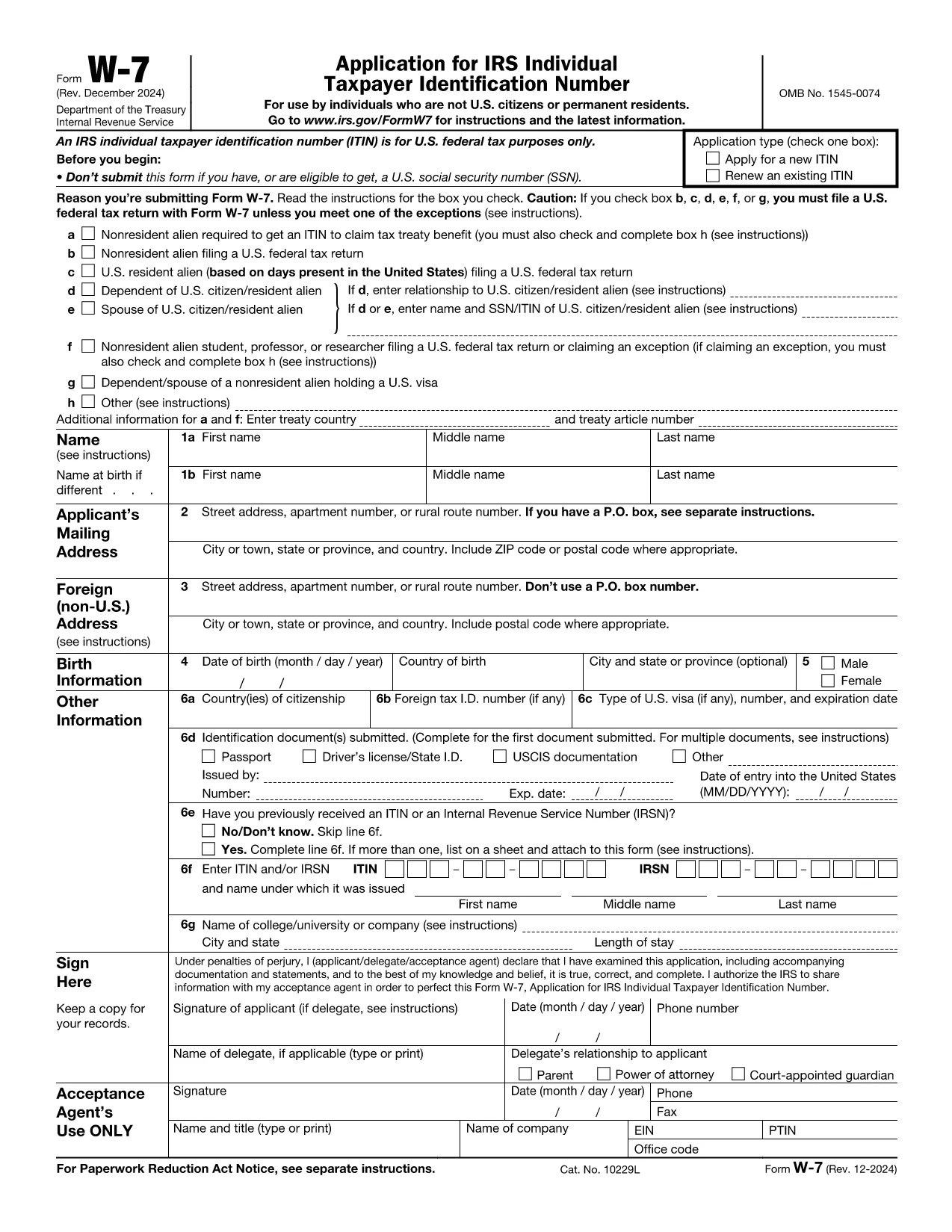
Form W‑7 is the official Application for an Individual Taxpayer Identification Number (ITIN) issued by the United States Internal Revenue Service (IRS). Taxpayers who are not eligible for a Social Security Number but need a federal tax identification number use this form.

What Is IRS Form W‑7?

The W‑7 form allows foreign individuals, residents, and certain dependents to obtain an ITIN so they can file U.S. tax returns, claim treaty benefits, or be listed on a tax return. The PDF is fully fillable, but editing it locally can be cumbersome.

Why Use Formize’s Fillable PDF?

  • Instant online filling – No need to download, install a PDF editor, or print the form.
  • Secure cloud processing – Your data stays encrypted while the Formize PDF Filler loads.
  • Auto‑save and review – Make changes, preview the completed document, and download a final PDF ready for mailing.

Step‑by‑Step Guide to Complete the Form Online

Follow the simple steps below to fill out Form W‑7 directly on this page.

Common Mistakes & Tips for a Successful Submission

Avoid these pitfalls to prevent delays:

  • Do not leave any required field blank – the online filler will highlight missing items.
  • Ensure the name on the form matches the identification document exactly.
  • Attach a clear, legible copy of the supporting document (passport, national ID, etc.).
  • Sign the form electronically if your PDF viewer allows it; otherwise, print, sign, and scan.

Where to Send Your Completed Form

After you download the finished PDF, mail it with the required documentation to:

Internal Revenue Service
ITIN Operation
P.O. Box 149342
Austin, TX 78714-9342
USA

Or submit through an IRS-authorized Acceptance Agent.

FAQ
  • Who needs an ITIN?

    Non‑U.S. residents, foreign nationals, and dependents who are not eligible for a Social Security Number but must file a U.S. tax return or be listed on one.

  • Can I submit Form W‑7 electronically?

    The IRS currently requires a paper submission. You can fill it out online with Formize, then download and mail the completed PDF.

  • What documents must I attach?

    A valid, original passport is the most common. If you don’t have a passport, you can provide a combination of a national ID, birth certificate, and a US visa.

  • How long does the IRS take to process an ITIN?

    Processing usually takes 6‑10 weeks after the IRS receives a complete application.

  • Do I need to renew my ITIN?

    ITINs that have not been used on a tax return for three consecutive years will expire. Renewal is done using the same Form W‑7.

  • Is there a fee to apply for an ITIN?

    There is no fee to the IRS, but if you use an Acceptance Agent, they may charge a service fee.

  • Can I correct a mistake after mailing?

    If you discover an error, you must submit a new, complete Form W‑7 with the correct information.

  • What if I lose my ITIN?

    You can request a copy of your ITIN by calling the IRS at 1‑800‑829‑1040 or by submitting a new Form W‑7.

  • Is Form W‑7 the same as a Social Security Number?

    No. An ITIN is for tax purposes only and does not provide work authorization or Social Security benefits.

  • Will Formize store my personal data?

    Formize processes the PDF in a secure, temporary session and does not retain any personal information after you download the completed form.

HVORDAN

Sådan udfylder du IRS Form W-7 gratis online i 5 nemme trin:

  1. 1
    Click the "Fill out this form" button
    Locate the bright orange "Fill out this form" button on the page and click it. The Formize PDF Filler app will open in a new tab.
  2. 2
    Wait for the Formize PDF Filler to load
    The online filler loads the IRS Form W‑7 automatically. This usually takes a few seconds.
  3. 3
    Enter your information
    Complete each required field. The filler will highlight any missing or incorrect entries.
  4. 4
    Upload supporting documents
    Use the "Attach File" option to add a scanned copy of your passport or other ID as required by the IRS.
  5. 5
    Review and download
    When you’re satisfied, click "Save & Download" to get a PDF ready for mailing to the IRS.
Formize PDF Filler app
OM

Skatteskemaer

IRS Form W-7 er en af ​​skatteformularer, der er dokumenter, der bruges til at indberette oplysninger relateret til skatter til den relevante skattemyndighed. Der er forskellige typer skatteformularer, herunder føderale, statslige og lokale skatteformularer, som kan variere afhængigt af skatteyderens forhold og placering.

FUNKTIONER

PDF Filler

Den nemmeste måde at udfylde IRS Form W-7 online

  • Udfyld hurtigt IRS Form W-7
    Leder du efter en måde, hvorpå du hurtigt kan fylde IRS Form W-7 online? Med vores online gratis PDF-formularudfylder ved du, hvordan du redigerer og udfylder dette pdf-dokument på mindre end et minut.
  • Let at bruge online PDF-editor
    Træt af at udskrive PDF-filer, så du kan redigere dem, før du scanner igen og sender dem tilbage? Rediger PDF-dokumenter gratis online. Brug vores online pdf-editor for at spare tid og papir.
  • Fantastiske værktøjer, alle platforme
    Er du i tvivl om, hvordan du udfylder IRS Form W-7 på en Mac, eller måske hvordan du bruger en PDF-filler gratis? Vores online PDF-værktøjer fungerer på alle platforme.
  • Sikker fillagring
    Fuldførte "IRS Form W-7"-filer gemmes i en sikret database, der administreres af Amazon Cloud-hosting. Du kan til enhver tid slette dine filer fra vores system. Under alle omstændigheder slettes disse filer automatisk efter 24 timer.
  • Chat med IRS Form W-7
    Chat med "IRS Form W-7" på Chatize, som er en gratis PDF-læserassistent. Stil spørgsmål og få svar fra "IRS Form W-7". Bare klik på knappen Chat med dokument ovenfor.

Slet udfyldningssession

Vil du slette den valgte påfyldningssession? I dette tilfælde vil dine fremskridt med at udfylde formularen gå tabt.

Slet redigeringssession

Vil du slette den valgte redigeringssession? I dette tilfælde vil dine fremskridt med at oprette og redigere formularen gå tabt.