
Vælg sprog

RI 20-97 – Military Earnings Request Form (Fillable PDF)

  1. Land USA
  2. Sprog engelsk
  3. Afdeling Kontoret for personaleledelse
  4. Sektor Pensions- og forsikringsskemaer
RI 20-97 – Military Earnings Request Form (Fillable PDF)

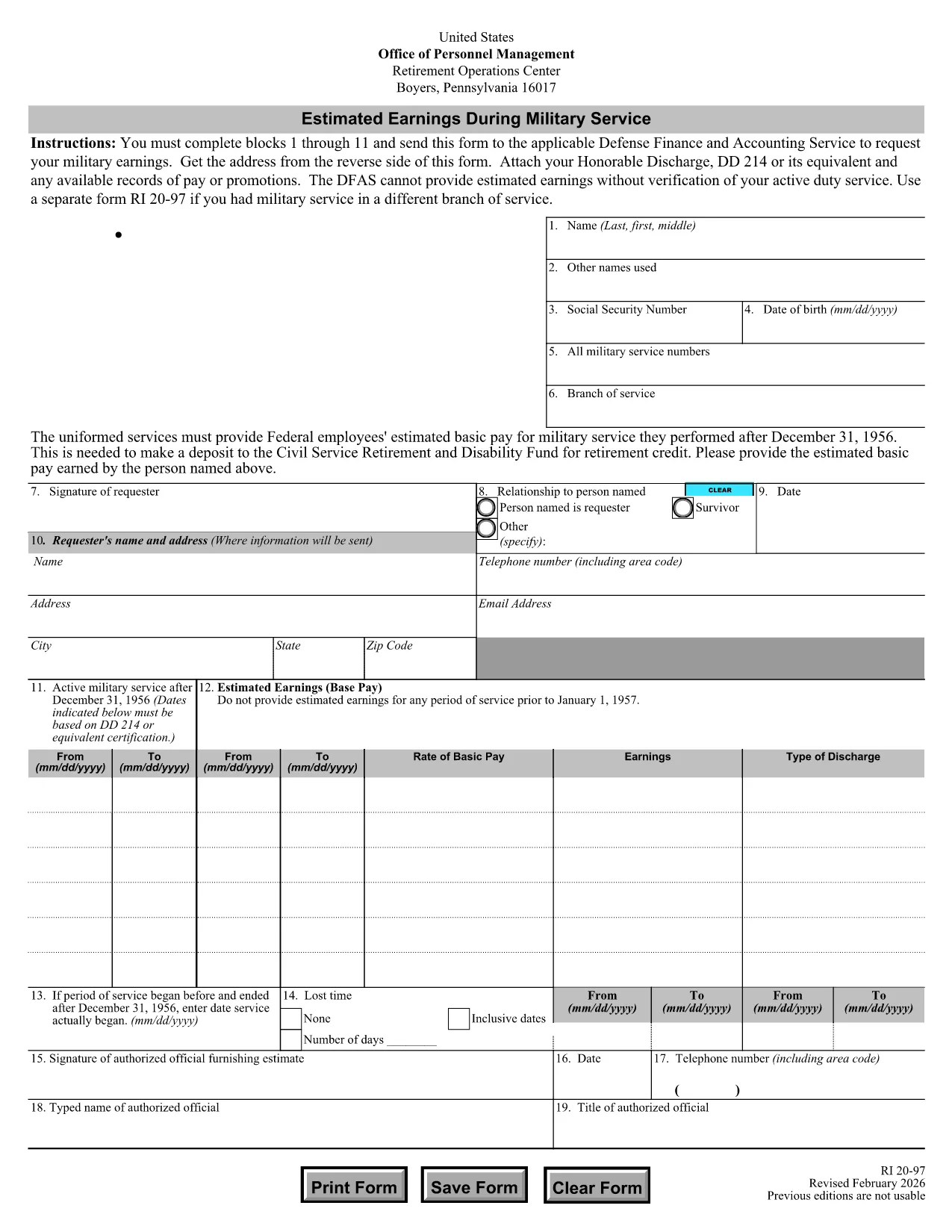
The RI 20-97 is the U.S. Office of Personnel Management (OPM) form used to request an estimate of your military earnings for retirement credit. Federal employees who have served in the armed forces use this form to ensure their service pay is counted toward their civil service pension.

What Is the RI 20-97 Form?

This official PDF, provided by OPM, captures personal details, service dates, pay grade, and any special pay received. Once completed, the form is sent to the Defense Finance and Accounting Service (DFAS) for calculation.

How to Complete the RI 20-97 Online with Formize

Instead of downloading, printing, and scanning, you can fill out the form directly on our site:

  1. Click the "Fill out this form" button below.
  2. The Formize PDF Filler app loads the fillable RI 20-97 template.
  3. Enter your information in each field (blocks 1‑11).
  4. Upload supporting documents such as your DD‑214.
  5. Review, e‑sign, and submit the form securely.

Common Mistakes & Tips for a Successful Submission

  • Missing DD‑214: The form will be rejected if you don’t attach a copy of your discharge papers.
  • Incorrect Service Dates: Double‑check start and end dates; even a one‑day error can delay processing.
  • Skipping Optional Fields: Fill in all optional fields when applicable; they help DFAS calculate a more accurate estimate.
  • Signature Errors: Both electronic and wet signatures are accepted – make sure the signature field is not left blank.

Supporting Documents You’ll Need

Prepare these items before you start:

  • DD‑214 or official military service record
  • Pay statements or promotion orders (if available)
  • Any previous RI 20‑97 submissions for reference

Where to Send Your Completed Form

After you finish the online fill, the Formize app will give you two options:

  • Download a PDF copy to mail to DFAS
  • Securely upload the completed form directly to DFAS through the provided portal link

Following these steps ensures your military earnings are counted toward your federal retirement benefits.

FAQ
  • Who needs to fill out the RI 20-97 form?

    Any current or former federal employee who served in the U.S. military and wants their service earnings counted toward their civil service retirement credit.

  • Can I use a wet signature on the RI 20-97?

    Yes. Both electronic and wet signatures are accepted. If you print the form, sign it, and mail it, DFAS will process it without issue.

  • What if I don’t have my DD‑214?

    The DD‑214 is required for verification. If it’s lost, request a replacement from the National Archives before submitting the RI 20‑97.

  • How long does DFAS take to calculate my earnings?

    Processing typically takes 2‑4 weeks after receipt of a complete, correctly signed RI 20‑97 with all supporting documents.

  • Is the Formize filler secure?

    Yes. Formize uses SSL encryption and complies with federal data‑privacy standards, ensuring your personal and military information is protected.

  • Do I need to fill out every field?

    All mandatory fields (blocks 1‑11) must be completed. Optional fields should be filled when applicable to improve accuracy.

  • Can I submit the form directly to DFAS from Formize?

    After completing the form, you can either download a PDF to mail or use the secure upload link provided by Formize to send it directly to DFAS.

  • What is the difference between the RI 20‑97 and the RI‑20‑97‑2023 version?

    The content is the same; the year in the file name reflects the most recent revision. All versions are accepted by DFAS as long as they are the official OPM form.

HVORDAN

Sådan udfylder du RI 20-97 gratis online i 5 nemme trin:

  1. 1
    Open the Fillable Form
    Click the "Fill out this form" button on the page. The Formize PDF Filler will load the RI 20-97 template instantly.
  2. 2
    Enter Your Information
    Complete fields 1 through 11 with accurate personal and service details. Use dropdowns and date pickers for consistency.
  3. 3
    Attach Supporting Documents
    Upload your DD‑214 and any pay records using the attachment area. The system validates file types before you proceed.
  4. 4
    Review and Sign
    Double‑check every entry, then add an electronic signature or upload a scanned wet signature as required.
  5. 5
    Submit or Download
    Choose to submit directly to DFAS through the secure portal, or download the completed PDF to mail it yourself.
Formize PDF Filler app
OM

Formularer til Office of Personal Management (OPM).

RI 20-97 er en af ​​de officielle formularer, der bruges af United States Office of Personnel Management, som er et uafhængigt agentur under den føderale regering, der er ansvarlig for styring af embedsværkets arbejdsstyrke og føderale personalegoder. OPM etablerer politikker og regler relateret til føderal beskæftigelse, administrerer forskellige personaleprogrammer og leverer tjenester til føderale ansatte, pensionister og jobansøgere.

Her er nogle eksempler på Office of Personal Management-formularer:

Standardformular 86 (SF-86) : Denne formular bruges til baggrundsundersøgelsesprocessen for personer, der ansøger om sikkerhedsgodkendelse. Den indsamler omfattende personlige, beskæftigelsesmæssige, uddannelsesmæssige og økonomiske oplysninger samt detaljer om udenlandske kontakter og aktiviteter.

Standardformular 2809 (SF-2809) : Denne formular bruges til at tilmelde dig Federal Employees Health Benefits (FEHB) Program, som giver sundhedsforsikringsdækning til føderale ansatte, pensionister og deres berettigede familiemedlemmer.

Standardformular 2817 (SF-2817): Denne formular bruges til at ansøge om fortsættelse af dækning under Federal Employees Dental and Vision Insurance Program (FEDVIP) efter pensionering eller adskillelse fra føderal tjeneste.

Standardformular 3107 (SF-3107) : Denne formular bruges til at ansøge om pensionsydelser under Civil Service Retirement System (CSRS).

Standard Form 2801 (SF-2801) : Denne formular bruges til at ansøge om pensionsydelser under Federal Employees Retirement System (FERS).

Standardformular 15 (SF-15) : Denne formular bruges til at ansøge om veteranens præference i føderal beskæftigelse. Det indsendes af veteraner eller deres berettigede familiemedlemmer, der søger beskæftigelsesmuligheder i den føderale regering.

Disse eksempler repræsenterer nogle almindelige OPM-former, der bruges i forbindelse med føderal beskæftigelse og personalegoder. OPM har dog en række andre former relateret til forskellige personaleprogrammer, pensionering, forsikring og andre aspekter af føderal beskæftigelse. De specifikke formularer, der kræves, kan variere afhængigt af arten af ​​transaktionen, programmet eller fordelen, der søges. Det er tilrådeligt at konsultere det officielle websted for U.S. Office of Personnel Management (www.opm.gov) eller søge vejledning fra OPM eller relevant personale med personale for at opnå nøjagtige og up- aktuelle oplysninger om de specifikke OPM-formularer, der er relevante for dine føderale beskæftigelses- eller fordelsrelaterede behov.

FUNKTIONER

PDF Filler

Den nemmeste måde at udfylde RI 20-97 online

  • Udfyld hurtigt RI 20-97
    Leder du efter en måde, hvorpå du hurtigt kan fylde RI 20-97 online? Med vores online gratis PDF-formularudfylder ved du, hvordan du redigerer og udfylder dette pdf-dokument på mindre end et minut.
  • Let at bruge online PDF-editor
    Træt af at udskrive PDF-filer, så du kan redigere dem, før du scanner igen og sender dem tilbage? Rediger PDF-dokumenter gratis online. Brug vores online pdf-editor for at spare tid og papir.
  • Fantastiske værktøjer, alle platforme
    Er du i tvivl om, hvordan du udfylder RI 20-97 på en Mac, eller måske hvordan du bruger en PDF-filler gratis? Vores online PDF-værktøjer fungerer på alle platforme.
  • Sikker fillagring
    Fuldførte "RI 20-97"-filer gemmes i en sikret database, der administreres af Amazon Cloud-hosting. Du kan til enhver tid slette dine filer fra vores system. Under alle omstændigheder slettes disse filer automatisk efter 24 timer.
  • Chat med RI 20-97
    Chat med "RI 20-97" på Chatize, som er en gratis PDF-læserassistent. Stil spørgsmål og få svar fra "RI 20-97". Bare klik på knappen Chat med dokument ovenfor.

Slet udfyldningssession

Vil du slette den valgte påfyldningssession? I dette tilfælde vil dine fremskridt med at udfylde formularen gå tabt.

Slet redigeringssession

Vil du slette den valgte redigeringssession? I dette tilfælde vil dine fremskridt med at oprette og redigere formularen gå tabt.