
Vælg sprog

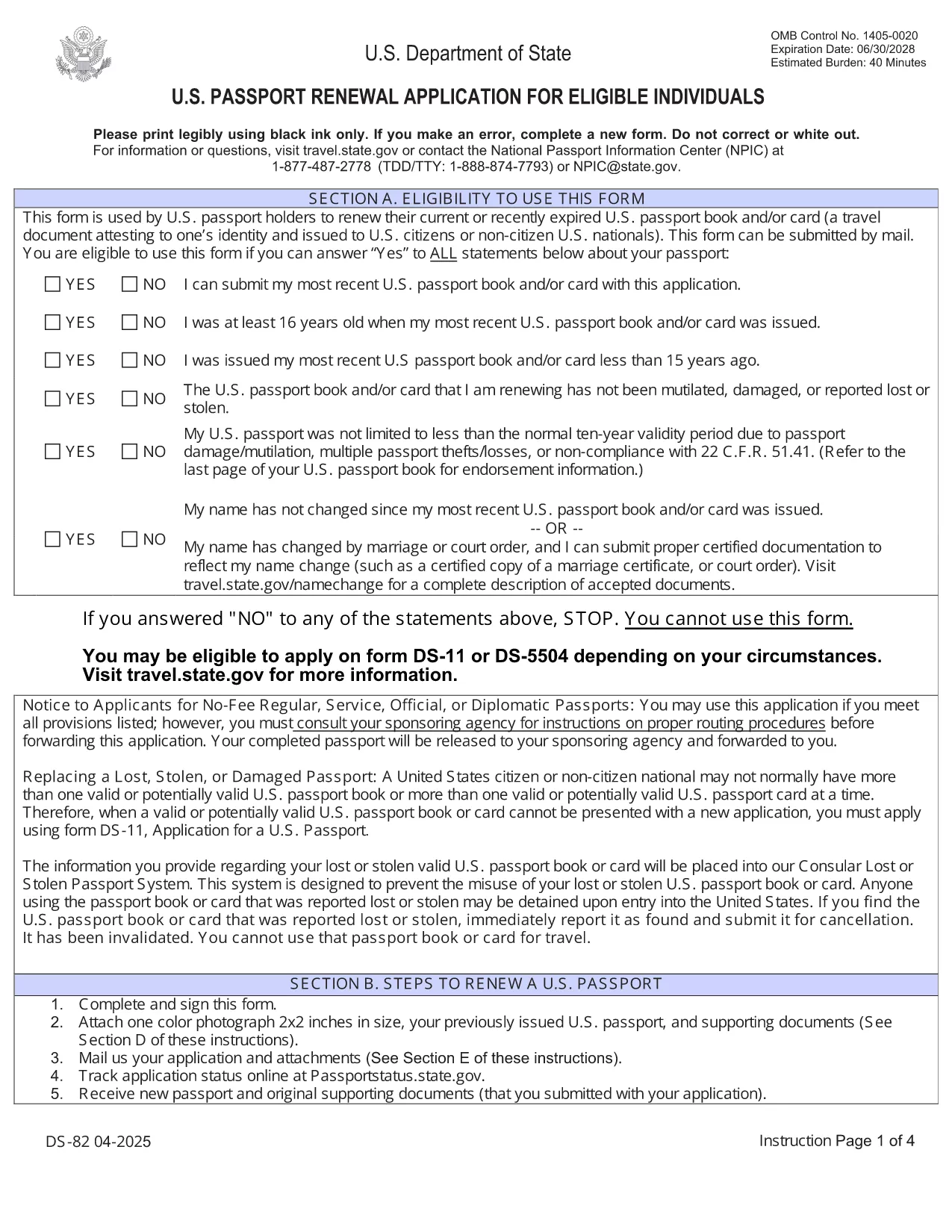
U.S. Passport Renewal Application (Form DS‑82) – Fillable PDF

  1. Sprog engelsk
  2. Land USA
  3. Aktivitet Pas
U.S. Passport Renewal Application (Form DS‑82) – Fillable PDF

Need to renew your U.S. passport quickly and without errors? The DS‑82 is the official application for eligible individuals. Our fillable PDF, powered by the Formize PDF Filler, lets you complete the form directly in your browser, save a copy, and print it ready for submission.

Why Use the Fillable DS‑82 Form

  • Instant online editing: No need to print, write, scan, or fax.
  • Auto‑validation: Formize checks required fields and formatting as you type.
  • Secure storage: Save a digital copy for future reference.
  • Time‑saving: Complete the entire application in minutes.

How to Complete the DS‑82 Online with Formize

Just click the "Fill out this form" button below and wait for the Formize PDF Filler app to load. The interface mirrors the official DS‑82 layout, so you’ll know exactly where each piece of information belongs.

Common Mistakes to Avoid

  • Leaving the Middle Name field blank when you have one – it must match your current legal name.
  • Submitting an expired passport photo (must be taken within the last 6 months).
  • Forgetting to sign the form – an unsigned DS‑82 is rejected.
  • Using a non‑U.S. mailing address without a proper explanation.

Where to Submit Your Renewal

After completing and printing the form, mail it with your current passport, a new passport photo, and the renewal fee to the address listed on the U.S. Department of State website. If you’re using a passport acceptance facility, bring the printed form and supporting documents.

Frequently Asked Questions

Explore the most common questions below. If you need more help, the State Department’s official site has detailed guidance.

FAQ
  • Who can use the DS‑82 form?

    U.S. citizens with a passport that is still valid or expired less than 5 years ago, and who can submit the same name and personal data as on the current passport.

  • Can I renew my passport if my name changed?

    Yes, but you must also submit a legal name‑change document (marriage certificate, court order, etc.) along with the DS‑82.

  • How long does the renewal process take?

    Standard processing is about 8‑11 weeks. Expedited service (for an additional fee) reduces the time to 5‑7 weeks.

  • Do I need to bring my old passport?

    Yes. Your current passport must be submitted with the DS‑82; it will be returned to you after processing.

  • What photo requirements apply?

    The photo must be 2×2 inches, taken within the last 6 months, on a plain white background, and show a full‑face view.

  • Is the Formize filler secure?

    Yes. Formize uses HTTPS encryption and does not store any personal data after you download or print the completed PDF.

HVORDAN

Sådan udfylder du DS-82 gratis online i 5 nemme trin:

  1. 1
    Open the Fillable Form
    Click the "Fill out this form" button on the page. The Formize PDF Filler will open in a new tab.
  2. 2
    Wait for the Filler to Load
    Allow a few seconds for the app to initialize. You’ll see the DS‑82 layout with editable fields.
  3. 3
    Enter Your Information
    Fill in each field exactly as it appears on your current passport and supporting documents. Required fields are marked with an asterisk.
  4. 4
    Review and Validate
    Use the built‑in validation to check for missing or incorrectly formatted entries. Correct any highlighted issues.
  5. 5
    Save, Print, and Submit
    Save a digital copy, then print the completed form. Mail it with your passport, photo, and fee to the address provided by the U.S. Department of State.
Formize PDF Filler app
OM

Pasformularer

DS-82 er en af ​​pasformularer, der er dokumenter, der bruges til at ansøge om et pas, som er et rejsedokument, der bekræfter indehaverens identitet og nationalitet og giver dem mulighed for at rejse internationalt. Pasformularer kan variere afhængigt af det land, der udsteder passet, men de indeholder generelt personlige oplysninger om ansøgeren, såsom navn, fødselsdato og fødselssted, samt oplysninger om ansøgerens forældre og eventuelle tidligere pas eller rejsedokumenter .

I USA er de to mest almindelige pasformer DS-11 og DS-82. DS-11-formularen bruges til førstegangsansøgere, mindreårige eller enkeltpersoner, der ikke er berettiget til at bruge DS-82-formularen. DS-82-formularen bruges til pasfornyelser pr. post for berettigede ansøgere. Begge formularer kræver, at ansøgeren afgiver personlige oplysninger og understøttende dokumentation, såsom et pasfoto og bevis for statsborgerskab.

Andre lande kan have forskellige pasformer og krav, men den grundlæggende proces involverer typisk at udfylde en pasansøgning, levere understøttende dokumentation og deltage i et interview med en pasembedsmand på en regeringsfacilitet eller en ambassade. Det er vigtigt at bemærke, at pasansøgningsprocessen kan tage flere uger eller endda måneder, så det anbefales at ansøge i god tid før enhver planlagt rejse.

FUNKTIONER

PDF Filler

Den nemmeste måde at udfylde DS-82 online

  • Udfyld hurtigt DS-82
    Leder du efter en måde, hvorpå du hurtigt kan fylde DS-82 online? Med vores online gratis PDF-formularudfylder ved du, hvordan du redigerer og udfylder dette pdf-dokument på mindre end et minut.
  • Let at bruge online PDF-editor
    Træt af at udskrive PDF-filer, så du kan redigere dem, før du scanner igen og sender dem tilbage? Rediger PDF-dokumenter gratis online. Brug vores online pdf-editor for at spare tid og papir.
  • Fantastiske værktøjer, alle platforme
    Er du i tvivl om, hvordan du udfylder DS-82 på en Mac, eller måske hvordan du bruger en PDF-filler gratis? Vores online PDF-værktøjer fungerer på alle platforme.
  • Sikker fillagring
    Fuldførte "DS-82"-filer gemmes i en sikret database, der administreres af Amazon Cloud-hosting. Du kan til enhver tid slette dine filer fra vores system. Under alle omstændigheder slettes disse filer automatisk efter 24 timer.
  • Chat med DS-82
    Chat med "DS-82" på Chatize, som er en gratis PDF-læserassistent. Stil spørgsmål og få svar fra "DS-82". Bare klik på knappen Chat med dokument ovenfor.

Slet udfyldningssession

Vil du slette den valgte påfyldningssession? I dette tilfælde vil dine fremskridt med at udfylde formularen gå tabt.

Slet redigeringssession

Vil du slette den valgte redigeringssession? I dette tilfælde vil dine fremskridt med at oprette og redigere formularen gå tabt.