Vælg sprog

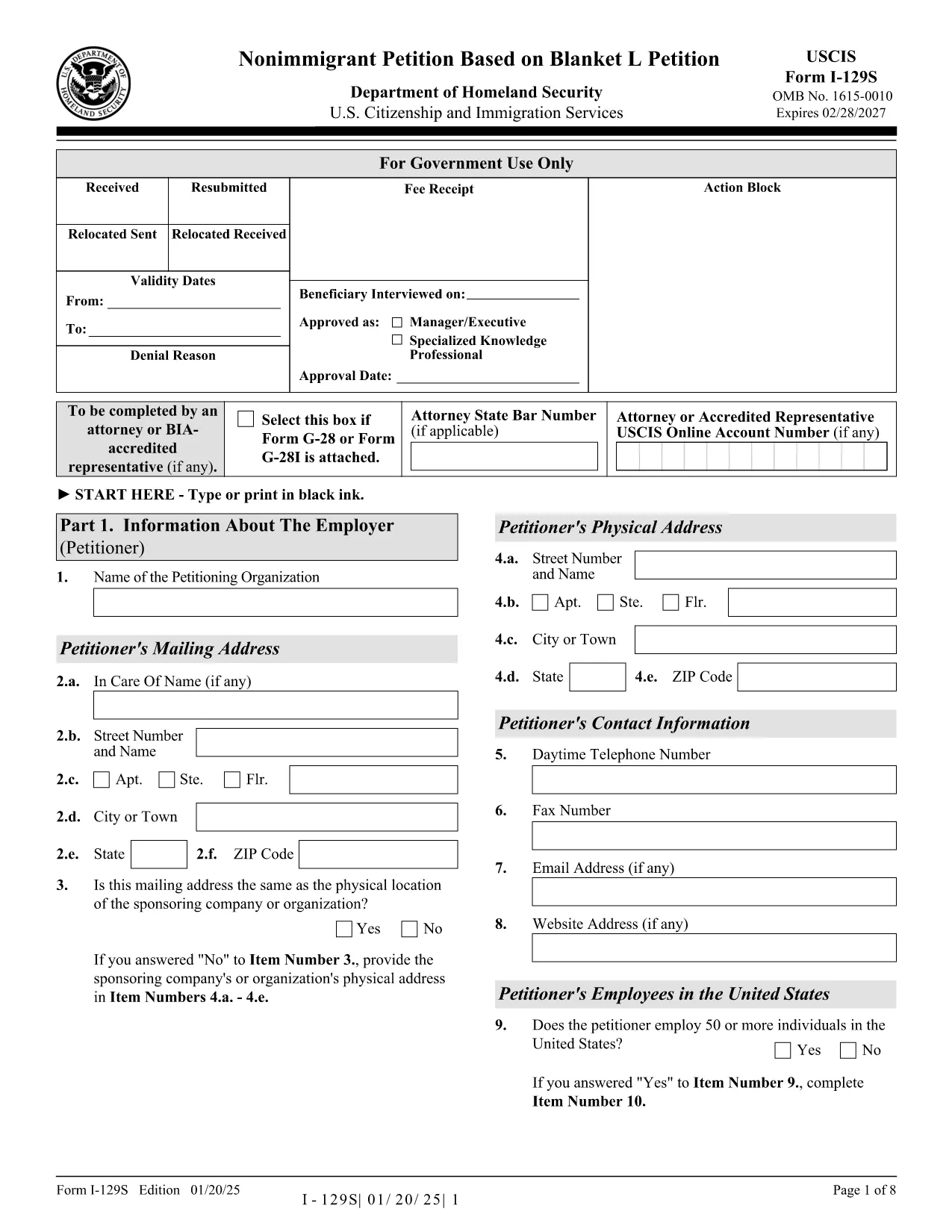
Form I-129S – Nonimmigrant Petition Based on Blanket L

  1. Land USA
  2. Sprog engelsk
  3. Afdeling amerikansk statsborgerskab og immigrationstjenester
Form I-129S – Nonimmigrant Petition Based on Blanket L

The Form I-129S is the USCIS‑approved petition used by employers to classify eligible alien employees as L‑1 intracompany transferees under a previously approved blanket L petition. This form is required for executives, managers, or professionals with specialized knowledge who have worked for the company abroad for at least one continuous year within the past three years.

On Formize.com you can access a fillable version of the official I‑129S PDF, complete it directly in your browser, and download a clean, printable copy ready for filing. No extra software or PDF editor is needed.

Why Use Form I-129S?

  • Official USCIS format – matches the exact layout and page numbers required by the agency.
  • Fillable fields speed up data entry and reduce errors.
  • All changes are saved automatically while you work.
  • Easy to print or export as a PDF for mailing or electronic submission.

How to Complete the Fillable PDF

Simply click the "Fill out this form" button on the page. The Formize PDF Filler app loads the I‑129S document, and you can start typing into each field. When you’re finished, save the file, download it, and attach it to your filing package.

Common Mistakes to Avoid

  • Leaving the form unsigned – an unsigned I‑129S will be rejected.
  • Using a different edition of the form – always use the latest version (01/20/25 edition).
  • Omitting the required supporting letter that details the employee’s job duties, salary, and prior qualifying employment.
  • Submitting original documents unless the instructions specifically request them.

Where to Submit Your Petition

If the beneficiary is outside the United States, present the completed I‑129S to a U.S. consular officer. Canadian citizens may file directly with U.S. Customs and Border Protection at designated ports of entry. If the employee is already in the U.S., file Form I‑129 together with the I‑129S at the appropriate USCIS lockbox.

Download the Official PDF

Click the button below to open the fillable version, or download the static PDF for offline use.

FAQ
  • What is Form I-129S used for?

    Form I-129S is the nonimmigrant petition for employees classified under a previously approved blanket L petition. It is used for L‑1 intracompany transferees who meet the executive, managerial, or specialized knowledge criteria.

  • Who can file Form I-129S?

    Only the petitioning employer who holds an approved blanket L petition may file Form I-129S on behalf of eligible employees.

  • Do I need to sign the form electronically?

    The form must be signed by an authorized representative of the employer. If you complete the form online, you can print it, sign it manually, and then submit the scanned copy.

  • Can Canadian citizens file I-129S directly with CBP?

    Yes. Canadian beneficiaries may present the completed I‑129S to U.S. Customs and Border Protection at designated ports of entry or pre‑flight inspection locations.

  • Is there a filing fee for Form I-129S?

    Form I‑129S itself does not have a separate fee, but it is filed together with Form I‑129, which carries the applicable filing fee as listed on the USCIS Fee Schedule.

  • What supporting documents are required?

    You must include a copy of the approved blanket L petition, a detailed employment letter for the beneficiary, and any required translations of foreign‑language documents.

  • Can I edit the form after I download it?

    Yes. Use the fillable PDF on Formize.com to make changes before printing. Once printed and signed, the document should not be altered.

  • How do I know I have the latest edition?

    The current edition (01/20/25) is linked on this page. Always verify the edition date at the bottom of the form before filing.

HVORDAN

Sådan udfylder du Form I-129S gratis online i 4 nemme trin:

  1. 1
    Open the Fillable Form
    Click the "Fill out this form" button on the page. The Formize PDF Filler loads the I‑129S document in your browser.
  2. 2
    Enter Petition Details
    Type directly into each highlighted field. Use the tab key to move quickly between sections.
  3. 3
    Save and Download
    When all required fields are completed, click "Save" then "Download PDF" to get a printable copy.
  4. 4
    Submit to USCIS
    Attach the completed I‑129S to your filing package (Form I‑129, supporting documents, filing fee) and send it to the appropriate USCIS address or consular office.
Formize PDF Filler app
OM

Form I-129S skabelon

Med det traditionelle sæt funktioner til at se og udfylde et PDF-dokument, kombineret med fordelene ved en webapplikation og responsivt layout, kan du fuldføre Form I-129S på få minutter.

FUNKTIONER

PDF Filler

Den nemmeste måde at udfylde Form I-129S online

  • Udfyld hurtigt Form I-129S
    Leder du efter en måde, hvorpå du hurtigt kan fylde Form I-129S online? Med vores online gratis PDF-formularudfylder ved du, hvordan du redigerer og udfylder dette pdf-dokument på mindre end et minut.
  • Let at bruge online PDF-editor
    Træt af at udskrive PDF-filer, så du kan redigere dem, før du scanner igen og sender dem tilbage? Rediger PDF-dokumenter gratis online. Brug vores online pdf-editor for at spare tid og papir.
  • Fantastiske værktøjer, alle platforme
    Er du i tvivl om, hvordan du udfylder Form I-129S på en Mac, eller måske hvordan du bruger en PDF-filler gratis? Vores online PDF-værktøjer fungerer på alle platforme.
  • Sikker fillagring
    Fuldførte "Form I-129S"-filer gemmes i en sikret database, der administreres af Amazon Cloud-hosting. Du kan til enhver tid slette dine filer fra vores system. Under alle omstændigheder slettes disse filer automatisk efter 24 timer.
  • Chat med Form I-129S
    Chat med "Form I-129S" på Chatize, som er en gratis PDF-læserassistent. Stil spørgsmål og få svar fra "Form I-129S". Bare klik på knappen Chat med dokument ovenfor.

Slet udfyldningssession

Vil du slette den valgte påfyldningssession? I dette tilfælde vil dine fremskridt med at udfylde formularen gå tabt.

Slet redigeringssession

Vil du slette den valgte redigeringssession? I dette tilfælde vil dine fremskridt med at oprette og redigere formularen gå tabt.