Vælg sprog

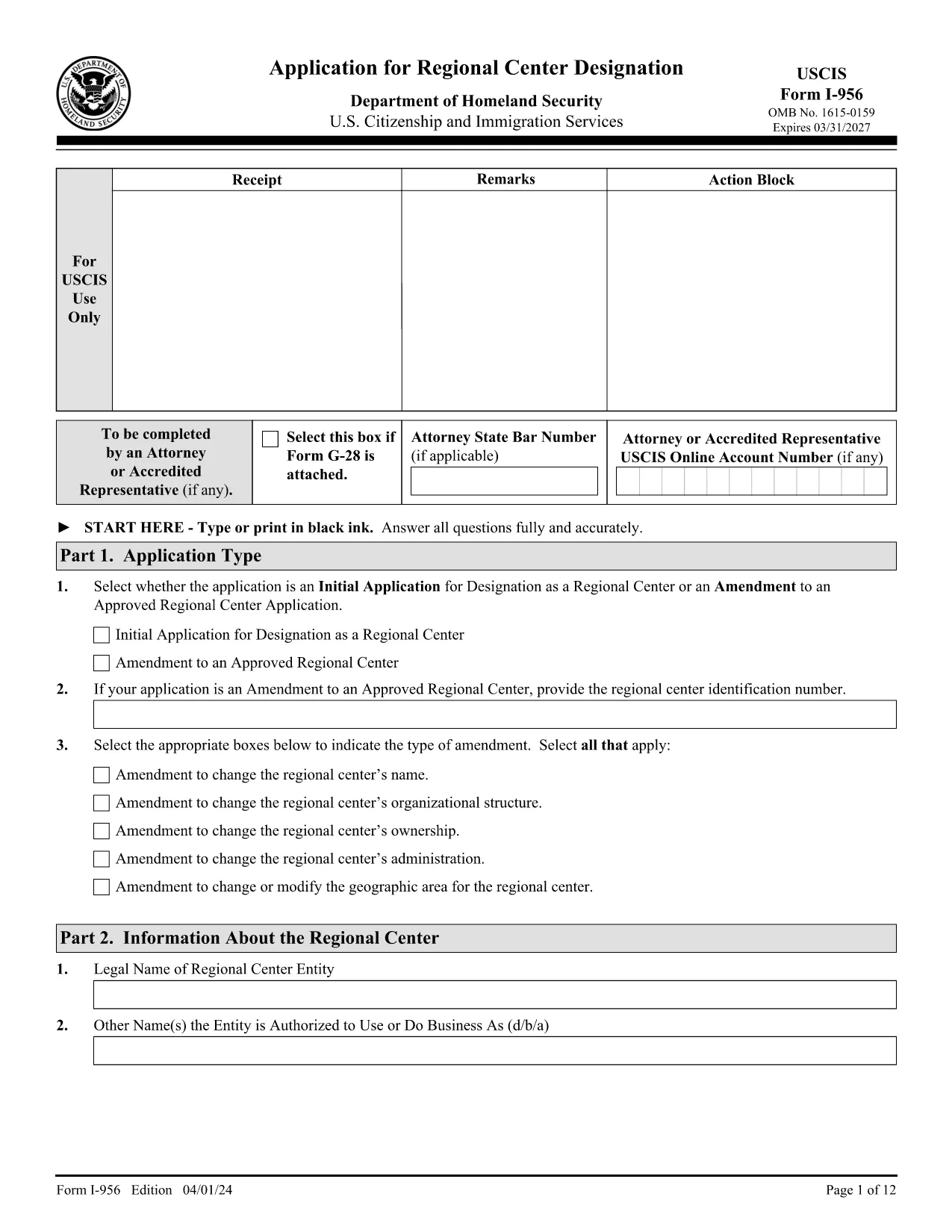
Form I-956 – Application for Regional Center Designation (Fillable PDF)

  1. Land USA
  2. Sprog engelsk
  3. Afdeling amerikansk statsborgerskab og immigrationstjenester
Form I-956 – Application for Regional Center Designation (Fillable PDF)

The USCIS Form I-956 is the official application used to request designation as a Regional Center under the EB‑5 Immigrant Investor Program, or to amend an existing designation. This form must be completed in English, signed, and submitted with the appropriate filing fee.

Formize provides a secure, fillable PDF version of Form I-956 that works directly in your browser—no extra software needed. Simply click the "Fill out this form" button, let the Formize PDF Filler load, and start entering your information.

What Is Form I-956?

Form I-956 collects detailed information about the proposed or existing regional center, including business structure, proposed projects, investment amounts, and the qualifications of key personnel. The form is a core requirement for EB‑5 investors and project sponsors.

How to Complete Form I-956 Online

Using the Formize fillable version, you can:

  • Navigate between sections with a click.
  • Save your progress and return later.
  • Validate required fields in real time.
  • Print a clean, signed PDF for mailing to the USCIS Lockbox.

Common Filing Mistakes to Avoid

  • Wrong edition date: Ensure every page shows the edition date 04/01/24.
  • Missing signatures: Unsigned forms are rejected.
  • Incorrect fee payment method: Use Form G‑1450 for credit‑card payments or the approved ACH form.
  • Inconsistent page numbers: All pages must be from the same edition.

Submission Guidelines & Filing Fee

Mail the completed Form I-956 to the USCIS Regional Center Designation Lockbox (Dallas, TX) with the current filing fee. Payments must be made electronically unless you qualify for an exemption.

Download & Save the Official PDF

For a hard‑copy backup, you can download the official PDF directly from USCIS. The link below is the exact source used by the U.S. government.

Download Official Form I-956 (PDF)

FAQ
  • What is the purpose of Form I-956?

    Form I-956 is used to request USCIS designation of a Regional Center under the EB‑5 Immigrant Investor Program, or to amend an existing designation.

  • Can I submit Form I-956 electronically?

    No. Form I-956 must be printed, signed, and mailed to the USCIS Lockbox. The fillable PDF helps you prepare a correct paper submission.

  • Do I need a lawyer to complete Form I-956?

    While not required, many applicants work with an immigration attorney to ensure the business plan and supporting evidence meet USCIS standards.

  • What edition of Form I-956 should I use?

    Use the edition dated 04/01/24. All pages of the form and its instructions must show this date; mixing editions leads to rejection.

  • How much is the filing fee for Form I-956?

    The fee varies; check the USCIS Fee Schedule for the current amount. Payments must be made electronically unless you qualify for an exemption.

  • What common errors cause Form I-956 to be rejected?

    Missing signatures, wrong edition date, inconsistent page numbers, and incorrect fee payment method are the top reasons for rejection.

  • Can I save my progress while filling the form online?

    Yes. The Formize fillable PDF allows you to save the document locally and return later to finish it.

  • Where do I mail the completed Form I-956?

    Send the signed form and fee to the USCIS Regional Center Designation Lockbox: P.O. Box 660168, Dallas, TX 75266‑0168.

HVORDAN

Sådan udfylder du Form I-956 gratis online i 5 nemme trin:

  1. 1
    Open the Fillable Form
    Click the "Fill out this form" button on the page. The Formize PDF Filler app will open in a new tab.
  2. 2
    Wait for the Filler to Load
    The app loads the official I-956 PDF and automatically makes every field editable.
  3. 3
    Enter Your Information
    Complete each section, following the on‑screen prompts. Required fields are highlighted.
  4. 4
    Review and Sign
    Use the built‑in review tool to check for missing data, then add your electronic signature.
  5. 5
    Download or Print
    Save the completed PDF to your computer or print it for mailing to the USCIS Lockbox.
Formize PDF Filler app
OM

Form I-956 skabelon

Med det traditionelle sæt funktioner til at se og udfylde et PDF-dokument, kombineret med fordelene ved en webapplikation og responsivt layout, kan du fuldføre Form I-956 på få minutter.

FUNKTIONER

PDF Filler

Den nemmeste måde at udfylde Form I-956 online

  • Udfyld hurtigt Form I-956
    Leder du efter en måde, hvorpå du hurtigt kan fylde Form I-956 online? Med vores online gratis PDF-formularudfylder ved du, hvordan du redigerer og udfylder dette pdf-dokument på mindre end et minut.
  • Let at bruge online PDF-editor
    Træt af at udskrive PDF-filer, så du kan redigere dem, før du scanner igen og sender dem tilbage? Rediger PDF-dokumenter gratis online. Brug vores online pdf-editor for at spare tid og papir.
  • Fantastiske værktøjer, alle platforme
    Er du i tvivl om, hvordan du udfylder Form I-956 på en Mac, eller måske hvordan du bruger en PDF-filler gratis? Vores online PDF-værktøjer fungerer på alle platforme.
  • Sikker fillagring
    Fuldførte "Form I-956"-filer gemmes i en sikret database, der administreres af Amazon Cloud-hosting. Du kan til enhver tid slette dine filer fra vores system. Under alle omstændigheder slettes disse filer automatisk efter 24 timer.
  • Chat med Form I-956
    Chat med "Form I-956" på Chatize, som er en gratis PDF-læserassistent. Stil spørgsmål og få svar fra "Form I-956". Bare klik på knappen Chat med dokument ovenfor.

Slet udfyldningssession

Vil du slette den valgte påfyldningssession? I dette tilfælde vil dine fremskridt med at udfylde formularen gå tabt.

Slet redigeringssession

Vil du slette den valgte redigeringssession? I dette tilfælde vil dine fremskridt med at oprette og redigere formularen gå tabt.