Vælg sprog

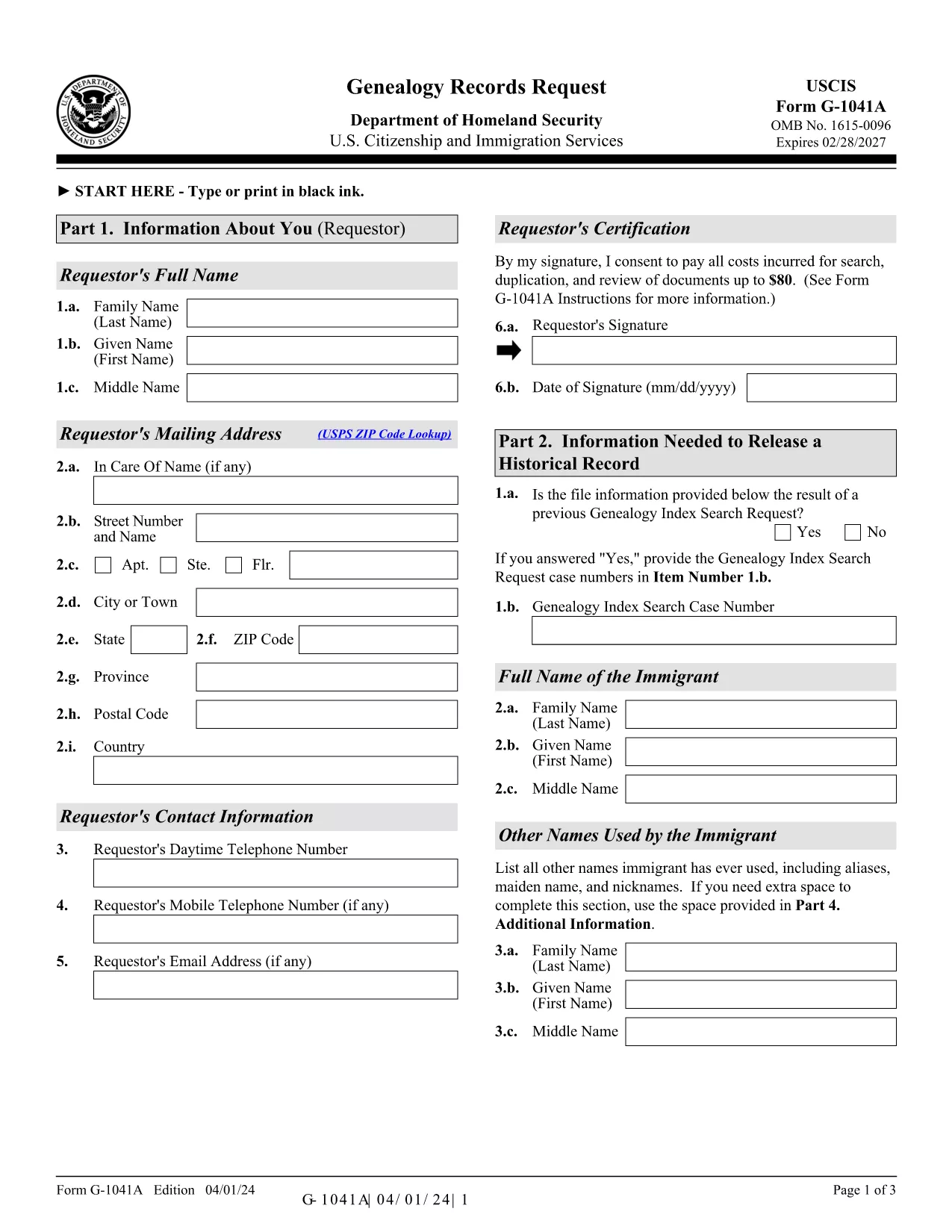
G-1041A – Genealogy Records Request (Fillable PDF)

  1. Land USA
  2. Sprog engelsk
  3. Aktivitet Immigration Records
  4. Afdeling USCIS
G-1041A – Genealogy Records Request (Fillable PDF)

The G-1041A is the official USCIS Genealogy Records Request form. It lets you obtain copies of historical immigration records for yourself or a relative. Instead of printing, scanning, and mailing a static PDF, you can fill the form directly on our site using the Formize PDF Filler – a secure, browser‑based editor that saves you time and eliminates formatting errors.

What Is the G-1041A Form?

G-1041A is used when you need full copies of an immigrant’s USCIS file, such as birth certificates, naturalization records, or travel documents. It is different from Form G-1041, which only requests an index search.

How to Complete the G-1041A with Formize

Follow the simple steps below to fill out the form online and download a completed PDF ready for mailing.

Common Mistakes & Tips for a Successful Submission

  • Use the latest edition – the form edition date is 04/01/24. Our filler always loads the current version.
  • Sign the form – the signature field is required; you can type your name and add a digital signature.
  • Provide English translations for any foreign‑language documents.
  • Do not send original documents unless specifically requested.

Where to Send Your Completed Request

After you download the filled PDF, mail it with the required fee to the USCIS Chicago Lockbox:

USCIS Attn: Genealogy Program
P.O. Box 805925
Chicago, IL 60680‑4188

For faster processing, you can also submit the request online through the USCIS Genealogy Program portal, but the fillable PDF remains the most reliable method for complex cases.

Need help? Review the official USCIS instructions or contact the USCIS Customer Service Center.

FAQ
  • What is the difference between G-1041 and G-1041A?

    Form G-1041 requests an index search of USCIS records, while G-1041A requests full copies of the records once the index is located.

  • Can I submit the G-1041A online instead of by mail?

    Yes, USCIS offers an online portal for genealogy requests, but the fillable PDF is required for many detailed or complex cases.

  • How much does the genealogy request cost?

    USCIS charges a fee for each copy of a document requested (up to $80 per document). Check the current fee schedule on the USCIS website.

  • Do I need to provide proof of death for the person I’m requesting?

    If the record holder is deceased and under 100 years old, you must include a death certificate or other acceptable proof of death.

  • What should I do if I receive a rejection notice?

    Review the notice for missing signatures, incorrect edition dates, or incomplete supporting documents. Correct the issue and resend the form.

  • Is the Formize filler secure for personal data?

    Yes. Formize uses SSL encryption and does not store your data on our servers after the PDF is generated.

HVORDAN

Sådan udfylder du G-1041A gratis online i 5 nemme trin:

  1. 1
    Open the Fillable Form
    Click the “Fill out this form” button on the page. The Formize PDF Filler app loads directly in your browser.
  2. 2
    Enter Your Information
    Complete each field – name, date of birth, alien registration number, and the relationship to the record holder. Use the Tab key to move quickly.
  3. 3
    Add a Digital Signature
    Type your full name in the signature field or upload a scanned signature image. The app validates the signature format automatically.
  4. 4
    Review & Download
    Click “Review” to check for missing fields. When everything looks correct, press “Download Completed PDF” to save the file to your computer.
  5. 5
    Mail the Request
    Print the downloaded PDF, attach the required fee, and mail it to the USCIS Chicago Lockbox address provided above.
Formize PDF Filler app
OM

G-1041A skabelon

Med det traditionelle sæt funktioner til at se og udfylde et PDF-dokument, kombineret med fordelene ved en webapplikation og responsivt layout, kan du fuldføre G-1041A på få minutter.

FUNKTIONER

PDF Filler

Den nemmeste måde at udfylde G-1041A online

  • Udfyld hurtigt G-1041A
    Leder du efter en måde, hvorpå du hurtigt kan fylde G-1041A online? Med vores online gratis PDF-formularudfylder ved du, hvordan du redigerer og udfylder dette pdf-dokument på mindre end et minut.
  • Let at bruge online PDF-editor
    Træt af at udskrive PDF-filer, så du kan redigere dem, før du scanner igen og sender dem tilbage? Rediger PDF-dokumenter gratis online. Brug vores online pdf-editor for at spare tid og papir.
  • Fantastiske værktøjer, alle platforme
    Er du i tvivl om, hvordan du udfylder G-1041A på en Mac, eller måske hvordan du bruger en PDF-filler gratis? Vores online PDF-værktøjer fungerer på alle platforme.
  • Sikker fillagring
    Fuldførte "G-1041A"-filer gemmes i en sikret database, der administreres af Amazon Cloud-hosting. Du kan til enhver tid slette dine filer fra vores system. Under alle omstændigheder slettes disse filer automatisk efter 24 timer.
  • Chat med G-1041A
    Chat med "G-1041A" på Chatize, som er en gratis PDF-læserassistent. Stil spørgsmål og få svar fra "G-1041A". Bare klik på knappen Chat med dokument ovenfor.

Slet udfyldningssession

Vil du slette den valgte påfyldningssession? I dette tilfælde vil dine fremskridt med at udfylde formularen gå tabt.

Slet redigeringssession

Vil du slette den valgte redigeringssession? I dette tilfælde vil dine fremskridt med at oprette og redigere formularen gå tabt.