
Vælg sprog

Pennsylvania Form MV-39 – Notification of Assignment/Correction of Vehicle Title

  1. Sprog engelsk
  2. Land USA
  3. Aktivitet Registreringsattest
  4. Stat Pennsylvania
Pennsylvania Form MV-39 – Notification of Assignment/Correction of Vehicle Title

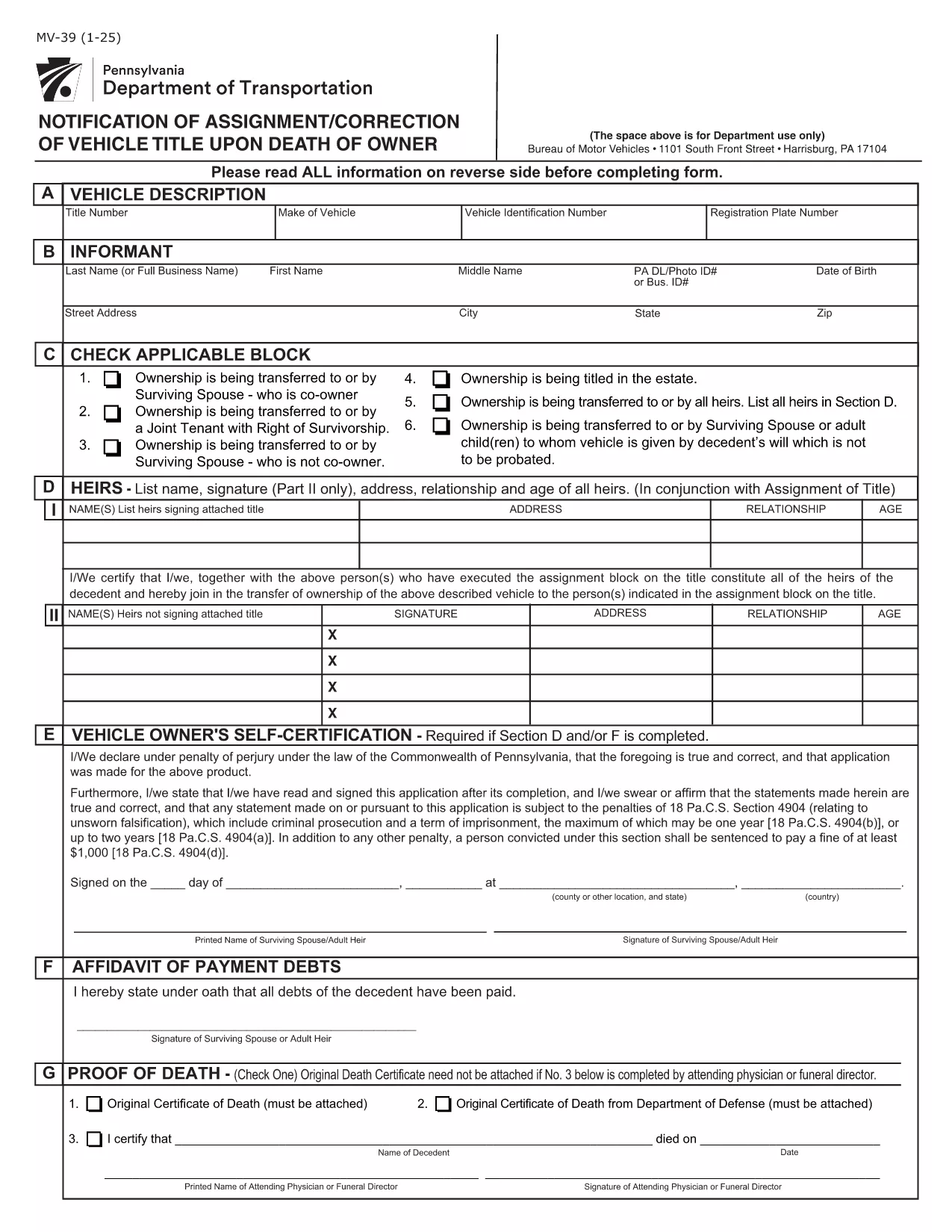
Form MV-39, titled “Notification of Assignment/Correction of Vehicle Title upon Death of Owner,” is required by the Pennsylvania Department of Transportation (PennDOT) whenever a vehicle title must be transferred after the owner’s death.

Our online fillable PDF lets you complete the form quickly without printing or using a separate PDF editor. Simply click the “Fill out this form” button, edit the fields, and download the finished document to submit to your local BMV office.

What Is Form MV-39?

This form notifies PennDOT of a change in ownership caused by the death of the original vehicle owner. It is used to assign the title to a surviving spouse, heir, or other qualified party and to correct any errors on the original title.

How to Complete Form MV-39 Online

Follow the step‑by‑step guide below to fill out the form directly in your browser using Formize’s PDF Filler.

  • Section A – Vehicle Information: Enter VIN, make, model, and year.
  • Section B – Owner’s Details: Provide the deceased owner’s name, Social Security Number, and date of death.
  • Section C – New Owner: List the name(s) of the surviving spouse, heir, or purchaser, along with their contact information.
  • Section G & H – Registration Intent: Indicate whether the vehicle will be re‑registered.
  • Section I – Signature: The new owner must sign and date the form.

Common Mistakes to Avoid

  • Leaving any required field blank – every section marked with an asterisk (*) is mandatory.
  • Using an illegible or mismatched VIN – copy it exactly as it appears on the current title.
  • Forgetting to attach a certified copy of the death certificate when required.
  • Signing the form with a pen before the PDF is fully completed – sign only after all information is entered.

Where to Submit the Completed Form

After saving the filled PDF, mail or deliver it to your nearest PennDOT Driver & Vehicle Services (DVS) office along with any supporting documents (e.g., death certificate, proof of relationship). Some offices also accept electronic submissions; check your local BMV’s website for details.

Frequently Asked Questions

Below are answers to the most common queries about Form MV-39.

FAQ
  • Do I need to print Form MV-39 after filling it online?

    Most PennDOT offices require a hard copy with an original signature, so print the completed PDF, sign it, and mail or deliver it as instructed.

  • Can I submit Form MV-39 electronically?

    Some DVS locations accept electronic submissions. Check your local office’s website for specific instructions and accepted file formats.

  • What supporting documents are required?

    You’ll need a certified copy of the owner’s death certificate, proof of relationship (e.g., marriage certificate), and any existing title documents.

  • Is there a fee for filing Form MV-39?

    PennDOT does not charge a fee for the MV-39 notification itself, but standard title transfer fees may apply when the new title is issued.

  • What if I make a mistake after submitting?

    Contact your local PennDOT office immediately. They may require you to submit a corrected MV-39 or an additional affidavit.

  • How long does it take to process the form?

    Processing times vary by office, but expect 7‑10 business days from receipt of the completed form and required documents.

HVORDAN

Sådan udfylder du MV-39 gratis online i 4 nemme trin:

  1. 1
    Open the Fillable Form
    Click the “Fill out this form” button on the page. The Formize PDF Filler app will load the MV-39 document directly in your browser.
  2. 2
    Enter Required Information
    Complete each highlighted field (Sections A, B, C, G, H, and I). The filler validates entries in real time, so you’ll know immediately if something is missing.
  3. 3
    Review and Sign
    Double‑check all data for accuracy, then add your electronic signature in the designated signature box.
  4. 4
    Save and Submit
    Click “Save PDF” to download the completed form. Print it (if required) and submit it to your local PennDOT office with any supporting documents.
Formize PDF Filler app
OM

Formularer til registrering af køretøjer

Hvis du ejer eller leaser et motorkøretøj, trailer eller båd, skal du opfylde visse forpligtelser for at holde dit køretøj lovligt registreret og sikkert.

MV-39 er en af ​​køretøjsregistreringsformularer, der er dokumenter, der bruges til at registrere et motorkøretøj hos den relevante stat eller provinsmyndighed. Disse formularer er typisk påkrævet, når en person køber et nyt eller brugt køretøj, eller når de flytter til en ny stat eller provins med et køretøj.

De nøjagtige krav og formularer, der er nødvendige for registrering af køretøjer, kan variere afhængigt af sted, men generelt involverer processen at give oplysninger om køretøjet, ejeren og eventuelle tilbageholdelsesret på køretøjet.

Når registreringsformularerne og gebyrerne er indsendt, udsteder staten eller provinsmyndigheden et registreringsattest eller nummerplade til ejeren af ​​køretøjet. Denne registrering tillader, at køretøjet kan køres lovligt på offentlige veje og motorveje.

FUNKTIONER

PDF Filler

Den nemmeste måde at udfylde MV-39 online

  • Udfyld hurtigt MV-39
    Leder du efter en måde, hvorpå du hurtigt kan fylde MV-39 online? Med vores online gratis PDF-formularudfylder ved du, hvordan du redigerer og udfylder dette pdf-dokument på mindre end et minut.
  • Let at bruge online PDF-editor
    Træt af at udskrive PDF-filer, så du kan redigere dem, før du scanner igen og sender dem tilbage? Rediger PDF-dokumenter gratis online. Brug vores online pdf-editor for at spare tid og papir.
  • Fantastiske værktøjer, alle platforme
    Er du i tvivl om, hvordan du udfylder MV-39 på en Mac, eller måske hvordan du bruger en PDF-filler gratis? Vores online PDF-værktøjer fungerer på alle platforme.
  • Sikker fillagring
    Fuldførte "MV-39"-filer gemmes i en sikret database, der administreres af Amazon Cloud-hosting. Du kan til enhver tid slette dine filer fra vores system. Under alle omstændigheder slettes disse filer automatisk efter 24 timer.
  • Chat med MV-39
    Chat med "MV-39" på Chatize, som er en gratis PDF-læserassistent. Stil spørgsmål og få svar fra "MV-39". Bare klik på knappen Chat med dokument ovenfor.

Slet udfyldningssession

Vil du slette den valgte påfyldningssession? I dette tilfælde vil dine fremskridt med at udfylde formularen gå tabt.

Slet redigeringssession

Vil du slette den valgte redigeringssession? I dette tilfælde vil dine fremskridt med at oprette og redigere formularen gå tabt.