
Vælg sprog

Form VTR-53 – Mobile Amateur Radio Operator License Plate Application

  1. Sprog engelsk
  2. Land USA
  3. Aktivitet Registreringsattest
  4. Stat Texas
Form VTR-53 – Mobile Amateur Radio Operator License Plate Application

What Is Form VTR-53?

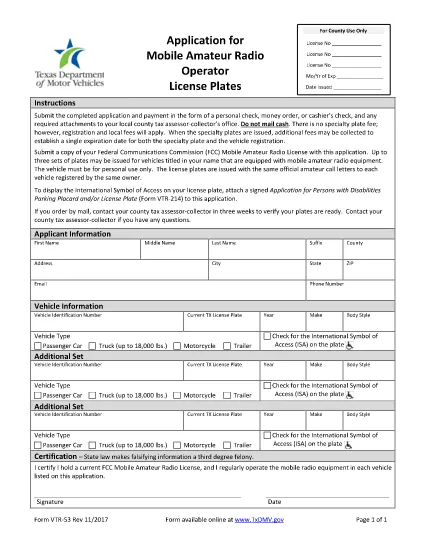
Form VTR-53 is the official application used by the Texas Department of Motor Vehicles (TxDMV) for issuing Mobile Amateur Radio Operator (M.A.R.O.) specialty license plates. The form collects vehicle information, radio‑operator details, and a certification that the applicant meets the eligibility requirements set by the Federal Communications Commission (FCC) and the TxDMV.

How to Complete the Fillable PDF Online

Instead of downloading the PDF and editing it with a separate editor, you can fill it out directly on our page using the Formize PDF Filler app. Follow the simple steps below.

  • Click the "Fill out this form" button below.
  • Wait a few seconds while the Formize PDF Filler loads the fillable VTR‑53 document.
  • Enter the requested information in each field – the form validates data in real time.
  • When you’re finished, click Save & Download to get a completed PDF ready for printing or electronic submission.

Common Mistakes to Avoid

Even a small error can delay processing. Keep these tips in mind:

  1. Vehicle VIN: Double‑check the 17‑character VIN for typos.
  2. Radio Call Sign: Use the exact call sign as issued by the FCC.
  3. Signature: The electronic signature must be clear; avoid scribbles.
  4. Eligibility Proof: Attach a copy of your FCC amateur radio license if the TxDMV requests it.

Where to Submit Your Application

After completing the form, you have two options:

  • In‑person: Bring the printed, signed form to any TxDMV regional office.
  • Mail: Send the completed PDF to:
    Texas Department of Motor Vehicles
    P.O. Box 12870
    Austin, TX 78711‑2870

Processing typically takes 7‑10 business days once the form is received.

FAQ
  • Is Form VTR-53 required for all amateur radio operators?

    Only operators who want the special Mobile Amateur Radio Operator license plate need to complete Form VTR‑53. Regular vehicle registration does not require it.

  • Can I submit the form electronically?

    TxDMV currently accepts only printed and signed copies. However, you can fill the PDF online, print it, sign it, and mail or drop it off.

  • What fee is associated with the VTR‑53 plate?

    The specialty plate fee varies by vehicle type and year. Check the TxDMV fee schedule for the most up‑to‑date amount.

  • Do I need to attach my FCC amateur radio license?

    A copy of your FCC license is not required with the initial application, but TxDMV may request it during verification.

  • How long does processing take after I submit the form?

    Processing usually takes 7‑10 business days once the completed, signed form is received by TxDMV.

  • Can I edit the form after I download it?

    Yes, the PDF is fully fillable. Use the Formize PDF Filler on our page to make changes before finalizing.

HVORDAN

Sådan udfylder du Form VTR-53 gratis online i 4 nemme trin:

  1. 1
    Open the Fillable Form
    Click the "Fill out this form" button on the page. The Formize PDF Filler app will load the VTR‑53 PDF directly in your browser.
  2. 2
    Enter Your Information
    Complete each field—vehicle details, radio call sign, and personal data. The app validates entries as you type.
  3. 3
    Save and Download
    When all required fields are filled, click "Save & Download" to obtain a finished PDF ready for printing or electronic submission.
  4. 4
    Submit to TxDMV
    Print the signed form and submit it in person or by mail to the Texas Department of Motor Vehicles.
Formize PDF Filler app
OM

Formularer til registrering af køretøjer

Hvis du ejer eller leaser et motorkøretøj, trailer eller båd, skal du opfylde visse forpligtelser for at holde dit køretøj lovligt registreret og sikkert.

Form VTR-53 er en af ​​køretøjsregistreringsformularer, der er dokumenter, der bruges til at registrere et motorkøretøj hos den relevante stat eller provinsmyndighed. Disse formularer er typisk påkrævet, når en person køber et nyt eller brugt køretøj, eller når de flytter til en ny stat eller provins med et køretøj.

De nøjagtige krav og formularer, der er nødvendige for registrering af køretøjer, kan variere afhængigt af sted, men generelt involverer processen at give oplysninger om køretøjet, ejeren og eventuelle tilbageholdelsesret på køretøjet.

Når registreringsformularerne og gebyrerne er indsendt, udsteder staten eller provinsmyndigheden et registreringsattest eller nummerplade til ejeren af ​​køretøjet. Denne registrering tillader, at køretøjet kan køres lovligt på offentlige veje og motorveje.

FUNKTIONER

PDF Filler

Den nemmeste måde at udfylde Form VTR-53 online

  • Udfyld hurtigt Form VTR-53
    Leder du efter en måde, hvorpå du hurtigt kan fylde Form VTR-53 online? Med vores online gratis PDF-formularudfylder ved du, hvordan du redigerer og udfylder dette pdf-dokument på mindre end et minut.
  • Let at bruge online PDF-editor
    Træt af at udskrive PDF-filer, så du kan redigere dem, før du scanner igen og sender dem tilbage? Rediger PDF-dokumenter gratis online. Brug vores online pdf-editor for at spare tid og papir.
  • Fantastiske værktøjer, alle platforme
    Er du i tvivl om, hvordan du udfylder Form VTR-53 på en Mac, eller måske hvordan du bruger en PDF-filler gratis? Vores online PDF-værktøjer fungerer på alle platforme.
  • Sikker fillagring
    Fuldførte "Form VTR-53"-filer gemmes i en sikret database, der administreres af Amazon Cloud-hosting. Du kan til enhver tid slette dine filer fra vores system. Under alle omstændigheder slettes disse filer automatisk efter 24 timer.
  • Chat med Form VTR-53
    Chat med "Form VTR-53" på Chatize, som er en gratis PDF-læserassistent. Stil spørgsmål og få svar fra "Form VTR-53". Bare klik på knappen Chat med dokument ovenfor.

Slet udfyldningssession

Vil du slette den valgte påfyldningssession? I dette tilfælde vil dine fremskridt med at udfylde formularen gå tabt.

Slet redigeringssession

Vil du slette den valgte redigeringssession? I dette tilfælde vil dine fremskridt med at oprette og redigere formularen gå tabt.