
Vælg sprog

VTR-71-6 – Application for Authority to Dispose of an Abandoned Vehicle (Fillable PDF)

  1. Sprog engelsk
  2. Land USA
  3. Aktivitet Registreringsattest
  4. Stat Texas
VTR-71-6 – Application for Authority to Dispose of an Abandoned Vehicle (Fillable PDF)

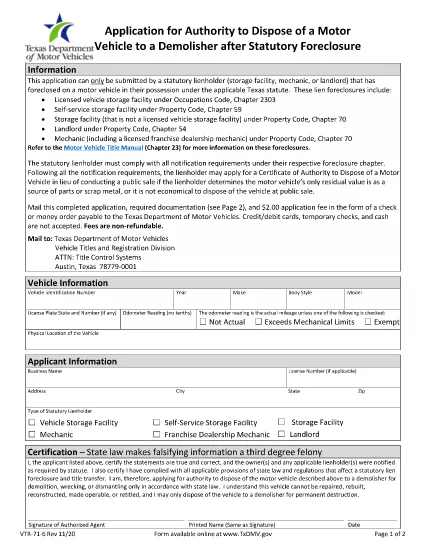
The Texas Department of Motor Vehicles (TxDMV) requires the VTR-71-6 form when you need official permission to dispose of an abandoned or public nuisance vehicle to a licensed demolisher. This fillable PDF is now available through Formize, so you can complete it securely in your browser—no extra software needed.

What Is the VTR-71-6 Form?

VTR-71-6, titled Application for Authority to Dispose of an Abandoned Nuisance Vehicle to a Demolisher, is used by vehicle owners, lienholders, or law‑enforcement agencies to certify that a vehicle meets the state’s criteria for demolition. The form collects:

  • Vehicle identification details (VIN, make, model, year)
  • Owner and lienholder information
  • Reason for disposal and supporting documentation
  • Signatures from the owner, lienholder and a law‑enforcement officer (if required)

How to Complete the VTR-71-6 Online with Formize

Instead of downloading the PDF, clicking “Fill out this form” on this page launches the Formize PDF Filler app. Follow the steps below to finish the form in minutes.

Common Mistakes to Avoid

  • Missing signatures: Every required signature must be entered; otherwise the TxDMV will reject the submission.
  • Incorrect VIN: Double‑check the VIN against the title and registration documents.
  • Incomplete supporting documents: Attach a copy of the notice to the owner and any police reports when applicable.

Where to Submit the Completed Form

After you finish the online form, you can:

  • Print the completed PDF and mail it to the TxDMV address listed on the form.
  • Upload the PDF through the TxDMV online filing portal.

Download the Official PDF

If you prefer the original document, you can download the official VTR-71-6 PDF directly from the TxDMV:

Download VTR-71-6 PDF

FAQ
  • Who can submit a VTR-71-6 form?

    The vehicle owner, a lienholder, or an authorized law‑enforcement agency may complete and submit the VTR-71-6.

  • Is the Formize filler free to use?

    Yes, Formize provides a free online filler for this PDF. No download or installation is required.

  • What happens after I submit the form?

    The TxDMV reviews the application. If approved, you’ll receive a Certificate of Authority, allowing the vehicle to be taken to a licensed demolisher.

  • Can I save my progress and finish later?

    The Formize app lets you save a draft locally. Click “Save Draft” before closing the browser, then reopen the saved file to continue.

  • Do I need a notarized signature?

    A notarized signature is not required for VTR-71-6, but all required parties must sign electronically.

  • How long does the approval process take?

    Processing typically takes 7‑10 business days after the TxDMV receives a complete, correctly signed form.

HVORDAN

Sådan udfylder du VTR-71-6 gratis online i 5 nemme trin:

  1. 1
    Open the Fillable Form
    Click the “Fill out this form” button on this page. The Formize PDF Filler app will load in a new window.
  2. 2
    Enter Vehicle Information
    Type the VIN, make, model, year, and license plate number into the highlighted fields.
  3. 3
    Provide Owner and Lienholder Details
    Fill in the owner’s name, address, and any lienholder information required by the form.
  4. 4
    Add Supporting Documents
    Upload a scanned copy of the notice to the owner and any police or law‑enforcement reports if applicable.
  5. 5
    Sign and Submit
    Use the electronic signature fields for the owner, lienholder, and law‑enforcement officer. When finished, click “Save & Download” to get the completed PDF.
Formize PDF Filler app
OM

Formularer til registrering af køretøjer

Hvis du ejer eller leaser et motorkøretøj, trailer eller båd, skal du opfylde visse forpligtelser for at holde dit køretøj lovligt registreret og sikkert.

VTR-71-6 er en af ​​køretøjsregistreringsformularer, der er dokumenter, der bruges til at registrere et motorkøretøj hos den relevante stat eller provinsmyndighed. Disse formularer er typisk påkrævet, når en person køber et nyt eller brugt køretøj, eller når de flytter til en ny stat eller provins med et køretøj.

De nøjagtige krav og formularer, der er nødvendige for registrering af køretøjer, kan variere afhængigt af sted, men generelt involverer processen at give oplysninger om køretøjet, ejeren og eventuelle tilbageholdelsesret på køretøjet.

Når registreringsformularerne og gebyrerne er indsendt, udsteder staten eller provinsmyndigheden et registreringsattest eller nummerplade til ejeren af ​​køretøjet. Denne registrering tillader, at køretøjet kan køres lovligt på offentlige veje og motorveje.

FUNKTIONER

PDF Filler

Den nemmeste måde at udfylde VTR-71-6 online

  • Udfyld hurtigt VTR-71-6
    Leder du efter en måde, hvorpå du hurtigt kan fylde VTR-71-6 online? Med vores online gratis PDF-formularudfylder ved du, hvordan du redigerer og udfylder dette pdf-dokument på mindre end et minut.
  • Let at bruge online PDF-editor
    Træt af at udskrive PDF-filer, så du kan redigere dem, før du scanner igen og sender dem tilbage? Rediger PDF-dokumenter gratis online. Brug vores online pdf-editor for at spare tid og papir.
  • Fantastiske værktøjer, alle platforme
    Er du i tvivl om, hvordan du udfylder VTR-71-6 på en Mac, eller måske hvordan du bruger en PDF-filler gratis? Vores online PDF-værktøjer fungerer på alle platforme.
  • Sikker fillagring
    Fuldførte "VTR-71-6"-filer gemmes i en sikret database, der administreres af Amazon Cloud-hosting. Du kan til enhver tid slette dine filer fra vores system. Under alle omstændigheder slettes disse filer automatisk efter 24 timer.
  • Chat med VTR-71-6
    Chat med "VTR-71-6" på Chatize, som er en gratis PDF-læserassistent. Stil spørgsmål og få svar fra "VTR-71-6". Bare klik på knappen Chat med dokument ovenfor.

Slet udfyldningssession

Vil du slette den valgte påfyldningssession? I dette tilfælde vil dine fremskridt med at udfylde formularen gå tabt.

Slet redigeringssession

Vil du slette den valgte redigeringssession? I dette tilfælde vil dine fremskridt med at oprette og redigere formularen gå tabt.