
Sprache auswählen

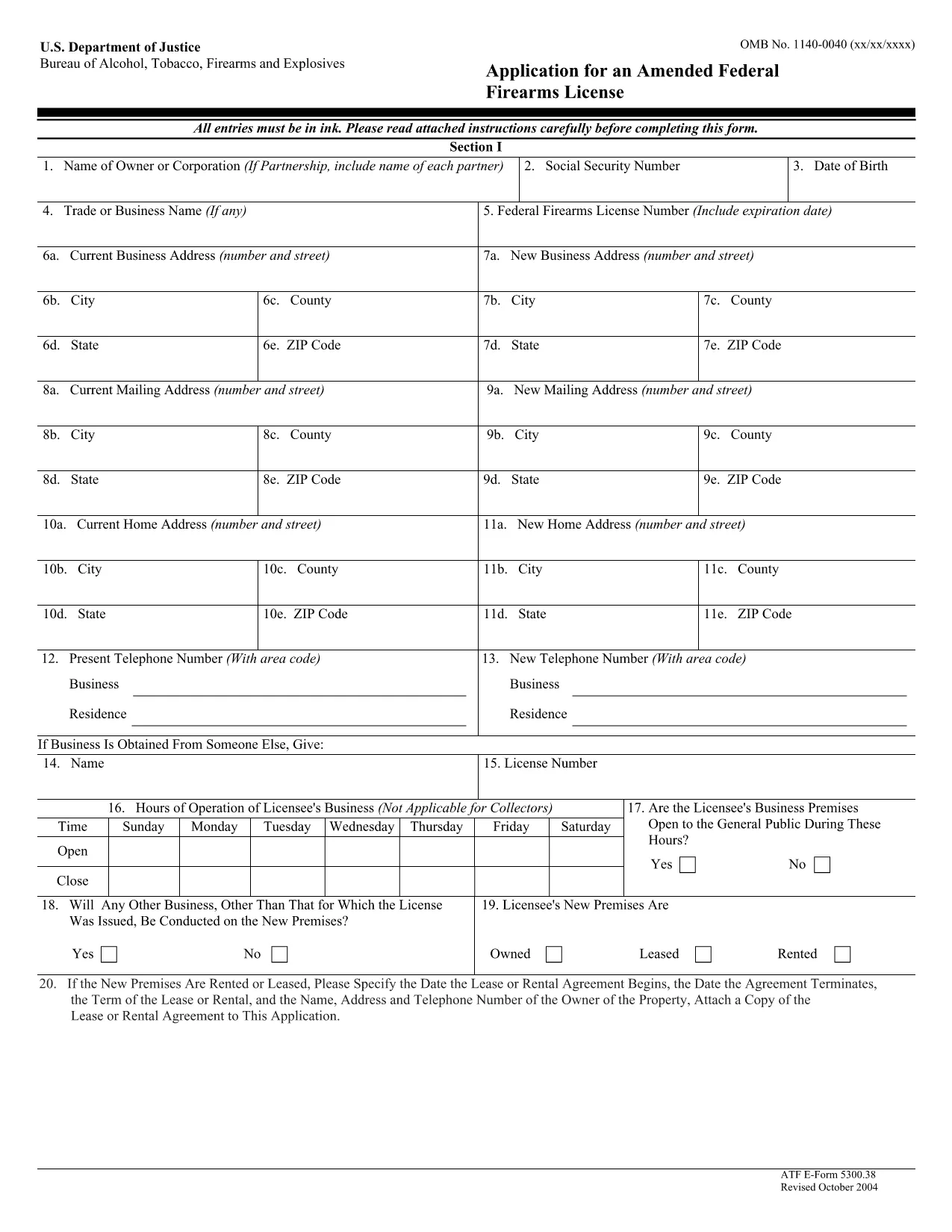
ATF Form 5300.38 – Amended Federal Firearms License Application

  1. Sprache Englisch
  2. Land USA
  3. Abteilung Bereau von Alkohol, Tabak, Schusswaffen und Sprengstoffen
  4. Sektor Feuerarme
ATF Form 5300.38 – Amended Federal Firearms License Application

The ATF Form 5300.38 is the official application used to request an amendment to an existing Federal Firearms License (FFL). Whether you need to add a new class of firearms, change your business address, or update other license details, this form is required by the Bureau of Alcohol, Tobacco, Firearms and Explosives (ATF).

Formize.com offers a 100% fillable, searchable PDF version of the ATF Form 5300.38. You can either download the PDF to complete it offline or use our integrated online PDF filler to fill it out instantly in your browser—no extra software needed.

What is ATF Form 5300.38?

This form is titled “Application for an Amended Federal Firearms License” and is governed by 18 U.S.C. Chapter 44. It is used by existing FFL holders to request any change to their license that does not require a completely new application.

How to Fill Out the Form Online

Follow the simple steps below to complete the form securely with Formize’s PDF Filler:

  • Click the “Fill out this form” button on this page.
  • Wait a few seconds while the Formize PDF Filler loads the fillable ATF Form 5300.38.
  • Enter your information directly into each field. The filler validates dates, phone numbers, and required fields in real time.
  • Review the completed form, sign electronically if required, and click “Download” or “Print”.
  • Mail the signed form to the ATF Federal Firearms Licensing Center as instructed.

Common Mistakes to Avoid

Even a small error can delay processing. Keep these tips in mind:

  • Incorrect ATF Number: Double‑check your current FFL number.
  • Missing Signatures: All required signatures must be original or an accepted electronic signature.
  • Out‑of‑Date Addresses: Use the exact mailing address listed on your current license.
  • Incomplete Attachments: If you’re adding a new class, include the appropriate supplemental pages.

Where to Submit Your Application

After completing the form, mail it to:

Chief, Federal Firearms Licensing Center
2600 Century Parkway NE
Atlanta, GA 30345
United States

Use certified mail or a reputable courier to ensure delivery tracking.

Download the Official PDF

If you prefer to fill out the form offline, click the download button below to get the official ATF Form 5300.38 PDF directly from the government source.

Download ATF Form 5300.38 PDF

FAQ
  • Is the ATF Form 5300.38 available as a fillable PDF?

    Yes. Formize provides a fully fillable PDF version that you can complete online or download for offline use.

  • Do I need a digital signature for this form?

    The ATF accepts electronic signatures for most sections, but the final signature line often requires a wet ink signature. Check the instructions on the form.

  • How long does it take for the ATF to process an amendment?

    Processing times vary, but most amended license requests are reviewed within 4‑6 weeks after receipt.

  • Can I submit the form electronically?

    The ATF still requires a hard‑copy submission by mail. You can, however, fill out the form electronically and print it for mailing.

  • What should I do if I make a mistake after printing?

    Cross out the error with a single line, initial the change, and complete the rest of the form. For major errors, it’s best to start a new copy.

  • Is there a fee for filing an amendment?

    Generally, there is no additional fee for amending an existing FFL unless the amendment adds a new class of firearms, which may incur a fee.

  • Where can I find the official ATF instructions for Form 5300.38?

    The official instruction sheet is included as the first page of the PDF linked above or can be accessed on the ATF website.

  • Do I need to attach any supporting documents?

    Depending on the amendment, you may need to attach a copy of your current license, a new business location map, or other relevant documentation.

WIE MAN

So füllen Sie ATF Form 5300.38 kostenlos online in 5 einfachen Schritten aus:

  1. 1
    Click the Fill‑out Button
    Press the “Fill out this form” button on this page to launch the Formize PDF Filler.
  2. 2
    Wait for the Filler to Load
    The fillable ATF Form 5300.38 will appear in your browser within a few seconds.
  3. 3
    Enter Your Information
    Complete each field. The tool validates entries and highlights required sections.
  4. 4
    Review and Sign
    Check the completed form for accuracy, add an electronic signature if allowed, and save.
  5. 5
    Download or Print
    Download the finished PDF or print it to mail to the ATF Federal Firearms Licensing Center.
Formize PDF Filler-App
ÜBER

Bereau von Formen von Alkohol, Tabak, Schusswaffen und Sprengstoffen (ATF).

ATF Form 5300.38 ist eines der offiziellen Formulare, die von der ATF, einer Bundesstrafverfolgungsbehörde des US-Justizministeriums, verwendet werden. Die ATF ist für die Durchsetzung der Bundesgesetze und -vorschriften in Bezug auf Alkohol, Tabak, Schusswaffen und Sprengstoffe verantwortlich. Diese Formulare werden für verschiedene Zwecke verwendet, einschließlich der Registrierung, Lizenzierung und Regulierung von Unternehmen und Einzelpersonen, die in diesen Branchen tätig sind. Hier sind einige Beispiele für ATF-Formulare:

ATF-Formular 4473: Dieses Formular wird für den Hintergrundüberprüfungsprozess verwendet, wenn eine Person eine Schusswaffe von einem staatlich zugelassenen Schusswaffenhändler kauft. Es sammelt Informationen über die Identität, den Hintergrund und die Berechtigung des Käufers zum Besitz von Schusswaffen.

ATF-Formular 1: Dieses Formular wird verwendet, um die Herstellung und Registrierung einer Schusswaffe zu beantragen. Es wird typischerweise für Personen verwendet, die eine Schusswaffe für den persönlichen Gebrauch herstellen oder eine vorhandene Schusswaffe in eine andere Konfiguration umwandeln möchten.

ATF-Formular 4: Dieses Formular wird für die Übertragung und Registrierung einer Schusswaffe von einer natürlichen oder juristischen Person an eine andere verwendet. Es wird häufig beim Kauf einer Schusswaffe von einer Privatperson oder beim Übertragen einer Schusswaffe an einen Trust oder ein Unternehmen verwendet.

ATF-Formular 6: Dieses Formular wird für die Einfuhr von Schusswaffen, Munition und bestimmten anderen durch das ATF regulierten Artikeln verwendet. Es ist für Einzelpersonen oder Unternehmen erforderlich, die solche Artikel in die Vereinigten Staaten importieren möchten.

ATF-Formular 7: Dieses Formular wird für die Beantragung und Erneuerung einer Bundesfeuerwaffenlizenz (FFL) verwendet. Es ist für Einzelpersonen oder Unternehmen erforderlich, die Schusswaffen herstellen, handeln oder importieren.

ATF-Formular 5320.20: Dieses Formular wird für die Meldung und Genehmigung des Transports von Schusswaffen verwendet oder zerstörerische Geräte über Staatsgrenzen hinweg.

ATF-Formular 5400.13: Dieses Formular wird für die Registrierung und Meldung von verwendet explosive Materialien und Geräte.

Dies sind nur einige Beispiele der ATF-Formulare, die für verschiedene Zwecke im Zusammenhang mit der Regulierung und Durchsetzung von Bundesgesetzen zu Alkohol, Tabak, Schusswaffen und Sprengstoffen verwendet werden. Welche konkreten Formulare erforderlich sind, hängt von der jeweiligen durchgeführten Aktivität oder Transaktion und den geltenden Vorschriften ab. Es ist wichtig, die offizielle Website des Bureau of Alcohol, Tobacco, Firearms and Explosives (www.atf.gov) zu konsultieren oder professionellen Rat einzuholen, um genaue und aktuelle Informationen zu erhalten bezüglich der spezifischen ATF-Formulare, die für Ihre Situation relevant sind.

MERKMALE

PDF-Filler

Der einfachste Weg, PDF-Formulare online auszufüllen

  • Füllen Sie schnell ATF Form 5300.38 aus
    Suchen Sie nach einer Möglichkeit, ATF Form 5300.38 schnell online auszufüllen? Mit unserem kostenlosen Online-PDF-Formularausfüller wissen Sie, wie Sie dieses PDF-Dokument in weniger als einer Minute bearbeiten und ausfüllen.
  • Einfach zu bedienender Online-PDF-Editor
    Haben Sie es satt, PDF-Dateien auszudrucken, damit Sie sie bearbeiten können, bevor Sie sie erneut scannen und zurücksenden? PDF-Dokumente kostenlos online bearbeiten. Nutzen Sie unseren Online-PDF-Editor, um Zeit und Papier zu sparen.
  • Tolle Tools, alle Plattformen
    Sie fragen sich, wie Sie ATF Form 5300.38 auf einem Mac ausfüllen oder vielleicht einen kostenlosen PDF-Ausfüller verwenden können? Unsere Online-PDF-Tools funktionieren auf allen Plattformen.
  • Sichere Dateispeicherung
    Fertige "ATF Form 5300.38"-Dateien werden in einer gesicherten Datenbank gespeichert, die vom Amazon Cloud-Hosting verwaltet wird. Sie können Ihre Dateien jederzeit aus unserem System löschen. In jedem Fall werden diese Dateien nach 24 Stunden automatisch gelöscht.
  • Chatten Sie mit ATF Form 5300.38
    Chatten Sie mit „ATF Form 5300.38“ auf Chatize, einem kostenlosen PDF-Leseassistenten. Stellen Sie Fragen und erhalten Sie Antworten von „ATF Form 5300.38“. Klicken Sie einfach oben auf die Schaltfläche Mit Dokument chatten.

Füllsitzung löschen

Die ausgewählte Füllsitzung löschen? In diesem Fall gehen Ihre Fortschritte beim Ausfüllen des Formulars verloren.

Bearbeitungssitzung löschen

Ausgewählte Bearbeitungssitzung löschen? In diesem Fall geht Ihr Fortschritt beim Erstellen und Bearbeiten des Formulars verloren.