
Sprache auswählen

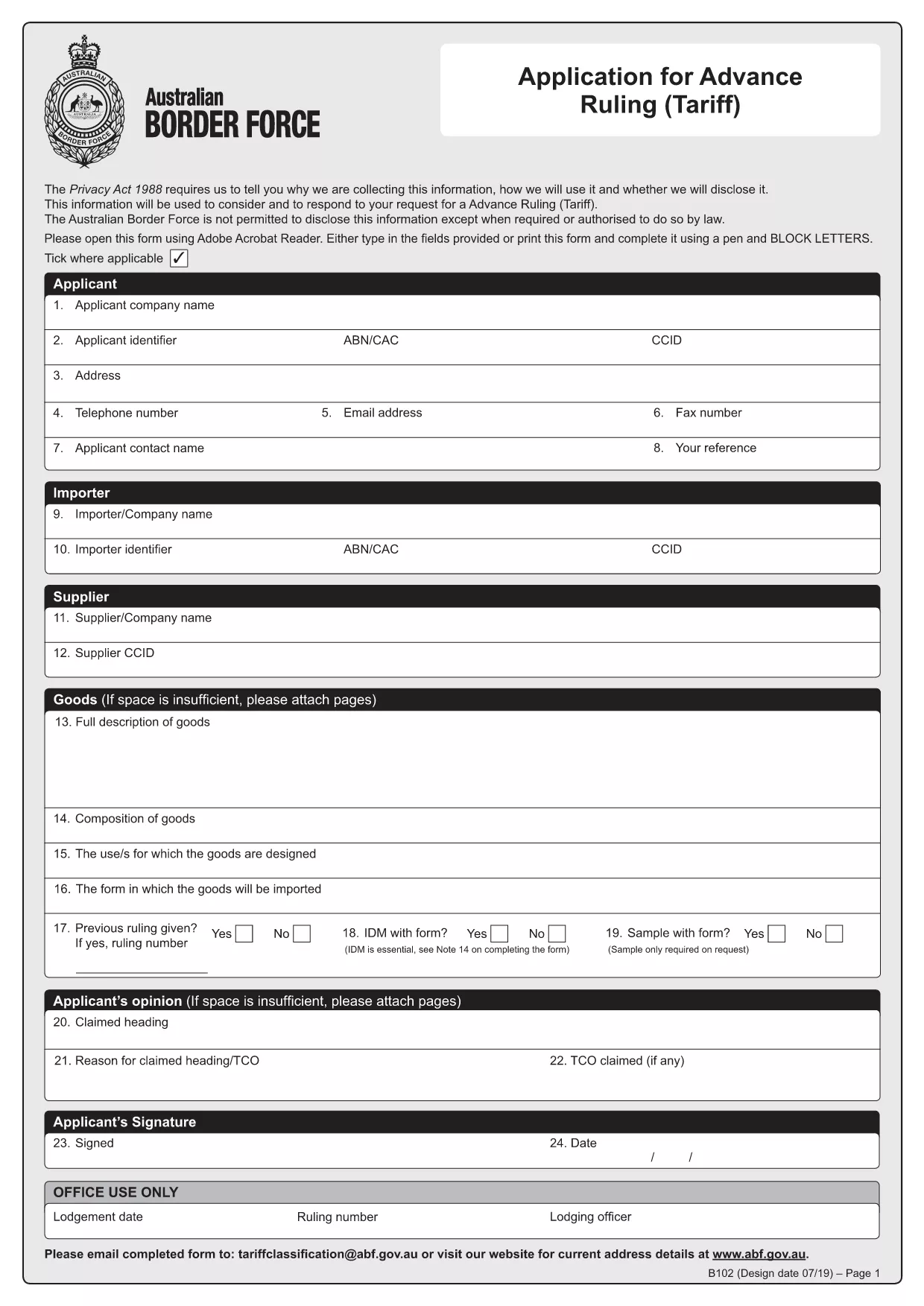
HSN Code Application Form (B102) – Fillable PDF

  1. Sprache Englisch
  2. Land Australien
  3. Aktivität Customs Classification
  4. Abteilung Australian Border Force
HSN Code Application Form (B102) – Fillable PDF

What is the HSN Code Application Form?

The HSN (Harmonized System Nomenclature) code is the international standard for classifying goods in customs. In Australia, the Form B102 – Application for Advance Ruling (Tariff) is used to request an official classification (HSN code) before importing goods. This ensures you know the correct duty rates and compliance requirements.

Why Use the Fillable B102 Form Online?

Formize turns the static PDF into a fillable, interactive form that can be completed in any browser. Benefits include:

  • Instant validation of required fields
  • Auto‑save so you never lose data
  • Direct PDF download after you finish
  • No need for Adobe Acrobat or other editors

Step‑by‑Step Guide to Complete the Form

Follow these simple steps to get your HSN code application ready for submission.

Common Mistakes to Avoid

Even experienced importers can miss details. Avoid these pitfalls:

  • Leaving the "Manufacturer Details" section blank.
  • Providing an incomplete product description.
  • Submitting the form without supporting technical specifications.

Where to Submit Your Completed Form

After you finish, download the completed PDF and email it to tariffclassification@abf.gov.au within 5 days of the request, or mail it to the National Trade Advice Centre, GPO Box 2809, Melbourne VIC 3001.

FAQ
  • What is an HSN code?

    An HSN (Harmonized System Nomenclature) code is a globally recognized six‑digit number used to classify goods for customs duties, taxes, and trade statistics.

  • Do I need a B102 form for every import?

    No. You only need to submit a B102 form when you want an advance ruling on the classification of a specific product before importing it.

  • Can I edit the form after I download it?

    Yes, but the easiest method is to complete the form online with Formize, then download the final PDF. Editing a static PDF later can cause formatting issues.

  • How long does the Australian Border Force take to issue a ruling?

    The standard service time is 30 days, though it can be longer during periods of high demand.

  • Is there a fee for submitting the B102 application?

    The service is free of charge when you submit directly to the Australian Border Force. Brokers may charge their own fees for assistance.

  • What supporting documents should I attach?

    Include product data sheets, technical specifications, photographs, and any prior classification decisions that relate to the goods.

  • What if I make a mistake on the form?

    You can withdraw the request and submit a new B102 application. Ensure all fields are correct before submission to avoid delays.

WIE MAN

So füllen Sie HSN code application form kostenlos online in 4 einfachen Schritten aus:

  1. 1
    Open the Fillable Form
    Click the **Fill out this form** button on the page. The Formize PDF Filler app loads instantly in your browser.
  2. 2
    Enter Your Information
    Complete each section—importer details, product description, and supporting documents. The app highlights any missing required fields.
  3. 3
    Validate & Save
    Use the built‑in validator to check for errors, then click **Save**. Your data is stored securely online.
  4. 4
    Download the Completed PDF
    When all fields are filled, click **Download PDF**. The file is ready for submission to the Australian Border Force.
Formize PDF Filler-App
ÜBER

HSN code application form-Vorlage

Mit den traditionellen Funktionen zum Anzeigen und Ausfüllen eines PDF-Dokuments, kombiniert mit den Vorteilen einer Webanwendung und einem ansprechenden Layout, können Sie HSN code application form in wenigen Minuten fertigstellen.

MERKMALE

PDF-Filler

Der einfachste Weg, PDF-Formulare online auszufüllen

  • Füllen Sie schnell HSN code application form aus
    Suchen Sie nach einer Möglichkeit, HSN code application form schnell online auszufüllen? Mit unserem kostenlosen Online-PDF-Formularausfüller wissen Sie, wie Sie dieses PDF-Dokument in weniger als einer Minute bearbeiten und ausfüllen.
  • Einfach zu bedienender Online-PDF-Editor
    Haben Sie es satt, PDF-Dateien auszudrucken, damit Sie sie bearbeiten können, bevor Sie sie erneut scannen und zurücksenden? PDF-Dokumente kostenlos online bearbeiten. Nutzen Sie unseren Online-PDF-Editor, um Zeit und Papier zu sparen.
  • Tolle Tools, alle Plattformen
    Sie fragen sich, wie Sie HSN code application form auf einem Mac ausfüllen oder vielleicht einen kostenlosen PDF-Ausfüller verwenden können? Unsere Online-PDF-Tools funktionieren auf allen Plattformen.
  • Sichere Dateispeicherung
    Fertige "HSN code application form"-Dateien werden in einer gesicherten Datenbank gespeichert, die vom Amazon Cloud-Hosting verwaltet wird. Sie können Ihre Dateien jederzeit aus unserem System löschen. In jedem Fall werden diese Dateien nach 24 Stunden automatisch gelöscht.
  • Chatten Sie mit HSN code application form
    Chatten Sie mit „HSN code application form“ auf Chatize, einem kostenlosen PDF-Leseassistenten. Stellen Sie Fragen und erhalten Sie Antworten von „HSN code application form“. Klicken Sie einfach oben auf die Schaltfläche Mit Dokument chatten.

Füllsitzung löschen

Die ausgewählte Füllsitzung löschen? In diesem Fall gehen Ihre Fortschritte beim Ausfüllen des Formulars verloren.

Bearbeitungssitzung löschen

Ausgewählte Bearbeitungssitzung löschen? In diesem Fall geht Ihr Fortschritt beim Erstellen und Bearbeiten des Formulars verloren.