Sprache auswählen

Apply for an Individual Contractor Licence – NSW

  1. Land Australien
  2. Sprache Englisch
  3. Aktivität Licensing
  4. Abteilung Building Commission NSW
Apply for an Individual Contractor Licence – NSW

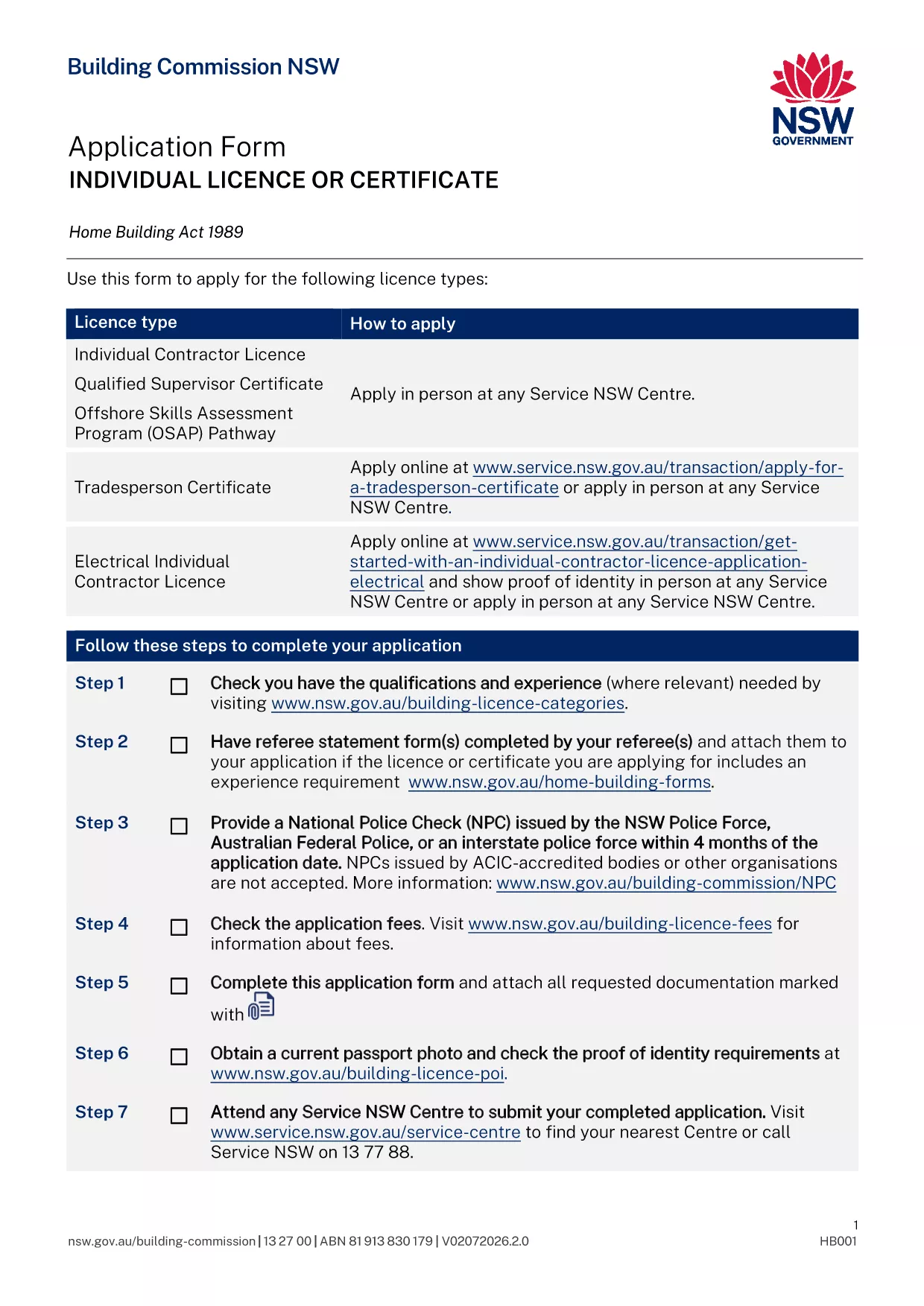
Builders, tradies and freelancers in New South Wales need an Individual Contractor Licence when the total cost of labour and materials exceeds $5,000. The licence verifies that you meet the state's safety and competency standards and lets you legally advertise, quote and work on building projects.

This page gives you everything you need to know about the application form, the supporting documents, and how to fill the PDF instantly with Formize’s online PDF filler – no software download required.

What is the Individual Contractor Licence?

The licence is issued by the Building Commission NSW and covers general building work as well as specialist categories such as plumbing, gas‑fitting, air‑conditioning and medical‑gas work. A “Q” endorsement on the licence also serves as a Qualified Supervisor Certificate.

Required Documents & Eligibility

  • Proof of identity (driver’s licence or passport) with current address
  • One recent passport‑sized photo
  • National Police Check (NPC) – not older than 4 months
  • Original qualifications and evidence of relevant work experience
  • Details of any past compliance, insolvency or criminal matters (if applicable)
  • Referee’s statement (required for some specialist categories)
  • Certificate of eligibility for Home Building Compensation Fund insurance (if required)

How to Complete the Form Online

Instead of downloading the PDF and opening it in a desktop editor, simply click the “Fill out this form” button on this page. The Formize PDF Filler app will load in your browser, letting you type, check boxes and upload supporting files directly on the form.

Common Mistakes to Avoid

  • Leaving any mandatory field blank – the system will flag it before you can submit.
  • Uploading an expired NPC or outdated qualifications.
  • Using a scanned signature that is not clear – type your name or use the built‑in signature tool.
  • Submitting the form without the required payment receipt.

Submit Your Application

After you have filled the form and attached all documents, click **Submit**. You will receive a confirmation email with a reference number. Bring the printed confirmation (or show the digital copy on your phone) to your booked Service NSW appointment, along with the original supporting documents and the payment.

Need help? Review the checklist above before your appointment to ensure a smooth assessment.

FAQ
  • Do I need to print the PDF after filling it online?

    Yes. You must bring a printed copy of the completed form and the original supporting documents to your Service NSW appointment.

  • Can I save my progress and finish the form later?

    The Formize filler allows you to download a draft PDF at any time. Save the draft, reopen it later, and continue where you left off.

  • What is the processing time after I submit the form?

    If all information is complete, the Building Commission typically assesses the application within 10‑14 business days. Missing information will delay the process.

  • Is there a fee to apply for the licence?

    Yes. Fees vary by licence class (1, 3 or 5‑year terms). The exact amount is listed on the Service NSW payment page and must be paid at the appointment.

  • Do I need a separate licence for each trade?

    If you perform specialist work (e.g., plumbing, gas‑fitting, medical‑gas), you need the appropriate endorsements on your individual contractor licence.

  • Can I use an interstate licence under the AMR scheme?

    Certain interstate licences are automatically recognised in NSW, but you must notify the Building Commission of your intention to work in the state.

  • What if I make a mistake on the form after submission?

    You can submit a correction form (available on the Service NSW site) or contact the Building Commission before your appointment to amend the details.

WIE MAN

So füllen Sie NSW contractor licence kostenlos online in 5 einfachen Schritten aus:

  1. 1
    Open the Fillable PDF
    Click the “Fill out this form” button on the page. The Formize PDF Filler loads instantly in your browser.
  2. 2
    Enter Your Details
    Type your personal information, select the appropriate licence class, and upload supporting documents using the upload icons.
  3. 3
    Review & Validate
    Use the built‑in validation to check for missing fields or errors. Correct any highlighted items before proceeding.
  4. 4
    Submit & Save
    Click “Submit” to generate a completed PDF. Download the final file or save it to your device for your Service NSW appointment.
  5. 5
    Book Your Appointment
    After submission, schedule a Service NSW appointment online, bring the printed confirmation and original documents.
Formize PDF Filler-App
ÜBER

NSW contractor licence-Vorlage

Mit den traditionellen Funktionen zum Anzeigen und Ausfüllen eines PDF-Dokuments, kombiniert mit den Vorteilen einer Webanwendung und einem ansprechenden Layout, können Sie NSW contractor licence in wenigen Minuten fertigstellen.

MERKMALE

PDF-Filler

Der einfachste Weg, PDF-Formulare online auszufüllen

  • Füllen Sie schnell NSW contractor licence aus
    Suchen Sie nach einer Möglichkeit, NSW contractor licence schnell online auszufüllen? Mit unserem kostenlosen Online-PDF-Formularausfüller wissen Sie, wie Sie dieses PDF-Dokument in weniger als einer Minute bearbeiten und ausfüllen.
  • Einfach zu bedienender Online-PDF-Editor
    Haben Sie es satt, PDF-Dateien auszudrucken, damit Sie sie bearbeiten können, bevor Sie sie erneut scannen und zurücksenden? PDF-Dokumente kostenlos online bearbeiten. Nutzen Sie unseren Online-PDF-Editor, um Zeit und Papier zu sparen.
  • Tolle Tools, alle Plattformen
    Sie fragen sich, wie Sie NSW contractor licence auf einem Mac ausfüllen oder vielleicht einen kostenlosen PDF-Ausfüller verwenden können? Unsere Online-PDF-Tools funktionieren auf allen Plattformen.
  • Sichere Dateispeicherung
    Fertige "NSW contractor licence"-Dateien werden in einer gesicherten Datenbank gespeichert, die vom Amazon Cloud-Hosting verwaltet wird. Sie können Ihre Dateien jederzeit aus unserem System löschen. In jedem Fall werden diese Dateien nach 24 Stunden automatisch gelöscht.
  • Chatten Sie mit NSW contractor licence
    Chatten Sie mit „NSW contractor licence“ auf Chatize, einem kostenlosen PDF-Leseassistenten. Stellen Sie Fragen und erhalten Sie Antworten von „NSW contractor licence“. Klicken Sie einfach oben auf die Schaltfläche Mit Dokument chatten.

Füllsitzung löschen

Die ausgewählte Füllsitzung löschen? In diesem Fall gehen Ihre Fortschritte beim Ausfüllen des Formulars verloren.

Bearbeitungssitzung löschen

Ausgewählte Bearbeitungssitzung löschen? In diesem Fall geht Ihr Fortschritt beim Erstellen und Bearbeiten des Formulars verloren.