
Sprache auswählen

Contractor License Application Form – Fillable PDF

  1. Land Australien
  2. Sprache Englisch
  3. Abteilung Building Commission
  4. Aktivität Contractor Licensing
Contractor License Application Form – Fillable PDF

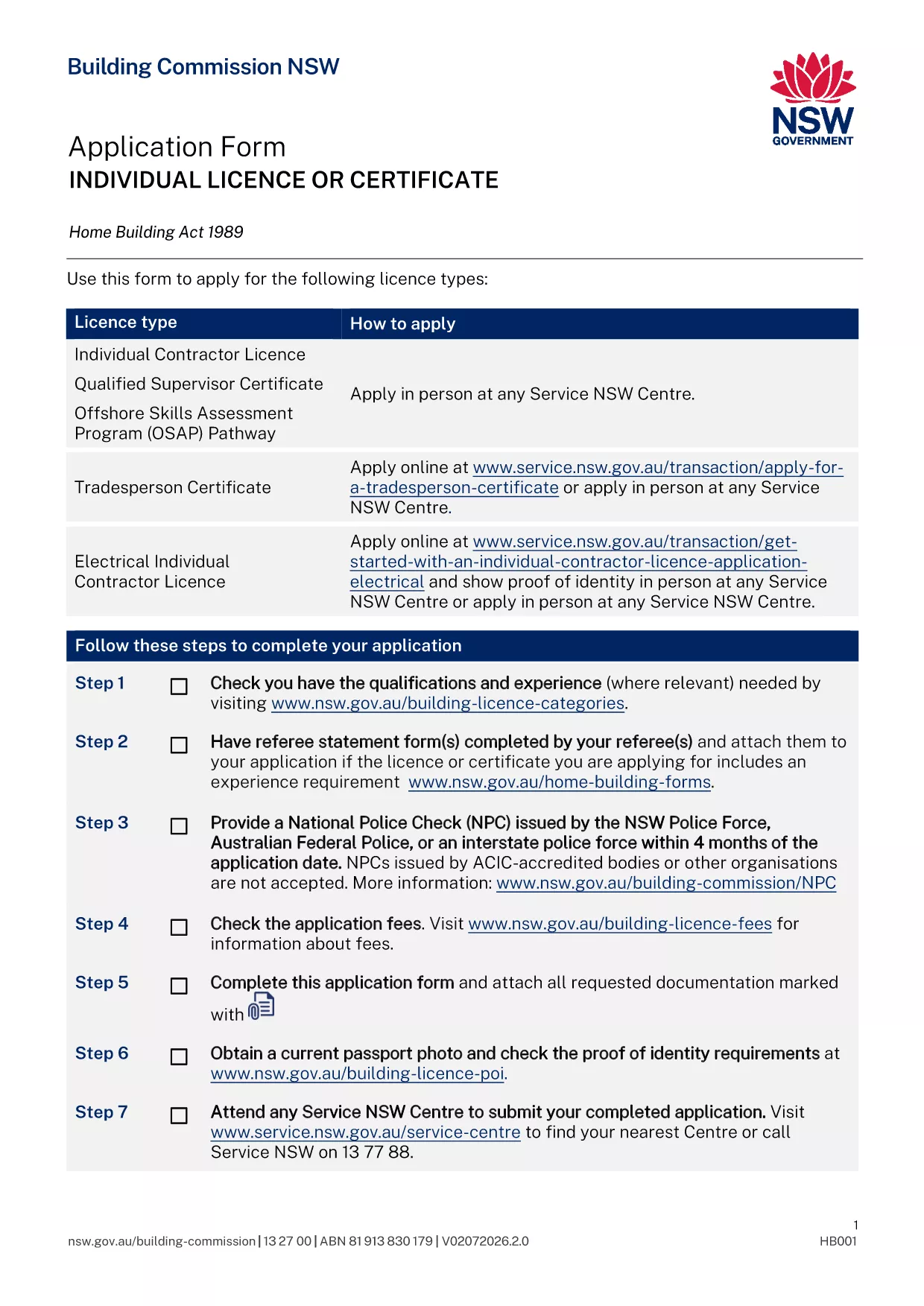
Applying for a contractor licence can feel overwhelming, but with the right form and clear instructions you can finish the process in minutes. The fillable PDF below is the official Application for Contractor Licence used by the Building Commission of New South Wales.

Why This Form Is Required

The Building Commission mandates a completed licence application for anyone who intends to contract, sub‑contract, or advertise residential building or trade work valued over $5,000. Submitting the correct form ensures your licence is processed without delay and keeps you compliant with the Home Building Act 1989.

Documents and Information You’ll Need

  • Proof of identity (driver licence, passport, or Medicare card)
  • Recent passport‑size photo
  • National Police Check (no older than 4 months)
  • Qualifications, employment history, and any relevant trade certificates
  • Details of any past compliance, insolvency, or criminal matters
  • Referee statements if required for your trade category

How to Complete the Form Online with Formize

Instead of downloading the PDF and editing it manually, simply click the "Fill out this form" button on this page. The Formize PDF Filler app will load, letting you type directly into each field, save progress, and download a completed copy ready for submission.

Common Mistakes to Avoid

  • Leaving required fields blank – the filler highlights missing information before you can submit.
  • Uploading an outdated police check – ensure the date is within the last four months.
  • Submitting an unsigned form – use the electronic signature feature in Formize.
  • Forgetting to attach supporting documents – the app lets you attach files before finalising.

What Happens After You Submit

Once you have a completed PDF, bring it to your booked Service NSW appointment or upload it through the online portal. The Building Commission will review your qualifications, fitness‑and‑propriety, and insurance details. You’ll receive a notification of approval, rejection, or a request for additional information within 2‑4 weeks.

FAQ
  • Do I need a separate form for a company contractor licence?

    Yes. Companies and partnerships use a different PDF (ap4452.pdf). The form linked here is for individual licences.

  • Can I submit the form without an appointment?

    If you have an ABN and choose the online route, no appointment is needed. For in‑person submissions, you must book a Service NSW appointment.

  • How long is a National Police Check valid?

    The police check must be issued within the last four months at the time you submit your application.

  • What if I make a mistake after I download the PDF?

    Open the PDF again in the Formize filler, correct the error, and re‑download the updated version before submitting.

  • Is there a fee for the contractor licence application?

    Yes. Fees vary by licence class (1, 3, or 5 years). The exact amount is listed on the Service NSW payment page.

  • Do I need insurance before applying?

    You must provide evidence of Home Building Compensation Fund insurance when you submit the application.

  • How will I know if my application is approved?

    The Building Commission will email you a decision or request additional information. You can also check the status via your MyServiceNSW account.

WIE MAN

So füllen Sie contractor license application kostenlos online in 5 einfachen Schritten aus:

  1. 1
    Open the Fillable Form
    Click the "Fill out this form" button on this page. The Formize PDF Filler loads instantly.
  2. 2
    Enter Your Details
    Type directly into each highlighted field – name, address, qualifications, and licence history.
  3. 3
    Attach Supporting Documents
    Use the attachment icon to upload your ID, police check, certificates, and referee statements.
  4. 4
    Review and Sign
    Check every section for completeness, then add an electronic signature using the Formize signature tool.
  5. 5
    Download and Submit
    Save the completed PDF, print it if required, and bring it to your Service NSW appointment or upload it online.
Formize PDF Filler-App
ÜBER

contractor license application-Vorlage

Mit den traditionellen Funktionen zum Anzeigen und Ausfüllen eines PDF-Dokuments, kombiniert mit den Vorteilen einer Webanwendung und einem ansprechenden Layout, können Sie contractor license application in wenigen Minuten fertigstellen.

MERKMALE

PDF-Filler

Der einfachste Weg, PDF-Formulare online auszufüllen

  • Füllen Sie schnell contractor license application aus
    Suchen Sie nach einer Möglichkeit, contractor license application schnell online auszufüllen? Mit unserem kostenlosen Online-PDF-Formularausfüller wissen Sie, wie Sie dieses PDF-Dokument in weniger als einer Minute bearbeiten und ausfüllen.
  • Einfach zu bedienender Online-PDF-Editor
    Haben Sie es satt, PDF-Dateien auszudrucken, damit Sie sie bearbeiten können, bevor Sie sie erneut scannen und zurücksenden? PDF-Dokumente kostenlos online bearbeiten. Nutzen Sie unseren Online-PDF-Editor, um Zeit und Papier zu sparen.
  • Tolle Tools, alle Plattformen
    Sie fragen sich, wie Sie contractor license application auf einem Mac ausfüllen oder vielleicht einen kostenlosen PDF-Ausfüller verwenden können? Unsere Online-PDF-Tools funktionieren auf allen Plattformen.
  • Sichere Dateispeicherung
    Fertige "contractor license application"-Dateien werden in einer gesicherten Datenbank gespeichert, die vom Amazon Cloud-Hosting verwaltet wird. Sie können Ihre Dateien jederzeit aus unserem System löschen. In jedem Fall werden diese Dateien nach 24 Stunden automatisch gelöscht.
  • Chatten Sie mit contractor license application
    Chatten Sie mit „contractor license application“ auf Chatize, einem kostenlosen PDF-Leseassistenten. Stellen Sie Fragen und erhalten Sie Antworten von „contractor license application“. Klicken Sie einfach oben auf die Schaltfläche Mit Dokument chatten.

Füllsitzung löschen

Die ausgewählte Füllsitzung löschen? In diesem Fall gehen Ihre Fortschritte beim Ausfüllen des Formulars verloren.

Bearbeitungssitzung löschen

Ausgewählte Bearbeitungssitzung löschen? In diesem Fall geht Ihr Fortschritt beim Erstellen und Bearbeiten des Formulars verloren.