Sprache auswählen

Reg 116 Report & Consent Form – Fillable PDF

  1. Sprache Englisch
  2. Land Australien
  3. Abteilung City of Melbourne
  4. Aktivität Building Regulations
Reg 116 Report & Consent Form – Fillable PDF

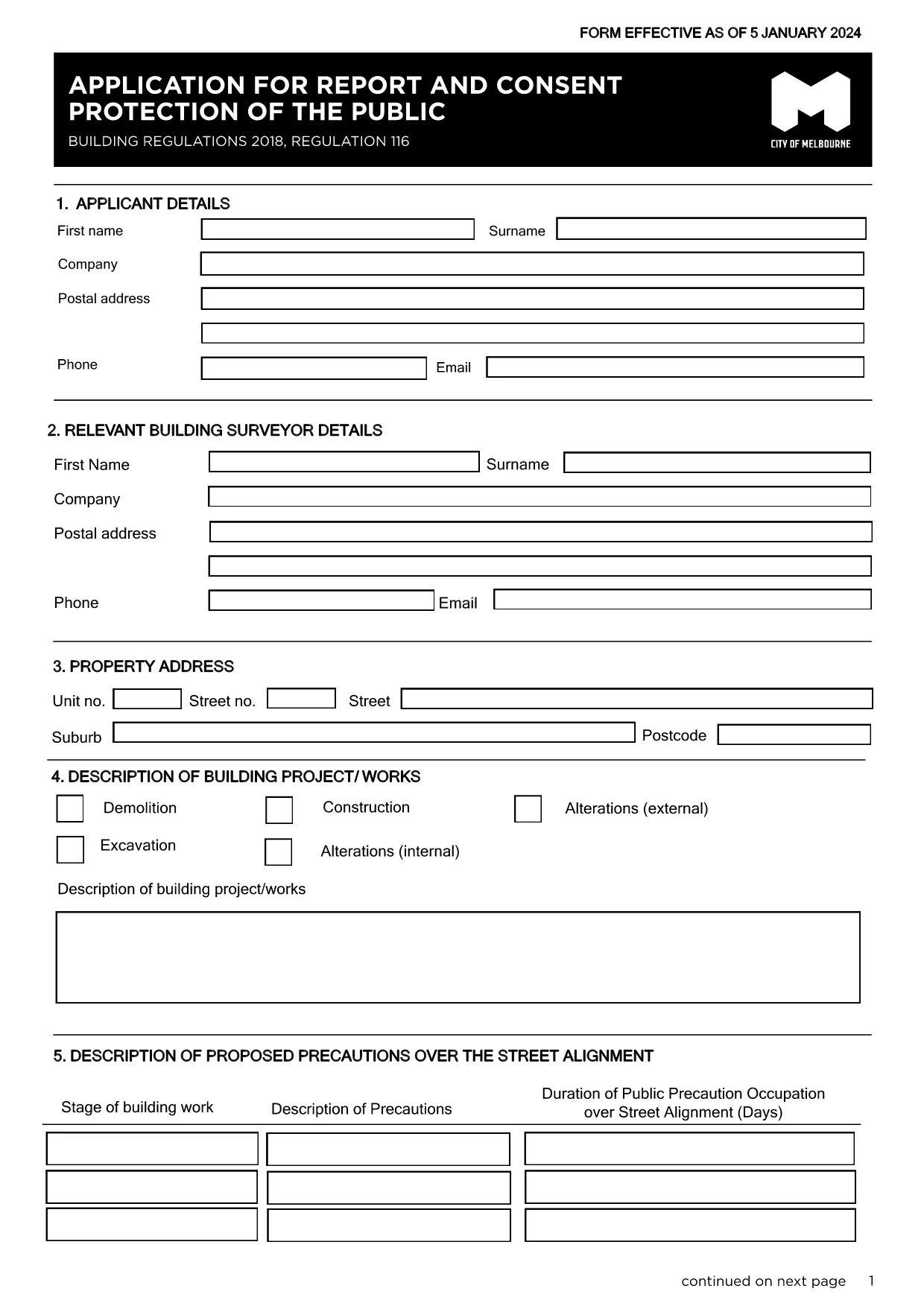
The Regulation 116 Report and Consent is required for any construction or demolition work that could affect public safety in the City of Melbourne. This fillable PDF lets you provide all necessary details quickly, securely, and in compliance with the Building Act 1993.

What Is the Reg 116 Report & Consent?

Reg 116 is a specific provision of the Building Regulations 2018 that mandates a formal report and consent before starting public‑protection measures such as hoardings, scaffolding, gantries, or exclusion zones. The form captures project details, risk assessments, and proposed safety measures.

When Do You Need This Form?

  • Any new construction, alteration, or demolition that impacts public spaces.
  • When a Construction Management Plan (CMP) is required.
  • Before installing hoardings, scaffolding, or temporary structures near footpaths or roads.

How to Complete the Form Online with Formize

Instead of downloading the PDF and editing it in a separate program, simply click the "Fill out this form" button on this page. The Formize PDF Filler app will load automatically, allowing you to:

  1. Enter text directly into each field.
  2. Upload supporting drawings or risk‑assessment documents.
  3. Save a draft and return later if needed.
  4. Submit the completed form securely to the City of Melbourne.

Common Mistakes to Avoid

  • Leaving required fields blank – the system will highlight missing information before you can submit.
  • Using an outdated version – always use the latest PDF linked below.
  • Submitting without a signature – you can add a digital signature in Formize or print, sign, and scan.

Where to Submit the Completed Form

After you finish, the Formize platform routes the file to the City of Melbourne’s Building Department. You will receive a confirmation email with a reference number. If you prefer a hard copy, you can print the PDF and deliver it to:

Building Department
City of Melbourne
Administration Building, 120 Swanston St
Melbourne VIC 3000

For any questions, refer to the FAQ section below.

FAQ
  • What is Regulation 116?

    Regulation 116 requires a Report and Consent for any work that could affect public safety, such as hoardings, scaffolding, or temporary structures.

  • Do I need a digital signature?

    A digital signature is accepted when using Formize. If you prefer a handwritten signature, print, sign, and scan the completed PDF before uploading.

  • Can I save a draft and finish later?

    Yes. Formize lets you save your progress and return to the form at any time using the same browser session or by logging into your account.

  • How long does the approval take?

    The City of Melbourne typically reviews Reg 116 submissions within 5‑10 business days, depending on project complexity.

  • Is there a fee for filing Reg 116?

    Yes. As of the latest schedule, the fee for a public‑protection consent is $334.50. Check the City’s fee schedule for updates.

  • What if I submit the wrong version of the form?

    The system will reject outdated versions. Always use the latest PDF linked on this page to avoid delays.

  • Can I submit the form by email?

    While you can email a completed PDF, using the Formize online submission ensures the file is logged and tracked automatically.

  • What supporting documents are required?

    Attach a site plan, risk assessment, and any relevant engineering drawings. The form’s attachment section lists all required files.

  • Who can I contact for help?

    For technical assistance with the Formize filler, refer to the help icon on the form. For regulatory questions, contact the City of Melbourne Building Department at building@melbourne.vic.gov.au.

WIE MAN

So füllen Sie Reg 116 report and consent kostenlos online in 5 einfachen Schritten aus:

  1. 1
    Open the Fillable Form
    Click the "Fill out this form" button on the page. The Formize PDF Filler will load in your browser.
  2. 2
    Enter Your Details
    Complete each field – project description, site address, risk assessments, and proposed safety measures.
  3. 3
    Add Attachments
    Upload any required drawings, risk‑assessment PDFs, or supporting documents using the attachment icon.
  4. 4
    Review and Sign
    Use the built‑in digital signature tool or print, sign, and scan the form before final submission.
  5. 5
    Submit Securely
    Press the Submit button. You’ll receive an email confirmation with a reference number for tracking.
Formize PDF Filler-App
ÜBER

Reg 116 report and consent-Vorlage

Mit den traditionellen Funktionen zum Anzeigen und Ausfüllen eines PDF-Dokuments, kombiniert mit den Vorteilen einer Webanwendung und einem ansprechenden Layout, können Sie Reg 116 report and consent in wenigen Minuten fertigstellen.

MERKMALE

PDF-Filler

Der einfachste Weg, PDF-Formulare online auszufüllen

  • Füllen Sie schnell Reg 116 report and consent aus
    Suchen Sie nach einer Möglichkeit, Reg 116 report and consent schnell online auszufüllen? Mit unserem kostenlosen Online-PDF-Formularausfüller wissen Sie, wie Sie dieses PDF-Dokument in weniger als einer Minute bearbeiten und ausfüllen.
  • Einfach zu bedienender Online-PDF-Editor
    Haben Sie es satt, PDF-Dateien auszudrucken, damit Sie sie bearbeiten können, bevor Sie sie erneut scannen und zurücksenden? PDF-Dokumente kostenlos online bearbeiten. Nutzen Sie unseren Online-PDF-Editor, um Zeit und Papier zu sparen.
  • Tolle Tools, alle Plattformen
    Sie fragen sich, wie Sie Reg 116 report and consent auf einem Mac ausfüllen oder vielleicht einen kostenlosen PDF-Ausfüller verwenden können? Unsere Online-PDF-Tools funktionieren auf allen Plattformen.
  • Sichere Dateispeicherung
    Fertige "Reg 116 report and consent"-Dateien werden in einer gesicherten Datenbank gespeichert, die vom Amazon Cloud-Hosting verwaltet wird. Sie können Ihre Dateien jederzeit aus unserem System löschen. In jedem Fall werden diese Dateien nach 24 Stunden automatisch gelöscht.
  • Chatten Sie mit Reg 116 report and consent
    Chatten Sie mit „Reg 116 report and consent“ auf Chatize, einem kostenlosen PDF-Leseassistenten. Stellen Sie Fragen und erhalten Sie Antworten von „Reg 116 report and consent“. Klicken Sie einfach oben auf die Schaltfläche Mit Dokument chatten.

Füllsitzung löschen

Die ausgewählte Füllsitzung löschen? In diesem Fall gehen Ihre Fortschritte beim Ausfüllen des Formulars verloren.

Bearbeitungssitzung löschen

Ausgewählte Bearbeitungssitzung löschen? In diesem Fall geht Ihr Fortschritt beim Erstellen und Bearbeiten des Formulars verloren.