
Sprache auswählen

Online Registration Application Form (Fillable PDF)

  1. Land Australien
  2. Sprache Englisch
  3. Abteilung Transport NSW
  4. Aktivität Kfz-Zulassung
Online Registration Application Form (Fillable PDF)

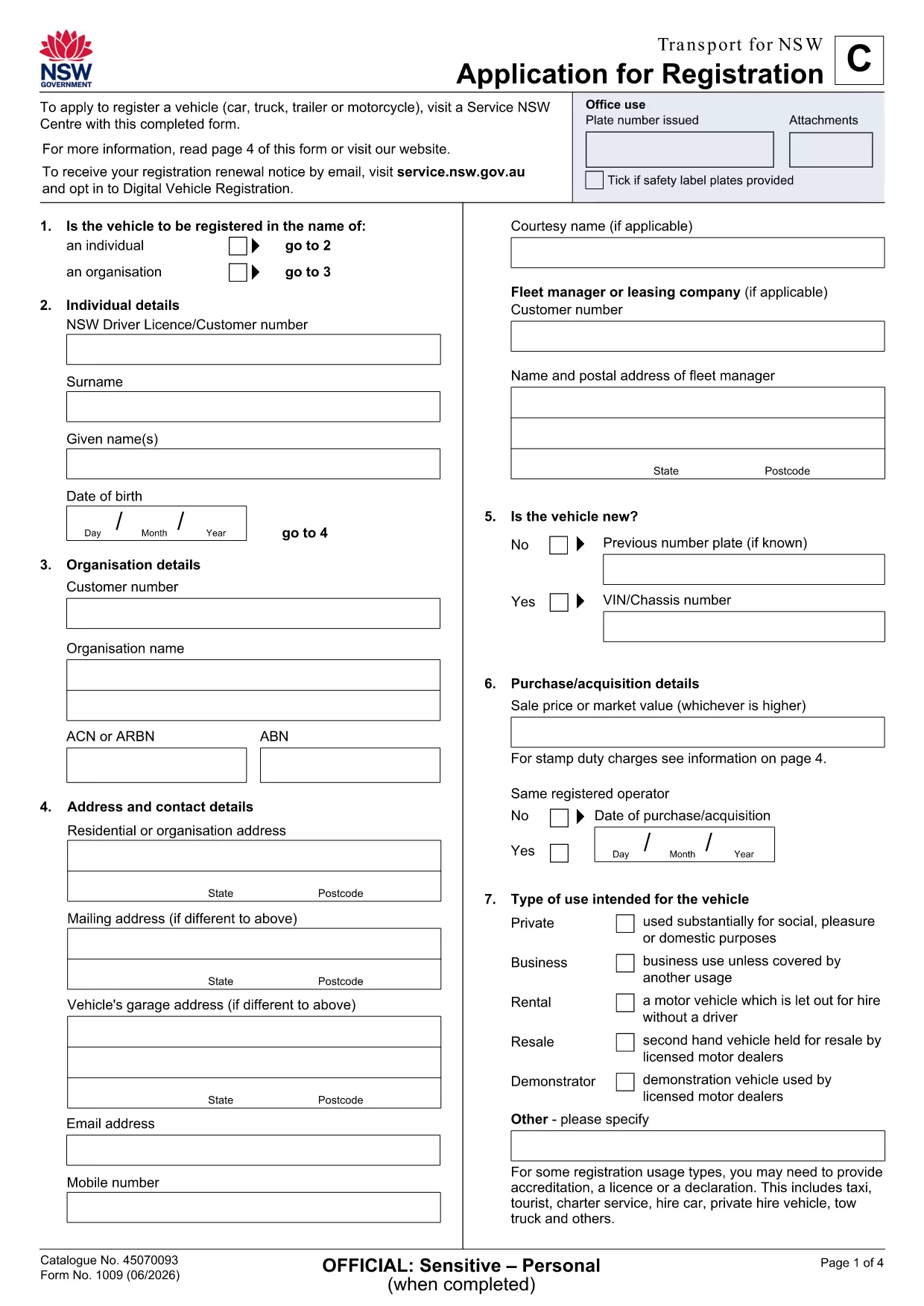
Looking for a fast, secure way to submit your registration? Our online registration application form is available as a fillable PDF, so you can complete it directly in your browser without printing or scanning.

The form is hosted on Formize.com and integrates with the Formize PDF Filler app, giving you a smooth, interactive experience. Simply click the button below, fill in the required fields, and download the completed PDF ready for submission.

Why Use a Fillable PDF Form?

Fillable PDFs retain the official layout of government forms while allowing digital entry. Benefits include:

  • Instant validation of required fields
  • Automatic saving so you never lose your progress
  • Easy printing or electronic submission
  • Compliance with accessibility standards

Step‑by‑Step Guide to Complete the Form

Follow the quick steps below to finish your registration without hassle.

Common Mistakes to Avoid

Even a small error can delay processing. Watch out for:

  • Leaving mandatory fields blank
  • Using unsupported fonts or special characters
  • Signing with a colored pen instead of black (digital signatures are accepted)
  • Forgetting to attach required supporting documents

Where to Submit Your Registration

After completing the form, you can either:

  • Print and deliver it to your nearest Service NSW centre, or
  • Upload the PDF through the online portal if the service is available in your state.

Make sure to keep a copy for your records.

FAQ
  • Do I need Adobe Acrobat to fill out this form?

    No. The Formize PDF Filler works directly in your web browser, so Adobe Acrobat is not required.

  • Can I save my progress and finish later?

    Yes. The filler automatically saves your entries locally, allowing you to return and complete the form at any time.

  • Is the form accepted if I submit it electronically?

    Most Australian states accept the completed PDF electronically. Check your local Service NSW guidelines for exact submission methods.

  • What if I make a mistake after saving?

    Open the saved PDF again with the Formize PDF Filler, edit the incorrect fields, and re‑save the document.

  • Do I need to print and sign the form with a pen?

    A digital signature is accepted for most registrations. If a handwritten signature is required, print the completed PDF and sign with a black pen.

  • Is my personal information secure?

    Formize uses SSL encryption for all data transferred between your browser and our servers, ensuring your information remains private.

WIE MAN

So füllen Sie online registration form kostenlos online in 5 einfachen Schritten aus:

  1. 1
    Click the "Fill out this form" button
    Start the process by clicking the button on this page. The Formize PDF Filler app will open in a new tab.
  2. 2
    Wait for the Formize PDF Filler to load
    The fillable PDF loads automatically. No download or extra software is required.
  3. 3
    Enter your information
    Fill in all required fields using the on‑screen text boxes. The app highlights any missing data.
  4. 4
    Review and sign
    Double‑check the entered details, add a digital signature if required, and click "Save".
  5. 5
    Download or submit
    Save the completed PDF to your device or follow the on‑screen instructions to submit it electronically.
Formize PDF Filler-App
ÜBER

Fahrzeugregistrierungsformulare

Wenn Sie ein Kraftfahrzeug, einen Anhänger oder ein Boot besitzen oder leasen, müssen Sie bestimmte Verpflichtungen erfüllen, um Ihr Fahrzeug gesetzlich zugelassen und sicher zu halten.

online registration form ist eines der Fahrzeugregistrierungsformulare, bei denen es sich um Dokumente handelt, die zur Registrierung eines Kraftfahrzeugs bei der zuständigen Landes- oder Provinzbehörde verwendet werden. Diese Formulare werden normalerweise benötigt, wenn eine Person ein neues oder gebrauchtes Fahrzeug kauft oder wenn sie mit einem Fahrzeug in einen neuen Staat oder eine neue Provinz zieht.

Die genauen Anforderungen und Formulare, die für die Fahrzeugregistrierung erforderlich sind, können je nach Standort variieren, aber im Allgemeinen umfasst der Prozess die Bereitstellung von Informationen über das Fahrzeug, den Eigentümer und etwaige Pfandrechte am Fahrzeug.

Sobald die Registrierungsformulare und Gebühren eingereicht wurden, stellt die Landes- oder Provinzbehörde dem Eigentümer des Fahrzeugs eine Registrierungsbescheinigung oder ein Nummernschild aus. Mit dieser Zulassung darf das Fahrzeug legal auf öffentlichen Straßen und Autobahnen betrieben werden.

MERKMALE

PDF-Filler

Der einfachste Weg, PDF-Formulare online auszufüllen

  • Füllen Sie schnell online registration form aus
    Suchen Sie nach einer Möglichkeit, online registration form schnell online auszufüllen? Mit unserem kostenlosen Online-PDF-Formularausfüller wissen Sie, wie Sie dieses PDF-Dokument in weniger als einer Minute bearbeiten und ausfüllen.
  • Einfach zu bedienender Online-PDF-Editor
    Haben Sie es satt, PDF-Dateien auszudrucken, damit Sie sie bearbeiten können, bevor Sie sie erneut scannen und zurücksenden? PDF-Dokumente kostenlos online bearbeiten. Nutzen Sie unseren Online-PDF-Editor, um Zeit und Papier zu sparen.
  • Tolle Tools, alle Plattformen
    Sie fragen sich, wie Sie online registration form auf einem Mac ausfüllen oder vielleicht einen kostenlosen PDF-Ausfüller verwenden können? Unsere Online-PDF-Tools funktionieren auf allen Plattformen.
  • Sichere Dateispeicherung
    Fertige "online registration form"-Dateien werden in einer gesicherten Datenbank gespeichert, die vom Amazon Cloud-Hosting verwaltet wird. Sie können Ihre Dateien jederzeit aus unserem System löschen. In jedem Fall werden diese Dateien nach 24 Stunden automatisch gelöscht.
  • Chatten Sie mit online registration form
    Chatten Sie mit „online registration form“ auf Chatize, einem kostenlosen PDF-Leseassistenten. Stellen Sie Fragen und erhalten Sie Antworten von „online registration form“. Klicken Sie einfach oben auf die Schaltfläche Mit Dokument chatten.

Füllsitzung löschen

Die ausgewählte Füllsitzung löschen? In diesem Fall gehen Ihre Fortschritte beim Ausfüllen des Formulars verloren.

Bearbeitungssitzung löschen

Ausgewählte Bearbeitungssitzung löschen? In diesem Fall geht Ihr Fortschritt beim Erstellen und Bearbeiten des Formulars verloren.