
Sprache auswählen

RTB‑45 Notice of Rent Increase – Fillable PDF

  1. Sprache Englisch
  2. Land Kanada
  3. Aktivität Mietverhältnis
  4. Zustand Britisch-Kolumbien
RTB‑45 Notice of Rent Increase – Fillable PDF

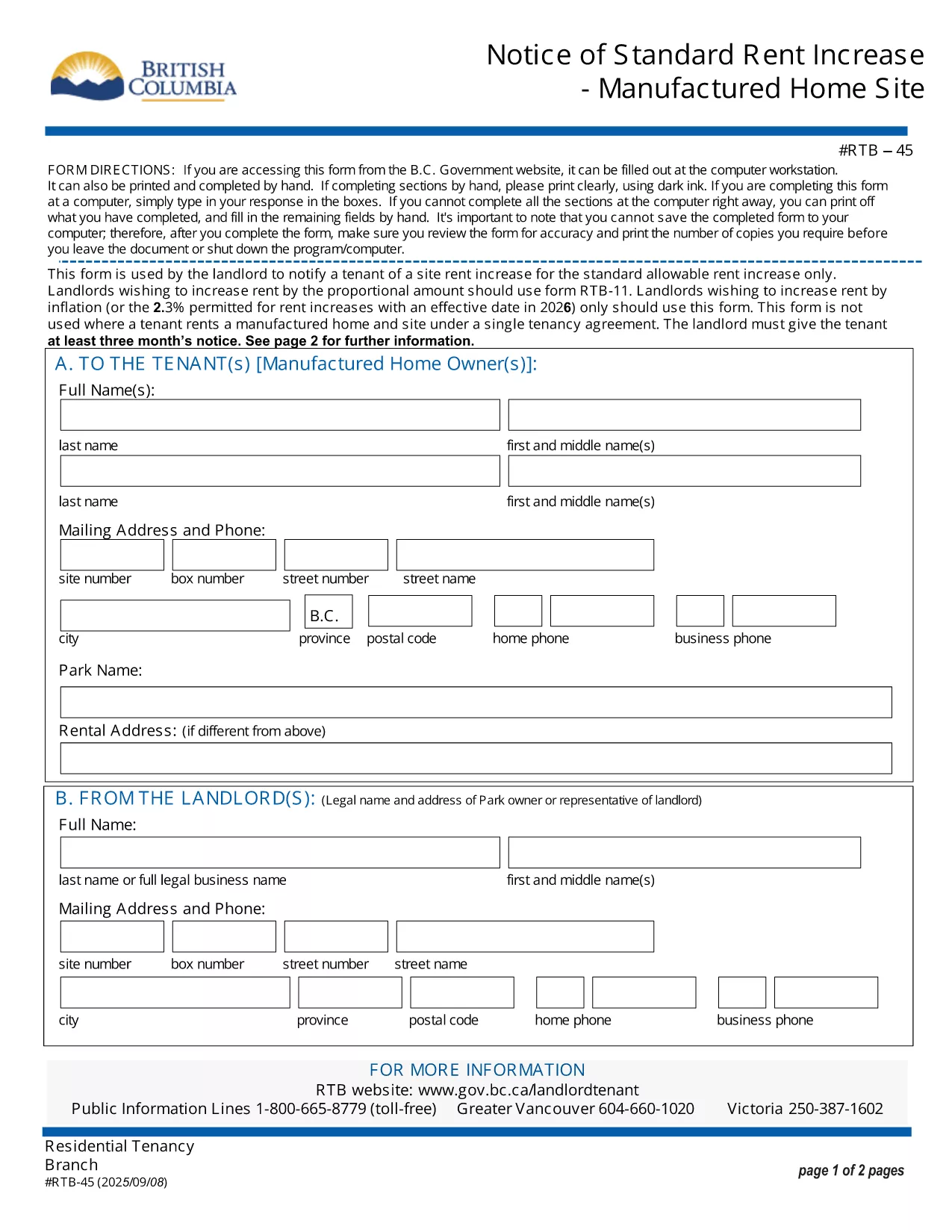
The RTB‑45 is the official notice used in British Columbia to inform tenants of a rent increase for manufactured home sites. Landlords must provide this form at least three months before the increase takes effect, as required by the Residential Tenancy Act.

Our fillable PDF version lets you complete the notice directly in your browser—no printing, scanning, or faxing needed. Simply click the button below, fill the required fields, and download a legally‑compliant PDF ready to serve.

What Is the RTB‑45 Form?

The RTB‑45 details the new rent amount, the date the increase starts, and the reason for the change. It must be signed by the landlord (or authorized agent) and delivered to the tenant in writing.

How to Complete the RTB‑45 Online

Using Formize’s PDF Filler, the process is quick and secure:

  • Click the "Fill out this form" button.
  • Wait for the Formize PDF Filler app to load.
  • Enter the landlord’s contact information, tenant’s name, current rent, new rent, and effective date.
  • Review the populated fields for accuracy.
  • Save or download the completed PDF and serve it to the tenant.

Common Mistakes to Avoid

  • Incorrect notice period: BC law requires at least three months’ written notice.
  • Missing signatures: The form is not valid without the landlord’s signature.
  • Wrong effective date: The increase cannot take effect before the tenancy has been in place for 12 months.

Download & Save Your Completed Form

After filling out the RTB‑45, you can download the PDF for your records or email it directly to the tenant. The fillable version retains all formatting, ensuring the document remains compliant with BC tenancy regulations.

FAQ
  • Who must use the RTB‑45 form?

    Landlords of manufactured home sites in British Columbia must use RTB‑45 to give tenants written notice of a rent increase.

  • How many days notice is required?

    BC law requires at least three months (90 days) written notice before the rent increase takes effect.

  • Can I submit the RTB‑45 electronically?

    Yes. The fillable PDF can be completed online and emailed to the tenant, as long as the tenant receives a legible, signed copy.

  • Do I need a lawyer to fill out the form?

    No. The form is straightforward; just follow the on‑screen prompts. If you have complex questions, consult a tenancy specialist.

  • What happens if I miss the notice period?

    If the three‑month notice isn’t given, the rent increase is invalid and you must re‑issue a new RTB‑45 with proper notice.

  • Is the fillable PDF compatible with all browsers?

    The Formize PDF Filler works with modern browsers (Chrome, Edge, Firefox, Safari). For best results, use the latest version.

WIE MAN

So füllen Sie RTB-45 kostenlos online in 5 einfachen Schritten aus:

  1. 1
    Click the Fill Out Button
    Press the "Fill out this form" button on the page to launch the Formize PDF Filler.
  2. 2
    Wait for the Filler to Load
    The app loads in a few seconds; a loading indicator will appear.
  3. 3
    Enter Required Information
    Complete each field: landlord details, tenant name, current rent, new rent, and effective date.
  4. 4
    Review and Validate
    Double‑check all entries for accuracy and ensure the signature field is filled.
  5. 5
    Save or Download
    Click "Save" to store the form in your account or "Download" to get a printable PDF.
Formize PDF Filler-App
ÜBER

Formulare für Vermieter und/oder Mieter, um Maßnahmen im Zusammenhang mit Mietverträgen vorzuschlagen.

RTB-45 ist die Art von Wohnungsmietverträgen, die von den meisten privaten Vermietern und Wohnungsbaugesellschaften verwendet wird.

Es gibt eine Reihe von Angelegenheiten, bei denen Vermieter oder Mieter bestimmte Regeln befolgen müssen, die in den Vorschriften festgelegt sind. In einigen Fällen kann es erforderlich sein, dass sie ein Formular ausfüllen, das als „vorgeschriebenes Formular“ bezeichnet wird und Maßnahmen vorschlägt, die die andere Partei des Mietvertrags betreffen können.

Die Formulare werden als vorgeschriebene Formulare bezeichnet, weil die darin enthaltenen Formulierungen sorgfältig formuliert wurden, um sicherzustellen, dass die Person, die das Formular ausfüllt, und die Person, der es zugestellt wird, verstehen können, was vorgeschlagen wird und was sie als Reaktion darauf tun können. Wird das Formular nicht korrekt ausgefüllt, kann die vorgeschlagene Maßnahme ungültig werden.

Sie dürfen den Wortlaut in diesen Formularen nicht ändern, es sei denn, ein Formular besagt, dass Sie dies tun dürfen. Wenn Sie den Wortlaut ändern, kann das Formular ungültig werden. Sie müssen auch alle im Formular festgelegten Kündigungsfristen einhalten.

MERKMALE

PDF-Filler

Der einfachste Weg, PDF-Formulare online auszufüllen

  • Füllen Sie schnell RTB-45 aus
    Suchen Sie nach einer Möglichkeit, RTB-45 schnell online auszufüllen? Mit unserem kostenlosen Online-PDF-Formularausfüller wissen Sie, wie Sie dieses PDF-Dokument in weniger als einer Minute bearbeiten und ausfüllen.
  • Einfach zu bedienender Online-PDF-Editor
    Haben Sie es satt, PDF-Dateien auszudrucken, damit Sie sie bearbeiten können, bevor Sie sie erneut scannen und zurücksenden? PDF-Dokumente kostenlos online bearbeiten. Nutzen Sie unseren Online-PDF-Editor, um Zeit und Papier zu sparen.
  • Tolle Tools, alle Plattformen
    Sie fragen sich, wie Sie RTB-45 auf einem Mac ausfüllen oder vielleicht einen kostenlosen PDF-Ausfüller verwenden können? Unsere Online-PDF-Tools funktionieren auf allen Plattformen.
  • Sichere Dateispeicherung
    Fertige "RTB-45"-Dateien werden in einer gesicherten Datenbank gespeichert, die vom Amazon Cloud-Hosting verwaltet wird. Sie können Ihre Dateien jederzeit aus unserem System löschen. In jedem Fall werden diese Dateien nach 24 Stunden automatisch gelöscht.
  • Chatten Sie mit RTB-45
    Chatten Sie mit „RTB-45“ auf Chatize, einem kostenlosen PDF-Leseassistenten. Stellen Sie Fragen und erhalten Sie Antworten von „RTB-45“. Klicken Sie einfach oben auf die Schaltfläche Mit Dokument chatten.

Füllsitzung löschen

Die ausgewählte Füllsitzung löschen? In diesem Fall gehen Ihre Fortschritte beim Ausfüllen des Formulars verloren.

Bearbeitungssitzung löschen

Ausgewählte Bearbeitungssitzung löschen? In diesem Fall geht Ihr Fortschritt beim Erstellen und Bearbeiten des Formulars verloren.