
Sprache auswählen

IMM 5476 – Use of a Representative (Canada)

  1. Land Kanada
  2. Sprache Englisch Französisch
  3. Aktivität Visa
IMM 5476 – Use of a Representative (Canada)

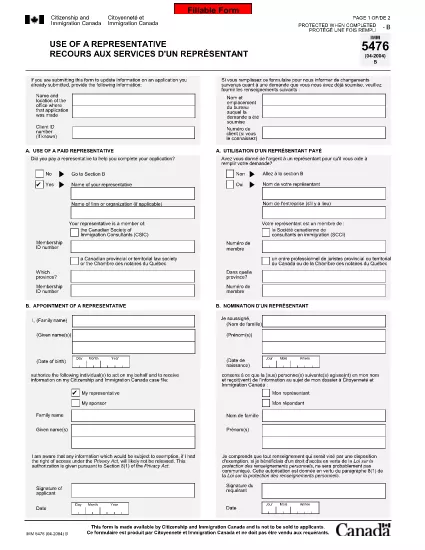
The IMM 5476 – Use of a Representative form allows you to officially appoint an immigration consultant, lawyer, or another authorized person to act on your behalf with Immigration, Refugees and Citizenship Canada (IRCC) and the Canada Border Services Agency (CBSA). This form is required for most permanent‑resident, temporary‑resident, and citizenship applications.

What Is the IMM 5476 Form?

IMM 5476 is a government‑issued PDF that records the details of your chosen representative, their contact information, and the scope of authority you are granting. It is available in both English and French and must be signed by both you (the applicant) and your representative.

How to Fill Out IMM 5476 Online

Instead of downloading the PDF and editing it manually, simply click the "Fill out this form" button on the page. Our Formize PDF Filler app will load the fillable version instantly, letting you complete the form directly in your browser.

Common Mistakes to Avoid

  • Incorrect Representative Details: Double‑check the name, address, and CRA‑issued client number of your representative.
  • Missing Signatures: Both the applicant and the representative must sign; unsigned forms are rejected.
  • Wrong Language Version: Use the official English or French version that matches the rest of your application package.
  • Out‑of‑Date Form: Always use the latest version – the link below always points to the current PDF.

When to Submit the Form

Attach IMM 5476 to the same package as your main application (e.g., Express Entry, Study Permit, Visitor Visa). If you change representatives later, submit a new, signed IMM 5476 with your updated request.

Need More Help?

While Formize does not provide live support, you can find detailed guidance on the IRCC website or consult a licensed immigration professional.

FAQ
  • Do I need a lawyer to fill out IMM 5476?

    No. You can appoint any authorized representative, such as a licensed immigration consultant, lawyer, or family member, as long as they have a valid client number.

  • Can I change my representative after submitting the form?

    Yes. Submit a new, signed IMM 5476 with the updated representative’s details and include a brief letter explaining the change.

  • Is a digital signature accepted?

    IRCC accepts electronic signatures generated within a fillable PDF application like Formize, provided the signature field is clearly marked.

  • What happens if I forget to sign the form?

    An unsigned IMM 5476 will be considered incomplete and may delay processing of your entire application.

  • Do I need to submit both English and French versions?

    Submit only the language version that matches the rest of your application package. IRCC does not require both versions.

  • Is there a fee to use the Formize PDF Filler?

    No. Formize provides free access to fillable PDFs for government forms like IMM 5476.

  • Can I print the form after filling it online?

    Yes. Once you finish, click "Download PDF" and print a hard copy if your submission requires a physical signature.

  • Where can I find the latest version of IMM 5476?

    The link on this page always points to the most recent version published by Immigration, Refugees and Citizenship Canada.

WIE MAN

So füllen Sie IMM 5476 kostenlos online in 5 einfachen Schritten aus:

  1. 1
    Open the Fillable Form
    Click the "Fill out this form" button on the page. The Formize PDF Filler app will load the IMM 5476 form directly in your browser.
  2. 2
    Enter Applicant Information
    Fill in your full name, client ID, and contact details in the Applicant section. All fields are required.
  3. 3
    Enter Representative Details
    Provide the representative’s name, firm, address, phone, and email. Make sure the CRA client number matches the one on record.
  4. 4
    Add Signatures
    Use the built‑in signature fields to sign electronically. Both you and your representative must sign before saving.
  5. 5
    Download or Submit
    After completing the form, click "Download PDF" to save a copy for your records, then attach it to your immigration application package.
Formize PDF Filler-App
ÜBER

Visa-Formulare

IMM 5476 ist eines der Visa-Formulare, bei denen es sich um Dokumente handelt, die zur Beantragung eines Visums für die Einreise in ein fremdes Land verwendet werden. Ein Visum ist ein Dokument, das es einem Ausländer ermöglicht, für einen bestimmten Zeitraum in ein fremdes Land einzureisen, sich dort aufzuhalten und manchmal dort zu arbeiten. Die genauen Formulare und Anforderungen für die Erlangung eines Visums variieren je nach Land und Art des Visums.

Visaformulare erfordern in der Regel persönliche Informationen wie Name, Geburtsdatum und Passinformationen sowie Informationen über den Zweck und die Dauer der Reise, das beabsichtigte Ziel und ob dem Antragsteller zuvor ein Visum verweigert oder aus einem Land ausgewiesen wurde. Die Formulare können auch Begleitdokumente wie einen Reisepass, Fotos und einen Nachweis über finanzielle Unterstützung erfordern.

In den Vereinigten Staaten sind die häufigsten Visumformulare die Formulare DS-160 und DS-260. Das DS-160-Formular wird zur Beantragung eines Nichteinwanderungsvisums verwendet, während das DS-260-Formular zur Beantragung eines Einwanderungsvisums verwendet wird. Diese Formulare erfordern detaillierte Informationen über die persönliche und Reisegeschichte des Antragstellers sowie unterstützende Unterlagen wie Reisepass, Reiseroute und Finanzunterlagen.

Andere Länder haben möglicherweise andere Visaformulare und -anforderungen, aber das grundlegende Verfahren umfasst in der Regel das Ausfüllen eines Visumantrags, das Bereitstellen von Begleitdokumenten und die Teilnahme an einem Gespräch mit einem Konsularbeamten in einer US-Botschaft oder einem US-Konsulat. Es ist wichtig zu beachten, dass das Visumantragsverfahren komplex und zeitaufwändig sein kann, und es wird empfohlen, dass Personen, die ein Visum beantragen, einen Anwalt für Einwanderungsfragen oder einen anderen qualifizierten Fachmann konsultieren, um sicherzustellen, dass alle erforderlichen Formulare und Anforderungen erfüllt sind.

MERKMALE

PDF-Filler

Der einfachste Weg, PDF-Formulare online auszufüllen

  • Füllen Sie schnell IMM 5476 aus
    Suchen Sie nach einer Möglichkeit, IMM 5476 schnell online auszufüllen? Mit unserem kostenlosen Online-PDF-Formularausfüller wissen Sie, wie Sie dieses PDF-Dokument in weniger als einer Minute bearbeiten und ausfüllen.
  • Einfach zu bedienender Online-PDF-Editor
    Haben Sie es satt, PDF-Dateien auszudrucken, damit Sie sie bearbeiten können, bevor Sie sie erneut scannen und zurücksenden? PDF-Dokumente kostenlos online bearbeiten. Nutzen Sie unseren Online-PDF-Editor, um Zeit und Papier zu sparen.
  • Tolle Tools, alle Plattformen
    Sie fragen sich, wie Sie IMM 5476 auf einem Mac ausfüllen oder vielleicht einen kostenlosen PDF-Ausfüller verwenden können? Unsere Online-PDF-Tools funktionieren auf allen Plattformen.
  • Sichere Dateispeicherung
    Fertige "IMM 5476"-Dateien werden in einer gesicherten Datenbank gespeichert, die vom Amazon Cloud-Hosting verwaltet wird. Sie können Ihre Dateien jederzeit aus unserem System löschen. In jedem Fall werden diese Dateien nach 24 Stunden automatisch gelöscht.
  • Chatten Sie mit IMM 5476
    Chatten Sie mit „IMM 5476“ auf Chatize, einem kostenlosen PDF-Leseassistenten. Stellen Sie Fragen und erhalten Sie Antworten von „IMM 5476“. Klicken Sie einfach oben auf die Schaltfläche Mit Dokument chatten.

Füllsitzung löschen

Die ausgewählte Füllsitzung löschen? In diesem Fall gehen Ihre Fortschritte beim Ausfüllen des Formulars verloren.

Bearbeitungssitzung löschen

Ausgewählte Bearbeitungssitzung löschen? In diesem Fall geht Ihr Fortschritt beim Erstellen und Bearbeiten des Formulars verloren.