
Sprache auswählen

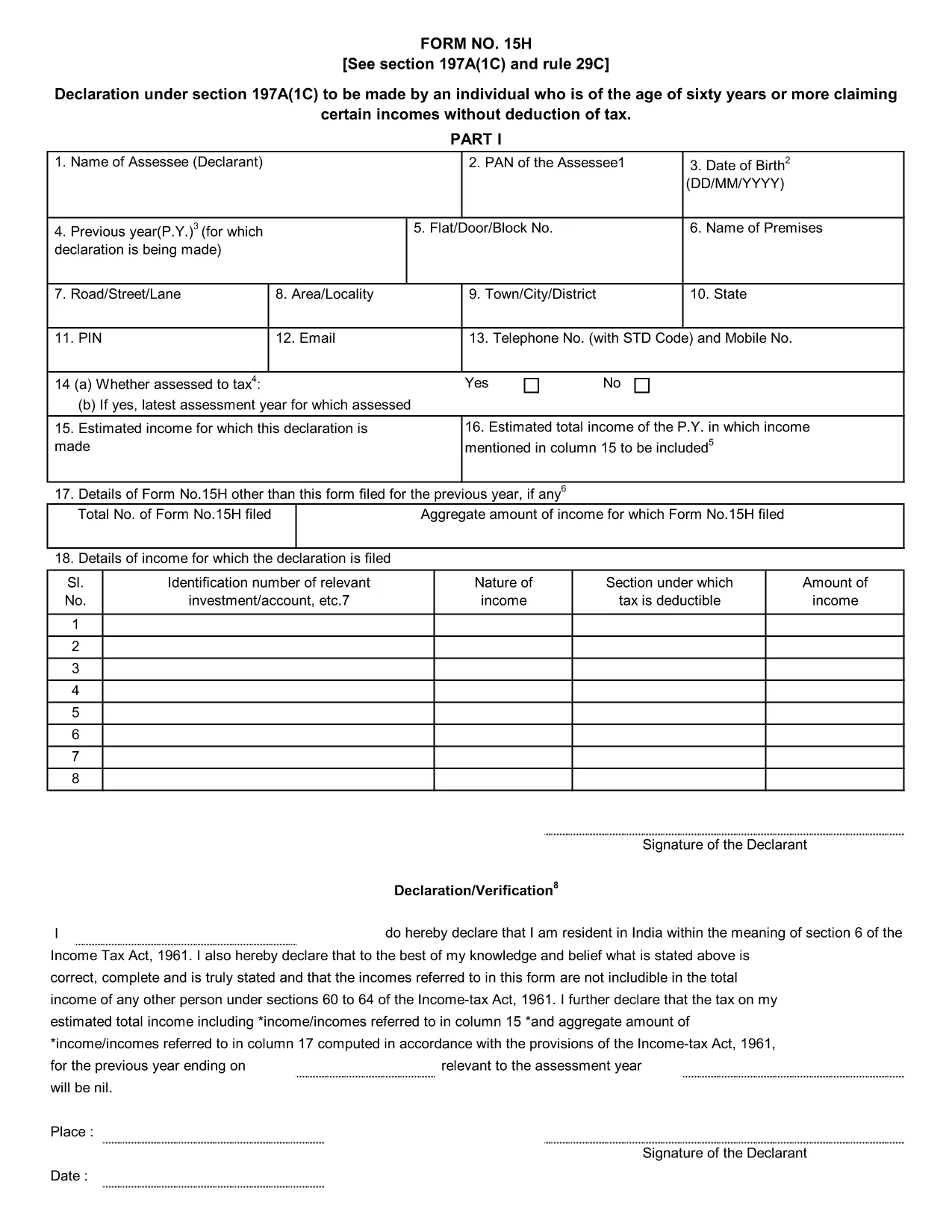
Form 15H – Senior Citizens’ Interest Income Declaration (Fillable PDF)

  1. Sprache Englisch
  2. Land Indien
  3. Aktivität Steuern
Form 15H – Senior Citizens’ Interest Income Declaration (Fillable PDF)

Form 15H is a declaration under sub‑section (1C) of section 197A of the Income‑Tax Act, 1961. It allows senior citizens (aged 60 years or more) to request that tax be **not deducted at source (TDS)** on interest earned from bank or post‑office deposits, provided they meet certain income thresholds.

Who Can Use Form 15H?

  • Resident individuals aged 60 years or above.
  • Those whose total taxable income does not exceed the limits set by the Act (₹3 lakhs for ages 60‑79, ₹5 lakhs for 80 years and above).
  • Taxpayers who receive interest income from banks, post offices, or cooperative societies.

Eligibility & Income Limits

The Income‑Tax Department defines two income caps:

  • Age 60‑79: Taxable income ≤ ₹300,000 per financial year.
  • Age 80 and above: Taxable income ≤ ₹500,000 per financial year.

If your interest earnings are below ₹50,000 in a year, you are not required to submit Form 15H – the bank will not deduct TDS automatically.

How to Fill Form 15H Online

Instead of downloading the PDF and editing it locally, simply click the "Fill out this form" button on this page. The Formize PDF Filler app will load in your browser, allowing you to complete the declaration in a few easy steps:

  1. Enter your name, PAN, and address as they appear on your PAN card.
  2. Provide your bank account details where the interest is credited.
  3. Declare the total interest earned and confirm it is within the eligible limit.
  4. Sign electronically (or print, sign, and scan if you prefer a hard copy).
  5. Submit the form to your bank or download it for manual submission.

Common Mistakes to Avoid

  • Entering an incorrect PAN – the bank will reject the form.
  • Mis‑calculating total taxable income; always include salary, rent, and other earnings.
  • Submitting the form after the interest has already been taxed – it must be given **before** the bank deducts TDS.
  • Leaving the "Signature" field blank; an electronic signature is acceptable in most banks.

Download & Save the Fillable PDF

If you prefer a local copy, you can download the official fillable PDF below. The file retains the original layout and can be opened with any modern PDF reader.

Download Form 15H – Fillable PDF

Using Formize’s online filler saves time, reduces errors, and lets you submit the declaration instantly to your bank.

FAQ
  • What is the purpose of Form 15H?

    Form 15H allows senior citizens (60 years or older) to request that TDS be **not deducted** on interest income when their total taxable income is below the specified thresholds.

  • Can I use Form 15H if I am below 60 years?

    No. Individuals under 60 should use Form 15G, which serves the same purpose for younger taxpayers.

  • Do I need to submit Form 15H every financial year?

    Yes. The declaration is valid only for the financial year in which it is submitted. A new Form 15H must be provided each year you wish to claim the exemption.

  • What if my interest income exceeds ₹50,000?

    If interest exceeds ₹50,000, the bank will automatically deduct TDS unless you submit a valid Form 15H before the interest is credited.

  • Is an electronic signature accepted?

    Most banks accept an electronic signature entered via the Formize PDF Filler. If your bank requires a handwritten signature, print, sign, and scan the completed form.

  • Can I submit Form 15H online to the Income‑Tax Department?

    Form 15H is submitted to the **bank or post‑office** where the interest is credited, not directly to the Income‑Tax Department.

  • What happens if I submit an incorrect PAN?

    The bank will reject the form and may still deduct TDS. Ensure the PAN matches the one on your PAN card.

  • Do I need to attach any supporting documents?

    Generally no. The form itself is sufficient, but keep your interest statements handy in case the bank requests verification.

WIE MAN

So füllen Sie Form 15H kostenlos online in 5 einfachen Schritten aus:

  1. 1
    Click the Fill‑out Button
    Press the "Fill out this form" button on the page. The Formize PDF Filler loads instantly in your browser.
  2. 2
    Enter Your Details
    Provide your name, PAN, address, bank account number, and total interest earned as prompted.
  3. 3
    Verify Income Limits
    The filler will automatically check that your total taxable income is within the ₹3 Lakh or ₹5 Lakh limits based on age.
  4. 4
    Add Your Signature
    Use the electronic signature tool or upload a scanned signature image.
  5. 5
    Submit or Download
    Send the completed form directly to your bank via their portal, or download the PDF for manual submission.
Formize PDF Filler-App
ÜBER

Formulare der Einkommensteuerabteilung

Form 15H ist eines der offiziellen Formulare, die von der indischen Einkommensteuerbehörde zur Verwaltung und Erhebung von Einkommenssteuern verwendet werden. Diese Formulare werden von Steuerzahlern verwendet, um den Steuerbehörden ihre Einkünfte, Abzüge und Steuerschulden zu melden.

Hier sind einige häufig verwendete Formulare der Einkommensteuerbehörde in Indien:

ITR-1 (Sahaj): Dieses Formular wird verwendet von Personen, die Einkünfte aus Gehalt, Hausbesitz und anderen Quellen wie Zinsen, Rente oder Familienrente haben. Es gilt für Einzelpersonen mit einem Gesamteinkommen von bis zu Rs. 50 Lakhs.

ITR-2: Dieses Formular wird von Einzelpersonen und Hindus verwendet Ungeteilte Familien (HUFs), deren Einkommen aus anderen Quellen als Geschäft oder Beruf stammt. Es gilt für Personen mit einem Gesamteinkommen von mehr als Rs. 50 Lakhs oder ausländisches Vermögen/Einkommen.

ITR-3: Dieses Formular wird von Einzelpersonen und HUFs verwendet Einkünfte aus Gewerbe oder Beruf haben. Sie gilt für Personen, die Einkünfte aus einer Partnerschaftsgesellschaft beziehen, sowie für Freiberufler, die einen Beruf ausüben.

ITR-4 (Sugam): Dieses Formular wird verwendet von Einzelpersonen, HUFs und Firmen (außer LLP), die sich für die präsumtive Besteuerung gemäß Abschnitt 44AD, 44ADA oder 44AE des Einkommensteuergesetzes entschieden haben.

Formular 16: Dieses Formular wird von Arbeitgebern an Arbeitnehmer bereitgestellt und enthält Einzelheiten Gehalt, Quellensteuer (TDS) und andere damit zusammenhängende Informationen. Es hilft Mitarbeitern bei der korrekten Abgabe ihrer Einkommensteuererklärung.

Formular 26AS: Dies ist kein Formular, sondern eine jährliche konsolidierte Steuererklärung Hier finden Sie eine Zusammenfassung steuerbezogener Informationen wie TDS, Vorsteuer und vom Steuerzahler gezahlte Selbstveranlagungssteuer. Es hilft Steuerzahlern, ihre Steuerverbindlichkeiten bei der Einreichung ihrer Einkommensteuererklärungen zu überprüfen.

Dies sind nur einige Beispiele für Formulare der Einkommensteuerbehörde in Indien. Die spezifischen Formen und Anforderungen können je nach Art des Einkommens, der Steuerzahlerkategorie und den in Indien geltenden Steuergesetzen variieren. Es ist wichtig, die offizielle Website des indischen Einkommensteuerministeriums (www.incometaxindia.gov.in) zu konsultieren oder professionellen Rat einzuholen, um genaue und aktuelle Informationen zu erhalten die spezifischen Einkommensteuerformulare, die für Ihre Steuersituation in Indien relevant sind.

MERKMALE

PDF-Filler

Der einfachste Weg, PDF-Formulare online auszufüllen

  • Füllen Sie schnell Form 15H aus
    Suchen Sie nach einer Möglichkeit, Form 15H schnell online auszufüllen? Mit unserem kostenlosen Online-PDF-Formularausfüller wissen Sie, wie Sie dieses PDF-Dokument in weniger als einer Minute bearbeiten und ausfüllen.
  • Einfach zu bedienender Online-PDF-Editor
    Haben Sie es satt, PDF-Dateien auszudrucken, damit Sie sie bearbeiten können, bevor Sie sie erneut scannen und zurücksenden? PDF-Dokumente kostenlos online bearbeiten. Nutzen Sie unseren Online-PDF-Editor, um Zeit und Papier zu sparen.
  • Tolle Tools, alle Plattformen
    Sie fragen sich, wie Sie Form 15H auf einem Mac ausfüllen oder vielleicht einen kostenlosen PDF-Ausfüller verwenden können? Unsere Online-PDF-Tools funktionieren auf allen Plattformen.
  • Sichere Dateispeicherung
    Fertige "Form 15H"-Dateien werden in einer gesicherten Datenbank gespeichert, die vom Amazon Cloud-Hosting verwaltet wird. Sie können Ihre Dateien jederzeit aus unserem System löschen. In jedem Fall werden diese Dateien nach 24 Stunden automatisch gelöscht.
  • Chatten Sie mit Form 15H
    Chatten Sie mit „Form 15H“ auf Chatize, einem kostenlosen PDF-Leseassistenten. Stellen Sie Fragen und erhalten Sie Antworten von „Form 15H“. Klicken Sie einfach oben auf die Schaltfläche Mit Dokument chatten.

Füllsitzung löschen

Die ausgewählte Füllsitzung löschen? In diesem Fall gehen Ihre Fortschritte beim Ausfüllen des Formulars verloren.

Bearbeitungssitzung löschen

Ausgewählte Bearbeitungssitzung löschen? In diesem Fall geht Ihr Fortschritt beim Erstellen und Bearbeiten des Formulars verloren.