
Sprache auswählen

IRS Form 706 – Fillable Estate Tax Return PDF

  1. Land USA
  2. Sprache Englisch
  3. Aktivität Steuern
  4. Abteilung Finanzamt
IRS Form 706 – Fillable Estate Tax Return PDF

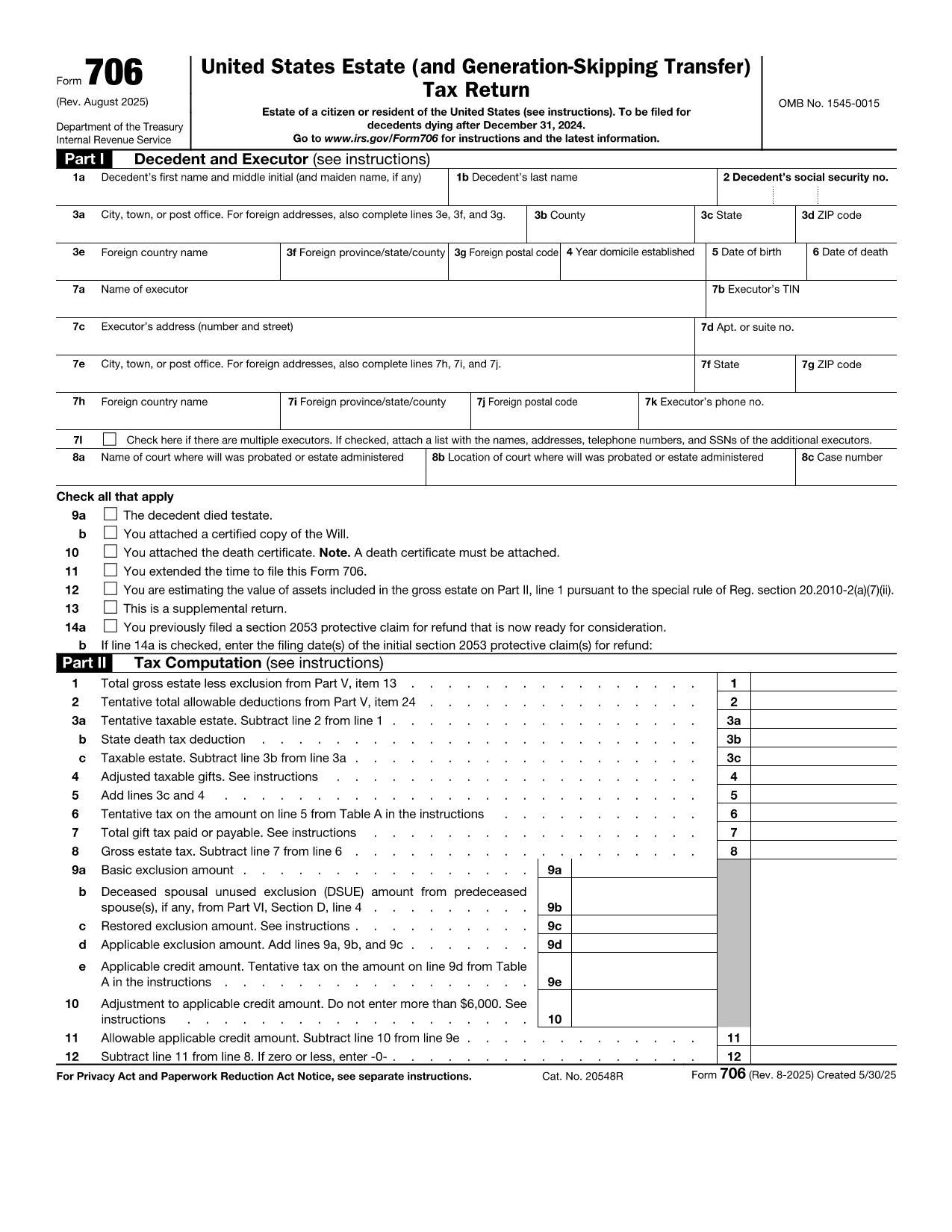
Form 706 is the United States federal estate (and generation‑skipping transfer) tax return. Executors use it to report the value of a decedent’s estate, claim deductions, and calculate any estate tax owed. The official fillable PDF is now hosted on Formize, allowing you to complete the form directly in your browser without installing additional software.

What Is IRS Form 706?

Form 706 must be filed when the gross estate exceeds the annual exemption limit (e.g., $12.92 million for 2023). It includes sections for:

  • Decedent’s personal information
  • Gross estate valuation
  • Allowable deductions (funeral expenses, state death taxes, charitable gifts, etc.)
  • Tax computation and credits
  • Schedules for assets, liabilities, and generation‑skipping transfers

Key Features of the Fillable PDF

  • Interactive fields that auto‑advance as you type
  • Built‑in calculations for taxable estate and tax due
  • Easy navigation with a table of contents
  • Direct export to PDF for printing or electronic filing

How to Complete Form 706 with Formize

Instead of downloading the PDF and opening a separate editor, simply click the "Fill out this form" button on this page. The Formize PDF Filler app will load in seconds, and you can start entering data immediately.

Common Mistakes to Avoid

  • Missing signatures: Both the executor and any paid preparer must sign.
  • Incorrect exemption amount: Verify the exemption limit for the year of death.
  • Omitting Schedule R‑1: Required when state death taxes are paid.
  • Late filing: File within nine months of death or request a six‑month extension.

Where to Submit the Completed Form

Mail the signed Form 706 to the address listed in the official instructions (based on the estate’s location). If you are filing electronically, use the IRS e‑file system for estate tax returns.

Anweisungen

  • Formular 706 Anweisungen - Anleitung für Form 706, United States Estate (und Generation-Skipping Transfer) Steuererklärung
FAQ
  • Who must file IRS Form 706?

    The executor (or personal representative) of a decedent’s estate must file Form 706 when the gross estate exceeds the federal exemption amount for the year of death.

  • What is the filing deadline for Form 706?

    Form 706 is due nine months after the date of death. An automatic six‑month extension can be requested, but any tax owed must be paid by the original deadline.

  • Can I file Form 706 electronically?

    Yes. After completing the fillable PDF, you can submit the form through the IRS’s e‑file system for estate tax returns.

  • Do I need a professional to complete Form 706?

    While the form is complex, the fillable PDF with built‑in calculations simplifies the process. However, many executors still consult a tax professional for large or complicated estates.

  • What if the estate is below the exemption limit?

    If the gross estate is less than the exemption amount, you are not required to file Form 706, but you should keep records in case the IRS requests them later.

  • How are generation‑skipping transfers reported?

    Schedule G of Form 706 captures generation‑skipping transfer (GST) tax information. The fillable PDF includes prompts to enter GST taxable amounts and credits.

  • What deductions can I claim on Form 706?

    Common deductions include funeral expenses, administrative costs, state death taxes paid, charitable contributions, and certain mortgage interest.

  • Is there a penalty for filing Form 706 late?

    Yes. Late filing may result in a penalty of 5% of the tax due for each month the return is late, up to a maximum of 25%.

WIE MAN

So füllen Sie Form 706 kostenlos online in 5 einfachen Schritten aus:

  1. 1
    Open the Fillable Form
    Click the "Fill out this form" button on the page. The Formize PDF Filler will launch in a new tab.
  2. 2
    Enter Estate Information
    Start with the decedent’s name, SSN, and date of death. Then fill in the gross estate values and any deductions.
  3. 3
    Review Calculations
    The filler automatically updates the taxable estate and tax due. Verify the numbers against your supporting documents.
  4. 4
    Add Signatures
    Use the built‑in signature tool to sign as the executor and, if applicable, the paid preparer.
  5. 5
    Save and Export
    When finished, click "Export PDF". Save the file to your computer, print a copy, or submit electronically as instructed.
Formize PDF Filler-App
ÜBER

Steuerformulare

Form 706 ist eines der Steuerformulare, mit denen Informationen zu Steuern an die zuständige Steuerbehörde gemeldet werden. Es gibt verschiedene Arten von Steuerformularen, einschließlich bundesstaatlicher, bundesstaatlicher und lokaler Steuerformulare, die je nach den Umständen und dem Standort des Steuerzahlers variieren können.

MERKMALE

PDF-Filler

Der einfachste Weg, PDF-Formulare online auszufüllen

  • Füllen Sie schnell Form 706 aus
    Suchen Sie nach einer Möglichkeit, Form 706 schnell online auszufüllen? Mit unserem kostenlosen Online-PDF-Formularausfüller wissen Sie, wie Sie dieses PDF-Dokument in weniger als einer Minute bearbeiten und ausfüllen.
  • Einfach zu bedienender Online-PDF-Editor
    Haben Sie es satt, PDF-Dateien auszudrucken, damit Sie sie bearbeiten können, bevor Sie sie erneut scannen und zurücksenden? PDF-Dokumente kostenlos online bearbeiten. Nutzen Sie unseren Online-PDF-Editor, um Zeit und Papier zu sparen.
  • Tolle Tools, alle Plattformen
    Sie fragen sich, wie Sie Form 706 auf einem Mac ausfüllen oder vielleicht einen kostenlosen PDF-Ausfüller verwenden können? Unsere Online-PDF-Tools funktionieren auf allen Plattformen.
  • Sichere Dateispeicherung
    Fertige "Form 706"-Dateien werden in einer gesicherten Datenbank gespeichert, die vom Amazon Cloud-Hosting verwaltet wird. Sie können Ihre Dateien jederzeit aus unserem System löschen. In jedem Fall werden diese Dateien nach 24 Stunden automatisch gelöscht.
  • Chatten Sie mit Form 706
    Chatten Sie mit „Form 706“ auf Chatize, einem kostenlosen PDF-Leseassistenten. Stellen Sie Fragen und erhalten Sie Antworten von „Form 706“. Klicken Sie einfach oben auf die Schaltfläche Mit Dokument chatten.

Füllsitzung löschen

Die ausgewählte Füllsitzung löschen? In diesem Fall gehen Ihre Fortschritte beim Ausfüllen des Formulars verloren.

Bearbeitungssitzung löschen

Ausgewählte Bearbeitungssitzung löschen? In diesem Fall geht Ihr Fortschritt beim Erstellen und Bearbeiten des Formulars verloren.