

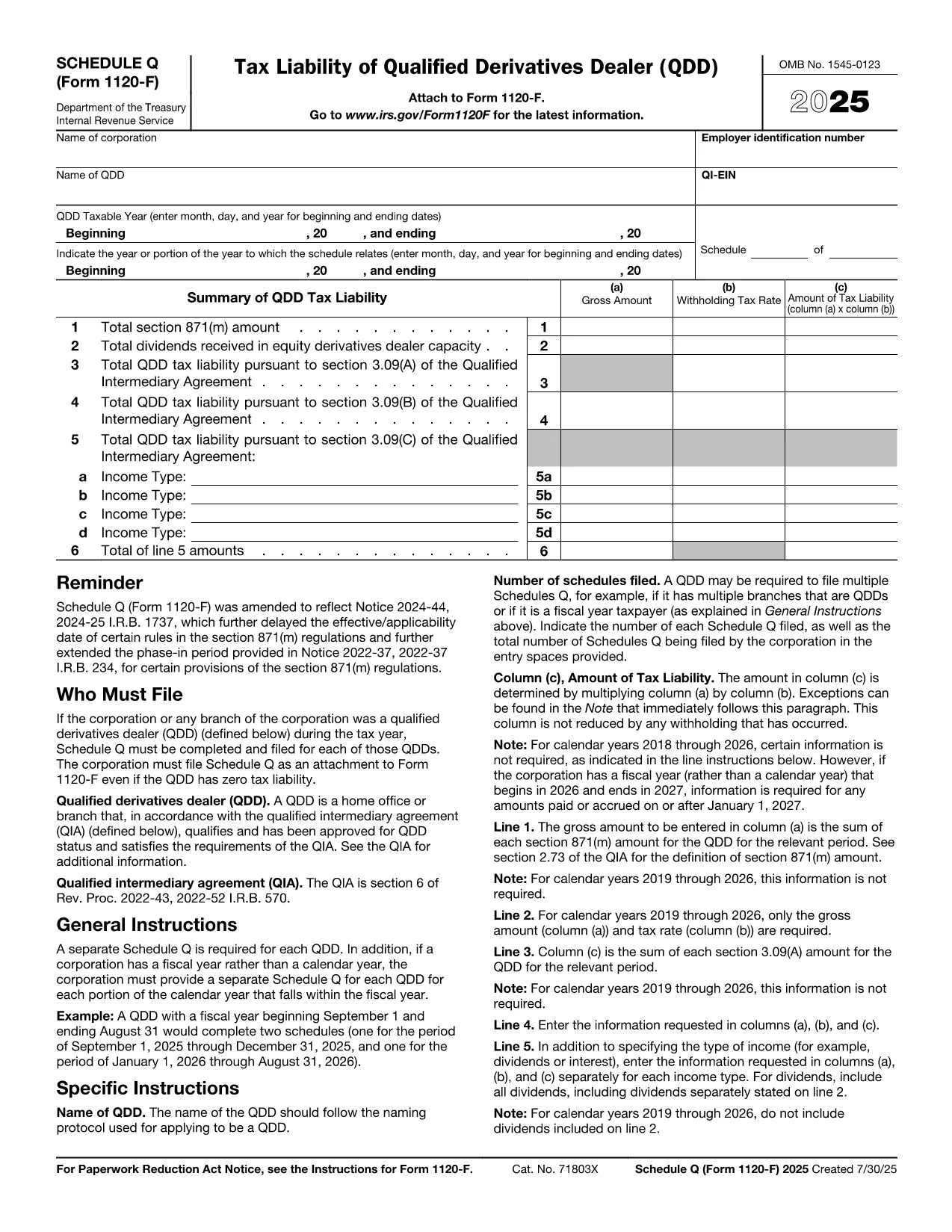

Formulare des Internal Revenue Service (IRS).
Form 1120-F Schedule Q ist eines der offiziellen Steuerformulare, die in den Vereinigten Staaten zur Meldung von Einkünften, zur Geltendmachung von Abzügen und Gutschriften, zur Berechnung der Steuerschuld und zur Erfüllung anderer steuerbezogener Verpflichtungen verwendet werden. Der IRS ist die Bundesbehörde, die für die Verwaltung und Durchsetzung der internen Steuergesetze in den Vereinigten Staaten zuständig ist.
Hier sind einige Beispiele für Formulare des Internal Revenue Service:
Formular 1040: Dies ist das primäre Einkommensteuererklärungsformular, das von den meisten Steuerzahlern verwendet wird. Es wird verwendet, um verschiedene Einkommensarten zu melden, Abzüge und Gutschriften geltend zu machen, die Steuerschuld zu berechnen und festzustellen, ob ein Steuerzahler zusätzliche Steuern schuldet oder Anspruch auf eine Rückerstattung hat.
Formular 1099: Es gibt verschiedene Variationen von Formular 1099, wie zum Beispiel 1099-MISC, 1099-INT, 1099-DIV usw. Diese Formulare werden verwendet, um Einkünfte zu melden, die Einzelpersonen oder Unternehmen aus anderen Quellen als der Beschäftigung beziehen, beispielsweise aus selbständiger Tätigkeit Einkommen, Zinserträge, Dividendenerträge und Mieteinnahmen.
Formular W-2: Dieses Formular wird von Arbeitgebern verwendet, um an Arbeitnehmer gezahlte Löhne und Steuern zu melden von ihrem Lohn einbehalten. Mitarbeiter verwenden die Informationen auf Formular W-2, um ihre individuellen Steuererklärungen auszufüllen.
Formular 941: Arbeitgeber verwenden dieses Formular, um die Lohnsteuer, einschließlich der einbehaltenen Bundeseinkommenssteuer, der Sozialversicherungssteuer und der Medicare-Steuer, für ihre Mitarbeiter zu melden.
Formular 1065: Dieses Formular wird von Personengesellschaften verwendet, um ihre Einkünfte, Abzüge und Steuerschulden zu melden. Personengesellschaften selbst zahlen keine Einkommensteuer; Stattdessen geben die Partner ihren Anteil am Partnerschaftseinkommen in ihrer individuellen Steuererklärung an.
Formular 1120: Dies ist das Körperschaftssteuererklärungsformular, das von C-Unternehmen zur Meldung ihrer Einkünfte verwendet wird. Abzüge und Steuerpflicht.
Formular 990: Dieses Formular wird von steuerbefreiten Organisationen wie gemeinnützigen Organisationen und Wohltätigkeitsorganisationen verwendet Melden Sie ihre Finanzinformationen, Aktivitäten und die Einhaltung von Steuergesetzen.
Formular 8862: Dieses Formular wird von Steuerzahlern verwendet, die zuvor die Earned Income Tax Credit (EITC) beantragt haben. aber es wurde abgelehnt und ich möchte es nun erneut beanspruchen.
Dies sind nur einige Beispiele der zahlreichen IRS-Formulare, die zur Erfüllung verschiedener steuerbezogener Verpflichtungen existieren. Die spezifischen Formulare, die für eine Einzelperson oder ein Unternehmen erforderlich sind, hängen von ihren individuellen Umständen, Einkommensquellen und Abzügen ab. Es wird empfohlen, die offizielle Website des Internal Revenue Service (www.irs.gov) zu konsultieren oder professionellen Steuerrat einzuholen, um genaue und aktuelle Informationen zum jeweiligen IRS zu erhalten Formulare, die für Ihre Steuersituation relevant sind.