
Sprache auswählen

Form 13614-C – Fillable PDF for IRS Tax Interview

  1. Land USA
  2. Sprache Englisch
  3. Aktivität Steuern
  4. Abteilung Finanzamt
Form 13614-C – Fillable PDF for IRS Tax Interview

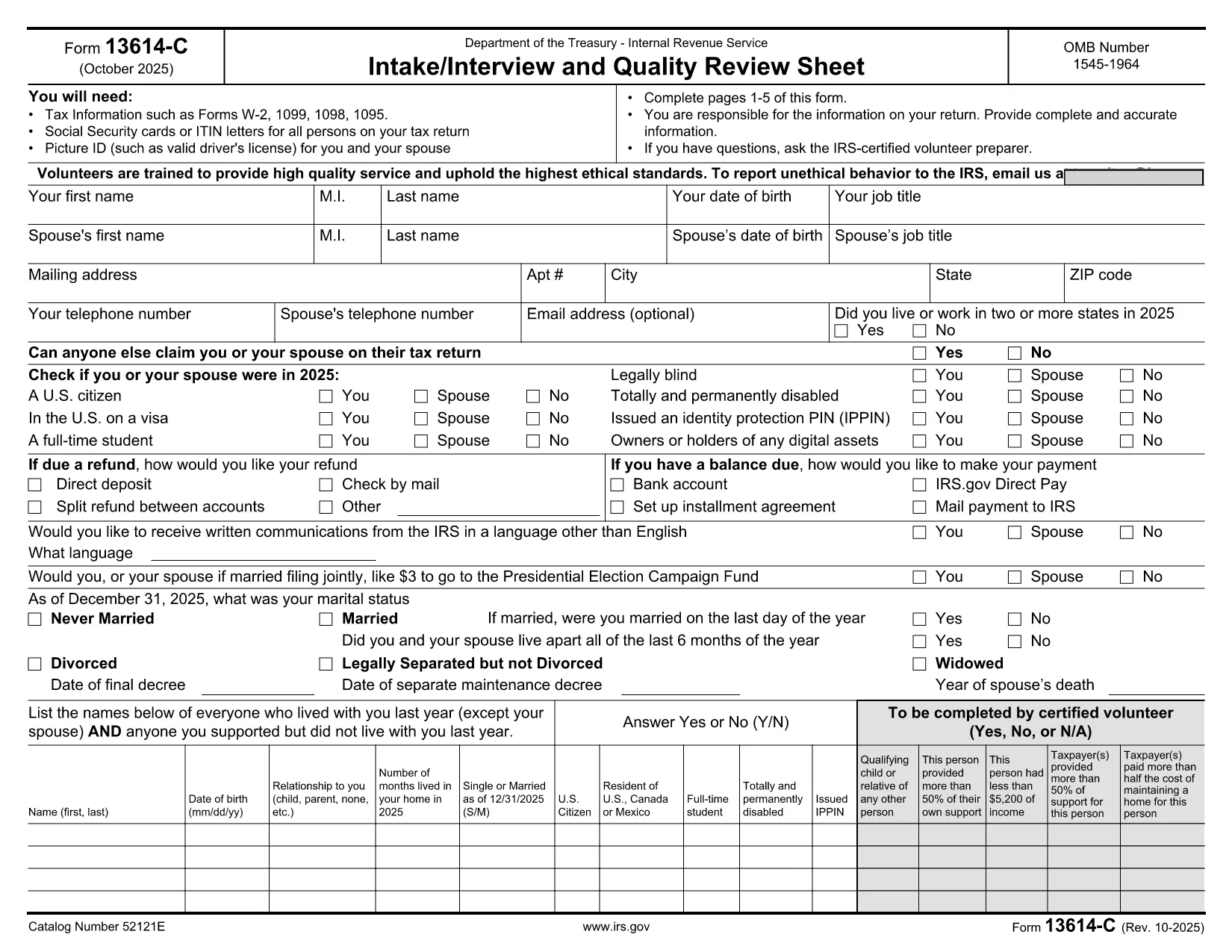
Form 13614-C, also known as the Intake/Interview and Quality Review Sheet, is the standard worksheet used by IRS‑approved Volunteer Income Tax Assistance (VITA) and Tax Counseling for the Elderly (TCE) programs. It collects essential taxpayer information—income, deductions, credits, and filing status—so volunteers can prepare an accurate return.

While the IRS provides a printable PDF, you can now complete the entire form online, save time, and eliminate errors. Our Formize fillable PDF loads instantly in your browser, lets you type directly into each field, and stores your data securely until you download the finished document.

Below you’ll find a quick overview of the form’s sections, step‑by‑step instructions for using the online filler, and tips to keep your submission error‑free.

FAQ
  • Is Form 13614-C required for every tax return?

    It is required only when a VITA/TCE volunteer is preparing your return. Independent filers can skip it, but many volunteers use it to gather accurate data.

  • Can I edit the form after I download it?

    Yes. The PDF is fully fillable, so you can reopen it in any PDF reader that supports form fields and make changes before final submission.

  • Do I need special software to use the online filler?

    No. Formize works in all modern browsers (Chrome, Edge, Firefox, Safari) and requires no additional plugins.

  • Is my personal information safe?

    All data stays in your browser until you choose to download or delete it. Formize does not store any personal information on external servers.

  • What if I make a mistake while filling the form?

    You can clear any field by selecting it and pressing Delete, or use the “Reset Form” button to start over without losing the rest of your entries.

  • Can I print the completed form?

    Absolutely. After you download the filled PDF, you can print it like any standard document.

  • Which version of Form 13614-C should I use?

    Use the most recent revision (October 2025). The link below always points to the latest official PDF.

WIE MAN

So füllen Sie form 13614-c kostenlos online in 3 einfachen Schritten aus:

  1. 1
    Click “Fill out this form”
    On the page, press the bright “Fill out this form” button. The Formize PDF Filler app will open in a new tab.
  2. 2
    Enter your information
    Type directly into each field—no printing or scanning required. Use the tab key to move quickly between sections.
  3. 3
    Save or download
    When you’re finished, click “Save” to store a copy in your browser or “Download” to get the completed PDF ready for submission.
Formize PDF Filler-App
ÜBER

Steuerformulare

form 13614-c ist eines der Steuerformulare, mit denen Informationen zu Steuern an die zuständige Steuerbehörde gemeldet werden. Es gibt verschiedene Arten von Steuerformularen, einschließlich bundesstaatlicher, bundesstaatlicher und lokaler Steuerformulare, die je nach den Umständen und dem Standort des Steuerzahlers variieren können.

MERKMALE

PDF-Filler

Der einfachste Weg, PDF-Formulare online auszufüllen

  • Füllen Sie schnell form 13614-c aus
    Suchen Sie nach einer Möglichkeit, form 13614-c schnell online auszufüllen? Mit unserem kostenlosen Online-PDF-Formularausfüller wissen Sie, wie Sie dieses PDF-Dokument in weniger als einer Minute bearbeiten und ausfüllen.
  • Einfach zu bedienender Online-PDF-Editor
    Haben Sie es satt, PDF-Dateien auszudrucken, damit Sie sie bearbeiten können, bevor Sie sie erneut scannen und zurücksenden? PDF-Dokumente kostenlos online bearbeiten. Nutzen Sie unseren Online-PDF-Editor, um Zeit und Papier zu sparen.
  • Tolle Tools, alle Plattformen
    Sie fragen sich, wie Sie form 13614-c auf einem Mac ausfüllen oder vielleicht einen kostenlosen PDF-Ausfüller verwenden können? Unsere Online-PDF-Tools funktionieren auf allen Plattformen.
  • Sichere Dateispeicherung
    Fertige "form 13614-c"-Dateien werden in einer gesicherten Datenbank gespeichert, die vom Amazon Cloud-Hosting verwaltet wird. Sie können Ihre Dateien jederzeit aus unserem System löschen. In jedem Fall werden diese Dateien nach 24 Stunden automatisch gelöscht.
  • Chatten Sie mit form 13614-c
    Chatten Sie mit „form 13614-c“ auf Chatize, einem kostenlosen PDF-Leseassistenten. Stellen Sie Fragen und erhalten Sie Antworten von „form 13614-c“. Klicken Sie einfach oben auf die Schaltfläche Mit Dokument chatten.

Füllsitzung löschen

Die ausgewählte Füllsitzung löschen? In diesem Fall gehen Ihre Fortschritte beim Ausfüllen des Formulars verloren.

Bearbeitungssitzung löschen

Ausgewählte Bearbeitungssitzung löschen? In diesem Fall geht Ihr Fortschritt beim Erstellen und Bearbeiten des Formulars verloren.