
Sprache auswählen

IRS Form 14693 – Application for Reduced Rate of Withholding on Whistleblower Award

  1. Land USA
  2. Sprache Englisch
  3. Aktivität Steuern
  4. Abteilung Finanzamt
IRS Form 14693 – Application for Reduced Rate of Withholding on Whistleblower Award

What Is Form 14693?

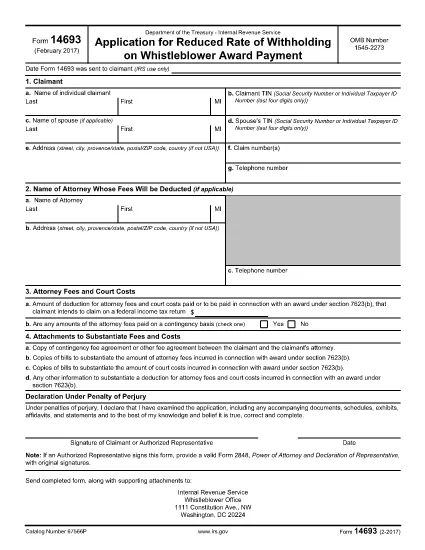
Form 14693 is the Internal Revenue Service’s official Application for Reduced Rate of Withholding on Whistleblower Award Payment. It allows eligible whistleblowers to request a lower tax withholding rate on award payments, helping them receive more cash up‑front.

Who Should Use This Form?

The form is intended for individuals who have been notified that they will receive a whistleblower award under Section 7623(b) of the Internal Revenue Code and wish to reduce the standard 24% withholding.

How to Complete Form 14693 Online

Instead of downloading and editing the PDF manually, simply click the "Fill out this form" button on this page. The Formize PDF Filler app will load the fillable version, and you can complete every field directly in your browser.

Common Mistakes to Avoid

  • Leaving any required field blank – the system will flag it before submission.
  • Entering an incorrect Social Security Number or Taxpayer Identification Number.
  • Misstating the award amount, which could affect the withholding calculation.

Where to Submit the Form

After completing the online form, print it or submit the electronically‑signed PDF to the IRS Whistleblower Office at the address shown in the instructions. Keep a copy for your records.

FAQ
  • Do I need a PDF editor to use Form 14693?

    No. With Formize you can fill the form directly in your browser—no extra software required.

  • Can I submit the form electronically?

    The IRS currently requires a printed copy, but you can use the filled PDF to ensure accuracy before printing.

  • What if I make a mistake after submitting?

    Correct the error on a new copy of the form and resend it to the Whistleblower Office. Keep a copy of both versions.

  • Is there a fee to use the Formize filler?

    Formize offers free filling for IRS forms like 14693. No hidden charges.

  • How long does the reduced withholding request take to process?

    Processing times vary, but the IRS typically acknowledges receipt within 30 days and finalizes the rate within 60‑90 days.

WIE MAN

So füllen Sie Form 14693 kostenlos online in 3 einfachen Schritten aus:

  1. 1
    Click the Fill‑Out Button
    Press the "Fill out this form" button on the page. The Formize PDF Filler app will open in a new tab.
  2. 2
    Enter Your Information
    Complete each field in the fillable PDF. Required fields are highlighted, and real‑time validation helps prevent errors.
  3. 3
    Save or Submit
    When finished, either download the completed PDF for mailing to the IRS or use the built‑in submit option if your agency accepts electronic filings.
Formize PDF Filler-App
ÜBER

Bundessteuerformulare

Form 14693 ist eines der Bundessteuerformulare, bei denen es sich um Dokumente handelt, die zur Meldung und Einreichung von Bundeseinkommenssteuern beim Internal Revenue Service (IRS) in den Vereinigten Staaten verwendet werden. Diese Formulare werden von Einzelpersonen, Unternehmen und Organisationen verwendet, um ihre Einkünfte, Abzüge und andere relevante Informationen anzugeben, die für die Berechnung ihrer Bundessteuerschuld erforderlich sind.

Das am häufigsten verwendete Bundessteuerformular ist das Formular 1040, das von einzelnen Steuerzahlern zur Meldung ihrer persönlichen Einkommenssteuer verwendet wird. Weitere häufig verwendete Formulare sind das Formular 1065 für Partnerschaften, Formular 1120 für Unternehmen und Formular 990 für steuerbefreite Organisationen.

Auf Bundessteuerformularen müssen Steuerzahler in der Regel verschiedene Einkommensquellen wie Löhne, Gehälter und Trinkgelder sowie Einkünfte aus Investitionen, Mietobjekten und anderen Quellen angeben. Die Formulare ermöglichen es Steuerzahlern auch, Abzüge und Gutschriften für verschiedene Ausgaben zu beantragen, beispielsweise für Spenden für wohltätige Zwecke, Hypothekenzinsen und Gesundheitsausgaben.

Es ist wichtig, die Bundessteuerformulare korrekt und rechtzeitig einzureichen, da ein Versäumnis dazu führen kann, dass der IRS Strafen und Zinsen verlangt.

MERKMALE

PDF-Filler

Der einfachste Weg, PDF-Formulare online auszufüllen

  • Füllen Sie schnell Form 14693 aus
    Suchen Sie nach einer Möglichkeit, Form 14693 schnell online auszufüllen? Mit unserem kostenlosen Online-PDF-Formularausfüller wissen Sie, wie Sie dieses PDF-Dokument in weniger als einer Minute bearbeiten und ausfüllen.
  • Einfach zu bedienender Online-PDF-Editor
    Haben Sie es satt, PDF-Dateien auszudrucken, damit Sie sie bearbeiten können, bevor Sie sie erneut scannen und zurücksenden? PDF-Dokumente kostenlos online bearbeiten. Nutzen Sie unseren Online-PDF-Editor, um Zeit und Papier zu sparen.
  • Tolle Tools, alle Plattformen
    Sie fragen sich, wie Sie Form 14693 auf einem Mac ausfüllen oder vielleicht einen kostenlosen PDF-Ausfüller verwenden können? Unsere Online-PDF-Tools funktionieren auf allen Plattformen.
  • Sichere Dateispeicherung
    Fertige "Form 14693"-Dateien werden in einer gesicherten Datenbank gespeichert, die vom Amazon Cloud-Hosting verwaltet wird. Sie können Ihre Dateien jederzeit aus unserem System löschen. In jedem Fall werden diese Dateien nach 24 Stunden automatisch gelöscht.
  • Chatten Sie mit Form 14693
    Chatten Sie mit „Form 14693“ auf Chatize, einem kostenlosen PDF-Leseassistenten. Stellen Sie Fragen und erhalten Sie Antworten von „Form 14693“. Klicken Sie einfach oben auf die Schaltfläche Mit Dokument chatten.

Füllsitzung löschen

Die ausgewählte Füllsitzung löschen? In diesem Fall gehen Ihre Fortschritte beim Ausfüllen des Formulars verloren.

Bearbeitungssitzung löschen

Ausgewählte Bearbeitungssitzung löschen? In diesem Fall geht Ihr Fortschritt beim Erstellen und Bearbeiten des Formulars verloren.