
Sprache auswählen

Form 637 – Application for Excise Tax Registration (Fillable PDF)

  1. Land USA
  2. Sprache Englisch
  3. Aktivität Steuern
  4. Abteilung Finanzamt
Form 637 – Application for Excise Tax Registration (Fillable PDF)

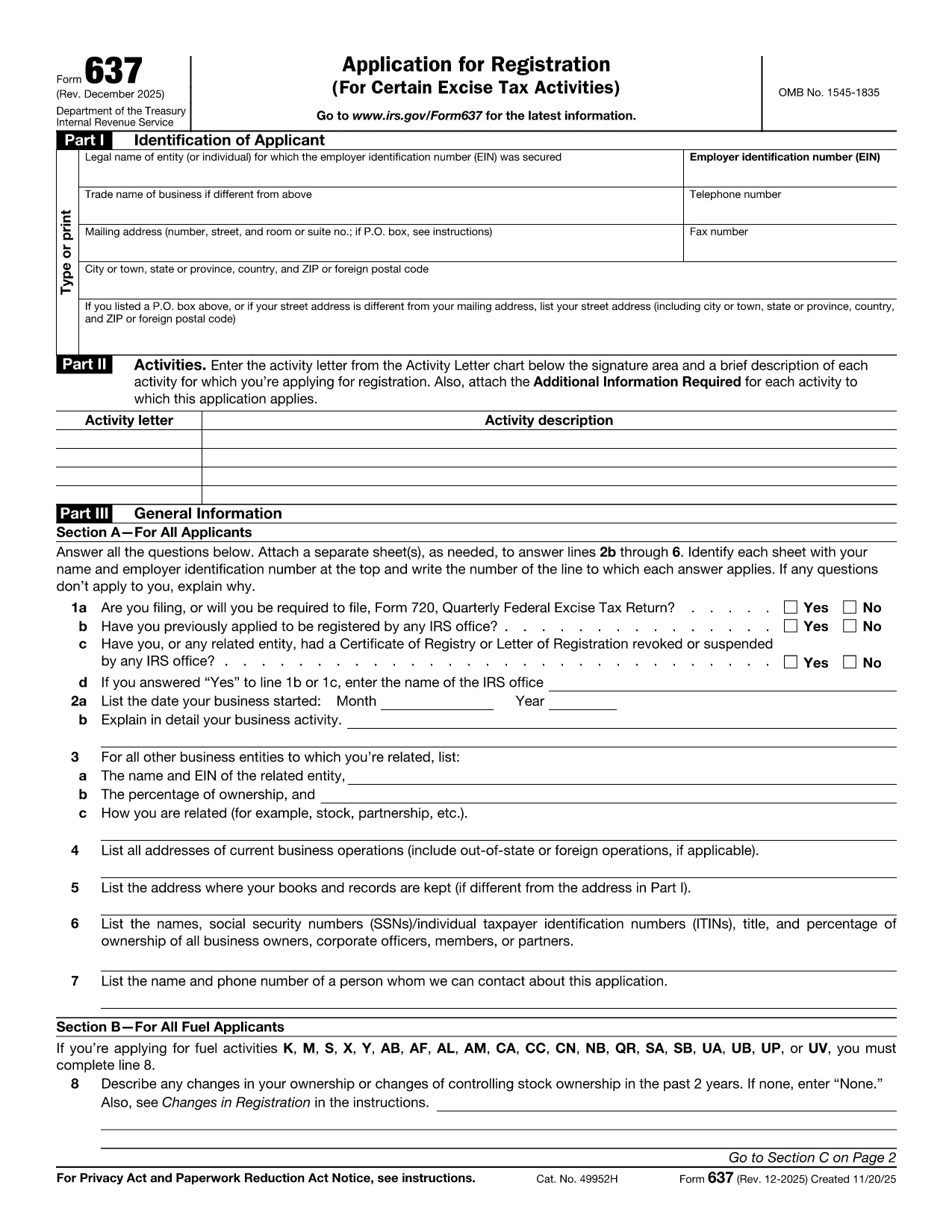
Form 637, Application for Registration (For Certain Excise Tax Activities), is the IRS’s official request to register for activities subject to federal excise taxes. Whether you are a manufacturer, importer, fuel seller, or any other entity that handles taxable products, you need this form to stay compliant.

On Formize.com you can fill the form directly in the browser—no PDF editor required. Just click the Fill out this form button, let the Formize PDF Filler load, and start entering your information.

Who Must File Form 637

  • Manufacturers, producers, or importers of excise‑taxed products.
  • Sellers or purchasers of taxable fuel.
  • Exporters of excise‑taxed goods.
  • Any entity using products that require a Certificate of Registration.

How to Complete Form 637 Online

Follow these simple steps to finish the application without printing a single page:

  1. Click the Fill out this form button on this page.
  2. Wait for the Formize PDF Filler to load (usually a few seconds).
  3. Enter your legal name, EIN, trade name, and contact information.
  4. Select the appropriate activity letter (M, S, etc.) and provide a brief description.
  5. Answer the general information questions in Part III.
  6. Upload any required supporting documents directly in the filler.
  7. Review the completed form, then click Submit to download a signed PDF or mail it to the IRS address shown in the instructions.

Common Mistakes & Tips

  • Incorrect EIN: Double‑check the number; a typo will delay approval.
  • Missing activity letter: Use the chart on pages 2‑5 of the form to pick the right letter.
  • Skipping supporting documents: Attach licenses, permits, or prior registration letters as required.
  • Out‑of‑date form: Always use the latest PDF – the link below points to the current IRS version.

Download the Fillable PDF

If you prefer to work offline, you can download the official PDF from the IRS and open it with any PDF editor. However, the online filler is faster, error‑proof, and saves you a trip to the printer.

FAQs About Form 637

Below are the most frequently asked questions. Click each question to see the answer.

FAQ
  • What is Form 637 used for?

    Form 637 is the IRS application to register for activities subject to federal excise taxes, such as manufacturing or selling taxable fuel.

  • Who is required to file Form 637?

    Manufacturers, producers, importers, fuel sellers, exporters, and any entity that uses products requiring excise tax registration must file Form 637.

  • Can I file Form 637 electronically?

    Yes. On Formize.com you can fill the PDF online, then download the completed form to mail to the IRS. The IRS does not accept direct e‑filing, but the online filler streamlines the process.

  • Do I need an EIN to complete Form 637?

    An Employer Identification Number (EIN) is required. If you don’t have one, apply using Form SS‑4 before completing Form 637.

  • What supporting documents are required?

    Typically you must attach business licenses, permits, prior registration letters, and any documents that prove the activity you’re registering for.

  • How long does the IRS take to approve the registration?

    Processing times vary, but most applicants receive a response within 30‑45 days after the IRS receives the complete application.

  • Is there a fee to file Form 637?

    No filing fee is required for Form 637 itself. However, excise taxes will be due based on the activity once registration is approved.

  • What should I do if I make a mistake on the form?

    Correct the error in the online filler before downloading the final PDF. If you’ve already mailed the form, submit a corrected Form 637 with a cover letter explaining the changes.

  • Where do I mail the completed Form 637?

    The mailing address is listed in the form’s instructions. It is typically the IRS Office of Excise Tax at the address shown on page 1 of the PDF.

  • Can I save my progress while filling the form online?

    Yes. The Formize PDF Filler allows you to save a draft and return later to finish the application.

WIE MAN

So füllen Sie Form 637 kostenlos online in 5 einfachen Schritten aus:

  1. 1
    Click "Fill out this form"
    Locate the button on this page and click it to launch the Formize PDF Filler.
  2. 2
    Wait for the filler to load
    The web app loads the fillable version of Form 637 in a few seconds.
  3. 3
    Enter required information
    Complete each field—legal name, EIN, activity letter, and any supporting details.
  4. 4
    Review and validate
    Use the built‑in validation to catch missing or incorrectly formatted entries.
  5. 5
    Submit or download
    When finished, either submit the form directly to the IRS address shown or download the completed PDF for your records.
Formize PDF Filler-App
ÜBER

Steuerformulare

Form 637 ist eines der Steuerformulare, bei denen es sich um Dokumente handelt, mit denen Informationen über das Einkommen, die Abzüge und die Steuerschuld einer Einzelperson oder eines Unternehmens an die zuständige Steuerbehörde gemeldet werden. Diese Formulare sind zur Einhaltung der Steuergesetze und zur Erfüllung steuerlicher Pflichten erforderlich. Die Steuerformulare variieren je nach Land und den spezifischen Steueranforderungen. Hier sind einige gängige Arten von Steuerformularen:

Individuelle Steuerformulare: Diese Formulare werden von einzelnen Steuerzahlern verwendet, um ihr persönliches Einkommen anzugeben und Abzüge, Gutschriften und Befreiungen zu beantragen. Beispiele hierfür sind das Formular 1040 in den Vereinigten Staaten oder das Formular „Self-Assessment Tax Return“ im Vereinigten Königreich.

Gewerbesteuerformulare: Gewerbesteuerformulare werden von Unternehmen, Personengesellschaften oder Selbständigen verwendet, um ihre Geschäftseinnahmen, -ausgaben und andere steuerbezogene Informationen anzugeben. Beispiele hierfür sind das Schedule C-Formular (Profit or Loss from Business) in den Vereinigten Staaten oder das CT600-Formular (Company Tax Return) im Vereinigten Königreich.

Lohnsteuerformulare: Diese Formulare werden von Arbeitgebern verwendet, um die von den Gehaltsschecks ihrer Mitarbeiter einbehaltenen Löhne, Gehälter und Steuern anzugeben. Beispiele hierfür sind das W-2-Formular in den Vereinigten Staaten oder das P60-Formular im Vereinigten Königreich.

Umsatzsteuerformulare: Umsatzsteuerformulare werden von Unternehmen verwendet, um die auf steuerpflichtige Waren oder Dienstleistungen erhobene Umsatzsteuer zu melden und abzuführen. Die spezifischen Umsatzsteuerformulare variieren je nach Gerichtsbarkeit.

Mehrwertsteuerformulare (MwSt.): Mehrwertsteuerformulare werden in Ländern verwendet, die eine Mehrwertsteuer erheben, um die auf Verkäufe erhobene Mehrwertsteuer zu melden und abzuführen und Mehrwertsteuergutschriften für Einkäufe zu beantragen. Beispiele hierfür sind die in vielen Ländern verwendeten Mehrwertsteuererklärungsformulare.

Schätzungssteuerformulare: Schätzsteuerformulare werden verwendet, um geschätzte Steuern auf Einkünfte zu melden und zu zahlen, die nicht der Quellensteuer unterliegen, beispielsweise Einkünfte aus selbständiger Tätigkeit oder Kapitalerträge.

Dies sind nur einige Beispiele für die zahlreichen Steuerformulare, die es geben kann. Welche konkreten Formulare erforderlich sind, hängt von den Steuergesetzen und -vorschriften in Ihrem Land oder Ihrer Gerichtsbarkeit ab. Es ist wichtig, die Richtlinien der Steuerbehörde zu konsultieren oder professionellen Rat einzuholen, um festzustellen, welche Formulare auf Ihre Situation anwendbar sind.

MERKMALE

PDF-Filler

Der einfachste Weg, PDF-Formulare online auszufüllen

  • Füllen Sie schnell Form 637 aus
    Suchen Sie nach einer Möglichkeit, Form 637 schnell online auszufüllen? Mit unserem kostenlosen Online-PDF-Formularausfüller wissen Sie, wie Sie dieses PDF-Dokument in weniger als einer Minute bearbeiten und ausfüllen.
  • Einfach zu bedienender Online-PDF-Editor
    Haben Sie es satt, PDF-Dateien auszudrucken, damit Sie sie bearbeiten können, bevor Sie sie erneut scannen und zurücksenden? PDF-Dokumente kostenlos online bearbeiten. Nutzen Sie unseren Online-PDF-Editor, um Zeit und Papier zu sparen.
  • Tolle Tools, alle Plattformen
    Sie fragen sich, wie Sie Form 637 auf einem Mac ausfüllen oder vielleicht einen kostenlosen PDF-Ausfüller verwenden können? Unsere Online-PDF-Tools funktionieren auf allen Plattformen.
  • Sichere Dateispeicherung
    Fertige "Form 637"-Dateien werden in einer gesicherten Datenbank gespeichert, die vom Amazon Cloud-Hosting verwaltet wird. Sie können Ihre Dateien jederzeit aus unserem System löschen. In jedem Fall werden diese Dateien nach 24 Stunden automatisch gelöscht.
  • Chatten Sie mit Form 637
    Chatten Sie mit „Form 637“ auf Chatize, einem kostenlosen PDF-Leseassistenten. Stellen Sie Fragen und erhalten Sie Antworten von „Form 637“. Klicken Sie einfach oben auf die Schaltfläche Mit Dokument chatten.

Füllsitzung löschen

Die ausgewählte Füllsitzung löschen? In diesem Fall gehen Ihre Fortschritte beim Ausfüllen des Formulars verloren.

Bearbeitungssitzung löschen

Ausgewählte Bearbeitungssitzung löschen? In diesem Fall geht Ihr Fortschritt beim Erstellen und Bearbeiten des Formulars verloren.