
Sprache auswählen

Fillable IRS Form 8824 – Like‑Kind Exchange PDF

  1. Land USA
  2. Sprache Englisch
  3. Aktivität Steuern
  4. Abteilung Finanzamt
Fillable IRS Form 8824 – Like‑Kind Exchange PDF

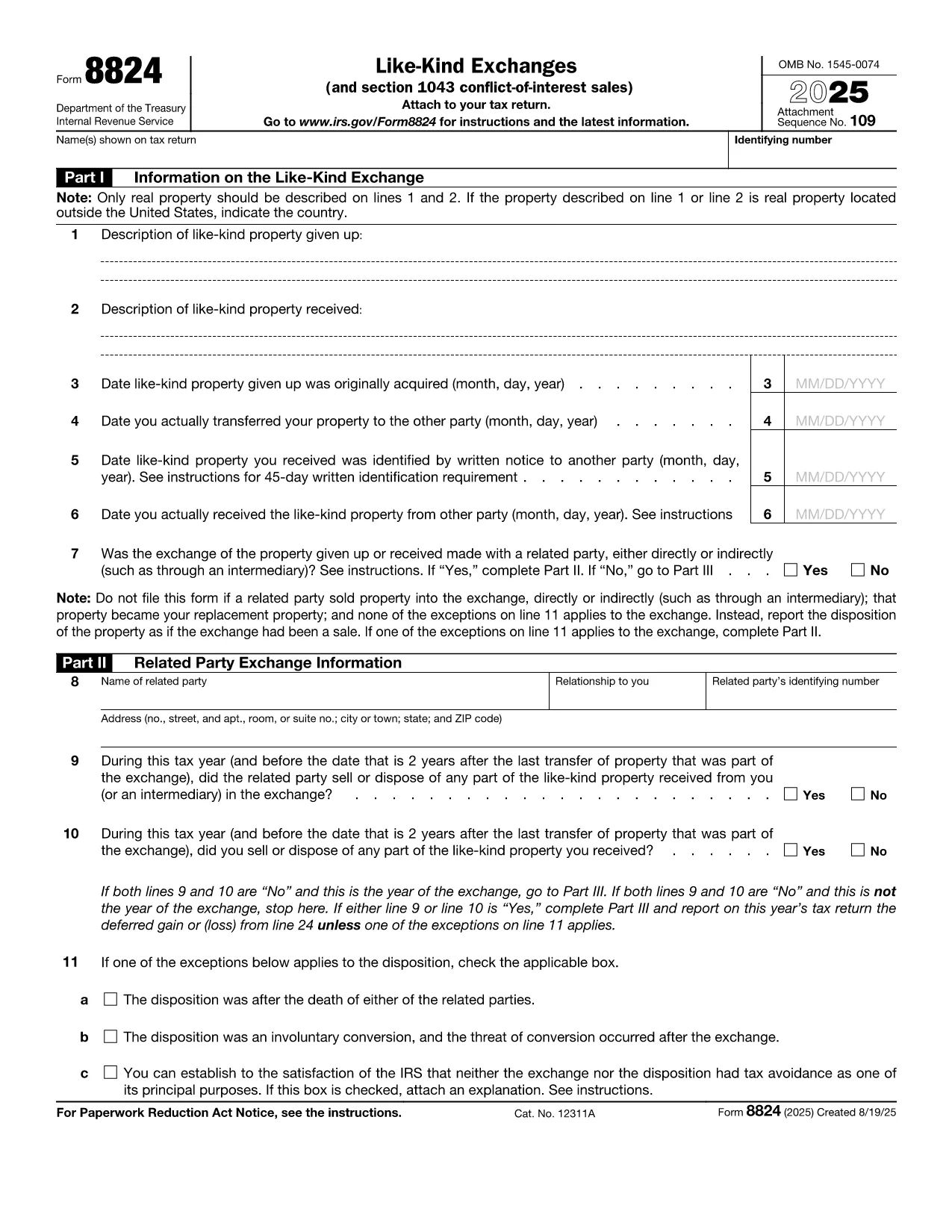
IRS Form 8824 is the official tax document used to report like‑kind exchanges of real property under Section 1031 of the Internal Revenue Code. Whether you’re swapping a rental house for a commercial building or exchanging raw land, the form lets you defer capital‑gain tax when the transaction qualifies.

What Is IRS Form 8824?

The form captures essential details about the property you gave up, the property you received, and the dates that trigger the 45‑day identification and 180‑day exchange periods. It also includes a separate section for related‑party exchanges and for Section 1043 conflict‑of‑interest sales.

How to Complete the Fillable Form Online

Instead of downloading the PDF and opening a separate editor, simply click the "Fill out this form" button on this page. The Formize PDF Filler app will load the official fillable version instantly. Follow these steps:

  • Enter the description of the relinquished property (address, legal description, or a brief identifier).
  • Enter the description of the replacement property you received.
  • Provide acquisition dates, transfer dates, and identification dates as required on Lines 3‑6.
  • Answer the related‑party question and, if "Yes," complete Part II.
  • Calculate realized gain or loss in Part III and indicate any deferral on Part IV.

Common Mistakes & Tips for Accuracy

  • Missing dates: The 45‑day and 180‑day deadlines are strict. Double‑check the calendar entries.
  • Incorrect property description: Use the legal description or street address; vague terms can trigger IRS queries.
  • Related‑party errors: If the exchange involves a family member or a disqualified person, you must complete Part II.
  • Math errors: Use the worksheet in the instructions to verify gain/loss calculations before entering them.

Download & Print Options

If you prefer a hard copy, you can still download the official PDF from the IRS link below. After filling it out online, click Export → PDF to save a printable version that you can sign and mail.

Ready to start? Click the button, complete the fields, and submit your Form 8824 with confidence.

FAQ
  • Do I need to file Form 8824 for every property exchange?

    Yes. Any like‑kind exchange of real property that you want to defer under Section 1031 must be reported on Form 8824, even if no gain is recognized.

  • Can I file Form 8824 electronically?

    Most tax software accepts the filled‑out PDF as an attachment to your return. You can also upload the PDF directly through the IRS e‑file system if supported.

  • What is the 45‑day identification rule?

    You must identify the replacement property in writing within 45 days after the transfer of the relinquished property. The identified property must be clearly described in the document.

  • What happens if I miss the 180‑day exchange deadline?

    Missing the 180‑day deadline generally means the exchange is not qualified, and the entire gain becomes taxable in the year of the transfer.

  • Do I need to complete Part II for unrelated parties?

    No. Part II is only required if the exchange is with a related party (family member, corporation owned >50%, etc.). Skip it if the answer to the related‑party question is "No."

  • Where can I find the official PDF for Form 8824?

    The official, fillable PDF is available directly from the IRS at the link provided below.

WIE MAN

So füllen Sie IRS Form 8824 kostenlos online in 4 einfachen Schritten aus:

  1. 1
    Open the Fillable Form
    Click the "Fill out this form" button on the page. The Formize PDF Filler app loads the official IRS Form 8824 automatically.
  2. 2
    Enter Your Exchange Details
    Complete each section—property descriptions, dates, and related‑party information—using the on‑screen fields.
  3. 3
    Review Calculations
    Use the built‑in calculator or the IRS worksheet to verify realized gain, recognized gain, and basis amounts.
  4. 4
    Save or Print
    When finished, click "Export → PDF" to download a printable copy, or submit the form electronically if your tax software supports it.
Formize PDF Filler-App
ÜBER

Steuerformulare

IRS Form 8824 ist eines der Steuerformulare, mit denen Informationen zu Steuern an die zuständige Steuerbehörde gemeldet werden. Es gibt verschiedene Arten von Steuerformularen, einschließlich bundesstaatlicher, bundesstaatlicher und lokaler Steuerformulare, die je nach den Umständen und dem Standort des Steuerzahlers variieren können.

MERKMALE

PDF-Filler

Der einfachste Weg, PDF-Formulare online auszufüllen

  • Füllen Sie schnell IRS Form 8824 aus
    Suchen Sie nach einer Möglichkeit, IRS Form 8824 schnell online auszufüllen? Mit unserem kostenlosen Online-PDF-Formularausfüller wissen Sie, wie Sie dieses PDF-Dokument in weniger als einer Minute bearbeiten und ausfüllen.
  • Einfach zu bedienender Online-PDF-Editor
    Haben Sie es satt, PDF-Dateien auszudrucken, damit Sie sie bearbeiten können, bevor Sie sie erneut scannen und zurücksenden? PDF-Dokumente kostenlos online bearbeiten. Nutzen Sie unseren Online-PDF-Editor, um Zeit und Papier zu sparen.
  • Tolle Tools, alle Plattformen
    Sie fragen sich, wie Sie IRS Form 8824 auf einem Mac ausfüllen oder vielleicht einen kostenlosen PDF-Ausfüller verwenden können? Unsere Online-PDF-Tools funktionieren auf allen Plattformen.
  • Sichere Dateispeicherung
    Fertige "IRS Form 8824"-Dateien werden in einer gesicherten Datenbank gespeichert, die vom Amazon Cloud-Hosting verwaltet wird. Sie können Ihre Dateien jederzeit aus unserem System löschen. In jedem Fall werden diese Dateien nach 24 Stunden automatisch gelöscht.
  • Chatten Sie mit IRS Form 8824
    Chatten Sie mit „IRS Form 8824“ auf Chatize, einem kostenlosen PDF-Leseassistenten. Stellen Sie Fragen und erhalten Sie Antworten von „IRS Form 8824“. Klicken Sie einfach oben auf die Schaltfläche Mit Dokument chatten.

Füllsitzung löschen

Die ausgewählte Füllsitzung löschen? In diesem Fall gehen Ihre Fortschritte beim Ausfüllen des Formulars verloren.

Bearbeitungssitzung löschen

Ausgewählte Bearbeitungssitzung löschen? In diesem Fall geht Ihr Fortschritt beim Erstellen und Bearbeiten des Formulars verloren.