
Sprache auswählen

Form 8862 (SP) – Fillable PDF for Claiming Tax Credits

  1. Land USA
  2. Sprache Spanisch
  3. Aktivität Steuern
  4. Abteilung Finanzamt
Form 8862 (SP) – Fillable PDF for Claiming Tax Credits

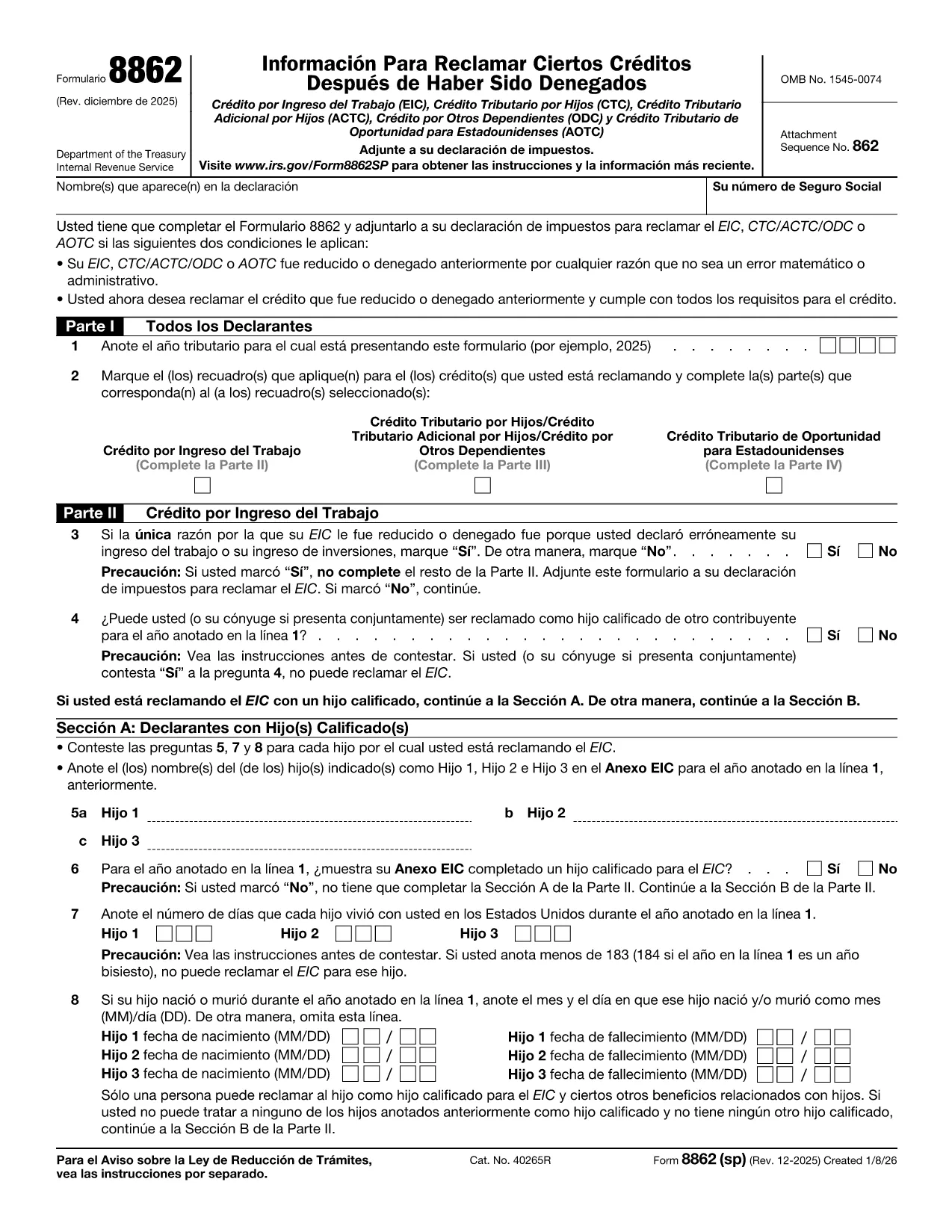
Form 8862 (SP) – "Información para reclamar ciertos créditos después de una denegación" – is the Spanish version of the IRS form used when a taxpayer wants to claim credits that were previously disallowed. It covers the Earned Income Credit (EIC), Child Tax Credit (CTC), American Opportunity Tax Credit (AOTC) and other important credits.

What Is Form 8862 (SP)?

This form tells the IRS that you now meet all eligibility requirements for the credits you are re‑claiming. You must file it with your tax return for the year you are correcting the earlier denial.

How to Complete Form 8862 (SP) Online

Instead of printing and filling out a paper copy, you can use Formize’s built‑in PDF filler:

  1. Click the **"Fill out this form"** button on this page.
  2. Wait a few seconds while the Formize PDF Filler app loads the fillable version of Form 8862 (SP).
  3. Enter the required information in each field. The form automatically validates dates and numeric entries.
  4. When you’re done, click **"Save & Download"** to get a completed PDF that you can attach to your tax return.

Common Mistakes to Avoid

  • Skipping Part IV (AOTC) questions. The IRS requires detailed answers for each student you are claiming.
  • Incorrect residency information. Make sure the days each child lived in the U.S. are accurate.
  • Leaving blanks. Even if a question does not apply, write “N/A” to avoid processing delays.

Download & Fill the Form in Seconds

The fillable PDF is hosted directly from the IRS, guaranteeing you have the latest revision (Rev. December 2025). Click the button below to start the online filling process – no PDF editor needed.

Where to Find Help

If you have questions about eligibility, consult the IRS instructions for Form 8862 or contact a qualified tax professional. Remember, Formize only provides the filling tool; it does not offer tax advice.

Anweisungen

FAQ
  • Do I need to file Form 8862 (SP) for every credit I want to claim?

    Yes. You must attach a separate Form 8862 (SP) for each credit that was previously denied, unless the denial was due only to a math or clerical error.

  • Can I use the English version of Form 8862 instead of the Spanish one?

    If you filed your original return in Spanish, the IRS expects the Spanish version. Using the correct language avoids processing delays.

  • Is the Formize filler free to use?

    Filling out the form with Formize is free. You only need to download the completed PDF, which you can attach to your return at no cost.

  • What if I make a mistake after saving the PDF?

    Open the saved PDF in any PDF editor, correct the error, and re‑save. Or simply start a new fill session on Formize.

  • How long does it take for the IRS to process Form 8862 (SP)?

    Processing time varies, but most returns with a correctly completed Form 8862 are processed within 4‑6 weeks.

  • Do I need to attach supporting documents?

    Yes. Include any required statements, such as proof of residency or school enrollment for the AOTC, as indicated in the form instructions.

WIE MAN

So füllen Sie Form 8862 SP kostenlos online in 4 einfachen Schritten aus:

  1. 1
    Click the Fill‑out Button
    Press the **"Fill out this form"** button on the page to launch the Formize PDF Filler.
  2. 2
    Wait for the Filler to Load
    The fillable version of Form 8862 (SP) loads in a few seconds—no download needed.
  3. 3
    Enter Your Information
    Complete each section, answering all eligibility questions. The tool validates dates and numbers automatically.
  4. 4
    Save and Download
    When finished, click **"Save & Download"** to get a completed PDF ready to attach to your tax return.
Formize PDF Filler-App
ÜBER

Steuerformulare

Form 8862 SP ist eines der Steuerformulare, mit denen Informationen zu Steuern an die zuständige Steuerbehörde gemeldet werden. Es gibt verschiedene Arten von Steuerformularen, einschließlich bundesstaatlicher, bundesstaatlicher und lokaler Steuerformulare, die je nach den Umständen und dem Standort des Steuerzahlers variieren können.

MERKMALE

PDF-Filler

Der einfachste Weg, PDF-Formulare online auszufüllen

  • Füllen Sie schnell Form 8862 SP aus
    Suchen Sie nach einer Möglichkeit, Form 8862 SP schnell online auszufüllen? Mit unserem kostenlosen Online-PDF-Formularausfüller wissen Sie, wie Sie dieses PDF-Dokument in weniger als einer Minute bearbeiten und ausfüllen.
  • Einfach zu bedienender Online-PDF-Editor
    Haben Sie es satt, PDF-Dateien auszudrucken, damit Sie sie bearbeiten können, bevor Sie sie erneut scannen und zurücksenden? PDF-Dokumente kostenlos online bearbeiten. Nutzen Sie unseren Online-PDF-Editor, um Zeit und Papier zu sparen.
  • Tolle Tools, alle Plattformen
    Sie fragen sich, wie Sie Form 8862 SP auf einem Mac ausfüllen oder vielleicht einen kostenlosen PDF-Ausfüller verwenden können? Unsere Online-PDF-Tools funktionieren auf allen Plattformen.
  • Sichere Dateispeicherung
    Fertige "Form 8862 SP"-Dateien werden in einer gesicherten Datenbank gespeichert, die vom Amazon Cloud-Hosting verwaltet wird. Sie können Ihre Dateien jederzeit aus unserem System löschen. In jedem Fall werden diese Dateien nach 24 Stunden automatisch gelöscht.
  • Chatten Sie mit Form 8862 SP
    Chatten Sie mit „Form 8862 SP“ auf Chatize, einem kostenlosen PDF-Leseassistenten. Stellen Sie Fragen und erhalten Sie Antworten von „Form 8862 SP“. Klicken Sie einfach oben auf die Schaltfläche Mit Dokument chatten.

Füllsitzung löschen

Die ausgewählte Füllsitzung löschen? In diesem Fall gehen Ihre Fortschritte beim Ausfüllen des Formulars verloren.

Bearbeitungssitzung löschen

Ausgewählte Bearbeitungssitzung löschen? In diesem Fall geht Ihr Fortschritt beim Erstellen und Bearbeiten des Formulars verloren.