
Sprache auswählen

INZ 1220 Supplementary Form – Fillable PDF

  1. Land Neuseeland
  2. Sprache Englisch
  3. Aktivität Besuch und Tourismus Arbeiten Einwanderung Lernen
INZ 1220 Supplementary Form – Fillable PDF

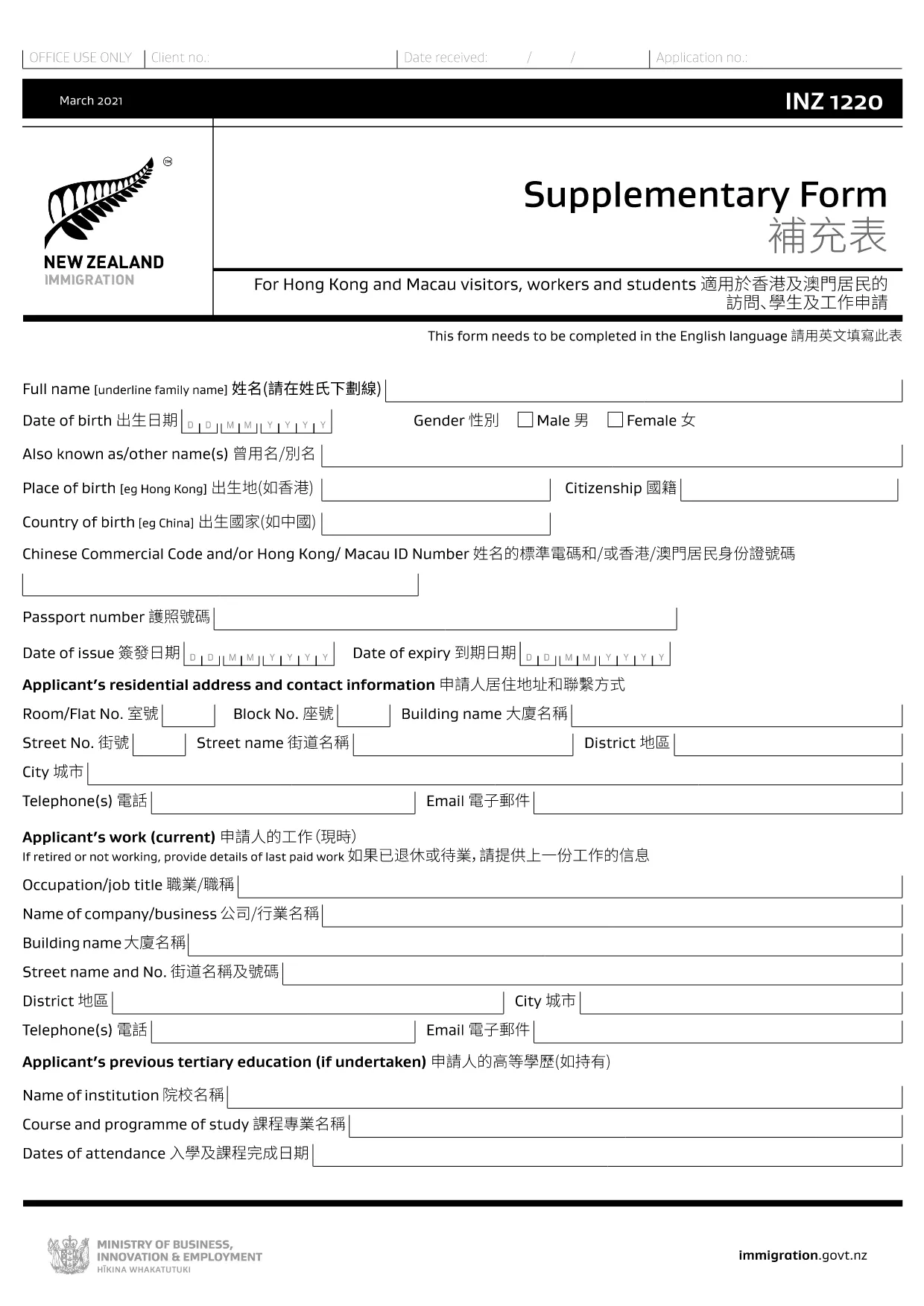
The INZ 1220 Supplementary Form is required by Immigration New Zealand for visitors, workers and students from Hong Kong and Macau who need to provide additional contact details. This fillable PDF lets you complete the form quickly, securely, and without printing.

Our page integrates the Formize PDF Filler app, so you can edit the document directly in your browser. No extra software, no downloads – just click, fill, and submit.

What Is the INZ 1220 Form?

INZ 1220 is a supplementary information sheet that collects the name, address, telephone, and email of a New Zealand contact (friend, family member, or sponsor). It is often requested alongside visa applications to verify local support.

How to Complete the INZ 1220 Online

Follow the simple steps below to fill out the form using Formize:

  • Click the **Fill out this form** button on this page.
  • Wait a few seconds while the Formize PDF Filler loads.
  • Enter the required details in each field – the interface highlights mandatory sections.
  • Review the information for accuracy.
  • Save the completed PDF to your device or download a copy for your records.

Common Mistakes to Avoid

  • Leaving the contact’s phone number incomplete – include country code.
  • Using an outdated email address – Immigration may send important updates.
  • Submitting the form with blank mandatory fields – the filler will flag these before you can save.

Where to Submit the Completed Form

After saving the PDF, attach it to your visa application through the Immigration New Zealand online portal, or email it to the address specified in your application instructions.

FAQs About INZ 1220

Find quick answers to the most common questions below (full FAQ list further down).

FAQ
  • Do I need to print the INZ 1220 form?

    No. Using the Formize PDF Filler you can complete the form entirely online and download the finished PDF.

  • What language is the INZ 1220 form in?

    The official form is in English. If you need a translation, you must provide a certified translation alongside the original.

  • Can I save my progress and finish later?

    Yes. While the Formize app is open, you can click **Save** to download a partially‑filled PDF, then reload it later to continue.

  • Is the contact’s New Zealand address mandatory?

    Yes. Immigration requires a full local address (street, city, postal code) to verify your support network.

  • What if I make a mistake after saving?

    Simply reopen the saved PDF in the Formize filler, correct the error, and save a new version.

  • How many pages is the INZ 1220 form?

    The supplementary form is a single‑page PDF, making it quick to fill and attach.

  • Do I need a digital signature?

    A handwritten signature is required. Print the completed PDF, sign it, then scan or take a clear photo to upload.

  • Where can I find help if I’m stuck?

    The Formize filler includes tooltip help for each field. For further assistance, consult the Immigration New Zealand website.

WIE MAN

So füllen Sie INZ 1220 kostenlos online in 5 einfachen Schritten aus:

  1. 1
    Open the Fillable Form
    Click the **Fill out this form** button on the page. The Formize PDF Filler app will open in a new tab.
  2. 2
    Load the Form
    Wait a few seconds while the INZ 1220 PDF loads. All fields become editable directly in the browser.
  3. 3
    Enter Your Information
    Type the required details (contact name, address, phone, email). Required fields are marked with an asterisk.
  4. 4
    Review and Save
    Check the entered data for errors, then click **Save** to download the completed PDF to your device.
  5. 5
    Submit with Your Visa Application
    Attach the saved INZ 1220 PDF to your Immigration New Zealand online application or email it as instructed.
Formize PDF Filler-App
ÜBER

Tourismusformulare

INZ 1220 ist eines der Tourismusformulare, bei denen es sich um Dokumente handelt, die von Einzelpersonen oder Gruppen verwendet werden, die eine Reise zu touristischen Zwecken planen. Diese Formulare können je nach Zielland oder Reisedienstleister variieren, enthalten jedoch im Allgemeinen Informationen über den Reisenden, seine Reiseroute und andere relevante Details.

Einige gängige Tourismusformen sind:

Reiseplan: Dieses Formular listet die geplanten Aktivitäten des Reisenden auf, einschließlich Datum, Uhrzeit und Ort von Flügen, Unterkünften, Touren und anderen Aktivitäten.

Visumantrag: In vielen Ländern müssen Touristen vor der Einreise ein Visum beantragen. Das Visumantragsformular fragt normalerweise nach persönlichen Informationen, Reisedetails und unterstützenden Dokumenten, wie z. B. einem Reisepass, Foto oder Finanzberichten.

Gesundheitserklärungsformular: Dieses Formular wird verwendet, um alle medizinischen Bedingungen oder eine mögliche Exposition gegenüber übertragbaren Krankheiten wie COVID-19 anzugeben. In einigen Ländern müssen Reisende vor der Einreise einen negativen COVID-19-Test vorlegen.

Reiseversicherungsformular: Dieses Formular enthält Informationen über den Reiseversicherungsschutz des Reisenden, einschließlich der Art der Police, Deckungsgrenzen und Kontaktinformationen für Notfälle.

Zollerklärungsformular: Dieses Formular wird von einigen Ländern verlangt, um alle Artikel zu deklarieren, die in das Land eingeführt werden, wie Geschenke, Souvenirs oder Elektronik.

Unterkunftsbuchungsformular: Dieses Formular enthält Informationen über die Unterkünfte des Reisenden, einschließlich der Aufenthaltsdaten, der Zimmerkategorie und etwaiger Sonderwünsche.

Tourismusformulare können von Fluggesellschaften, Reisebüros, Hotels oder anderen Reisedienstleistern verlangt werden und sind möglicherweise in elektronischer oder Papierform verfügbar. Es ist wichtig, alle erforderlichen Formulare sorgfältig zu prüfen und auszufüllen, um ein reibungsloses und problemloses Reiseerlebnis zu gewährleisten.

MERKMALE

PDF-Filler

Der einfachste Weg, PDF-Formulare online auszufüllen

  • Füllen Sie schnell INZ 1220 aus
    Suchen Sie nach einer Möglichkeit, INZ 1220 schnell online auszufüllen? Mit unserem kostenlosen Online-PDF-Formularausfüller wissen Sie, wie Sie dieses PDF-Dokument in weniger als einer Minute bearbeiten und ausfüllen.
  • Einfach zu bedienender Online-PDF-Editor
    Haben Sie es satt, PDF-Dateien auszudrucken, damit Sie sie bearbeiten können, bevor Sie sie erneut scannen und zurücksenden? PDF-Dokumente kostenlos online bearbeiten. Nutzen Sie unseren Online-PDF-Editor, um Zeit und Papier zu sparen.
  • Tolle Tools, alle Plattformen
    Sie fragen sich, wie Sie INZ 1220 auf einem Mac ausfüllen oder vielleicht einen kostenlosen PDF-Ausfüller verwenden können? Unsere Online-PDF-Tools funktionieren auf allen Plattformen.
  • Sichere Dateispeicherung
    Fertige "INZ 1220"-Dateien werden in einer gesicherten Datenbank gespeichert, die vom Amazon Cloud-Hosting verwaltet wird. Sie können Ihre Dateien jederzeit aus unserem System löschen. In jedem Fall werden diese Dateien nach 24 Stunden automatisch gelöscht.
  • Chatten Sie mit INZ 1220
    Chatten Sie mit „INZ 1220“ auf Chatize, einem kostenlosen PDF-Leseassistenten. Stellen Sie Fragen und erhalten Sie Antworten von „INZ 1220“. Klicken Sie einfach oben auf die Schaltfläche Mit Dokument chatten.

Füllsitzung löschen

Die ausgewählte Füllsitzung löschen? In diesem Fall gehen Ihre Fortschritte beim Ausfüllen des Formulars verloren.

Bearbeitungssitzung löschen

Ausgewählte Bearbeitungssitzung löschen? In diesem Fall geht Ihr Fortschritt beim Erstellen und Bearbeiten des Formulars verloren.