
Sprache auswählen

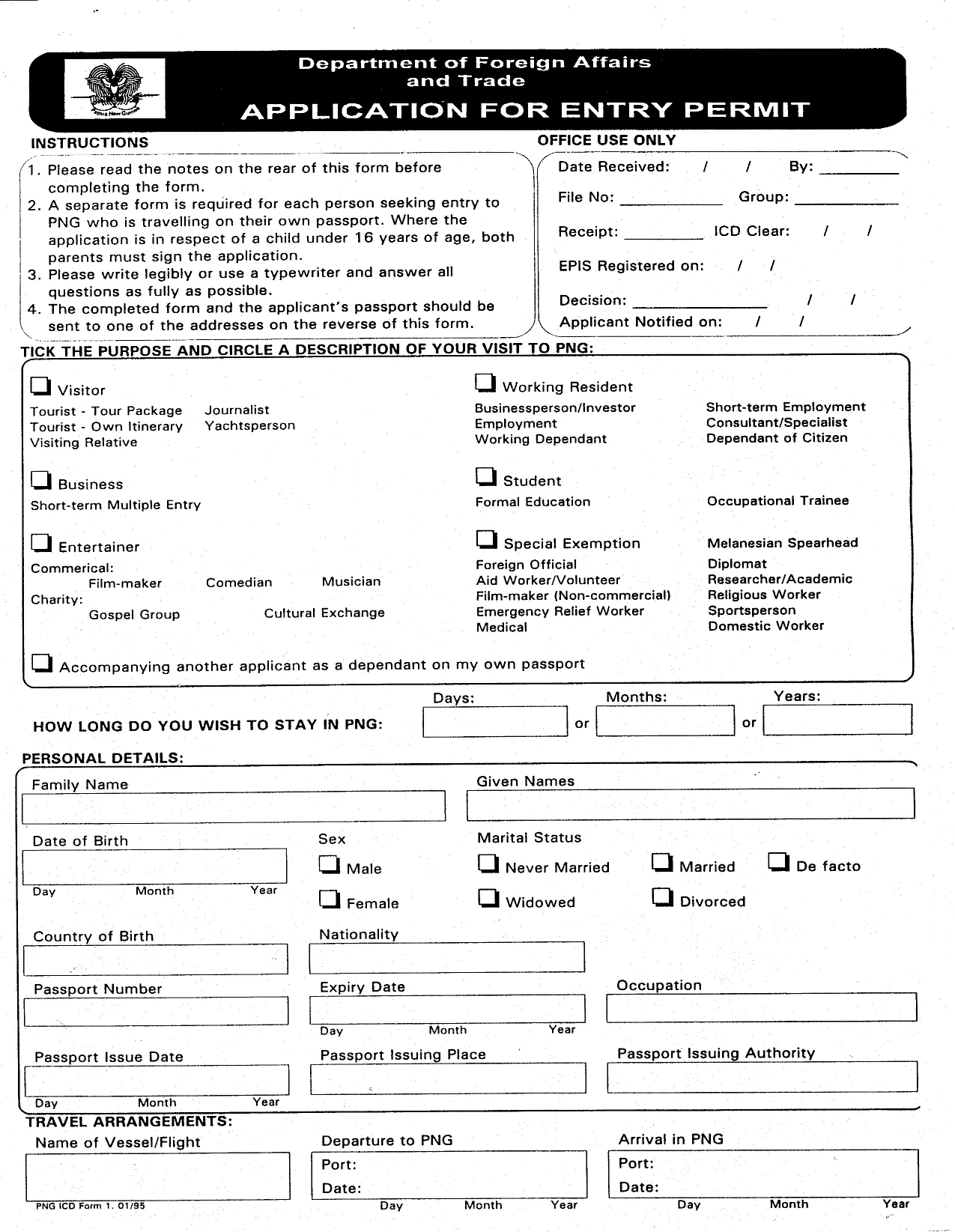
Papua New Guinea Entry Permit Application Form (Fillable PDF)

  1. Sprache Englisch
  2. Land Papua Neu-Guinea
  3. Aktivität Visa
Papua New Guinea Entry Permit Application Form (Fillable PDF)

Traveling to Papua New Guinea for work, study, or tourism? You’ll need an official Entry Permit before you land. Our page gives you instant access to the official fillable PDF, a clear step‑by‑step guide, and answers to the most common questions.

Why choose the online Formize PDF Filler? It eliminates the need for a separate PDF editor, saves your progress automatically, and lets you submit a clean, printable version straight from your browser.

  • Instant download of the government‑approved form.
  • All fields are interactive – just click, type, and move on.
  • Guided instructions appear beside each section.
  • Export to PDF or print when you’re done.

Below you’ll find everything you need to know before you start filling the form.

FAQ
  • Do I need a separate PDF editor to complete the form?

    No. The Formize PDF Filler works directly in your browser, so you can fill, save, and print without any extra software.

  • Is the PDF version on this page the official government form?

    Yes. The file is the exact PDF used by the Papua New Guinea Immigration & Citizenship Service Authority.

  • Can I save my progress and return later?

    Absolutely. Use the “Save” button in the Formize app to download a draft copy, then reload it later to continue.

  • What supporting documents must I attach with the completed form?

    Typical documents include a passport copy, a recent passport‑size photo, proof of employment or invitation, a medical certificate, and proof of onward travel.

  • How long does it take to process an entry permit after submission?

    Processing times vary by visa type, but most tourist or short‑term business permits are reviewed within 7‑14 business days.

  • Is there a fee to download the PDF?

    Downloading the fillable PDF is completely free. Any government processing fees are paid directly to the PNG immigration office.

  • Can I submit the form electronically?

    The PNG authorities currently require a printed, signed copy. After filling the form online, print, sign, and mail or hand‑deliver it as instructed.

  • What should I do if I make a mistake after printing?

    Cross out the error neatly, initial it, and write the correct information. For major errors, it’s best to redo the form using the online filler and print a fresh copy.

WIE MAN

So füllen Sie PNG entry permit kostenlos online in 5 einfachen Schritten aus:

  1. 1
    Click the Fill‑out Button
    On this page, click the bright “Fill out this form” button. The Formize PDF Filler will open in a new tab.
  2. 2
    Wait for the Formize App to Load
    The filler loads in seconds. You’ll see the PNG Entry Permit form with editable fields.
  3. 3
    Enter Your Information
    Complete each section—personal details, travel purpose, sponsor information, and health declarations. Use the drop‑down menus where provided.
  4. 4
    Review and Validate
    After filling, click the “Validate” button to check for missing or incorrectly formatted data.
  5. 5
    Save, Print, or Submit
    When everything looks correct, download the completed PDF, print it for your records, or follow the instructions on the last page to submit it to PNG immigration authorities.
Formize PDF Filler-App
ÜBER

Visa-Formulare

PNG entry permit ist eines der Visa-Formulare, bei denen es sich um Dokumente handelt, die zur Beantragung eines Visums für die Einreise in ein fremdes Land verwendet werden. Ein Visum ist ein Dokument, das es einem Ausländer ermöglicht, für einen bestimmten Zeitraum in ein fremdes Land einzureisen, sich dort aufzuhalten und manchmal dort zu arbeiten. Die genauen Formulare und Anforderungen für die Erlangung eines Visums variieren je nach Land und Art des Visums.

Visaformulare erfordern in der Regel persönliche Informationen wie Name, Geburtsdatum und Passinformationen sowie Informationen über den Zweck und die Dauer der Reise, das beabsichtigte Ziel und ob dem Antragsteller zuvor ein Visum verweigert oder aus einem Land ausgewiesen wurde. Die Formulare können auch Begleitdokumente wie einen Reisepass, Fotos und einen Nachweis über finanzielle Unterstützung erfordern.

In den Vereinigten Staaten sind die häufigsten Visumformulare die Formulare DS-160 und DS-260. Das DS-160-Formular wird zur Beantragung eines Nichteinwanderungsvisums verwendet, während das DS-260-Formular zur Beantragung eines Einwanderungsvisums verwendet wird. Diese Formulare erfordern detaillierte Informationen über die persönliche und Reisegeschichte des Antragstellers sowie unterstützende Unterlagen wie Reisepass, Reiseroute und Finanzunterlagen.

Andere Länder haben möglicherweise andere Visaformulare und -anforderungen, aber das grundlegende Verfahren umfasst in der Regel das Ausfüllen eines Visumantrags, das Bereitstellen von Begleitdokumenten und die Teilnahme an einem Gespräch mit einem Konsularbeamten in einer US-Botschaft oder einem US-Konsulat. Es ist wichtig zu beachten, dass das Visumantragsverfahren komplex und zeitaufwändig sein kann, und es wird empfohlen, dass Personen, die ein Visum beantragen, einen Anwalt für Einwanderungsfragen oder einen anderen qualifizierten Fachmann konsultieren, um sicherzustellen, dass alle erforderlichen Formulare und Anforderungen erfüllt sind.

MERKMALE

PDF-Filler

Der einfachste Weg, PDF-Formulare online auszufüllen

  • Füllen Sie schnell PNG entry permit aus
    Suchen Sie nach einer Möglichkeit, PNG entry permit schnell online auszufüllen? Mit unserem kostenlosen Online-PDF-Formularausfüller wissen Sie, wie Sie dieses PDF-Dokument in weniger als einer Minute bearbeiten und ausfüllen.
  • Einfach zu bedienender Online-PDF-Editor
    Haben Sie es satt, PDF-Dateien auszudrucken, damit Sie sie bearbeiten können, bevor Sie sie erneut scannen und zurücksenden? PDF-Dokumente kostenlos online bearbeiten. Nutzen Sie unseren Online-PDF-Editor, um Zeit und Papier zu sparen.
  • Tolle Tools, alle Plattformen
    Sie fragen sich, wie Sie PNG entry permit auf einem Mac ausfüllen oder vielleicht einen kostenlosen PDF-Ausfüller verwenden können? Unsere Online-PDF-Tools funktionieren auf allen Plattformen.
  • Sichere Dateispeicherung
    Fertige "PNG entry permit"-Dateien werden in einer gesicherten Datenbank gespeichert, die vom Amazon Cloud-Hosting verwaltet wird. Sie können Ihre Dateien jederzeit aus unserem System löschen. In jedem Fall werden diese Dateien nach 24 Stunden automatisch gelöscht.
  • Chatten Sie mit PNG entry permit
    Chatten Sie mit „PNG entry permit“ auf Chatize, einem kostenlosen PDF-Leseassistenten. Stellen Sie Fragen und erhalten Sie Antworten von „PNG entry permit“. Klicken Sie einfach oben auf die Schaltfläche Mit Dokument chatten.

Füllsitzung löschen

Die ausgewählte Füllsitzung löschen? In diesem Fall gehen Ihre Fortschritte beim Ausfüllen des Formulars verloren.

Bearbeitungssitzung löschen

Ausgewählte Bearbeitungssitzung löschen? In diesem Fall geht Ihr Fortschritt beim Erstellen und Bearbeiten des Formulars verloren.